Desert Online General Trading LLC
Dubai, United Arab Emirates
Desert Online General Trading LLC
Dubai, United Arab Emirates


Full description not available
J**T
One of very few real wifi clocks available at a reasonable price
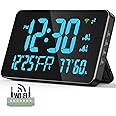
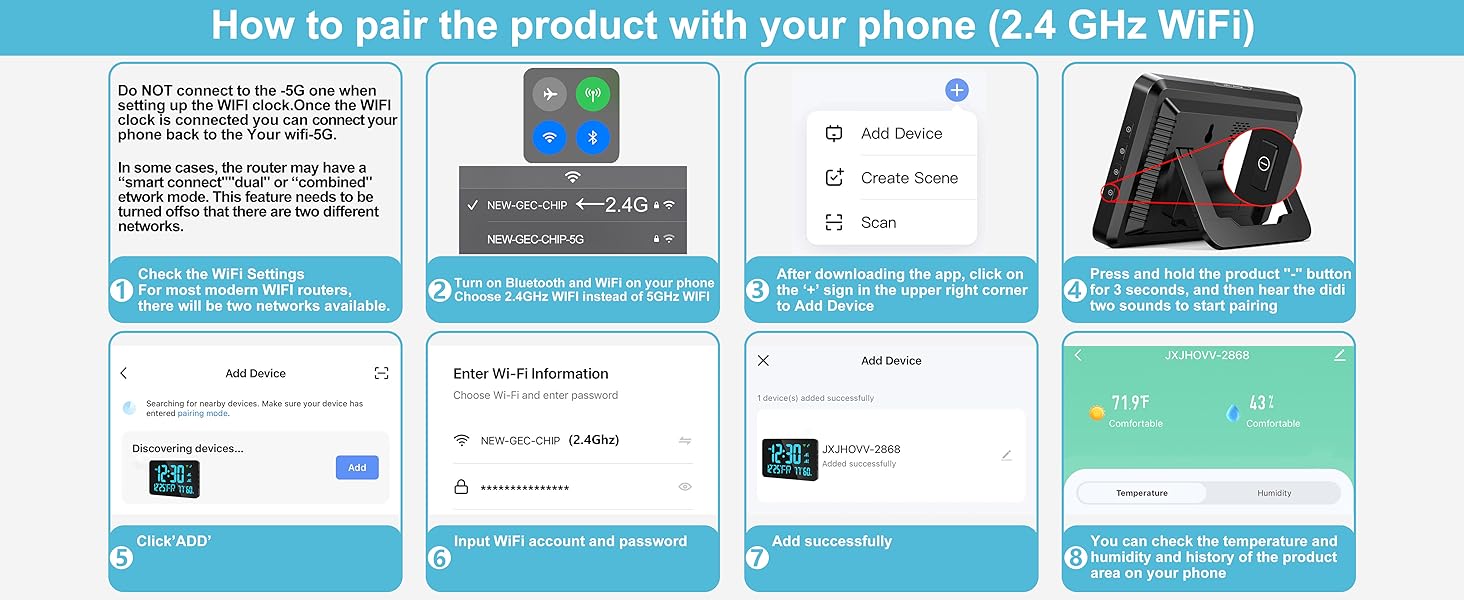
JXJHOVV-2868 Wifi ClockI’m very happy I found this clock. At this time, there are few real wifi clocks on the market at a reasonable price.What is a wifi clock?If you want a very accurate wall or tabletop display clock, the usual choice has been a so-called atomic clock. These clocks periodically adjust their time by synchronizing with a radio signal sent from an actual atomic clock. In the US, these signals are broadcast by the National Institute of Science and Technology from transmitters in Colorado and Hawaii.The “atomic” clocks work fine if you are able to receive the signal, but they might not work in your home, depending on your location and the construction materials used to build your house.The alternative is a clock that sets its time the same way your computer does: by getting updates from one of the time servers on the internet. These clocks are known as “wifi clocks,” because that is usually how they connect to the internet.How good is this wifi clock?It does everything it’s supposed to do. This is fortunate, because there are few competitors available at a reasonable price. It’s a large and very readable display, available in different colors. (But not configurable. Buy the color you want to live with). It’s very bright at the maximum setting, and the brightness can be adjusted.The display also shows the month, day, and year, the day of the week, as well as the temperature and humidity, as measured by the clock itself.I use the fold-out table top stand, but it also can be mounted on a wall. The product includes some mounting hardware and a template which might make that easier to do.It can function as an alarm clock, with 2 different alarms that can be set to go off at different times. I don’t use this feature and have not tested it.The product has a few specific characteristics you should be aware of. I can’t really call them “flaws,” but they are design decisions that you might regard as drawbacks.Like most wifi clocks, this unit is not battery powered. The LED display and the task of communicating with the internet require too much power for that to be practical.There is a battery compartment which accepts 2 AA batteries, which are not supplied. These batteries are used for the energy needed to back up the settings information, in case your home loses power. With the batteries in place, the clock will reconnect to wifi and resume its function when power is restored. Those are pretty big batteries for this simple need, so I expect they will last a long time in normal use.The clock must be plugged into a wall outlet, but the way that happens is a little unusual. The unit is supplied with a long power cord, over 8 feet long, but not a standard one. On one end, there is the familiar large size USB plug. (USB-A). On the other end is a small metal cylinder that plugs into the clock.Many devices use the USB system to supply power, since USB connectors and wires are able to carry both power and data. However, since the clock needs this wire only for power, the designers decided to save some money by eliminating the data wires and designing their own solution, instead of using a standard USB cord.You probably are familiar with USB wall chargers. These are the small cubes that plug into a wall outlet and contain a USB socket on another side so you can plug in your device to get charged. You will need one of these for this clock. It is not supplied, because many consumers already own several of them.The wire should last as long as the product does, but because it is not really a standard item, it could be tricky to replace it if that was ever necessary. If you don’t own a spare USB wall charger, you will have to buy one, but they are not expensive. These are 2 of the potential drawbacks of this product design.The 3rd characteristic to be aware of is that the clock is able to connect to wifi on only the 2.4 gigahertz frequency band. In order to set up the clock, you must connect both your smartphone (or tablet) and the clock to 2.4 G wifi. The setup requires the Smart Life app. The app first pairs with the clock over bluetooth, and then transmits the network name and password to the clock so it can stay connected over wifi.Once the clock is setup, it doesn’t matter much if your phone reconnects to the different 5G wifi band. In that case, you will lose only a minor bit of functionality, the ability to view the temperature and humidity history on a smartphone app.This 2.4G requirement is present for many simple, internet-connected products. If you already know what to do, there is no need to read the rest of this review. I will conclude with a brief description of the issue, and the steps you may need to take in order to set up the clock.Wifi is a radio network used to send and receive data. In most parts of the world, there are actually 2 networks in operation, which use different parts of the radio frequency spectrum. The 2.4 gigahertz (2.4G) network requires less power, and has better ability to penetrate walls and other obstacles that cause interference. The 5 gigahertz network (5G) is faster for large amounts of data, provided the signal is good.Your home wifi is broadcast by a small device called a router. Most home routers now are able to use both the 2.4G and 5G networks, but they can be configured to turn either one on or off.When you connect to wifi, your device shows you a list of available networks, each identified by its name, or SSID.Some routers are configured to use different names for the 2.4G and 5G networks. If your home network is named “MyWifi,” you might see 2 similar names on the list, like “MyWifi” and “MyWifi-5G”.It’s more common for your home router to use an automatic feature when deciding which network to use. The network list displays only one name, and the router determines whether your phone or computer is able to use the 5G network or not. The signal might not be strong enough, or, as in the case of this clock, the device may be unable to use 5G.To set up the clock, you need to put both the clock and, say, your phone, on the 2.4G network. If the router uses the automatic decision method, you may find that the phone is on 5G, and you cannot choose. You can solve this problem by temporarily turning off the 5G network.The company that provides your internet service probably supplied your router with a paper sticker or other documentation that explains how to change the router settings. You type a numerical address into the address field of your web browser, a number such as “192.168.1.1”You are asked for the administrator user name and password. Once you log in, there is (typically) some obvious button or switch on the web page that allows you to turn 5G on or off.Once this happens, the router reboots, and all the devices reconnect. When they do, they are all on 2.4G, because that is the only network available. After the clock setup is done, you can repeat the procedure, and turn 5G back on.If you have trouble or are uncertain about this, your internet provider’s help desk should be able to assist you.
M**F
Battery and Wi-Fi
This clock sucks for one reason it's not battery dependent You have to plug it into USB to keep it running. I continuous power source is needed and it drains your Wi-Fi if you want to know the temperature . I tried hooking an external source battery pack to the clock thinking that it would run off The battery pack. It lasted hours and it's a big battery pack 2000 milliamps
S**R
Give this a shot
It's a great clock, has brightness, & come right back on if it looses connection. It great buy! 👍
N**
It's a great WiFi clock that was easy to setup and a real value for the money
This was remarkably easy to set up. Note that you use an app for this, but it works well. I purchased another clock from another company because of it's size. It was extraordinarily difficult to set up, and I could not control the brightness of the lights and such.There are two things I don't love about the clock: the display design is to mimic the old painted segments on spinners. But most of the segmented segments clearly have two LED lights behind them. They can be dimmed, and that works well, but at lower settings, you can clearly see the two LED's. I'd buy another, but that's something I would want to change.The second was clearly represented in the pitch. I recognize they are selling this clock in multiple countries, but the date with 1 and a small M for Month, and the date with a small D for the number, with the day of the week abbreviated to two letters, just looks confusing. Then the Temp and Humidity, are in smaller segments.I'd buy this again for the circuit, size (which was really important) and the ease of setup.
L**Y
Unit is accurate and bright.
What I like about this clock is that it keeps accurate time, as any timepiece should, when plugged into wifi. The unit has four brightness settings that, all but the lowest setting, seem too bright. Overnight guests have commented that they pulled the power on the unit to keep out all light when sleeping. I'm perfectly ok with it, so 5-stars seems appropriate.
M**B
buy this clock!
These clocks are awesome! Atomic clocks tend not to work well indoors, based on my experience. I have bought several while trying to find a solution. This clock did the trick! I have three of them in my home office, and they all keep perfect time!
R**Y
Alarm is useless.
Difficult to set up, Alarm couldn't wake up a flea
J**.
At first it was great, then it wasn't
For the first two months this clock worked great, then it stopped communicating with my wifi. Everything else was working just fine with it. I downloaded the Smart Life app again and tried pairing the clock with my wifi again, but it just would not do it. So into the trash it goes.
Trustpilot
1 month ago
2 months ago
1 week ago
3 days ago