Desert Online General Trading LLC
Dubai, United Arab Emirates
Desert Online General Trading LLC
Dubai, United Arab Emirates


🚀 Upgrade your network, upgrade your life.
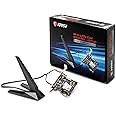
The MSI Dual Band AX 200 WiFi 6 Bluetooth 5.0 PCIe Network Adapter (AX916C) delivers cutting-edge wireless performance with Intel's AX200NGW module. Supporting dual-band 802.11ax Wi-Fi 6 at 2x2 160MHz and MU-MIMO technology, it achieves blazing speeds up to 2.4Gbps and drastically reduces latency by 75%. Bluetooth 5.0 integration ensures versatile connectivity, making this adapter an essential upgrade for professionals seeking ultra-fast, reliable, and future-ready networking.


| Brand | msi |
| Item model number | AX916C |
| Item Weight | 10.2 ounces |
| Package Dimensions | 7.72 x 5.39 x 3.31 inches |
| Color | multicolor |
| Manufacturer | MSI |
| ASIN | B081SLD8JF |
| Date First Available | November 21, 2019 |
J**S
Solid Performance & Cheap
Bought 2 of these for myself and the wife. We were using dongles for bluetooth and wifi (when applicable) and had no issues prior but both wanted those usb ports free. I use the bluetooth mainly for headphones, my xbox controller and transferring files from my phone and so far it's worked great...no shoddy signal or anything. It works well with no issues. Signal range is pretty decent overall. Installation is mostly pretty easy and painless except for the bluetooth power cable. It's a little on the tough/stiff end so the cable management leaves a lot to be desired. The usb headers on our boards are at the bottom and the power is has some good length so I tried to hide most of the routing in the back but the cable is so tough. so I hide most of it in the back, it tugs and unplugs itself on its own from the header. Kind of annoying to be honest but I gave it the slack it needed. Messy, but works fine.
T**D
Good Wifi Adapter - Although requires internal USB connector and driver issues.
This is a pretty good Wifi Adapter. After you finally get it working.Installed this on a new pc build with fresh install of windows 10.One of the things I didn't realize when I bought the adapter was the PCI express card also requires a internal USB Connection - (Connection from motherboard to pci express card) It comes with the cable you will need to do this, however it may require you to disconnect another USB device on your motherboard to use this, as it did in my case.**The internal USB connection on the motherboard is usually used to connect the USB ports on the front or top of your PC Case to the motherboard. **The other problem I had was the drivers disc sent with the card was not readable. I tried it on 2 different PC's both would not read the disc. Not a huge problem as you can usually find better, more up-to-date drivers on the Manufacturer website.I went over to the MSI website only to find , there is no product actually called "MSI AX905C" on the site.I was able to find a product called the MSI Herald-AX Intel AX200NGW Wifi 6 , it appeared to be the same device, so I went for it. Sure enough , it worked.So be aware MSI calls it the MSI Herald-AX Intel AX200NGW Wifi 6 , if you are looking for support/drivers.After all of those little hiccups, it installed and worked well. Low latency on 5ghz and relatively good speed. Will report more if it changes, after more use.
J**L
AWESOME!
This was super easy to install and get up and running, I get a great signal to it from our WiFi router, starlink. NO COMPLAINTS! I recommend this for your wifi needs.
S**E
Works perfect
Works perfect.
T**R
It's ok.
It's ok.That's really all I can say about it. It's a wifi/bluetooth PCI card. It's easy to install but seems to have limited bluetooth range. (I can't make it from my bedroom to the kitchen [~30 feet] without losing connection.)But at this point it is kind of old tech and the price was fair so I have no real big complaints. Still, Bluetooth should have a range of about 30 yards (line of sight) and this doesn't.
A**.
Read and Important...!!!!
I know some of you bought this and you have currently fresh installed Windows 10 and had difficulty of wifi connection or your windows having BSoD is because you are missing driver that needed to be installed. Which is Intel Proset/ Wireless Software or rather go to google and search Intel and download driver & Support Assistant. It will download the driver you needed for the wifi. This gives me hard time and check the logs of my system of what causing BSoD. It tooked me 2hrs to figure it out. The driver from MSI is fine but you need the support from PROset as Dual band wireless is spamming error on your system then will cause BSoD. Which is coming from intel. Just search Intel PROset Wireless Software.5 star for over all I wont give less star even it gives me hard time to figure out what's the problem. Read this and it will help you. Thank me later.
U**D
Great upgrade! Details included, sorry no tl;dr.
Important: First of all, just like how another reviewer had already stated, there is currently an issue getting the included DISC to properly read. I managed to get it to read one time out of three tries. It contained stuff I personally found to be redundant, such as a digital copy of the Manual that is already included in the box and the Drivers (albeit outdated) for both the Wifi and Bluetooth functions. Updated Drivers for both the Wifi function and Bluetooth can be found on Intel's website under AX200. Then, there are the Drivers on MSI's website. These can be found under the model name AX916C, just like it says on the box. Both Drivers serve the same purpose, Intel just has the more recent of the two.The hardware: Basically, it's just a NGFF (Next Generation Form Factor)/M.2 to PCIe adapter, with the Intel AX200 Wifi module installed.What I personally did for my individual use case, was to first uninstall any accompanying software associated with the Wifi card I was replacing, then making sure to remove the device from within Device Manager to ensure nothing is left behind. After powering off my system, I opened the case and removed my old Wifi card.Hardware Installation: The product is already fully assembled for Wifi function right out of the box, installation should be a snap. First, remove one of the existing screws holding down the PCIe slot bracket next to an empty PCIe x1 slot in your case, if you haven't done so already. Next, carefully (while noting the holes on each end) connect one end of the included Internal USB Header cable to the USB pin slot on the product and the other end to an empty USB pin slot on the motherboard. Now carefully insert the product into the PCIe x1 slot noting that the notch on both the slot and on the product properly line up. Then, finally secure the screw into place on the bracket. After which, you would then run the Driver installation utility for both the Wifi and Bluetooth once your PC boots up.FYI: If you choose to not install the Bluetooth Driver, there will be an entry in Device Manager listed as "Unknown Device". It's just the Bluetooth function that Windows somehow cannot seem to identify without the Drivers being installed. Just installing the Bluetooth Driver changes that entry to "Bluetooth" within Device Manager.
Trustpilot
5 days ago
4 days ago