
DOWNLOAD THE APP


Customer Services
Copyright © 2025 Desertcart Holdings Limited
DOWNLOAD THE APP


⚡ Own your desk, your style, your game with the ultimate hot-swap RGB keyboard!
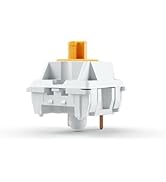
The Glorious GMMK1 is a 60% compact mechanical keyboard featuring hot-swappable 3-pin switch sockets, customizable per-key RGB lighting controllable via software or onboard hotkeys, and broad compatibility with MX-style keycaps. Its minimalist design and built-in memory for key assignments make it perfect for professionals and gamers seeking a personalized, space-saving setup with plug-and-play customization.






| ASIN | B07J5QJTD2 |
| Amazon Bestseller | #115,504 in Computers ( See Top 100 in Computers ) #1,254 in PC Gaming Keyboards |
| Are Batteries Included | No |
| Brand | GLORIOUS |
| Color | Black |
| Customer Reviews | 4.4 4.4 out of 5 stars (939) |
| Date First Available | October 29, 2019 |
| Is Discontinued By Manufacturer | No |
| Item Weight | 590 g |
| Item dimensions W x H | 29.3 x 10.3 x 4.4 cm |
| Item model number | GMMK-COMPACT-RGB |
| Manufacturer | Glorious PC Gaming Race |
| Operating System | Windows 10 |
| Power Source | USB |
| Processor Count | 1 |
| Product Dimensions | 29.3 x 10.3 x 4.4 cm; 590 g |
| Series | GMMK-COMPACT-RGB |
夕**音
個人的にはタイトルの通り、「キーアサインの変更設定が本体内に保存出来る」のが最大のポイント。 以前にPulsarのTKLも購入したのですが、TLK版は専用アプリを起動している間だけキーアサイン変更が有効という事でがっかりしてたところ、本製品を発見。 こちらはキーボード本体内のメモリに設定を保存し、どの環境でもその設定で利用出来たので、一安心です。 惜しむらくは、ソケットが3ピンのため利用可能な軸に制限があるところでしょうか。 GMMK v2は5ピン対応らしいので、そちらが入手出来るようになったら試してみたいですね。
M**W
Nice Keyboard, Terrible USB Placement
This is a great keyboard so far, but the USB-C port is horrible. There's only one, straight out the middle of rear, and there's zero reinforcement. There's no way it's going to last, which is extremely disappointing.
L**N
HOW
some of th screws are rusty
A**E
普通に良いキーボードキットだし色んなキースイッチとかキーキャップとか組み合わせて使ってるけど、しばらくすると動画みたくカチャカチャ音がスタビライザー付きのキー、例えばEnter,Space,backspaceキー中心に鳴り出します。ルブスプレーとか試して見たけど効果ゼロ。やっぱり分解するしかない。めんどくさい。ついでに言うとEpomaker見たくキットの中に静音パッドが入ってないからクリーミーな音も出ずらいし静音軸もわりかし音がする。 しかしながら、EverglideのApua king V3 Switch 67gfとの相性は群を抜いて良い。最高のコトコト音が実現されます。
K**.
キーキャップとキースイッチを自分で選べて英字配列の85%キーボードを探して三千里。このキーボードにたどり着きました。ケーブルが取り外し可能である点や、アルミニウムプレートを採用している点などが気に入っています。特に問題なく使用できていますが、CapsLockキーランプが非常に小さく個人的に判別しにくいです。
A**R
Terrible
Flimsy. Not very configurable
な**う
FPS等のゲーム用として使うにはコスパも非常に良く、剛性感や安定感もかなりあって非常にコスパのいいキーボードだと思います。 ただ、FNキーを押しながら操作するコマンドが非常に使いにくいです。 右側のALTの更に右側にFNキーがあるのですが、非常によく使う矢印キーのコマンドは右手のホームポジションでもある、i、j、k、lになっており、右手の親指をかなり内側に傾けながらキーを押す必要があります。 また、右手でFNキーを押すのですが、空いている左手のコマンドはほとんどがLEDのライティング等のほぼ使わないの変更等の機能が集中していて、PageUp・Down等の操作に必要なコマンドは全て右手側に集中しているため、右手の親指が無理のある姿勢になる事が多いです。 FNキーの場所や、コマンドの変更もできないようです。 見た目、安定感などは非常に良いので、このあたりのキーの割当で非常に損していると感じました。 また、FN + Winキーで、Winキーを無効化できる機能があり、ゲームなどをする際に非常に便利だとは思うのですが、弊害として、Winキーをどこか他のキーに割り当てておかないと、矢印キーとWinキーを同時押しすることができません。 MacではWinキーはCommandキーとして認識されるのですが、文章等を編集しているときにCommandキー+矢印キーでカーソルを文末等に移動する機能をよく使われる方は、こちらも使用不可能になりますので注意が必要です。
A**A
This keyboard is probably one of the best hotswappable boards on the market. It features USB type C connectivity and an overall sleek design. Plus, the board has a nice weight to it which further increases the overall sturdiness of the board. Multiple different lighting effects are available too. Considering there is no function keys (f1-12,) they are integrated nicely with easy hot key orders. Additionally, this board is 3 pin hotswappable, perfect for a variety of key switches. I used Kalih Box Reds and they sound great in combination with this new board.
K**H
I do like a full size keyboard the build quality on this was nice
G**R
First off, it's a floating key design. This means there is no bezel around the switches. That look was popular with gaming keyboards a few years ago. Custom keyboard enthusiasts generally frown upon it now. That out of the way, at 55 dollars this board is a good buy. It feels solid. The weight is from 3 cheap metal blocks stuck in the case, not from thick, high-density structural materials like some high-end boards But the weights don't move around, and are only visible with the case open. My board is modified. I replaced the included foam with thicker neoprene foam. I left the stabilizers stock, as they seemed to be adequately lubed. If you're doing your first build, they might not bother you. They're better than those on cheap, standard/gaming keyboards. But if you're looking for good sound, you might want to consider modifying or replacing the stabilizers. With Kailh Pro Purple switches, the look, sound, and feel of this board is something I'm proud of. I've gotten compliments on it several times. I you're looking to build your first budget mechanical keyboard and don't want to go with a more enthusiast entry level board, I say go for it. This is a great platform to start with. If I couldn't build another board and had to use this one indefinitely, I think I'd be quite happy with it. But building custom keyboards is addictive. I've already ordered some higher-end entry-level boards to explore the hobby further. I'm going for more thock next time.
G**R
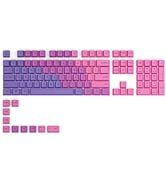
The Glorious Modular Mechanical Keyboard (GMMK) Barebones Edition serves as a good entry-level case and hot-swappable PCB so people who are curious about custom keyboards can get their feet wet in the hobby without spending too much on the switches and materials. Plus, the synergy with other supplies from the manufacturer (such as key switches and keycaps) ensures a one-stop shop for a beginner DIY build, a very important fact for a beginner. There are a couple drawbacks, but nothing bad enough to detract from the finished product. For this build, I chose the full-size layout because I use the numpad for schoolwork. I went with the barebones edition so I could add my preferred choice of keyboard switches and keycaps; I bought the Gateron Clear key switches (the 120-pack from the Glorious PC Gaming Race's website, to ensure compatibility with this board) and the Glorious Aura keycaps (also from the GPGR's website) to build on this product, to create the keyboard shown in the image above. Putting the pieces together using this board was very straight-forward. One negative was the included keycap puller to pry attached keycaps off of the keyboard; it is finicky, and is likely to mark or damage the bottom edge of the keycaps when you use it. Then again, one rarely sees the bottom edge of the keycap when the build is finished so only those making a serious final build for a client will be concerned with this problem. For beginners looking to make their very first board, the minor nicks and scratches will be at worst a minor nuisance and at best not even noticeable. Inserting the key switches was near-painless; the only times I was unable to insert a switch, it was due to human error on my part by mis-aligning the tiny wires on the key switches I purchased to use with this build. I only bungled one switch completely thankfully, and being able to repeatedly test the key switches to make sure they worked as intended while the keyboard was plugged into the computer made confirming proper installation very simple. There was some confusion when attaching the different key caps as this was my first time realizing just how many key caps there were and all the different places they go! With some effort I finally got it all installed, as you see in the image above! Aesthetically, the brightness was really good for the majority of the keyboard. I did notice that for the larger keys, like the spacebar or the shift/enter/backspace keys, there was only one LED light underneath the entire key. The spacebar in particular looked way too muted compared to the rest of the keyboard, because there was only one LED in the center attempting to light up the entire spacebar! Other than that, the brightness was set perfectly right out of the box, and the manual showed many ways I could adjust the brightness or the colors or the pattern in which the colors shift or whathaveyou. I did not test the software the manufacturer of the keyboard provides in order to manually adjust the lighting and colors of the board in much greater detail; I did not see a need to do so out of my personal preference, but the option is there for others. I have heard good things about it, so make of that what you will. The software is technically optional, so keep that in mind. In terms of subjective opinion of the finished product? The keyboard sounds and feels amazing, especially in contrast to my old Logitech G710 plus with its Cherry MX Brown switches (ugh, my old keyboard is HORRIBLE in comparison). Trying the Gateron Clears, a lighter and truly linear key switch, was a revelation, and my fingers practically fly across this keyboard when I type! The video above shows a typing demonstration of what this keyboard sounds like, and it is very crisp and responsive in my opinion! There is a satisfying clack when bottoming out with these switches and keycaps, and I am still adjusting to the lighter weight so I don't pound too hard on the board and hurt my fingers! I chalk that up to adjusting after a typing style that demanded heavy key-presses, and not a problem with the board or the build itself. The stabilizers for the bigger key caps do have a rattle to them, which does sound very different from the rest of the keyboard. Time will tell if this becomes a problem or not for me, but for now I am not bothered. Perhaps as I try out different switches in the future, I may decide to change out the stabilizers for something that doesn't rattle as much, but for now I have no problems with them personally. The overall build quality is very solid, the machined aluminum on the board has it feeling sturdy and weighted. This is a heavy keyboard, it is just as heavy as my giant old keyboard despite being smaller. The texture of the surface finish is a nice matte feeling, and after a week of typing on this board I have noticed zero issues or problems with the build. The addition of extra rubber feet I could add or swap out is helpful in deciding just how high a profile I want this keyboard to have, and the adjustable feet are nice for when I want the keyboard propped towards me. The braided cable is sturdy but flexible, and the board worked as intended out of the box. As mentioned before, building the keyboard with the switches and keycaps was very simple and straightforward. Overall, I would recommend this board for people curious about custom keyboards who want to understand the terminology, put together their own build, and do so with a minimum of hassle or issues. This board satisfies all of that criteria. People who have already spent months or years in the custom keyboard hobby do not need this board, and they likely know of better (possibly cheaper) alternatives, and/or know exactly what they want and how much it costs. This board is for people looking for that custom keyboard typing experience for the very first time, something they can change or modify as they desire over the course of a few months or a year as they learn their preferences and what works best for their typing style. For that purpose, it is very well-built and provides quite a lot of customization for the price, and for that purpose I highly recommend it!
M**E
I used this product for more than a year and never had an issue. It was well built and I still have it in my second setup. If you are looking to buy a buy it I still think its a bit overpriced but the quality is there. For me its a 4/5
Trustpilot
3 days ago
2 months ago