🚀 Power meets portability — your ultimate on-the-go creative command center
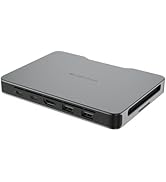
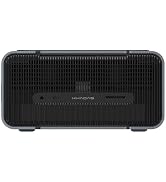
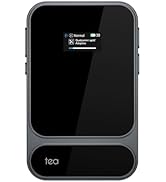
The Khadas Mind 2 Mini PC packs desktop-grade Intel Core Ultra 7 155H processing with 32GB LPDDR5 RAM and 1TB PCIe 4.0 SSD into a sleek, ultra-portable 435g aluminum chassis. Featuring integrated Intel Arc graphics and a 34 TOPS AI Boost NPU, it delivers exceptional performance for professional multitasking, gaming, and AI-driven creative tasks. Thunderbolt 4 and USB4 ports enable lightning-fast data transfers and 4K/8K UHD output, while a built-in battery offers up to 25 hours standby and instant wake-up. Expand storage effortlessly via a magnetic M.2 slot, making it the perfect hybrid workstation for millennial professionals craving power, style, and mobility.


| ASIN | B0DHCJVG4J |
| Additional Features | AI Boost NPU, Built-in Battery, Thunderbolt 4 Interface |
| Aspect Ratio | 16:9 |
| Best Sellers Rank | #12,689 in Computers & Accessories ( See Top 100 in Computers & Accessories ) #491 in Mini Computers |
| Brand | Khadas |
| Built-In Media | Instruction Manual, Mind 2 Mini PC, Power Adapter, USB-C Cable |
| CPU Model Number | Intel Core Ultra 7 155H |
| CPU Model Speed Maximum | 4.8 GHz |
| Cache Memory Installed Size | 24 MB |
| Color | silver |
| Compatible Devices | Laptops, Tablets, Smartphones, and other devices with Thunderbolt 4 or USB4 ports and/or wireless connectivity |
| Connectivity Technology | Bluetooth, usb_type_a, usb_type_c |
| Cooling Method | Air |
| Customer Reviews | 4.3 out of 5 stars 47 Reviews |
| Display Resolution Maximum | 5120 x 2880 |
| Display Type | LED/LCD |
| Graphics Card Interface | Integrated |
| Graphics Card Ram | 8 GB |
| Graphics Coprocessor | Intel Arc Integrated Graphics |
| Graphics Description | Integrated |
| Graphics Ram Type | GDDR6 |
| Hard Disk Description | SSD |
| Hard Disk Interface | PCIE x 4 |
| Hardware Interface | Thunderbolt 4 |
| Human-Interface Input | Keyboard, Mouse, Touchscreen |
| Item Dimensions | 5.75 x 4.13 x 0.79 inches |
| Item Height | 2 centimeters |
| Item Weight | 435 Grams |
| Keyboard Description | Standard keyboard compatible, none bundled |
| Keyboard Layout | QWERTY |
| Manufacturer | Khadas Technology Co.,Ltd. |
| Memory Clock Speed | 6400.0 |
| Memory Speed | 6400 MHz |
| Memory Storage Capacity | 32 GB |
| Model Name | Khadas Mind Portable Workstation |
| Model Number | 32GB+1TB, Intel Core Ultra 7 155H |
| Model Year | 2024 |
| Native Resolution | 5120 x 2880 |
| Number of Component Outputs | 2 |
| Operating System | Windows 11 Home |
| Personal Computer Design Type | Mini PC |
| Power Plug Type | Type A - 2 pin (North American) |
| Processor Brand | Intel |
| Processor Count | 1 |
| Processor Series | Intel Core Ultra 7 |
| Processor Socket | FCBGA2049 |
| Processor Speed | 4.8 GHz |
| RAM Memory Installed | 32 GB |
| RAM Memory Technology | LPDDR5 |
| RAM Type | DDR5 RAM |
| Ram Memory Maximum Size | 32 GB |
| Resolution | 5120 x 2880 |
| Security Features | Windows Defender, Windows Hello |
| Specific Uses For Product | Business, Gaming, Video Editing |
| Style Name | Minimalist |
| Total Expansion Slots Quantity | 1 |
| Total Number of HDMI Ports | 1 |
| Total Thunderbolt Ports | 1 |
| Total Usb Ports | 4 |
| Video Output | HDMI, USB-A |
| Video Output Interface | HDMI |
| Video Processor | Intel |
| Warranty Description | 2 year |
| Wireless Compability | Bluetooth |
| Wireless Network Technology | Wi-Fi |
| Wireless Technology | Bluetooth |
C**R
Best PC I've Ever Bought!
The Khadas Mind has completely changed my mobile computing experience in such a meaningful way that I have to share. First off, I have to confess that I'm a bit of a geek, unashamedly so. If you care what other people think, my use case might not be a great fit for you, but read on anyway, because there are other options that don't involve sitting in an airport with a pair of VR glasses on and a keyboard in your lap. I travel for work, not as often as I used to, but still enough that I absolutely require a mobile PC. I also despise using laptops while traveling. Hunching over a tiny screen and keyboard in a meeting is bad for my neck and shoulders, and forget trying to work, play a game, or watch a movie on the flight. As soon as the yoyo in front of me reclines their seat, my screen is forced to an angle that makes it unusable. So a while back I thought to solve the flight problem by buying a pair of VR glasses. I'm not talking about the big, bulky VR systems like the Meta Quest, but rather the compact Viture or XReal glasses. They're not really great for 3D purposes, but they put a giant screen right in front of your eyes and are really comfortable for longer-term use. At first I was connecting them to my phone for movies and not really using them for work, but I knew I had to try them with a PC. I tried them at home with a laptop, and they were great. So then I asked myself, "Why should I bother with a whole laptop? Why not have a Raspberry Pi or something that's compact and portable?" Well, the simple answer to the Raspberry Pi question is that there are some applications that I absolutely have to have for work that are Windows-only. So, I tried a "hybrid" approach, using the Raspberry Pi for movies and some games, and still lugging around my tank of a laptop for work. I hated it. Then I learned about the Khadas Mind. A full-fledged Windows PC with more processing power, memory, and hard drive space than my laptop, in a form factor about the size of two decks of cards next to each other. More than that, there's a dock option where you can conveniently hook it up at home. It has DisplayPort over USB-C, so I can connect it directly to my glasses, and it's powered by USB-PD, so I can use my mobile power bank to run it when outlets are scarce. Needless to say, I was absolutely hooked on the idea. Khadas is not a big company, like Dell or HP, so I was a little leery about spending this much money on an unknown, but I took the plunge anyway and have been absolutely thrilled with it since. I also bought a Mind Dock for at home, expanding my I/O ports a bit, but more important for me, making it a snap to just grab the computer and go when I need to pack my bag for a trip. So now, instead of a laptop with a dedicated charger in my bag, I have my Khadas Mind in its leather case, my VR glasses, single charger that has ports that will power my Khadas Mind, charge my Kindle, phone, headphones, and watch, and still has a couple of USB ports left over, and a 65% form factor keyboard and a mouse. It doesn't set up quite as quickly as a laptop, but once it is I'm remarkably more comfortable using it, especially for longer working sessions. I also have a wireless mini keyboard/mouse that I use on flights to navigate to movies and play games, and a Bluetooth controller for games as well. My backpack is significantly lighter, in fact I'll be switching to a smaller bag that will be easier on my back and shoulders, and my neck no longer hurts from crouching over a laptop like a caveman. I do get some funny looks using the glasses, so like I said, my use case might not be for everyone, but that doesn't mean the Khadas Mind isn't a great option for less geeky folks, too. Are you a hybrid worker that spends 3 days at home and 2 days in the office? This thing is PERFECT for that. Grab a couple of docks, put one at your office and one at home, and you'll be using the same PC at home and at work. Because it's so compact, you can just drop it in a purse or small sling bag for your commute. I'm hoping Khadas will continue to expand and improve on the Mind lineup. The I/O port on the bottom that the dock uses opens up all kinds of possibilities, like a battery backpack for mobile use or additional storage via an NVMe array (both ideas I'd love to see them build!). They're already heading down that road, with an optional dock that includes an RTX 4060 graphics card for people who want to do more intense gaming. I'd also like to share my support experience. Several months after I bought this computer it developed an issue where the system would blue screen frequently. After some conversations with the support team over e-mail, they have determined that the root cause is likely a hardware defect, and they are sending DHL to pick up the device so they can do troubleshooting in-house. The communication with the support team has been stellar. This further increases my likelihood of buying more products from them in the future!
S**Y
Khadas Mind 2s AI Mini PC - 96 Tops AI Performance, Intel Core Ultra 7 255H|64GB LPDDR5X
I bought the Khadas Mind 2s with 64GB of ram. I also bought an extra 2TB drive for storage, which inserts easily into the bottom of the device. The Khadas Mind 2S is unbelievably powerful for its size. I currently am using it as a portable gaming rig with a portable 16in 1080p monitor. You set modern games to use XESS balanced, limit the frame rate to 30fps, then have lossless scaling (separate purchase on steam) double the framerate to 60fps with almost no discernable lag. You aren't going to be gaming at 4K on this thing and even 1440p might be a stretch, but 1080p on a portable monitor works fantasti with high settings on nearly every game. I have this device, plus the portable monitor, plus a macbook pro M2 Max, large battery backups, all in a leather backpack. Great stuff.
I**8
Great build! High quality! Compact!
Fantastic so far, small compact, I can put it in my pocket if I wanted to. Paired it with Mind Graphics, game changer for such a small unit. Pricy, yes but worth the price.
L**S
Excellent PC, great battery, bad built-in software but otherwise incredible!
It's taken me a long time to really write a review about this little guy because I wanted to put it through it's paces. The truth of the matter is, it's quite a little beast for the price, but a big part of that also factors in it's portability and size too. The model I got was an Intel Core Ultra 7 255H with 64GB LPDDR5X ram and a 2TB SSD and the Arc 140T gpu. It's been able to handle basically any and all office work I've thrown at it, as well as any of the dev work I've thrown at it - lots of heavy c# dev in Visual Studio and it hasn't missed a beat. I use it with a 49" Samsung Ultrawide monitor and it also has no issues handling that. I'm slowly in the process of upgrading my home lab and I think this may take over as a little home server soon, and I really love that it has a pretty big battery, because that means during power outages and issues like that, it should basically never turn off provided there's no prolonged power outage. When it starts really cranking up and running at max speed (which is considerable for such a little guy) doing stuff like gaming - I'll get to gaming in a minute - it can get a little noisier than it typically is, but that honestly takes a good amount of work to make that happen. I HAVE noticed a few times where it sort of "breathes" heavily while idling and I'm not sure what causes it. I've dug through the performance monitor and can't find anything that should be taxing it, so it seems to just have a weird fan curve that makes the fan kind of pulse rhythmically at random times. As far as gaming goes, this is NOT a gaming machine and you shouldn't consider it as such. It definitely CAN run some things though. You can run just about any low-end game without any problems - think things like Stardew Valley, Limbo, Super Meat Boy, etc. Mid-level games or older "high end" games it can also do well with, depending on the fidelity. High end or very demanding modern games are going to be really sluggish unless you tank the graphics options, and you'll likely find the fan maxing out on the device too. The biggest downside for me is being forced to use the Khadas Mind software. It's their in-house driver management software and there's basically no way to update or maintain drivers for the system without it. It has a sort of cheap, poorly developed feel to it and some menus are randomly in Chinese. I genuinely wish I could remove this entirely and just download drivers as I need them from their website. Lastly, worth mentioning - it has the ability to get a really awesome docking station to make popping it in and out very quick and easy. I don't have one so I won't mention it too much, but it seems like a pretty cool option if you want to move it into several places.
S**Y
Little Powerhouse Packed PC
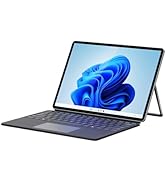
The Khadas Mind 2s AI Mini PC is a remarkably powerful and portable workstation wrapped in an ultra-sleek, minimalist design. I love how it balances raw performance with size—this is a full-fledged PC that you can literally fit in your hand. Packed with the Intel Core i9-13900H and Intel Iris Xe graphics, I feel confident tackling most high-intensity creative tasks like video editing (which does have its limit based on the built-in GPU, but they do have a solution to which I detail later) and AI development without lag or stutter. The aluminum casing feels solid and premium, and I appreciate that it stays cool even during heavier workloads thanks to its advanced cooling system. I also really like the flexibility of the dual Thunderbolt 4 ports and 40Gbps data transfer—it makes connecting to multiple displays or fast external drives feel effortless. The built-in AI engine, dual SSD slots, and quad-display capability give me everything I need for multitasking at a professional level. Plus, the system runs nearly silently, which is a rare feature for this much horsepower. That said, the RAM and SSD are soldered onto the motherboard and should be considered in your purchase. On the base of the unit, you can add an additional SSD, which is an awesome bonus feature! And while the price is premium, I believe it’s justified for the features and build quality you’re getting. Where the Khadas Mind 2s AI Mini PC shines is in using locally hosted LLMs for all sorts of AI tasks. With video editing, it'll tackle anything at 1080 no problem, where it stutters a bit is with 2K, and definitely at 4K resolutions. However, they do make an additional item to help solve these bottlenecks... If you have heavier workloads and/or gaming, Khadas does make an additional attachment with a 4060 Ti GPU, which also gives you way more ports: 3.5mm headphone jack, 2x HDMI 2.1a ports, 1x display port, 1x SD 4.0 card reader, 3x USB-A 3.2 ports, and a finger print reader to for unlocking the device ($999 for 8GB or $1199 for 16GB). They also make a stationary docking station where you can leave your setup connected and just plug in the computer when you arrive at your desk. The docking station adds: 1x volume knob, SD card reader, 3.5mm headphone jack, 3x USB-A 3.2 ports, 1x Ethernet 2.5Gbps port, 2x HDMI 2.0 ports, and 1x USB-C power delivery port ($179). One thing I would love to see, if you look at their original marketing material, they have a screen and keyboard attachment that would make this into a laptop-style portable computer - I would LOVE if that were available as I would definitely pick it up to make this into my daily driver. Please, Khadas, release that accessory attachment! Overall, I highly recommend the Khadas Mind 2s if you’re looking for an incredibly compact yet extremely capable mini PC for professional creative work, especially those with AI workflows, or even multi-display productivity setups. It’s the perfect blend of portability, performance, and modern design.
R**S
Khadas Suitability
To 'She' below who attempted to use the Khadas to edit videos. Using a computer like this to edit videos is like using a Prius to haul 50 tons. Computers like the Khadas are made for web apps, office work and light photo editing. For what it's made for, the Khadas appears to work well but for processor and graphics card intensive tasks like video editing and heavy digital content creation in general, this is a poor choice. Video editing can bring even the most powerful workstation to its knees so in that scenario, the Khadas doesn't stand a chance. Khadas offers a graphics card add-on and with the most powerful CPU, you may be able to do some video editing. I hope this helps. Be well.
P**1
You really have to have a specific use case to justify the price
I have taken my time with this review. It has been about a month of me running with this as my main daily rig. I do web development / general software development and systems engineering as my primary job. Overall, I am using this about 8 – 10 hours a day 6 days a week. First let me geek at you for a bit. This is a technical marvel. The amount of computing that this computer that is basically a bit bigger than a pack of playing cards is truly astounding. I did not think that I would notice too much of a difference coming from my Intel 13700 but wow. I was wrong. And some of that might have to do with the absurd amount of RAM they packed into this. This is the “snappiest” computer I have ever used and it floors me almost every day on what it is capable of. I tend to run a ton of docker containers and even a few VM’s that I use on the daily – this tiny powerhouse is not bothered at all by it. It is absolutely stuffed to the gills with potential and yet it runs off USB-C power… it is absurd in the best way possible. That being said. I cannot for the life of me figure out who this is actually for? The only thing that comes to mind is the person that lives a minimalist lifestyle and has one of those clean desk spaces that look staged, or a person that needs to hide a powerhouse of a computer in a tiny space. The price is hideously egregious compared to pretty much everything else on the market and I constantly think to myself I should have purchased a nice laptop over this. I also do not understand the battery situation of this. Yes you can have it hibernate for a period of time because of it, to move between work spaces? I really, really just do not get it. Why not just laptop? My time with this tiny powerhouse has not been without trouble either. I have worked with support to try and resolve a mystery bluescreen that keeps on randomly happening in the dead of night. I am fully up to date on firmware and Windows updates. And despite having a ton of disk controller errors, after weeks of trying one thing, waiting 24 hours and then trying something else the only thing they can suggest is re-installing Windows. Which did not resolve the issue. I fear now that I have this incredibly expensive unit with a failing disk controller. Support for something like this should be available via phone or remote control at least. Not through Amazon and waiting 24 hours or more between responses. With a price this high, it commands top tier support -- and that simply is not what was given. I did not try and play any games with this, but I have seen videos of others doing some basic gaming. I have done a ton of other stuff, surfing the web etc. and using some pretty heavy IDE’s and it is great for that. I do have some times when compiling software or my IDE is indexing that I can hear the fan, it is quite audible when you’re running it up to speed. At the end of the day and for the end of my review. I love this micro power house, I am concerned it is not going to last much longer and there is nobody I could recommend it to. You really have to have some sort of very, very specific use case for this for it to make any sort of sense at all over a similar and much more capable laptop.
T**N
So close but sold short at a high price
The thunderbolt 4 connection is a plain usb4. I have asking Khadas if there is a way to turn on resizable bar in bios, still waiting.
Trustpilot
5 days ago
1 month ago