
🔊 Elevate your desktop audio game with crystal-clear digital precision!
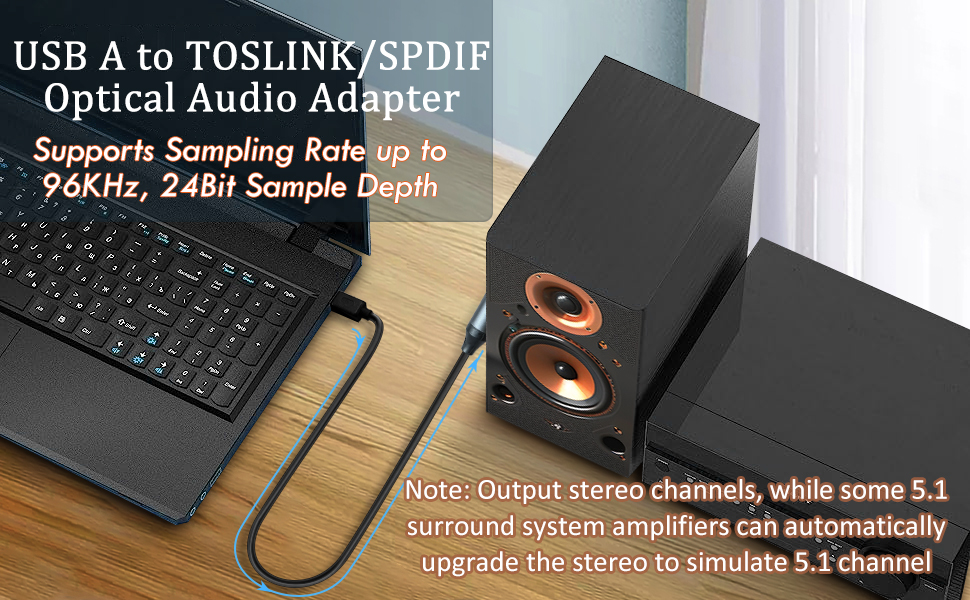
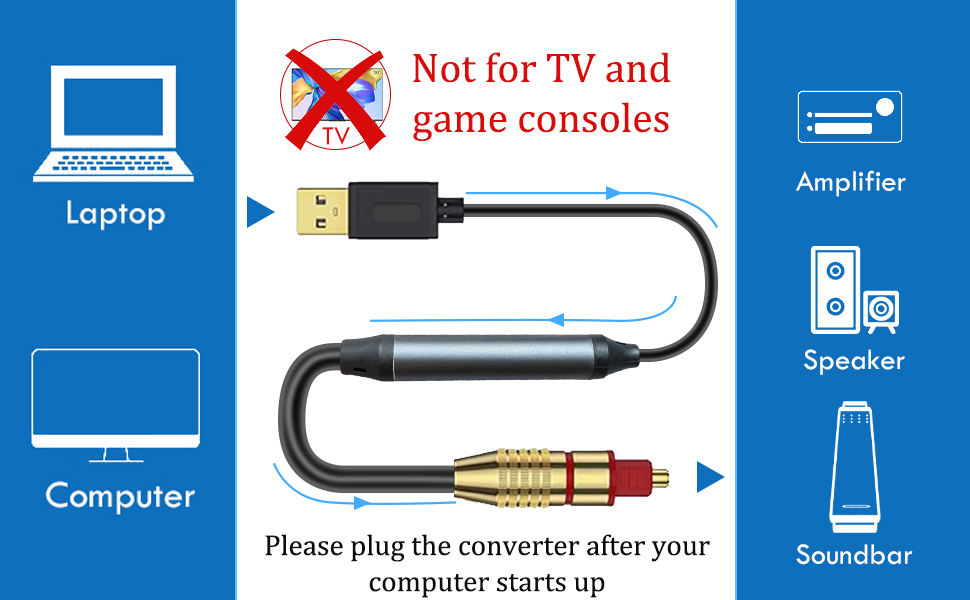
The Tackston USB to Optical Audio Adapter converts your computer’s USB Type A port into a high-fidelity S/PDIF optical output, delivering pristine 24-bit/96KHz stereo sound. Designed for effortless plug & play use with Windows, macOS, and Linux, it’s ideal for connecting laptops or PCs to soundbars, DACs, or home audio systems. Note: It supports one-way audio transmission from USB to optical only and does not support TVs, gaming consoles, or multi-channel surround sound formats.




| ASIN | B0CGVK3MC1 |
| Best Sellers Rank | #16,244 in Electronics ( See Top 100 in Electronics ) #39 in Digital-Analog Converters |
| Brand | Tackston |
| Cable Type | USB, OPTICAL |
| Color | Black |
| Compatible Devices | Laptop, Computer |
| Compatible Phone Models | No Compatible Phone Models |
| Connector Gender | Male-to-Male |
| Connector Type | Optical Toslink, USB Type A |
| Customer Package Type | FFP |
| Data Transfer Rate | 96 KHz |
| Date First Available | August 29, 2023 |
| Frequency | 48000 Hz |
| Indoor/Outdoor Usage | Indoor |
| Item Weight | 5.3 ounces |
| Item model number | USB to Optical 1.5M |
| Manufacturer | Tackston |
| Model Name | USB to Optical Adapter |
| Number of Items | 1 |
| Number of Pins | 6 |
| Outer Material | Plastic or Rubber |
| Package Dimensions | 5.67 x 5.51 x 1.5 inches |
| Recommended Uses For Product | As External Sound Cards for Laptop/computers. |
| Shape | Round |
| Special Feature | Converts Audio Signal from USB A to Optical ONLY, Not from Optical to USB., Optical Output Stereo Channel Only, Not 5.1 Channel. |
| Specification Met | USB-IF |
| Unit Count | 1.0 Count |
H**Y
Works exactly as it should...just make sure it's what you are looking for depending upon your setup
I was given a BOSE SOLO 5 soundbar from a friend. It sat in a box for nearly 6 months because this version is not AIRPLAY compatible and nearly every other audio device in my house is. It has Bluetooth, but that technology really only accepts a single connection vs AIRPLAY which will allow all compatible speakers to connect at the same time in different rooms with individual volume control and delay free audio transmission. Fast forward 6 months after a move and I start looking for some new PC speakers for my office. I had an old pair of DELL speakers with a small bass box and 2 desktop speakers that I think I've had for at least 15 years. They've worked well, but had developed an annoying hum whenever the power was turned on. I decided the BOSE SOLO 5 soundbar would be perfect for the office since it's a single connection and I'm very familiar with BOSE quality and sound since I have a 5.1.2 ATMOS BOSE surround sound setup in my living room. The BOSE SOLO 5 has 3 audio connections available: 1) A standard 1/8" headphone jack 2) A single RCA connection (the old red, white & yellow push in connectors which used to be on every TV & 3) An optical audio input. Of those 3 options, only the optical audio is truly a digital connection. I decided I wanted to use that connection directly to my PC for the best audio signal available. However, my PC motherboard doesn't have an optical audio out port on it. So, I did a quick search on Amazon and found this USB-A (standard flat USB connection) to an optical audio connector. My plan was to plug the USB port into the PC and the optical audio into the soundbar for all my PC audio. I ordered the cable and it was going to be several days before it arrived. In the meantime, I connected a standard 1/8th headphone jack cable to the PC audio output and into the same input on the soundbar. It worked perfectly and sounded great. When the optical audio cable arrived, I swapped out the cables and everything worked exactly as it was designed. The PC immediately recognized the USB audio device was connected and I was able to switch to that audio source by clicking the speaker icon at the bottom of the screen (within Windows), and selecting the USB AUDIO device from the provided list. Unfortunately, the way optical audio is configured on a PC, it was not the ideal setup for me (and I will get into the technical specifics below). Before I do, let me reiterate that this cable does EXACTLY what it's designed to do. It feels solid in your hand, the connections are secure and it 100% converts your digital USB-A connection to a digital optical audio connection that your receiver, soundbar or other audio device will accept and play. It's also reasonably priced for the quality and functionality, so for all those reasons, this cable is getting a 5-star review. Now, on to the reason I won't actually be using it. As I stated earlier, my desire was to get a digital audio signal to my soundbar. When I connected this cable to my PC and the soundbar, the volume controls on my PC (including my multi-media audio controls on my keyboard) become useless. Unlike a standard 1/8" headphone jack connection plugged into your computer, this optical audio setup only uses the audio source as your volume control. One would think that since the computer is your audio source for the optical audio, it would work just like any other connection. But that's not exactly true. The audio source on a PC is whatever is actually playing the audio. For example, to test my audio connection, I played music through Spotify on my PC. Spotify is an installed program and has it's own volume controls built into the player (as do most video & music players on a computer). So, Spotify is playing music and I'm very happy with the sound quality of the soundbar. But when I press the mute button on the keyboard (acknowledged by the PC with an "X" through the speaker icon in Windows) the music continues to play. The volume slider of the computer does not affect the soundbar volume in any way. The only way to adjust the volume of the soundbar is to adjust the Spotify volume slider within the program, or use the soundbar remote to change the volume up or down. As a PC speaker, my plan was to set the soundbar level (via soundbar remote) to roughly 75%, then use my PC audio controls to adjust daily volume (including the mute functionality) whenever I wanted. Since the volume controls don't change any volume with the optical audio into the soundbar, even the normal Windows chimes (new email notifications, window prompts, etc...) would come through at whatever volume the soundbar was set to...in this case very loudly. Not having full PC volume control was a deal breaker for me. As much as I love knowing I'm getting the best digital audio quality, this specific adapter technology is setup such that it is not conducive for a normal computer setup, unless you wanted to ONLY control your volume for a specific app or through the soundbar remote. If you are using your computer as a home theater setup, none of this would be an issue for you since you would probably plan to control your movie audio via the soundbar/receiver remote anyway. For my specific PC audio setup, it's just not what I wanted and have gone back to the 1/8" headphone jack connection for full audio control via my multi-media keyboard buttons. I do not know without testing it, if a built-in optical audio port on a PC motherboard, or a separate optical audio PCI card physically installed on your PC, would function the way I was hoping for or not. All I know for sure is, this adapter does not. Hope that helps someone looking to do the same thing.
D**R
Good value in a 24/96K USB to optical cable.
Works exactly as billed, passes high quality 24/96 2 channel sound from a USB output to a DAC. Only downside is it does not expose the USB pin for bit streaming, so it will not pass Dolby Digital, DTS, or Atmos. As it clearly states that feature is not supported, no stars taken off. But it would have been nice. :-)
A**D
Works great on PS5 with soundbar
Writing this almost immediately after getting it hooked up and will certainly update this review should it fail on me in the long run. Needed this after getting a new PS5 with monitor setup and realizing that Sony, being as outdated as they are, was lacking adequate audio options on this console as well. (No dedicated audio port on a console is ridiculous.) The only real option they want you to use is to hook it up to a TV and then from there reroute the audio to wherever you want. With a monitor that is not an option. My soundbar is a SAMSUNG B-Series Soundbar HW B400F with only optical, HDMI, and USB. PS5 only has one HDMI, and my monitor only has digital audio out and the conversion options for that to optical suck. I tried USB to USB but my soundbar didn't recognize it. My only option left was to find a USB to optical cable and this one worked. On PlayStation there is typically an issue with USB audio which is that the volume will be incredibly low. Experienced this first hand on my PS4. Was worried it would be the same here, and at least for me and my setup this is not the case. I am so so so so happy about this. No audio delay either. Audio quality is fantastic and as immersive as you'd hope. If I just described your exact situation, this is seemingly your best option (and a perfectly good one).
A**R
Does what it says on the tin, works out of the box, no issues. Works at 48khz.
I needed this to enable dual optical audio output from my computer. I use SPDIF for one sound stream coming from my PC, but I needed a second physical hardware output for a second audio stream coming from my PC and this worked fantastic for that. Reaper recognized it instantly, no driver issues. It solved the audio ground issue I had when using USB --> DAC, as going optical was the only way to remove the electrical ground interference.
R**H
Gets the job done!
This product was finicky for me. I have a lot of items plugged into my main computer so when I plugged in this cable I was notified of a surge issue on the USB port. I tried every port that was open from my 3.2, 3.0, 2.0 etc.... I kept getting the notification. I do have several power hungry usb items so I figured that may be the reason I was getting the issue but I wasn't sure. I tried on another computer of mine and it was working for a little bit and then it just stopped working. I plugged it into a few different ports and it just stop working. So I tried it on my 3rd computer. Every time I plugged it into the front IO with my keyboard plugged in there it would turn off my keyboard and would not work. I decided to plug it into the back of the 3rd PC and it worked. I made sure to only have a keyboard and mouse plugged in as well. Solution: With this knowledge, I purchased a powered USB hub and that did the trick. This cable is power hungry. Hope this helps someone else! In terms of the product itself, it does what it says it will do. I have it plugged into a DAC I have that stopped working from the Computer to usb to the DAC but works with the SPDIF port. It is delivering good quality sound and I am enjoying it! 4 stars because I was almost about to return this until I figured out it needed a dedicated power source.
J**K
Worked perfectly with no setup needed on my windows desktop going to a DAC
converter looks like quality product and works perfectly. My Desktop audio system is a NAD C328 into $2k speakers and sound is as hoped for with subtle loss of resolution.
C**F
Hab mir das Kabel bestellt weil die Ps5 kein optisch Eingang hat ,und es funktioniert wunderbar klare Kaufempfehlung
E**A
Funciona a la primera sin necesidad de alimentar externamente el dispositivo, la consola lo alimenta lo que hace que su instalación sea más limpia
A**T
Bilindiği üzere, dizüstü bilgisayarlarda optik ses sürücüsü bulunmuyor şayet optik ses girişi olan bir hoparlörünüz varsa bu bağlantıyla bilgisayardan ses alamıyorsunuz, ben bu dönüştürücüyü bu amaçla aldım ve gerçekten ses gücünden sesin netliğinden çok memnun kaldım, bana göre iki tane eksiği olmakla birlikte genel olarak iyi bir ürün, bu iki tane eksiklik Bir keşke tip C olsaydı USB C olsaydı ikincisi cihazımızın ses ayarını yapamıyoruz yani hoparlörün sesini bu dönüştür bu dönüştürücü üzerinden kısamıyoruz ancak kumandayla kısabiliyoruz
B**H
Plugged it from my DAC to PS5. Sounds SO much better than plugging the headphones into the controller.
M**D
ممتاز لكن لاتفكرو تشترونها عشان تشغلون المحيطي للسوني تنفع للبي سي تشتغل ع السوني بس ما تغنيك عن قطعه الاسترو اللي تشغل محيطي
Trustpilot
1 week ago
3 weeks ago



