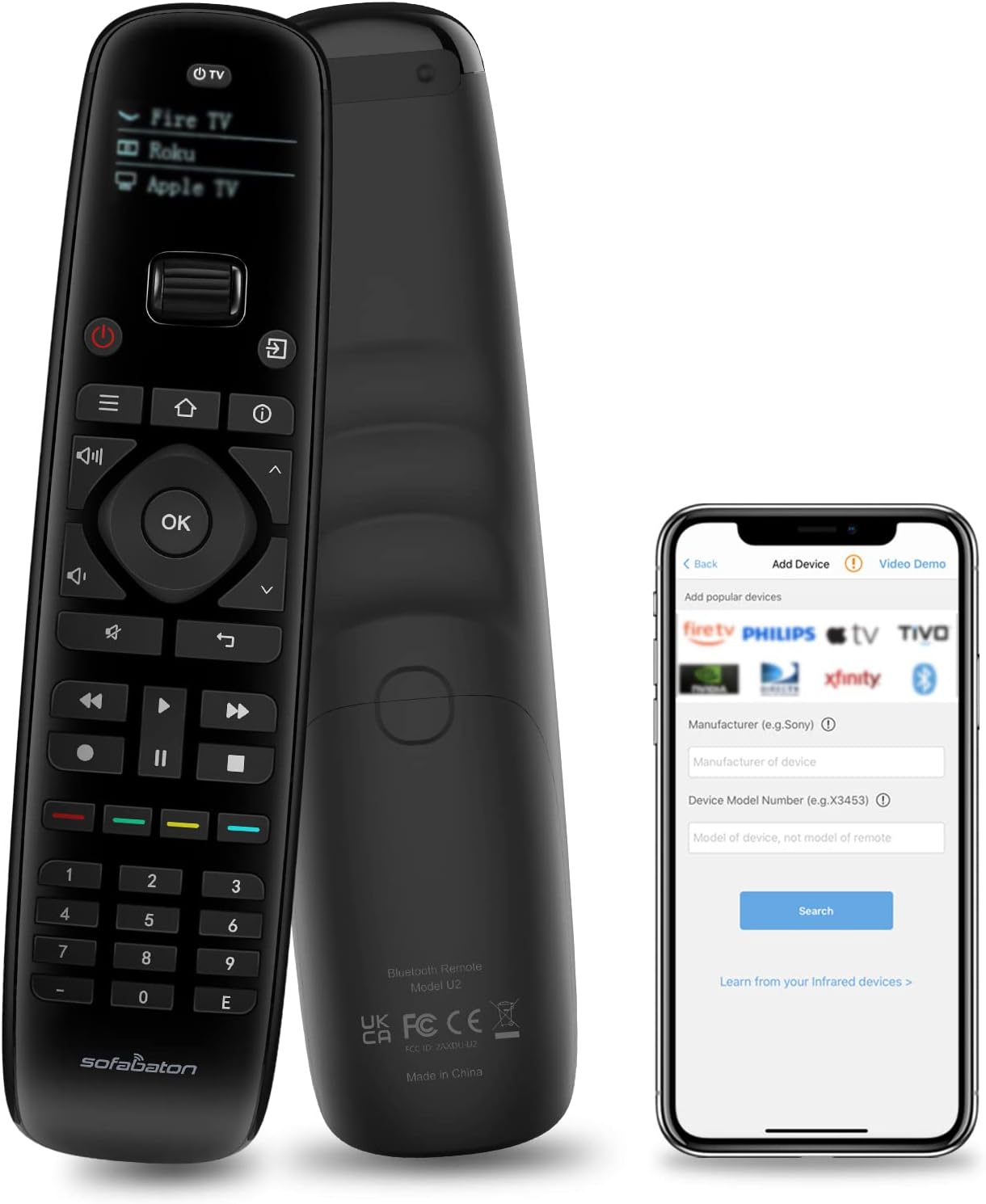
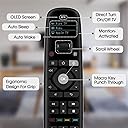
🎮 One remote to rule them all—control your smart life with style!
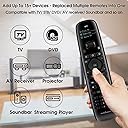
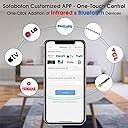
The SofaBaton U2 Universal Remote is a powerful all-in-one smart controller compatible with TVs, soundbars, streaming devices, and more. Featuring Bluetooth and infrared connectivity, it supports up to 15 devices, offers a 35-foot signal range, and includes a customizable app for button reassignment and macro commands. Its ergonomic design, OLED display, and scroll wheel deliver a premium user experience while replacing multiple remotes with one sleek device.


| ASIN | B0BY8P1HZM |
| Additional Features | Ergonomic |
| Battery Type | Lithium-Ion Polymer |
| Best Sellers Rank | #9,949 in Electronics ( See Top 100 in Electronics ) #508 in Remote Controls (Electronics) |
| Brand | SofaBaton |
| Button Quantity | 15 |
| Color | black |
| Compatible Devices | DVD/Blu-ray Player, Home Theater, Set Top Box, Stereo System, Television |
| Connectivity Technology | Bluetooth, Infrared |
| Controller Type | Sofabaton APP |
| Customer Reviews | 3.5 out of 5 stars 7,180 Reviews |
| Item Dimensions L x W x H | 7.87"L x 1.97"W x 1.18"H |
| Item Height | 3 centimeters |
| Manufacturer | Sofabaton |
| Maximum Number of Supported Devices | 15 |
| Maximum Range | 35 Feet |
| Model Name | U2 |
| Model Number | U2 |
| Number of Batteries | 2 AA batteries required. (included) |
| UPC | 795063906597 |
A**7
Sofabaton -- A Wonderful Universal Remote…
Whether a product is considered great or not depends on certain variables. What are your expectations and how difficult is it to set up and use? Let’s deal first with expectations: If you are wanting a remote that will, for example, with two steps turn off your TV, cable box, and then turn on your cd player connected to a different sound system or switch from Live TV to your Blu-Ray Player, then the Sofabaton is not for you and it will not meet your expectations. On the other hand if you are willing to utilize perhaps 3 or 4 steps, it likely will meet your expectations. That one extra step or two will save you two to three times as much money depending on which Logitech Harmony Remote you would be willing to purchase. I have owned two different models of Harmony remotes with the latest being the Harmony One. Harmony has an Activities button where you can press it and then select the activity you want. The remote will then turn off one activity (several devices) and turn on another--pretty slick. It has been a fabulous remote. However, since my model can’t handle Amazon Fire TV (a bluetooth device), it left me with a decision. Spend another $110 to $270 for another Harmony that would or look for something else. Now to address setup and ease of use. This will be in the eye of the beholder. If you’re technically minded, setting up remotes can be fairly easy peasy. If you’re not, both Sofabaton and Harmony will prove challenging, however, the Sofabaton will win for just basic addition of devices using Sofabaton’s library of codes and it’s far less time consuming for that setup than the Harmony. Should you need to have a button perform differently the Sofabaton can also learn from your original remote. Where the Sofabaton may prove challenging is that in order to gain somewhat similar functionality (i.e. Activities), you have to set up a macro -- a single instruction that performs that instruction several times or in this case on several devices. If you don’t know what a macro is, you’re not alone, but it does tell me your learning curve may take more time. Macros may be the most time consuming and frustrating element because there may be some trial and error in getting everything to work properly. To give an example, after setting up a macro I was able to turn on my Blu-ray player, Samsung TV and Soundbar with the press of one button. If I then wanted to quit, I could hit that same button to turn everything off. If I wanted to simply go to another activity I can simply press the power button on the remote to turn off my Blu-ray player, roll the remote’s wheel to pick my TV and then select an input from the Samsung Smart Hub. If I had used a compatible Harmony, it would have saved me the step of powering down the Blu-ray player and automatically have given me the TV remote function. Frankly for me, saving another $60 to $220 is well worth the meager time of having to power down one device and roll the device selection wheel on the Sofabaton. You do pay the piper, however, by having to set up the macros if your needs require them. Remember that both remotes will take time to setup and depending on the complexity of your request -- a lot more time. If you're one of those people who find it challenging to reset the timer on your microwave or use it’s custom defrost functions, I definitely recommend having a techy friend or relative setup either remote for you. Both will need programming. In the case of Sofabaton their customer support is more than happy to help. However, if the best you can communicate to them is that the remote doesn’t work, well. I can see an Amazon return in the making. :-) Additional thoughts: Unlike Harmony, the Sofabaton is not rechargeable, but you could use rechargeable batteries. It’s also far quicker to get up and running by changing the batteries than waiting for a depleted remote to recharge. Some people claim that their Sofabaton U1 disconnects from their Fire TV Stick. Short of an actual failure, the only way I know that can happen is if you’ve connected the remote to another bluetooth device such as when programming from your phone. Another issue will also simulate a disconnect. Your Amazon Fire TV stick will go into standby when not in use and go off if it loses power. So for example. If I power up my TV, I will have to wait for the Fire TV to come out of standby. When I select Fire TV on my Sofabaton I may have to hit the Home button a couple of times before the remote once again reconnects to the FireTV. If you switch away from the Fire TV and use a function on your TV and the Fire TV goes into standby, you may see a small pop-up indicating that the Sofabaton has disconnected. Rolling the wheel back to Fire TV and clicking on it will reconnect the remote. To me this is a normal function of the technology. Conclusion: Everyone's products are different and I can speak to only my equipment and experience. As much as I enjoyed the sophistication of my Harmony One, I can hardly justify the price when the Sofabaton is so close in overall functionality and I’m really starting to get the hang of setting up the macros. If your needs are quite simple, you might not even need their use, but the feature is there if you do. If I had one suggestion for Sofabaton it would be to have a qualified instructor make a couple of videos available on their web site with one being a general set up video and the other solely dedicated to creating macros. I believe this would be a huge asset for their customers and help minimize customer support requests. For my equipment and in my opinion the Sofabaton U1 is a great remote at a great price.
M**B
Pretty easy to setup but a button stopped working after 1 month
UPDATE 2: Since Sofabaton replaced the defective one and told me to just keep the old one, I figured I'd take it apart to see what was wrong with it and just get an idea of the construction. The good news is it's relatively easy to open up (there are two screws under the rubber "nubs" on the bottom, just FYI). The buttons use a metal disc/membrane style. I was able to peel up the plastic covering the number section and I did see some corrosion or something on that metal disc for the "4" button which is why it didn't work. I used a little IPA to clean it, put it all back together, and it's working now. The metal discs are only held in place by the plastic sheet so if you had to do this on some other key in the middle, you may have trouble trying to get to it, but fortunately for me it was on the edge. So far, so good, I put this in my other room controlling just a few devices and it's working good so far. I'm attaching a photo of my disassembly and testing. I used an external power supply to test it out in place of a battery when I was working on that button (screwdriver is pointing to that flaky "4" button disc). My replacement is still doing well too. It seems like sometimes it doesn't "wake up" when I press a button even though the screen turns on. I've noticed this after a few days, and pulling the battery and putting it back in actually seems to get it working better. "memory leak" possibly? :) UPDATE: I reached out to the manufacturer and they were very helpful in sending out a replacement U2 remote which solved the issue (where the "4" button wasn't sending anything). Curiously, when setting up the replacement (I still wish there was a backup/restore feature) I noticed that the Denon AVR-S930H I previously used was now missing some of the discrete "input" commands, but I used a S950H model instead which had them all. So that tells me their command database gets changed/updated and maybe not always for the better. You might have to experiment with similar models to find one that has what you need. And I'm still hopeful that future app and/or firmware updates will add some of the missing functionality I'm hoping for. --- Original review: I wanted a replacement for my aging Logitech that's been having issues. This one seemed to fit the bill the best out of all the options. It was pretty easy to setup using the app on my Android phone. A couple things became apparent though after using it for a bit. PROS: - I like the bluetooth support and I programmed a few keys to manage my HTPC so I could play/pause, etc. without having to use my wireless keyboard. - The app is pretty basic but easy to use, not much of a learning curve. - The IR power seems to be about the same as my Logitech was. At least, it works from the same distance and I don't feel like I have to be aiming right at the device like some cheaper remotes I've had over the years. CONS: - The "4" button no longer sends anything, no matter what device I'm controlling. It doesn't show anything on the display to indicate it's sending IR, like it does for other buttons. That's just weird. Maybe it never worked... I don't remember if I'd seen it working before, but I noticed after 1 month that when controlling my Xfinity X1 box, which I finally got to respond by adding an IR repeater (known issue with weak IR receiver on the XG1v4 box), I could put in any other # but not 4. Then I tried on my Tivo, Blu-Ray, Denon receiver, etc. and nothing, it just doesn't send, as if the button is physically dead. It clicks fine (super loud clicks like all the others), so maybe it's software/electronic related? - Once you setup a device, you have ZERO ways of modifying the type of device. Yes, you can modify key assignments, but you can't change what the device is. Like if you get a different Blu-Ray player, you can't change from Samsung to Sony, you have to delete the old device and setup a new one from scratch. Normally that wouldn't be terrible, but in my case I had a bluetooth device to control my HTPC and I had all kinds of custom buttons setup for it. Then I switched to a different computer and wanted to pair it up again with the new one and keep all of those button assignments, but you can't do that! I had to delete it and then spend a bunch of time remembering what all the customizations were. I should be able to pair it to a new device, right? - This brought up another aspect - there's no way to backup your configuration, or even view how your devices are setup. I have a list of all my devices (makes, models, etc) but maybe I want to make sure I put in the right info when I set it up? But again, all you can do in the app really is change the display name and modify buttons. - The remote does not have distinct buttons for things like page up/down that most cable boxes have (or I could have used that for Tivo thumbs up/down which is how I had my Logitech doing it with those separate up/down buttons on those). I worked around it by using a couple of the "color" buttons for page up/down but that only makes sense to me. Good luck to anyone else using the remote with instructions taped to it. :) The other color buttons I used to mimic the Xfinity "A", "B" (didn't care about C or D) buttons, so again, doesn't make a bunch of sense, but those are less common across other remotes so I'm fine with that. It would have been great to have a couple of "customizable" buttons though, for generic use. In the end, given the shortcomings and the fact that "4" doesn't work at all, I'm probably going to eat the cost of this and it'll become e-waste, unless the support email I sent to Sofabaton results in getting a replacement or something. I don't know if I can exchange through Amazon since I didn't keep the packaging, but I'll try that avenue if Sofabaton doesn't come through for me. On the flip side, if Sofabaton and/or Amazon does get me a replacement eventually, I'll bump my review, because the other cons I mentioned were kind of known in advance and maybe, just maybe, those could be addressed for the most part with some software/app updates, and my workaround for missing customizable buttons is good enough that I could live with it.
D**R
Meh.. [Updated! Now Bad]
You can read my original review below. I was obviously frustrated with the lack of compatibility with my older equipment. One, in particular, was my JVC NX-DV3...a DVD and MiniDisc player/recorder. I use it as an amp for my computer as well as my main Minidisc recording studio. To my surprise, I finally got something back from the Sofa Baton that said they added this player to their database. I downloaded the device to my sofa baton and tried it out. I was excited to see that the device turned the player on, however, when I hit the play button, the device turned off and now will not turn on again. I'm not sure what code was sent to the machine, but my dvd/md player is now an unresponsive brick. I tried unplugging the device and plugging it back in but it seems truly dead. I'm sure it is not a coincidence since I have used the device for the last 2 years as the amp for my computer 24/7 without any problems. So, not only is the Sofa Baton a limited device for my older electronics, now it is actively killing my old electronics. I don't like sending my old but functional electronics to the landfill which is why I still have them in the first place, but it looks like I'll have to with my beloved minidisc player there. Thanks, Sofa Baton /s. I was in the military for 26 years. Over my many moves, the moving companies have managed to lose the one box with my remote controls twice. I've been playing catch up ever since. Some things I can operate with buttons on the machine itself but some features were forever lost without the remote. Every universal remote I have tried has been an exercise in frustration...."try these 32 codes and see if any one of them works." FYI, they didn't. So, I had high hopes for the Couchbaton with its online database of tens of thousands of devices. I was able to download the app and check to see if they had my particular equipment and was happy to see many so I pulled the trigger on this expensive remote and looked forwarded to having the one remote that ruled them all. The remote seems to have four ways to add your equipment and I had problems with a majority of them: 1. Download from the database. Sounds great! I punched in the model for my 2007 vintage JVC LCD TV and it was right there. However, upon downloading it, the only thing that worked was the on/off button. None of the other buttons did anything. So their database does not seem to do well with older electronics. I encountered this over and over again with receivers, multi-CD changers, and VCRs (yes, I still own two). 2. Code search. This is similar to the ones on universal remotes but is easier to use. They give you a button and you press it and tell the app if it worked with a yes or no. After a few buttons, they declare you have the right codes and add the device to the remote. However, the same problem occurred. The buttons that were asked about seem to work, but that is it. So again I have the basic on/off for a device and no other functions. 3. We'll get back to you. If you fail the code search algorithm, the app tells you to punch in the make, model, and email address they will research the remote and get back to you within 72 hours. I must have done that with five devices from DVD players to receivers. A week and a half later, I still have not received even a confirmation email. I'll cut them some Covid-19 slack, but you can at least say we got your request and are working on it. I'd have no problem with, "Hey your VCR is too old and we can't get the codes for it." But nothing just pissing me off to no end. 4. Learning your old remote. This I'm actually quite pleased with. The aforementioned JVC TV that their database flubbed so badly was easily reprogrammed with the original remote (which I bought after the movers lost the original). The problem I had was that the replacement remote was wearing out and the buttons were not activating the remote properly. I had to take the remote apart and press the button pads with a q-tip wrapped in tin foil to get all the functions I needed. I really wished the database worked 8-( So, now I have an expensive remote that will turn on and off some of my electronic equipment. This product is obviously for new equipment or at least for things that you have a working remote control for. If you are looking for something that can unify your A/V equipment that you have acquired, you should probably look elsewhere.
J**K
After 2 months I definitely recommend!
Update 01/03/2025: After almost 2 months this remote is still going strong. Have not had to put in new batteries yet, the original ones are still good. The double-clicking issue that I talked about below is still happening, but sporadic. I'm guessing that it is a problem with the remote, but is a minor irritant. I've had to reconnect it back to my phone twice now, in order to reset the programming. Don't know what is happening but those were early on and haven't had to do that for the past month. Other than those two minor issues, it works as good or better than I could have hoped. I definitely recommend it for those of you who are looking for a Harmony replacement. Original review 11/12/2024: Like most others, I have been needing to replace my old Harmony remote for awhile now. After reading all of the reviews I decided to take a chance on this one because most indicate that it works a lot like the Harmony which I loved. I was a bit apprehensive because I'm 70 yo and have forgotten more than most people ever learn about computers and programming. Since I really had no other options (within my budget) I went ahead and purchased this, and so far I'm glad that I did. First things: Programming was very simple, it immediately recognized my LG TV, Sony stereo, Roku streaming box and Sony blue ray player. I did have to go in and manually set the volume up, down and mute on the TV, Roku and DVD so that they used the stereo for audio, but that was very easy to do. The remote, from the start, works exactly as needed so far, although there my be some functions that will need to be adapted that I haven't found yet. There are a couple of things that I see as "not a problem" but keeping a watch on, and that is that most of the buttons want to "double click" when you push them. A little irritating, but after a week it doesn't seem to be as bad as at the start, so either there is a break in period where it gets better or I'm learning to push gentler so it doesn't register the 2nd click. The 2nd thing that keeps my rating at only 4 stars is that it uses 2 AA batteries instead of having a charger and internal batteries. Maybe I'm just used to the Harmony, but that would be a huge improvement. Overall I'm very happy with the results, not perfect, but good enough for $50 compared to $300 for a new Harmony without any support. Wholeheartedly recommend!
I**I
Logitech Harmony replacement with some issues
First, the good. This remote *can* serve as a complete replacement for a Logitech Harmony remote (including "activities") if you take the time to do the initial setup. Probably like a lot of people reading this, I have a Logitech Harmony remote controlling multiple devices with macros (some of which are fairly complex). Hearing that Logitech was discontinuing the Harmony line immediately sent me looking for a backup because if my current Logitech remote breaks, then I'd have to go back to using all the individual remotes (and my family would not be happy). Of course the prices for Harmony remotes sky-rocketed, and I'm not paying that much for a remote which is already discontinued, so that brought me to the Sofabaton. Here's how you can create "Activities" on the Sofabaton so it works almost identical to a Harmony remote: 1) Add all devices through the app 2) When adding each device, be sure that any commands you want to use in an "Activity"/macro are assigned to a button at the device-level. This becomes really important in step 7 & 8. I rarely use the number keys (0-9), so I mapped a lot of commands to those buttons at the device level. For example, for my TV, I mapped Input HDMI 1 to the "1" button, Input HDMI 2 to the "2" button, etc. Under my AVR device, I mapped music mode settings to the "1" button, movie mode settings to the "2" button, etc. Be sure to include any commands the Sofabaton will need to "learn" from the original remote. If you run out of available buttons, you can create them later, but it will just take a few extra steps. WRITE DOWN WHICH COMMANDS ARE MAPPED TO WHICH BUTTONS FOR EACH DEVICE. 3) Once you have all of those in, it's time to start creating the Activities. When creating an Activity, identify the device that will have the most control inputs. For example, I have a "Movie (AVR)" activity which sets up all devices (TV, AVR, Blu-ray player, and secondary sub-woofer amp) to play a movie through the entire sound system. The main controlling device in that activity is the Blu-ray player. The other devices mostly get turned on, set inputs, and set settings. After that, they usually don't get any commands (other than volume controlled by the AVR). The Blu-ray, however, gets more on-going commands (e.g., top menu, pause, play, rewind, open/close tray, etc.). 5) Once you've identified what will be the main controlling device for an activity, go to the Sofabaton app and add a new device. Re-add the main controlling device. In the example above, I re-added my Blu-ray player. Don't worry, adding it twice is fine. Since you added the main controlling device for the activity, it means you will have fewer buttons to re-map. 6) Rename the device to the name of your activity. As in the example above, I renamed mine "Movie (AVR)." 7) Re-map the buttons in that activity by referencing the device-level buttons (which you wrote down from step 2, right?). In the example above, I remapped the "Movie (AVR)" activity volume buttons to the AVR volume commands from the AVR device profile. Continue until you have all commands for that activity assigned to buttons. There should be no need to re-learn any commands as long as you've already assigned them at the device-level profile. 8) At the activity level, create a macro for the power button. In the example above, my macro went something like this (this is from memory, so it may not exactly like this, but it's close): -Power on TV -Power on Blu-ray -Power on AVR -Power on secondary subwoofer amp -Set TV input to HDMI 2 -Set AVR input to Blu-ray -Set AVR listening mode to Movie Each of these commands references a button at the device-level. If you ran out of buttons in step 2, you can map the commands to buttons individually at the activity level at this point. It takes a little longer and gets more complicated/messy, but it will work. 9) Re-order the "devices" so the Activities are at the top by clicking, holding, and dragging them to the top. That way you can scroll through the Activities with the thumb wheel. I left the device-level profiles visible. That way, if I'm in an Activity but want to take fine control over a specific device, I can just select it from the menu. That's about it. I hope that makes sense. It's hard to describe in words alone. Other tips: you can chain macros together (e.g., create a macro by linking 2 or more separate macros together) and expand macros (e.g., add additional commands before and/or after a macro). In some ways, the Sofabaton system is more flexible than Logitech's. For every device and every Activity, use the separate "TV Power" button as a macro that sends discrete power off commands to all devices. That way, no matter what Activity or device profile you're in, pressing that button will shut everything down. Now, the bad news. I ultimately returned this remote after just a couple days for several reasons listed below. Deal-breakers: 1) No ability to edit interkey delays/repeat rate. This was a big miss. This is a setting on remotes that controls how it behaves when you press and hold a button. For example, how the remote functions if you press and hold volume down key. Most remotes will send rapid signals so the volume decreases steadily and rapidly. However, the Sofabaton has a very slow setting. When I pressed and held a volume key, it would send a command about once every 2 seconds. My TV's volume range is 0-80, and we typically listen at around 30. To decrease the volume from 30 to 20 would take 20 seconds (a change of 10 units x 2 seconds per unit change)!!! The Harmony (and pretty much any other remote I've used over the last 20 years) would only have taken maybe 2 seconds. Making any noticeable changes in volume took a long time. The same thing will happen for any sustained button presses on the Sofabaton (e.g., pressing and holding a channel + button will cycle through channels VERY slowly). If there was a setting where the interkey delay/repeat rate could be changed, this could be fixed. If you think you can just press the button really fast instead of holding it down, that won't work either. Pressing the button really fast gives the exact same result because of the interkey delay. 2) The other deal breaker has been mentioned by other reviewers, and that is the VERY narrow IR beam. Nearly all remotes send commands from an Infra-Red (IR) blaster at the tip of a remote control. Some use RF signals, but those are less common and won't be compared here because the Sofabaton is not an RF remote. The IR signals exit in a cone shape from the tip of the remote, which is why you have to point the remote somewhat towards the target device. If a remote has a wider cone, a device will register the command as long as the remote is even somewhat pointed at the device. You can think of this like a shotgun which spreads out over a wider area. However, if the remote is pointed in the opposite direction the target device won't receive the command (unless you have some reflective surfaces, but that's beyond this review). The Sofabaton has a VERY narrow cone. If you're going to use the Sofabaton, you will have to be EXTREMELY precise when aiming at your target device. If you're off just a few degrees, the device won't get the signal so this would be the equivalent of a sniper rifle. Even worse is that the Sofabaton cone is at about a -5 degree slope to begin with. If the remote is held completely level and you point it directly at the the IR sensor on a device, the device STILL won't register the signal because the narrow cone is actually aimed about 5 degrees lower than the physical remote. So, when you're aiming at a device you actually have to aim about 5 degrees above the target device, which is just awkward and makes accurate aiming even more difficult. The following are annoyances I could live with if #1 and #2 were fixed, but still take away from the product: 3) The button presses produce a very noticeable "click" sound. It gets annoying and frankly sounds cheap. To be fair, the remote is very budget friendly. I was just hoping for a better feel given that the programming capabilities are much more advanced than I expected. This is a minor annoyance I could easily live with if issues #1 and #2 above got resolved. 4) I wish there was better documentation about the programming app. It really can be quite powerful and you can do some really complex things, but sadly those capabilities are not documented at all. 5) The app should have a way so you can label what's been mapped to buttons. If you map HDMI Input 1 to button "1", there should be a way to label/indicate this and this should be on a per device/activity basis. You should also be able to name a macro and then reference macros/mappings by name rather than having to write them all down. If you can live with these 5 things, then this remote is a cheap and VERY capable remote that can almost completely replace a Logitech Harmony remote. I'm actually very impressed with it's capability at this price point. If it weren't for issues #1 and #2 above, I would replace my Harmony remote with it today.
T**S
Infuriatingly awful
I don't often publicly share thoughts on equipment I've purchased, but I'm feeling the need to write a review of the SofaBaton U2 to hopefully spare other poor saps the headaches and heartaches that I've been through with this universal remote. Tl;dr: I hate this remote. I really wanted to like the SofaBaton U2. I have a fairly simple setup that I wanted to control (TV, Denon avr, AppleTV, cd changer), and CEC has unsurprisingly been somewhat finicky lately. I didn't want to spend a fortune on a remote with a lot of bells and whistles that I wouldn't use. Specifically, I didn't want something with a big screen that I need to charge constantly, and I'm unwilling to spend big bucks on a discontinued Harmony remote. The U2 seemed like the perfect fit. Unfortunately, it has been trouble from day one, especially with regards to its inability to properly control the AppleTV. Setting up the remote is actually pretty simple through the app, but in my experience, nothing after that worked properly. First, I noticed that many of the buttons for both my TV and AVR weren't functioning properly with the U2. Even after remapping keys through the app, certain buttons like "input" or "setup" for the avr were entirely missing or simply didn't work. The solution I found was to learn the old remote. This seemed to work alright; luckily I still have all the other remotes. However, the AppleTV is where things broke down entirely. You have the ability to add this remote as either Bluetooth or IR. Neither option entirely works! First, and most troublesome, is the lack of a functioning home button. No matter how I tried to remap this (options include menu, home, homepage, and others), nothing worked on either Bluetooth or IR. This button always functions instead as "back." This is a huge problem for me because my partner often works from home at sometimes weird hours, and I need to use my AirPods during these times if I want to watch something. To connect to the AirPods, you have to press "home." "Back" does not work. And, you cannot have the U2 learn the original AppleTV remote like you can with the others. Contacting support did absolutely nothing. They kept going in a circle of telling me to alternately add the remote as Bluetooth or IR and remap keys. They couldn't get it through their head that these solutions didn't work. So that was a dead end. I did end up finding a weird workaround; however. If you add a random remote to the U2 (I think I did a Directv remote) you can have the AppleTV learn this as a new remote. This finally let me set up a functioning home button! But now there was a new problem. In order to do certain commands, such as pulling up the control menu on the AppleTV, you have to long press the home button. "No problem," I thought. I'll simply create a macro for this and have the remote press home many times. Nope. This didn't work. And again, SofaBaton customer support could not provide a solution. This, as far as I can tell, is a dead end. The final straw for me, though, is just how badly this remote works even on the commands it has successfully learned. It's IR signal is weak. Buttons constantly either need to be pressed multiple times or, even more maddeningly, it will randomly decide I pressed something multiple times. Scrolling through shows, etc is a nightmare as you're constantly skipping multiple rows at a time without meaning to. I'm done with this remote. The inability to learn basic commands for the remote I use most often, the finnicky response to button presses, and even little things like the lack of backlit keys have forced me to give up on what I really hoped would be a great universal remote. I hope I can spare someone from going through all this by shouting into the void here. If someone has a better suggestion for a universal remote that's not discontinued and doesn't cost a fortune, I am all ears! Thanks for reading my rant.
J**G
Fantastic and Easy-to-use
Aside from the dozen or so "universal remotes" of my youth, I've had one remote to rule them all. An old Harmony 890 series. I loved my Harmony so much, I was quite skeptical anything could top the success Logitech had, but boy was I wrong. Here's my experience w/ this Sofabaton U2 remote. Not a paid review, I really did buy this thing after hemming and hawing for probably 6 months. I wish I had sooner. 1. Easy. Like crazy easy. With the Logitech you had to connect to a computer and use an old clunky software to program your remote. It took a while and it was complex. It was sophisticated tech. It made sense at the time. Setting up this Sofabaton was a snap. Download the app, pair it to the remote, and start entering devices. Every device I owned was easily found in the existing library (even the Edifier speakers, which I thought for sure wouldn't be in the library). I had the remote unpacked and fully programmed in 10 minutes flat. Now that's easy. 2. Capable. The U2 has no range concerns in my setup. Living room is probably 20ft long and I can turn on/off all devices with ease. Also, the IR learning, really opens up the capability to all sorts of devices. I have a handful of different LED candles from different brands for ambient lighting (string lights, tumblers, tea lights, candle sticks) and I was able to consolidate 4 different cheap remotes into the Sofabaton as a separate menu options. This blew me away. Even my electric fireplace insert! So I effectively went from seven remotes to one. I couldn't be happier. HELPFUL TIP: If you use the IR learning, you might need to do it twice. I don't know why, but the second time it works. Also, you don't need to "hold the button" as it says. I would click the learn button, press my old remote button once, it would fail. I'd then repeat the exact same steps, and the second time it learned and worked perfectly. I did it this way for all 4 cheap lighting remotes and they all work flawlessly. 3. Good hand feel. It's ergonomic. I think the intuitive layout makes up for the lack of backlit buttons (which would be a nice feature) but still totally worth it. 4. Value. $60? How? I bought my old Logitech 890 series remote probably 15 years ago and I remember it being a BIG purchase. This remote has really simplified my life and it did not break the bank. I've had it for about 2 weeks now and I really hope this lasts for years.
P**H
SofaBaton remote review
I bought this remote to replace my Logitech Harmony 650 that was showing signs of wear with some buttons requiring multiple inputs before they would work. If you have not used the Logitech products then you will not know my expectations for a multi device remote is very high, that said let's review the SofaBaton product. Having watched a YouTube video prior to ordering the remote I had a good idea of how to set up the device. First step was to set up the equipment I wanted the remote to operate. I have Directv, and four other components. After testing the remote with the individual components I noticed that because some of my equipment is older the setup of the device on the remote was missing some settings, not a problem I could have used their tech support but chose to use a quicker method of using the old remote to teach the new remote the settings required. Simple to do and works very well. Then I started to put together the macros required so that when I want to watch TV I turn on three devices, turn off any devices not required and set my TV and amp to the correct settings. The macro is not difficult to set up but is does take some thought as to the steps you want to accomplish. Picking which remote button to assign the macro, and the steps requires some thought. Using my old remote as my example I have one button that runs the on macro for TV and one button that turns off all of the devices. I found that I had to program other buttons for the on and off settings for my devices so I picked the number buttons on the remote for another device that does not have channels and used those button settings in the macro. I know clear as mud but once you start to work with the remote this will make more sense. The set up was not difficult but again it takes planning and you can always go back and modify the set up if you find something is not working as planned. I have now used the remote for about a month and here are my comments on how the remote functions. I have to be more precise with were I hold the remote to operate my equipment, not a big deal but I feel either the signal is not as strong or does not broadcast as wide as my old remote. All of my units are in a cabinet behind glass so this could also play into the reason why I have to be more precise in placement of the remote during usage. The buttons are a little stiff on the remote, not a big deal just an observation. Some buttons are small and close together on the remote this is true for the number buttons, so changing the channel if you know the station is harder then it needs to be if the keys were bigger. The remote during some functions sends the information to the equipment multiple times. This could just be a Directv thing but if I push a channel button I will see the number appear as multiple digits when it is a single digit channel number. With the same number being repeated multiple times. This multiple thing is true for a couple other buttons such as the Directv guide which pops up then goes to a second screen where I have to select the function and press the OK key. Still all this is workable just a little frustrating. So I gave the remote a four stars as it is good but not great. That said given the competition on the market it is a good choice just wish they would make it a little larger so that key spacing could improve.
Trustpilot
1 month ago
3 days ago