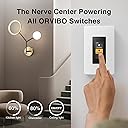
💡 Elevate your space with smart dimming that’s as connected as you are.
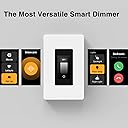
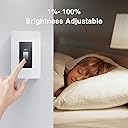
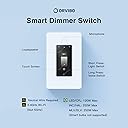
The ORVIBO Matter Smart Dimmer Switch is a sleek, touchscreen-enabled device offering precise 0-100% dimming control. Compatible with all major smart home ecosystems via the universal Matter protocol, it supports offline LAN control and advanced intercom features. Designed for easy installation in standard electrical boxes, it monitors energy usage and displays weather info, making it a high-tech upgrade for modern homes requiring a neutral wire and 2.4GHz Wi-Fi.


| ASIN | B0BQTHBKH3 |
| Actuator Type | Touch |
| Best Sellers Rank | #517,734 in Tools & Home Improvement ( See Top 100 in Tools & Home Improvement ) #969 in Dimmer Switches |
| Brand | ORVIBO |
| Circuit Type | 1-way |
| Connectivity Protocol | Wi-Fi |
| Connector Type | Crimp |
| Contact Material | Plastic |
| Contact Type | Spst |
| Control Method | Touch |
| Controller Type | Amazon Alexa, Apple HomeKit, Google Assistant |
| Current Rating | 2.5 Amps |
| Date First Available | December 22, 2022 |
| International Protection Rating | IP22 |
| Item Weight | 9.1 ounces |
| Item dimensions L x W x H | 4.12 x 1.75 x 1.8 inches |
| Item model number | D1-V70x-001 |
| Lower Temperature Rating | 32 Degrees Fahrenheit |
| Manufacturer | ORVIBO |
| Number of Items | 1 |
| Number of Positions | 3 |
| Operating Voltage | 120 Volts (AC) |
| Operation Mode | ON-OFF |
| Product Dimensions | 4.12 x 1.75 x 1.8 inches |
| Smart Home Compatibility | Smart Home Compatible |
| Terminal | Through Hole |
| UPC | 732767389547 |
| Unit Count | 1.0 Count |
| Upper Temperature Rating | 113 Degrees Fahrenheit |
| Wattage | 300 watts |
S**D
Feature rich, very nice looking.
I was very impressed with all the features packed into these switches. Weather, clock, multiple choices for display (analogue or digital clock, on-screen display of light on/off status, etc), Matter or WiFi communications, dimming or non-dimming, intercom to one switch or voice broadcast to all, default “on” levels (75% brightness for example), microphone on/off, vacation mode, scenes… impressive and very high tech looking. I don’t have 2 in the same house so I haven’t tested voice quality of the intercom features. I put one in a home I’m selling so it would turn the porch lights on at night & off at sunrise. I went to the house this weekend and it was locked up, displaying “HomeAI” and nothing else. I couldn’t turn on the light locally by the push button and the touch screen was frozen, but it still worked via the app. I tripped the breaker for a minute and it revived again. I hope it continues working! The one thing I wish you could do (and could be done with a firmware upgrade) is have the switch stay on whatever screen you wanted it left on. One switch could be an intercom, one could have the digital slider for dimming, one could display weather, one switch could always display the “Scenes” buttons to control groups of lights, etc… but currently they all default back to the same screen after 15 seconds or so and you have to scroll to your preferred screen. Price is very reasonable for what you get. One “gotcha” to be aware of. Although it supports the universal Matter protocol, it cannot control any other Matter switches except the ORVIBO ones.
M**Y
Upgrade Your Lighting with Smart Touchscreen Dimmer Switch
I recently purchased the Smart Touchscreen Dimmer Switch and I am absolutely thrilled with its performance! The easy-to-use touchscreen interface is incredibly intuitive and responsive, making adjusting the lighting levels in my home a breeze. I love the ability to program custom lighting scenes for different activities, and the switch integrates seamlessly with smart home systems. Plus, it's compatible with a wide range of different types of light bulbs. I highly recommend this sleek and modern dimmer switch to anyone looking to upgrade their home lighting.
J**S
Fantastic ... but could be better.
This is probably the most technically advanced switch I've found. I used it to replace some older technology Insteon switches. This was much better. The things I loved are. 1. That the switch displays device names that make sense and you can easily change it. With the older tech I was using, you had to buy custom engraved keys or use clear keycaps with a label under it. 2. I like that it has a button on the bottom that can be used to turn the main light on or off. 3. You can add control of any other Orvibo switch or Orvibo app scene to the switch. 4. On the main page (screen), you can personalize the page to display several different options that include combinations of the weather, date, time, and main switch button. 5. It supports Matter, but not until it does a firmware update on those I received. What are the main things I didn't like? 1. For installations where you have in a multi-gang box with multi-gang switch plate, the Decora cutout required needs to be larger for this. If there is a brand that fits properly, I'd sure like to know what it is. What this means is you have to file the openings of the plate to properly fit the switch. This can take quite a bit of time to do it properly. For single gang, the switch comes with it's own screwless plate. 2. Response can be a little slow ... noticeably. I have a mix of Matter over WiFi and Matter over Thread switches and I do not have this issue with Matter over Thread ... so perhaps they need to consider moving to that. 3. I've had an issue where some of the switch loose their WiFi connection ... like right now out of 10 switches, two are showing "No Response" in the HomeKit app. My router supports a separate IOT network and all of my smart devices are connected to it. So far, the only way to get these switches to reconnect is to either reboot the router or go to the WiFi setup on the switch and turn the WiFi off and then back on. Whenever I have the "No Response" error showing in HomeKit, the switch will not respond to Siri commands or via HomeKit on an iPhone. In my experience, Thread just seems more reliable ... so again a Thread version would be great. 4. Lastly, they talk about how to wire the switch for 3-way and basically one switch operates as a 1 way switch connected to the load and the other is simply a remote connected to a hot wire and white wire with the load wire capped off. The issue is there is no way of programming or linking the two switches so the the switch on the bottom of the remote will toggle the main light on/off. In addition, there is a button that appears on the screens that controls power to the load that is not connected to anything. Technical support responded ... and I get there is was a way of hiding that button prior to the Matter firmware upgrade, but it seems no matter what I tried I could not hide it with the Matter firmware. The idea of showing a button on the screen that has no purpose makes this switch unusable as a 3-way in my mind. My old home automation did the same thing, but you could pair the remote switch to give the same appearance as a 3-way. But overall, I really love how this switch looks and the design. I really am not interested in intercom or broadcast modes to didn't test those.
S**N
Choose another smart light switch
The mixpad worked good initially but the switch is unstable and has to be reset frequently. Doesn’t connect with Ring or Alexa for home automation. The mixpad app is clunky.
R**N
compre en 2024, 2025 se fallo. ahora no hay de reemplazos en todo el pais.
P**R
Arrived super fast. Installation was straight forward - make sure you turn off your circuit breaker, and follow the manual. It looks very stylish and this is something I always wanted on my wall. It will definitely make wherever you are installing this more modern compared to a traditional switch, or even another non-touch screen smart switch. Performance is good, touchscreen UI is smooth as you can tell in the video. Although there is a noticeable lag before the light turns on and after you press the switch, but that may be just my LED's compatibility. Another thing to look out for is durability. I've read other reviews saying that this stops working after a couple months, so I will have to wait and see how that goes. For now it's great!
S**B
This is a decent smart light (and only lights) switch with a touchscreen (neutral wire required) that comes with everything needed to have these lights installed. The included manual is easy to read and easily followed with clear instructions if you haven't done this before. In comparison to the ordinary switches, dimmable or otherwise, this single pole dimmable switch allows you to control the lighting fixtures (and ONLY lights) using the touchscreen and/or the companying app which is essentially what all other lighting switches operate anyway so there isn't fancy here. All there is really is to first shut off the power to the switch/outlet you will be working on, remove the plate and replace the switch with the new one by connecting together the wires with the same color using the provided twist-on wire connectors. Of course, there are plenty of how-to videos on youtube for how to do this. They support both Alexa and Google Assistant (and possibly other automation systems with integration) provided that you are ok with the license agreement (i.e. providing your info to 3rd parties etc); however, they only support 2.4GHz as do the vast majority of others. Unfortunately, this particular switch does NOT have any of the safety certifications which is disappointing so if this concerns you, look elsewhere. ≡ Safety note (from official gov sites) ✔ Electrical products that plug into an electrical outlet must meet Canadian national safety standards and be certified by an accredited certification body. ✔ Always check for certification marks, such as CSA, cUL, or cETL, before purchasing electrical products that plug into an electrical outlet. These marks indicate that the products are assessed and conform to the required Canadian national safety standard. ✔ Do not buy or use electrical products that plug into an electrical outlet without a certification mark. While some people would argue that these safety certifications means little or even nothing because there are products out there with safety cert that fail to perform while others without it have performed better in comparison. I'd say that's fallaciously misguided simply because exceptions are never to be used as supportive arguments to statements that are inherently untrue. Do you stop using seatbelts because someone died of accidents while wearing one? Is driver's license unnecessary because more accidents are caused by those with valid licenses than not? There are countless examples I could think of but most importantly is the undisputed fact that it is the Canadian law and it's there to minimize harm and not necessarily eliminate it. If the idea of certifications (safety or otherwise) are truly useless, then our civilization would crumble. In either case, I'd choose and support products with any of the 3 certs mentioned above any day over products that have none. The choice is of course yours, as always. ≡ Value All things considered, this is a reasonably decent touchscreen dimmable smart light switch that seems (no safe cert though) well-constructed and works as expected without issues (so far); however, its longevity remains to be seen (as a relatively large percentages of these smart switches tend to malfunction or stop working after a few months). It's somewhat reasonably priced at $80 for what it provides and its overall usability and performance. Your mileage might vary.
C**W
This is a nice wifi dimmer switch. It has a more features besides the dimmer like an intercom system but that would require more than one switch and i only have one so i cannot speak to how well that works. As a dimmer switch it works just fine. it was easy to install and using the app to set up the wifi was painless. you must have a neutral wire to install this switch but most newer homes will have it. when you turn the switch on or off, the light gently fades in and out and this is a nice touch. the dimmer range can be configured. i haven't added the alexa skill so i can control it through alexa but given how easy everything else was in the setup, i am sure it will be easy and work well. compared to other dimmer switches this is pretty expensive especially if you are only going to use it as a switch and not use the intercom. i like that the screen displays a small clock and the weather. i was worried that the screen would be bright at night since it is in our bedroom, but i found that the display on/off time can be configured and also turned off if you wish to do so. the switch looks very nice on our wall. i use homeassistant in my house and i haven't yet got this working with it. i saw some posts on homeassistant forums where people asked for a beta firmware and got it working with matter. they were pretty slim on the details but i think in future i hope i will be able to integrate this switch into my homeassistant instance when the firmware is released to the general public. overall, it is a nice dimmer switch. it is probably best suited to people who will install more than one given its price and that you need more than one for it to act as an intercom. i could not see any safety certifications on the switch and this might be a deal breaker for some. it usually is for me, but the switch didn't appear junky with thin wires, etc so i installed it. it is a little big like all of these switches but i was able to fit it in my electrical box no problem. this is worth a look if you are looking for a wifi dimmer switch but be aware that there are less expensive options out there if you just want to use it solely as a dimmer switch.
R**C
At the time of writing this review, this touch screen dimmer costs $129.00. There is a $50 coupon available, to bring this to $79.00. I'm an electrician by trade so installing this was pretty easy, but I can see where others might struggle. Specifically that this requires a neutral to operate properly. Almost all modern smart him appliances do require it, and it's been code to run neutrals to all fixtures and switches for a few years now. But if you have an older home, you need to check before you purchase this. This device is also fairly large inside the 1110 box so make sure you have the appropriate depth/room before you buy or install. With that being said, it works really well. It's nice being able to have a smart appliance in the location of where my dimmer switch was. It's not in the way, doesn't require being plugged in to an outlet, doesn't light up the room in the dark. As a dimmer, it works great. It's able to noticeably dim my bedroom lights 1% at a time. The dimming function is smooth and works arguably better than my older analogue one. As a smart device, that's where this really shines. It's nice having the date, time and weather displayed on the switch so I can see it when I walked by it first thing in the morning. Also having the ability to set a timer for the lights is really nice so I don't have to worry about leaving the lights on. Being able to make calls to and from the rooms is pretty nice too. Where this switch is located in my house, you can pretty much hear it from anywhere up stairs, so getting someone's attention upstairs while I'm down stairs is pretty easy. There's not safety certs on the device, so this is something to consider if you're buying this for someone else. Overall, decent device. I am taking a star away because of the lack of safety certifications.
Trustpilot
2 weeks ago
2 weeks ago