
🔐 Unlock Massive Storage with Silent, Secure, and Speedy Precision!
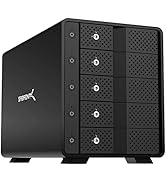
The SABRENT 10-bay Hard Drive Docking Station is a professional-grade, tool-free storage hub supporting up to 220TB across 10 hot-swappable 3.5" SATA drives. Featuring ultra-fast 10Gbps USB 3.2 connectivity, whisper-quiet cooling fans, and individual bay locks, it offers seamless compatibility with Windows, macOS, and Linux. Designed for managers and tech-savvy pros who demand scalable, secure, and silent storage solutions that integrate effortlessly into any workflow.






| ASIN | B09TV1XPDD |
| Batteries Required? | No |
| Batteries included? | No |
| Best Sellers Rank | 9,220 in Computers & Accessories ( See Top 100 in Computers & Accessories ) 9 in Hard Drive Docking Stations |
| Compatible devices | Desktop, Laptop, Tablet |
| Customer Reviews | 4.1 4.1 out of 5 stars (1,241) |
| Data transfer rate | 10000 Megabytes Per Second |
| Date First Available | 7 Mar. 2022 |
| Global Trade Identification Number | 00840025252943 |
| Hard disk form factor | 3.5 Inches |
| Included Components | DS-UCTB |
| Item Package Quantity | 1 |
| Item Weight | 5 kg |
| Item model number | DS-UCTB |
| Item weight | 5 Kilograms |
| Manufacturer | SABRENT |
| Material | Aluminium |
| Max number of supported devices | 10 |
| Memory storage capacity | 220 TB |
| Part Number | DS-UCTB |
| Product Dimensions | 34.04 x 26.67 x 14.48 cm; 5 kg |
| Size | 10 BAY |
| Style | 10 BAY |
| UPC | 840025252943 |
C**R
Perfect for the Job
As a laptop user, I often used external hardrives to add additional storage. Yet after breaking two within a relatively close amount of time of each other, it was time I changed it up a little bit. My issue was that my external hardrives were not suited to how I worked, and considering I wasn't always in a position to use a desk as my workspace, they often got torn out, dropped and thrown about. My plan then, was to find an alternative to my storage solution, one that wouldn't break so easily. That's when I perked some interest in hardrive docking stations, with this one in particular peaking my interest. A solid metal built contraption, this docking station by Sabrent, is all I could ask for, and then some. I went with the 4-bay option, as that's what I required, and it works exactly as intended. Hardrive installation was simple, and the durable build quality gave me assurance that my hardrives would be safe. Each bay is individually operated by its own power switch, meaning you can turn the drives on individually as and when you need them. Being that the bays are separate, means you can have multiple drives that appear as different storage devices on your computer. Just make sure to Install and Format your drives in Disk Management, otherwise they won't appear in the File Explorer. The unit itself comes with a rear fan that blows continuous cool air into the drives while at least one of them is on, but stays silent while all of them are off, even if the unit itself is on. It also works well with sleep mode as tested with my laptop. In all, while I may have lost portability, since even without hardrives the Docking Station is quite heavy, I have gained better data protection against physical breakages, which was the goal I set out to achieve. At the end of the day, if you have the budget, and need a safe way to store data, a docking station like this isn't a bad way to go. P.S. I use Seagate's 4TB Barracuda 3.5" Hardrives in my Docking Station, and they work perfectly after installation and formatting.
D**L
Pretty pretty pretty good
Had this for a while now. It's strurdy and reliable
J**P
Good solid device but some slight niggles
Device is solid and reliable and has usb-c for fast data transfer. Each hard drive can be turned on individually and recognised as a separate drive. RAID needs to be setup by you as this is not a NAS. The major cons are the supplied usb-c cable is way too short to position the device in a place of your choosing. Standard phone charger cables are longer. The cable is under 1 ft long. You will need an extension cable if you are space constrained or want to have a cable free look. You may even want consider using a usb hub to get this device connected. Second issue is the noise it makes from its fan. With only one hard drive installed and online the fan is on and active. It's noticeably audible through brick walls when 4 ft or less away from the wall. If you use this during the day in a home office you may be able to adjust to the noise but at night depending on your setup you may keep people up. So shut the door to keep things quiet for others and consider if you can't cope with the noise an extension cable and putting this device further away from you i.e. minimum 10+ ft away. Otherwise the device is very simple and sturdy and works as described and desired.
J**7
Excellent product!
This, 5 x bay SATA docking station, for me is a brilliant piece of kit! Load up any (or all) of the 5 available bays with SATA drive(s) of your choice, plug in the power and USB C 3.2 cable to a compatible connection on your PC (USB 3.2 if you want max transfer speed) and your drive(s) appear as indvidual drives in Windows. Great for backing up or storing files that need regular access. The box itself is very well constructed out of sturdy aluminium with rubber feet and a finely textured black finish. The drive bays are accessed by lockable hinged doors at the front and the hard drive(s) are slotted in with no need for any tools or screws. It has a 120mm cooling fan at the rear and noise levels are fairly low but do increase a bit when there is lots of multiple drive activity. After a peiod of inactivity, the drives spin down automatically and go into standby, instantly waking up again when you access them. Drives can be individually switched off by the buttons adjacent to the bay door. There is also a tiny, unobtrusive status micro LED above each button. Some users have reported the unit fauly and will not power up. To power up the drives, you have to use a short press on the power button adjacent to each drive and that drive will then spin-up and be registered in Windows. The supplied USB cable was a bit short for my setup, so I bought one of these high speed cables https://www.amazon.co.uk/gp/product/B08QCXJT5M/ref=ppx_yo_dt_b_asin_title_o03_s01?ie=UTF8&psc=1
D**S
DO NOT TOUCH THIS!
Purchased just a few weeks ago. Copied lots of data over without issues and cloned drives for backup. Randomly today tried to copy data to one of the drives and it crashes my Macbook (M2 Max). Swapped drives around into different bays, same issue persisted. The data is not corrupt,it is all there, I tried to open a premiere pro video project. Begins to open and same crash error. Screen goes green and MacBook restarts. As soon as the dock is removed from the Mac no errors occur at all. Totally us-stable and unfit for purpose! It will be going back!
Z**F
Stable and reliable
Works great.
J**H
Everything looks awesome just that they use stupid china fan which is totally crap. So I swapped in the famous and very expensive Noctua fan.
D**N
To start I wish Sabrent would spend some more time providing detailed and correct specs about the unit. I say this because the box and the instructions say that it has a 120mm fan? Yet on other areas of that same box and online it says 90mm? Which is it? Guess you need to buy it to find out huh? Also, I asked a question here about whether this unit supports the UASP protocol. The answer I recieved here was "No, it uses the older USB3.0 BOT transfer method which is still plenty fast." This is incorrect information. This unit in fact DOES support UASP which stands for USB Attached SCSI Protocol. I was SHOCKED and DELIGHTED to have discovered this when hooking up the unit to my PC. This allows for faster read/write data speeds to and from storage devices. Compared to traditional USB 3.0 BOT, UASP performs up to 70% faster read speeds and 40% faster write speeds at peak performance. It has to be the FASTEST unit I've ever used when accessing information off of a hard disk drive. I'm very impressed with the build quality of this unit and ease of installation when placing drives in the tooless bay slots. I have installed 4x 18TB Seagate Exos @ 7,200RPMs. Drives at idle are 29C and when under load don't go over 40C. Lastly, don't know what all the fuss is about over the loudness of the fan? It's very quiet, and doesn't bother me at all. The unit sits on top of my tower right on on my desk about 3-4 feet away from me. The only thing I hear are the low noise fans comming from my PC case. The Sabrents fan on the enclosure when I place my ear near it is quieter than my PC, and I have a quiet PC. So, I suspect one of two things in regards to the popular "the fan is too loud" postings: Either people got a defective fan from the get go, or Sabrents quietly released a new revision of the unit with a much quieter fan. I was researching ahead of time about possibly replacing the fan as others have when the unit arrives, but there is no need as it's whisper quiet. This is a fantastic enclosure. A bit on the pricey side but I got the bonus of finally having a unit with UASP.
P**I
Ciężka, solidna i działa bez problemu. Wentylator trochę słyszalny, ale nie przeszkadza. Łatwa i szybka instalacja dysków.
D**E
Le poids considérable du boîtier est immédiatement perceptible à la livraison – presque tout ce que l'on touche est en métal(Aluminium). Le boîtier dispose d'un connecteur d'alimentation 230 V direct, ce qui élimine le besoin d'une alimentation externe. Chaque Rack logement HDD possède son propre Interrupteur et de plus possibilité de le verouiller individuellement avec la clé fournie. J'ai ensuite testé sa vitesse avec un disque dur de 10 To tournant à 7 200 tr/min. J'ai obtenu un excellent débit de 285 Mo/s, à condition d'utiliser le port USB C adéquat. Mes ports USB 3.0 intégré n'offrant qu'environ la moitié de cette vitesse, j'ai ajouté une carte PCIe USB C 3.2 gen 2. (x2=10Gbps chacun) Avec cette carte, le boîtier est nettement plus rapide. De plus chaque Boitier possèdes un deuxième port USB C pour le montage en Série de 3 boitiers Maximum. (limitation Max de votre system windows). La température du disque dur est restée à un maximum de 38/40 degrés Celsius en fonctionnement et à 28 degrés Celsius en veille. Tous les disques durs installés dans les baies sont gérés individuellement par le système d'exploitation ; il n'y a pas de RAID matériel. J'ai pu aussi installé des SSD et HDD 2.5" avec l'utilisation de ""rack SABRENT 2.5" HDD to DESTOP3.5" BAY CONVERTER"" disponnible pour un prix résonnable. Concernant le bruit : j'ai les 2 boitiers juste à côté de moi sur le bureau, il n'est pas plus gênant. Le bruit de fond provient surtout des certains vieux HDD de récup. La possibilité d'entendre les disques durs dépend de leurs modèles et de leur age. La qualité de fabrication est irréprochable. Les disques durs 3,5 pouces s'insèrent simplement dans les baies sans vis ni autres fixations pour les 3.5" et un rack dispo pour les 2.5"; le système fonctionne parfaitement. Théoriquement, il serait possible d'insérer et de retirer les disques durs pendant que le système est en marche ; cependant, je le déconseille fortement, car le retrait du disque risque de l'endommager (surtout s'il est encore en rotation=DANGER). En conclusion : un boîtier élégant, une excellente qualité de fabrication et des performances rapides. Son prix est tout à fait justifié. Je le recommande vivement. C'est un boîtier fantastique.
B**N
Very impressive design and quality at a very good price. I'm very happy with it. The versatility is very impressive (optional RAID or multiple independent disks or a 2-disk combined "logical volume"). I'm just using it to support two independent disks for now and it's working great. The USB hub inputs is very handy. Support for SD cards seems to work well with no problems (I've only tested reading, so far.) Because it uses (non-SSD) disk drives, the transfer rate is nowhere near USB C 3.2 speeds, but it is still very good for disk transfer speeds. I'm using 7200 RPM disk drives and I'm getting sustained avg speeds of 225MB/sec for writing and 425MB/sec for reading, with bursts at significantly higher transfer rates. Yes, the fan is loud. I have not yet installed the "quiet" fan (listed as an optional add-on) - but it can't be any louder! (Installation of a new fan looks like a major modification and would void the warranty.) I'm just using the unit mainly for backups and creating Windows images, so I "safely remove" the drives and then turn the Sabrent unit off when done. Note: My Windows 10 system does not recognize the disk drives in the unit as "removable". But that is actually a "feature" since the "safety vs. speed" Windows drive "policy" can be set for non-removable drives and is automatically set to "speed" (i.e. removal of a disk drive inside the unit during normal operation would not be expected).
Trustpilot
3 weeks ago
4 days ago



