We remain fully operational. Our teams are working around the clock to ensure your deliveries continue safely.

DOWNLOAD THE APP


Customer Services
Copyright © 2025 Desertcart Holdings Limited
DOWNLOAD THE APP
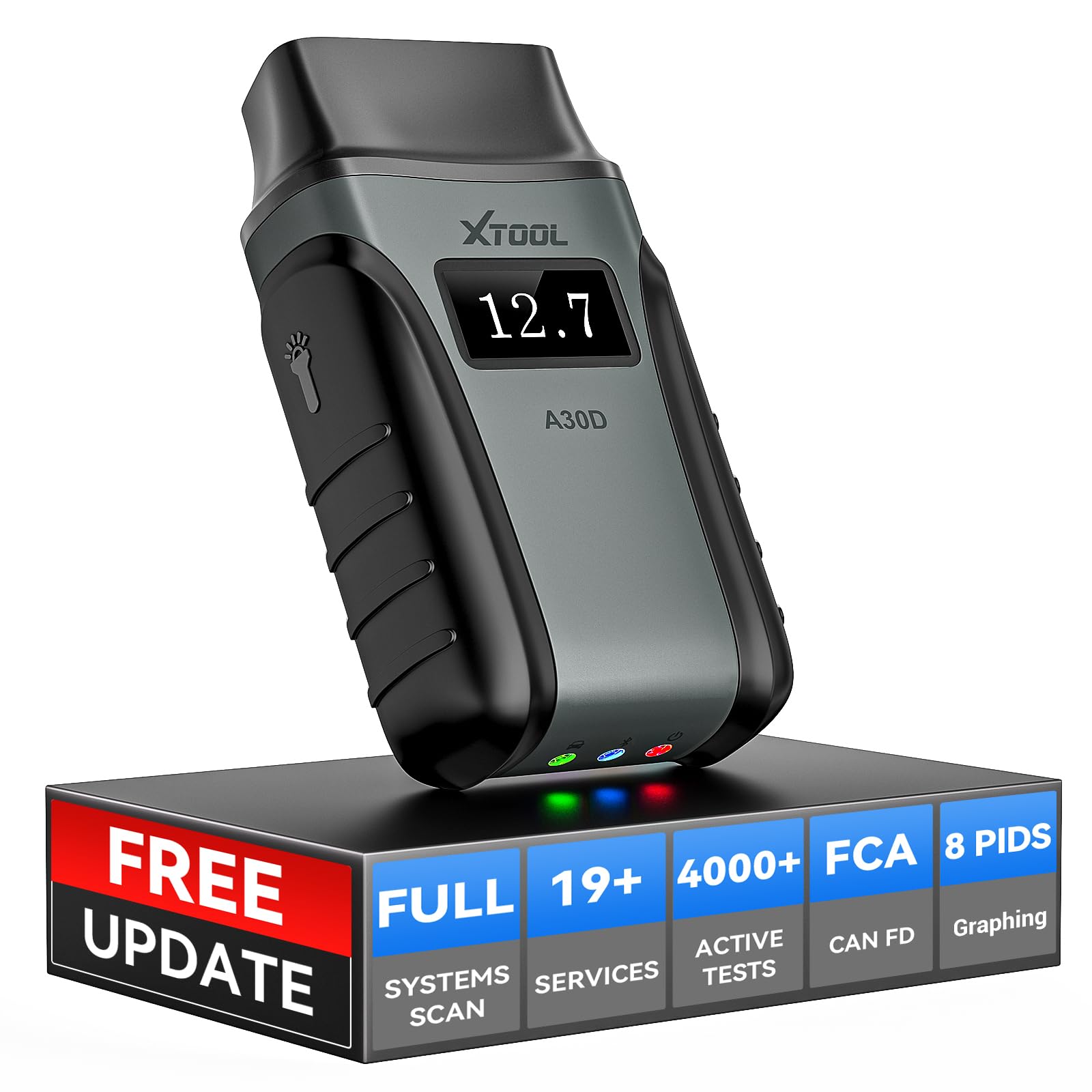


🚗 Diagnose smarter, not harder — your car’s health in the palm of your hand!
The Xtool Anyscan A30D is a wireless, bidirectional OBD2 scanner compatible with iPhone and Android devices, offering comprehensive diagnostics across all vehicle systems. Featuring 14+ advanced service functions such as ABS bleeding, injector coding, and EPB resets, it empowers professionals and enthusiasts alike to perform in-depth vehicle maintenance. With Bluetooth connectivity, lifetime free software updates, and active subsystem testing, this tool delivers cutting-edge automotive diagnostics and repair capabilities in a compact, easy-to-use package.


| ASIN | B098NC47SX |
| Best Sellers Rank | #34,825 in Automotive ( See Top 100 in Automotive ) #165 in Automotive Code Readers & Scan Tools |
| Brand | Xtool |
| Customer Reviews | 4.2 4.2 out of 5 stars (247) |
| Date First Available | 26 October 2021 |
| Item Weight | 100 g |
| Item model number | Anyscan A30D |
| Manufacturer | XTOOL |
| Manufacturer Part Number | Anyscan A30D |
| Model | XTOOL A30D |
| Product Dimensions | 10.01 x 14 x 5 cm; 100 g |
| Special Features | How to download the NEWEST Version App for Android system? Go xtool official website-Support-Download APPs-Anyscan Download |
R**R
I received the A30D yesterday and got it configured today. Setup and connecting to Bluetooth was easy. Downloaded all the software updates. So far, it's easy and straightforward to use. I successfully tested the electronic rear parking brake actuator deactivation and activation function on a 2019 Hyundai Tucson. It works great! Thank you again for including this important feature. My pre-purchase emails with questions to [email protected] have been promptly and courteously replied to. So far, my experience with the product and their support is great.
K**N
received used. Not happy.
A**R
XTool A30D I recently purchased the XTOOL Anyscan A30D wireless scan tool. I already have the XTOOL IP608, which has been great. It has helped me to pin point some issues I was having with a vehicle throwing codes, that had nothing to do with the sensor that was bad. I wanted a device with some bi-directional capabilities, allowing me to activate sensors, relay/switches, etc. to better troubleshoot issues that I may have. You only need to download their XTOOL Anyscan app/software to your device (phone, tablet, etc), activate with the information given with the device (S/N & activate code), update any information that has come out (since the A30D was put in a box), plug the device into your vehicles OBD connector and connect to it via Bluetooth. You are ready to go! You don’t need Wi-Fi to use it on the vehicle (but it would help if you need to look up any information). The unit itself displays your battery voltage as soon as you plug it in, So you know, whether or not battery voltage is an issue before you even begin. This scanner allows me to be out of the vehicle, wirelessly. With the live data feature, you can be under the hood, make changes and see the results in real time. It tells me everything any of the sensors are reporting. It’ll even start the car, so you aren’t running back and forth! It allows me to graph multiple values (up to 8) at the same time, I can record the live values to review or compare to values after any changes have been made. With any of the “Special Features” you can reset/relearn the throttle body after a cleaning, rest TPMS, battery reset, abs bleeding (activates the abs pump to bleed the system thoroughly!), release the electric parking brake when replacing brakes, and a lot more. There are currently 19 “SpecialFeatures” but having a XTOOL scanner for a while now, I’m sure there will be more. They are constantly upgrading and adding to their program. Of course you can clear any codes, turn off the oil change light and any of the basic features any cheap scanner will do. With lifetime FREE updates, you don’t get roped into another subscription, which is nice! I’ve had questions in the past and they are quick to respond, so it’s not a case of you buy it and you’re on your own. They seem to be a company that really stands by their products. So far I’m very impressed with what this thing can do. I haven’t even gotten into everything yet but I look forward to hooking it back up and using (playing?) it some more!
J**G
I've tried many an OBD-II scanner. From the first Bluetooth models that paired with Android Torque, to some of the newer dealer clones. I must say, this device shows great promise. The tech support is relatively responsive, depending on the time of day. There are a lot of language breaks in the software, but once you're used to those then you'll be working just fine. You WILL need quite a bit of space on your device if you want to download ALL of the manufacturer modules. Each car manufacturer has its' own download, along with some of the other functions having their own module. The software works pretty well, but definitely there's a lot of room for improvement. However, it's still a huge value. In testing my aunt's Lexus Hybrid, just connecting to the engine module and getting live data took about 60 seconds to pull all of the data. But there were seriously around 900 data points that were queried. This thing is seriously way beyond any scanner you've used before. It will connect to any number of independent systems in the car, provide live data for each, as well as scanning for fault codes not otherwise shown on generic scanners. The best part is that there are a ton of actuation tests that you can perform. But you must be careful with these, and make 100% sure you know what you're doing. You could definitely screw your vehicle up if you just go poking around and trying different actuation tests. Depending on which device you purchase (the devices themselves are identical) -- you'll get a license code that will enable certain of the special functions. If you plan to use on multiple cars, then get the most expensive one -- you'll get plenty of use out of it. Get yourself a good protective case for the unit also (it should come with one, seriously.). Save the tiny piece of paper that comes with it (or take a picture). Using an iPad is the optimal experience, but again you'll need a bunch of free space. I got free space errors even when I had 128GB free on my 256GB iPad so it can be finicky for some reason. If you have a technical mind then you will be in heaven with this device. With free lifetime updates, this is a major steal and you should jump on it now! I bought one for myself and one for my father. Don't wait... Just click and buy! You can always return it if you dislike it for some reason! (Plus it has a flashlight built into the adapter! Major WIN! LOL. The device is very well built and not flimsy feeling in the least bit). You can generate exports in PDF format of all of the data collected in live scans, but you cannot export raw data from a capture. This is the only big downside in my opinion. If you're trying to diagnose something and want to review live data, the best you'll get is reviewing it on-screen after recording. It even has space to enter your business details so they can be added into the PDF reports. Huge huge value, no kidding. I was not compensated or encouraged to leave this review. Good luck! --Josh
C**S
As a 40-something year old aspiring car mechanic (never going to happen), I'm very proud of the things I can change, fix, repair, and 'diagnose' on my cars. But, as the cars get smarter and I get a little older, the amount of help I need seems to increase year after year. I faced two problems with two different cars, an Acura TLX and, most recently, a Toyota Venza, where I needed some serious technical help- enter the A30D. First, I needed to complete the first brake replacement job on my Acura TLX. Fortunately, I research the repair/replace before I start and I learned that I needed a quality OBD device that can both read codes, and write data to the car's computer. Now, this was a little daunting and it was concerning that I would be writing to my car's computer. I wanted to make sure that I chose an ODB device that would do so safely and keep me out of trouble. I didn't have a boatload to pay for the device, so I was also concerned about the value of the device, not looking to spend more than a brake replacement job, and concerned that its value would only be for one this job. When I started my Amazon search, I found the A30D. There are a ton of ODB devices from which to choose and the A30D checked them all. It's a great value for the money because it will seemingly never be obsolete because it has LIFETIME updates (of which I update often!), it can read all of the particulars of my cars, and provide quality data feedback to me to help me understand what the car is trying to tell me in its cryptic-code language. But the killer feature of the A30D is the company's (XTOOL) technical support. Let me tell you, I ask a lot of questions and I'm very grateful for tech support that responds within a day, with helpful information, and really works to help me understand how the A30D can solve my problems. I purchased my A30D over a year ago for the Acura to provide me the ability to disable my e-brake for my brake job and the technical support was top-notch! They took my VIN numbers for both cars and confirmed that all of the necessary capabilities I needed where provided by the A30D. We must have gone back and forth over email for two weeks while they answered all my bothersome (my word, not theirs!) questions and they graciously helped me. Fast forward to today (2025) and I needed the A30D and their wonderful tech support to come through for me. My wife's car's TPMS sensor indicated that her tire(s) were low on pressure. Now, me being the mechanic that I am, I grabbed the tire pressure gauge and checked all of the tires. What do you know? They are all just fine! Well, the tires were fine, but thanks to my trusty A30D, I quickly learned that the car's computer was no longer receiving tire pressure updates from the tire pressure sensors. Okay, I now have this very helpful information and it's time to replace the 10 year old TPMS sensors whose batteries had clearly died. I did some research and learned that it's not exactly plug-and-play and I would need... wait for it... the A30D and their tech support to come through again. I needed a way to tell the car's computer the new serial numbers for the replacement TPMS sensors, otherwise the new sensors couldn't tell the car the tire pressure for each tire. Would the A30D and XTOOL tech support come through again? I quickly contacted the XTOOL tech support and posed the question, hoping I'd get lucky once again. Should I have been worried? Of course not. XTOOL tech support quickly replied that yes, absolutely, your A30D has your back and will be able to both reset the car's TPMS and configure your car's computer to use new TPMS sensors. How glorious is that? XTOOL tech support provided the step-by-step instructions, yet again! Although every single XTOOL customer service agent has been wonderful, I must give a shoutout to Phoebe at XTOOL. She was diligent in providing me assistance and following up to make sure my experience with those instructions was positive. XTOOL sets a high bar in quality car tech gear, coupled with high value customer service. I'd say I can't wait for the next time I need to use the A30D, but that means my car might have a problem. But I'm comforted by the tech support being there for me to help me fix my cars safely and correctly! I’ve attached a couple pictures of the TPMS diagnosis screen as they were very helpful!
Trustpilot
2 weeks ago
3 weeks ago