
❄️ Stay Cool, Stay Ahead — The Liquid Cooler That Means Business
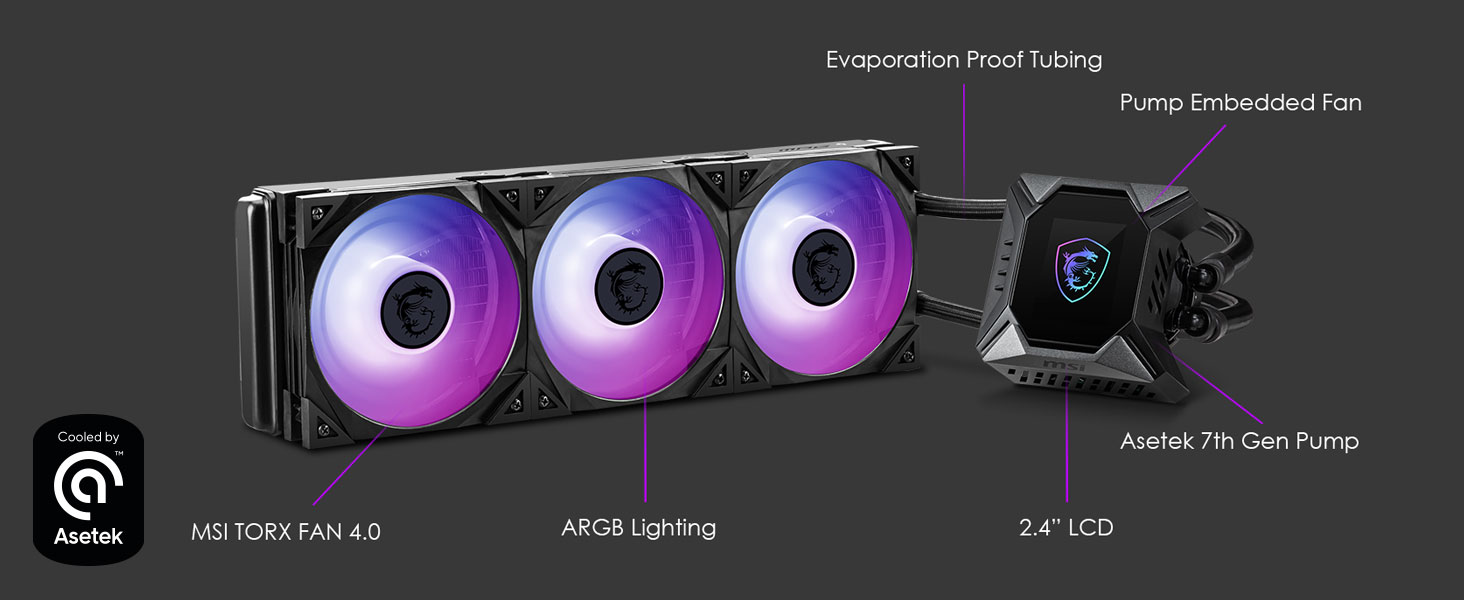
The MSI MPG CoreLiquid K360 is a high-performance all-in-one liquid CPU cooler featuring a 2.4-inch customizable LCD display, a large 360mm radiator with triple 120mm ARGB TORX FAN 4.0 blades, and a dedicated 60mm VRM fan for enhanced component cooling. Compatible with a wide range of AMD and Intel sockets, it offers easy installation and superior thermal management, making it ideal for demanding gaming and professional workloads.




| ASIN | B08XKDWHSB |
| Air Flow Capacity | 77.4 Cubic Feet Per Minute |
| Best Sellers Rank | #3,333 in Water Cooling Systems |
| Brand | msi |
| Compatible Devices | Radiator |
| Cooling Method | Water |
| Customer Reviews | 4.4 4.4 out of 5 stars (190) |
| Date First Available | February 25, 2021 |
| Item Dimensions LxWxH | 17.6 x 8.07 x 5.39 inches |
| Item Weight | 5 pounds |
| Item model number | MPG CoreLiquid K360 |
| Manufacturer | MSI |
| Maximum Rotational Speed | 2500 RPM |
| Noise Level | 16.7 Decibels |
| Number of Items | 1 |
| Power Connector Type | 4-Pin |
| Product Dimensions | 17.6"L x 5.39"W x 8.07"H |
| Voltage | 100 Volts |
| Wattage | 3.36 watts |
T**G
Great cooler for my 10900k k360
The screen is perfect for easily looking at the cpu temperature or any other random gifs. I had the msi 360r V2 before this cooler and I could not keep a 10900k below 100° in any amount of stress I was idling around 50° without overclocking. Now with the k360 I’m idling at 20° not overclocked and round 30° overclocked. I ran a cinebench stress test and cpu maxs out at about 70° full stress and around 80° full stress while overclocked. This cooler was pretty easy to install without any prior knowledge of how to install a cooler. I would recommend this cooler for any 10th, 11th, 12th (not including 12900k) gen cpu it’s pricy but it will keep your computer frosty and it’s worth it. I will say that this is a rather loud set up but you could always upgrade to the s360 for a significantly quieter set up but you lose a little performance. The design of the k360 is clean cable management is a little tough. Otherwise I highly recommend.
T**G
Great Quality
I have had this MSI MPG series Coreliquid K360 liquid cooler in my system for a little over a month now and I am still as in love with it as the day I bought it. The product is well built looks good and preforms phenomenally. There are some minor aspects however I don't particularly love, adding a custom image on the LCD is somewhat annoying as it must be a 240x320px BMP file and first install is somewhat difficult due to the sheer amount of cables coming from the screen and pump assembly. However all in all I think this is a great product for the price and these problems are easily solvable.
C**N
Versatile
It's great for it's price, very informative tells me the pump fan speed, radiator fan speed and CPU temp so I know how intense things are at all times!
P**L
i9-13900K APPROVED!
Buy this. Easy install and came with 1700 bracket. The software for the screen and fans is easy to use. i9-13900K idle: 28C Max: 78C Cyberpunk 2077 4K resolution RayTracing ON Psycho: max temp 74C average 66 EDIT: One of the top comments for this cooler is from someone who couldnt cool a 12900K with this but they likely did not properly use thermal paste, secure the AIO evenly, or had a bad AIO orientation setup in the case. I am cooling a chip that draws more power than a 12900K and i'm even using the thermal paste that came on the cooler. This cooler is great.
S**M
A cute novelty, that is a letdown.
So this thing is clever. Has a little screen and all, but that's where the problem comes in. The screen is absolute trash. Colors are garbage. So lets digress for a minute though. First the fans... I didn't use the MSI fans (i've heard they can be noisy, and I have no clue why MSI didn't opt for better fans in this thing). I put some other RGB fans on the radiator, and didn't use the MSI RGB header/controller. I used a different controller that came with the fans. So mine is very quiet as the fans I am using are nearly silent. The pump/CPU fan I can hear a little bit. Nothing crazy. And this is with my case panels off, so when those go back on, I imagine I won't hear it at all. And it seems to be keeping my CPU at a good temperature, so the cooling aspect seems just fine. But we all know why we all get this cooler. For the cute screen inside. Well... What a let down. The colors are legit awful. The picture you put on it is going to look absolutely different than it looks on your monitor. You can have it put your hardware monitor stuff on it, which means it can tell you the temps and fan speeds of various components, which is nice, but you have to be looking straight at the thing, at direct eye level or the way they designed the information display is just hard to read. It would be great if they didn't use the digital 8 design and just had the numbers show up on their own. I'll try to show and example picture. The refresh rate of this thing is horrific. Like 2 frames per second? Maybe 3? It's just choppy looking if you use one of the animated pictures. I'm not sure if I can make my own animations yet. I'll be trying, but it only supports .bmp files. What? Not .jpg, not .gif. Only .bmp. BUT... You can use animated gif files! you just rename the file to have a .bmp extension and then load it into the MSI software as a bmp. But it is gonna looks pretty terrible since it is such a slow refresh rate. Overall it's a fun idea, executed very poorly. I wont be bothering to return it and get another cooler, but I am pretty disappointed overall thanks to the poor poor screen quality. My bad though as I didn't read up on it too much before I got it. I was one of those that just thinks something looks cool and goes for it instead of researching it out as I should have. So yeah, I wouldn't get it again if I was going to, but I will just let it tell me my CPU temp and call it good. I don't know why a company lets things out the door like this, but maybe t's just manufacturing costs. I don't know. Overall, a letdown. IMAGES: 1. Apple Logo on Screen 2. Apple Logo Original 3. Retro picture on Screen 4. Retro picture Original 5. CPU Temp at an angle. 6. CPU Temp straight on. 7. Time Displayed (how the CPU Temp should look) 8. Animated .gif on Screen EDIT: I just tried to change back to that apple logo, and the screen just went blank. It won't show anything now. I suspect a reboot will fix it. But yeah, this thing is poor quality all around when it comes to the screen.
C**A
O produto é bom desempenho e qualidade . Só demora muito pra chegar
M**T
I ordered this unit for a i9-12900k. it was said that it wouldn't be compatible but the LGA 1700 bracket was included. I was expecting to have to order it from the manufacturer. But all is good. Super quiet and now it runs at about 43 Degrees under load. Perfect.
W**M
I got this for my 10900x, and it cools this cpu really well, about 30 c on idle, and 85c when maxed out on prime 95.. Had some buggy issues with the RGB, but it seems to have worked itself out.
A**F
DO NOT BUT THIS OVERPRICED AIO LCD screen from a Nintendo ds Rgb okay OVER PRICED
E**C
Pour fonctionne wow Ce qui es de l'écran médiocre Qualité indésirables vois pas grand chose . Apsi tu es droite à l'écran.
Trustpilot
4 days ago
2 months ago



