We remain fully operational. Our teams are working around the clock to ensure your deliveries continue safely.

DOWNLOAD THE APP


Customer Services
Copyright © 2025 Desertcart Holdings Limited
DOWNLOAD THE APP


🛫 Elevate your flight game with precision and style — don’t just play, pilot like a pro!
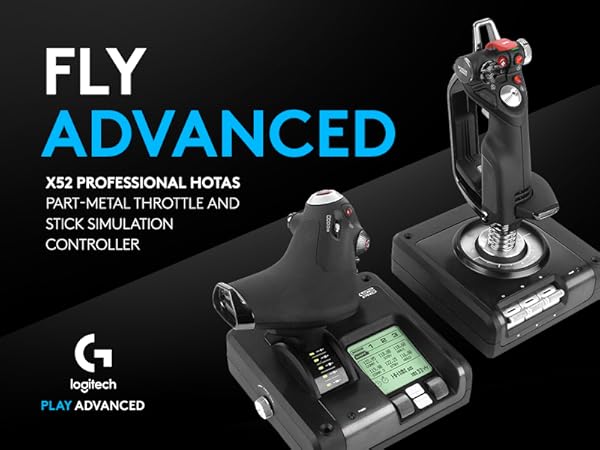
The Logitech G Saitek X52 Pro Flight Control System is a premium PC joystick and throttle combo designed for serious flight sim enthusiasts. Featuring illuminated buttons, a programmable LCD display, progressive throttle with adjustable resistance, and a precision centering mechanism with no-contact technology, it offers unparalleled control and comfort. Compatible with Windows 7/8.1/10, it supports deep customization through smart software, making it a top-tier choice for immersive, realistic flight simulation.



| ASIN | B01LZ1MQTL |
| Are Batteries Included | No |
| Best Sellers Rank | #4,414 in Videogames ( See Top 100 in Videogames ) #22 in PC Flight Controls |
| Brand | Logitech G |
| Color | Black |
| Customer Reviews | 4.0 4.0 out of 5 stars (549) |
| Date First Available | 9 October 2016 |
| Hardware Platform | PC |
| Item Weight | 905 g |
| Item model number | 945-000022 |
| Manufacturer | Logitech, Inc |
| Operating System | windows 10 |
| Power Source | Corded Electric |
| Product Dimensions | 37.01 x 24.99 x 23.01 cm; 905 g |
| Series | Pro Flight |
S**D
Good quality
Very good
E**S
Fazia tempo que estava querendo adquirir um manche para simulador de vôo/espacial. O X52 Pro é perfeito, muito preciso e de ótima qualidade. Valeu a pena, apesar do preço. Atualização: após mais ou menos 1 ano e 2 meses de uso, o joystick apresentou defeito na conexão entre o manche e o manete. Entrei em contato com a Logitech para questionar da garantia, e a empresa FOI EXCELENTE NO PÓS-VENDA. Em questão de dias acataram o meu pedido, e estão enviando outro produto em troca de garantia. Agora posso afirmar que a Logitech não só tem os MELHORES produtos, como também TEM O MELHOR PÓS-VENDA.
D**É
While the HOTAS market packs a lot of options, most entry-level offerings are lacking in flexibility. The X52 packs a solid, mid-range button suite that makes it easy to bind Elite or Ace Combat 7's essentials into place while relegating less-used commands or features to the mouse and keyboard. The X52's compatible button panel (sold separately) might offer more options, but it isn't exactly required.
B**D
Value is great for high quality, over 20 buttons, sensitive but accurate, lighter than expected and has ability to be adjusted to fit any hand
S**E
Overall, a very good product, highly satisfied! Couple things I didn't realise when I ordered, for future buyers: - All of the buttons are LED's and glow quite brightly at all times while connected. - Both the axial stick and the throttle devices are very light. They need to be secured during use with screws, clamps or included suction cups depending on your setup. If you just rest them on your desktop, they're fine for navigation but they'll move during dogfights or strong maneuvering. - The silver three-position thumb roller at the top right of the axial stick is read by the PC as three buttons, one of which is always engaged, depending on the position of the roller. Could be used as a shift or mode control with proper programming. The round black shape on the opposing side of the stick is not a control and doesn't move. - The axial stick is very loose, and there's a lot of 'slop', making the use of deadzones in sims practically essential. You get used to this very quickly and it hasn't been a big deal for me. It's a highly sensitive stick. - The throttle has a strength dial on the left side, making the throttle easier or harder to physically move. At a minimum strength it almost has slop, and at maximum it feels like an aircraft control - very nice. - The throttle has three stages, with two rocker positions guarding the zero position (stall protection) and maximum position (afterburner stage) at about 15% and 85%. It's very hard to set the throttle to 10% or 20% because the two rocker positions are attractive like a magnet - within the range of 10% - 20% the throttle will physically attract itself slowly toward 15%, and the same happens at the 85% rocker. This is annoying, and my biggest negative about the product, but isn't enough to withdraw my recommendation. - The two-device combo has *seven* axes in total. The three usuals exist on the axial stick (pitch yaw roll). On the throttle device, the throttle itself is one axis, the small thumb slider is a full axis, and the rings around the large "i" and "E" buttons are rotating knobs that also function as full axes that are all reported by the device. - I haven't been able to get the thumbstick mouse on the throttle device to function at all. This isn't the end of the world (I'm not sure what I'd use it for anyway) but worth mentioning. - Three hat switches in total. Only the lower hat switch on top of the axial switch is reported as a hat. The second one on the stick and the index hat on the throttle are reported as four buttons each, though they do have octagonal gates (eight positions). Even so, it was easy to use them all as ordinary hat switches in my sims. - The pinkie switch is just a button, not a hardware shift key. It's just like a second trigger, in the pinkie position. - The trigger itself is two stage. The second stage registers as both buttons being pressed at the same time. - There is a button under the "Safe" shield. I thought that arming the shield would report a button press, so that my sims could register when a capability was in an armed state, but the shield is only a hardware feature and its position isn't reported. It does change the button glow from green to red when armed, however. - The three switches on the bottom of axial stick are up-and-down rockers. They do not stay in the up or down position, but rather spring back to center, and are reported as six buttons. - The MFD on the throttle serves no useful purpose whatsoever that I have found. The MFD always displays nothing more than the name of the device and a hardware stopwatch, and the buttons and rollers are not reported. I feel that this space is wasted and should be replaced with additional switches. I may be overlooking something here, but I cannot get my PC to recognise these controls or change what's displayed on the MFD. Perhaps specific sims can interface with it, but none of mine do. - The axial stick device plugs into the throttle device using a PS/2 connection (oldschool keyboard and mouse plug, not Playstation 2), which then plugs into the PC via USB connection. Both of these cables are included. The resulting twin-device setup is reported to the PC as a single device. Keep this in mind if you're wiring a cockpit - a physical cable between the throttle and the stick is required. The cable is about a meter and a half long but can be replaced (with a male PS/2 to male PS/2) if it needs to be routed further around the seat. Overall 9/10 recommend, very satisfied.
D**S
Llegó antes de tiempo, en una caja perfectamente aislada. Al principio tuve problemas para configurarlo, pero eso es porque soy un poco tonto, intenté programarlo desde el Software propietario y no me di cuenta que en Elite Dangerous podía mapearlo perfectamente. Es una experiencia de otro planeta, realmente te sientes en control de la nave, mi habilidad para combatir se vio mejorada al no tener que depender de un control de xbox. Todos los botones responden a la perfección, el único problema es que aún no he descubierto como mapear la rueda de selección de modo para usarla en el juego. También siento a veces que se va a romper cuando hago giros muy pronunciados, pero sólo es mi impresión. 10/10 lo compraría de nuevo. Edit. Tras casi un mes de uso, puedo decir que es perfecto en muchos aspectos, es más natural que usar mando o teclado. Sin embargo he notado algo, el joystick se siente un poco diferente, más mmm flojo al momento de los giros.
Trustpilot
3 weeks ago
5 days ago