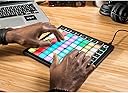
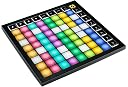
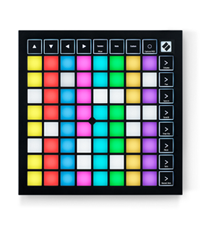
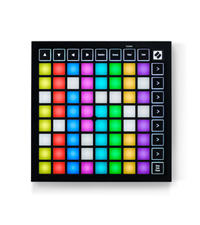
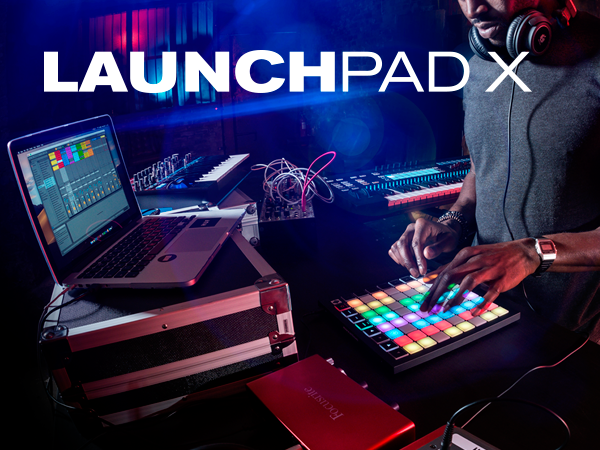
I love this controller. Most people are buying this to use in Ableton, but if you're using MPC 2.x as your DAW and want to access more than one pad bank at a time with physical pads, you know there are exceedingly few options out there. This gets the job done almost perfectly (I'll explain the "almost" below). Before that though, to review the controller more generally, outside of APC, I can say that while other people in the reviews seem to have complaints about the velocity pads, I've found them to be fantastic. To be clear, I'm not using the velocity function - I have it set to activate at full level with the lowest trigger threshold (in the controller's velocity settings), and adjust the velocity as necessary in MPC. Compared to the other controllers I own (The Mpk Mini Mk2 and the MPC Touch) though, these are by far the best in terms of fewest double-hits and in terms of missed-hits/consistent response. I can actually get decent finger drumming going on this, whereas with those other controllers, I could only do so for a very loose approximation of what I want to record, and have to adjust the grid after the fact. While there are features designed to work with Ableton exclusively, many of the best features on the LPX are baked into the device itself. First of those is the Scale Mode, a sub-setting in Note Mode, pictured above (Image 1) beside my MPC Touch. You can choose from 1 of 20 scales to enable at a time, decide which key the scale will play in, which key the scale plays in, and whether non-scale notes appear on the pad or not. Purple pads are the root notes, blue are the non-root scale notes, and unlit pads are non-scale notes. In the image above, the Scale Mode is set to display only scale notes, and is in 3-finger Overlap. The Overlap (5) settings decide at which point a given note repeats in the row(s) above it. Simply put, the first setting, Sequential, puts octaves on either side of a row with the scale notes in-between, giving you access to 8 octaves at once. The next 4 modes are a range of 2-Finger to 5-Finger, allowing you to play the scales ascending with 2 to 5 fingers, and allowing access to a range of 2 to 5 octaves at a time. It's not the easiest thing to describe but it's quite intuitive once you get hands-on. Additionally, the first of the factory-installed custom modes (that can be removed/replaced or moved to a different Custom Mode slot) offers a keyboard layout with four octaves at once, pictured above (Image 2). The purple pads are set to C by default, and the L/R Transpose buttons will shift that by a half step at a time. A-G are in-between those in each octave, and the sharps/flats are appropriately placed above those. The Up/Down Octave buttons can be used to shift the octave range displayed. The most important Custom Mode setting for me is the Drum Pad template. You can configure and apply these to correspond to whichever inputs are appropriate in the DAW you're using, and you can use two custom settings so that it essentially works as the controller's Drum Mode designed for Ableton, only on non-Ableton DAWs. Pictured above (Images 3-4) are my two Custom Mode profiles designed to activate pad banks A-D and E-H, respectively. The two groups of 64 pads can be switched between as easily as pressing the corresponding program key on the right side of the controller. At this point, I should mention that if you thought the APC Mini might have some way of working in MPC as a drum pad, I've got bad news for you. It just won't work for four pad banks at a time. It's possible that Akai might update MPC's MIDI Learn function at some point in the future to allow for those mappings, but currently, you can only program the APC Mini (and any other MIDI controller) to access 16 pads (one pad bank) at a time. The Launchkey takes it all out of the DAW's hands with the custom programs, and allows you to bypass all of that noise. You may notice older reviews that mention that there are only 4 custom programs available, but the firmware has been updates since then, and the LPX now allows for 8 custom modes that can be switched between on the fly, regardless of connection. I used one of those modes to map some basic MPC hotkeys, so that I can zoom the grid in and out vertically or horizontally, pan the grid vertically or horizontally, tap tempo, undo/redo, play/playstart, record, over dub, switch tracks forward/back, switch sequences forward/back and switch view modes. It helps a lot to be able to access a lot of those functions without moving over to my computer keyboard or my other controller while recording using the LPX. While I haven't tried it out, you can also apply customer sliders to the pads, and the pads can be set to be sensitive enough that you can run your finger along a row or column like piano keys and activate them all neatly, so I expect they'd actually make for decent slider controls. There are only a couple of minor downsides I can name. For one, it would be nice if it received feedback from non-Ableton DAWs so that corresponding lights on the controller activate when those inputs are being played back in the DAW. If you're particularly interested in Scale Mode, while I love it on the LPX, I noticed the APC Mini had a couple of advantages in that regard, as well as a debatable one. The debatable one is that the scale modes are different between the two devices. It's subjective, and a matter of which scales people find more important to have accessible. If you want the Flamenco Scale, for example, you're out of luck on the LPX. Both devices contain 20 scales though. Where the LPX missed out on an opportunity that the APC Mini takes is that the APC Mini, in the chord settings, allows you to hold down a setting button, activating a marquee across the pads that spell out the function of the setting button being held. With 20 available scales, it's a really huge help to be able to have the labels for all of them within reach. Not just for the Scale Mode, but for any number of the numerous settings on these devices that aren't always easy to recall without a map. The LPX is certainly capable of displaying text. Pictured above (Image 5), you can see that the settings menus use the LEDs to display the name of the menu, and certain settings/mode switches activate marquee-style text. It just can't be used to identify setting buttons though, which means you need to have the manual handy if you want to know what all 20 scales are. It would be nice to be able to alter the colors that display in Note Mode, outside of Custom Mode(s). I'd like to establish a color scheme on it identical to MPC 2/x and my MPC Touch, but that's very minor. It's possible that it can be done in the LPX's Program Mode, but it's a pretty involved process that I don't entirely understand yet, and that doesn't seem to be for the faint of heart. As the name suggests, there is something resembling programming required to use that mode, and most people will find it easier to use the Novation software to customize the LPX for most purposes. A chord mode would be nice as well, seeing as how much of that heavy lifting was already done when the Scale Mode was designed. I can access some chords in MPC, but they won't activate if I play the corresponding notes on the LPX. It's good in its own way, as it allows me to have two modes for two devices - I can play chords with one hand on the Touch and notes with the other in the LPX. Still though, it would nice to be able to use those interchangeably. None of those are enough to knock a star off of my review though. This is a fantastic device, and works better in Akai's software than Akai's own comparable offering, which is frankly beyond me. Even aside from being virtually the only game in town in terms of accessing 4 pad banks at a time in MPC, the LPX is a great little controller for the price., and has greatly enhanced my workflow and general fun in MPC 2.x.