We remain fully operational. Our teams are working around the clock to ensure your deliveries continue safely.

DOWNLOAD THE APP


Customer Services
Copyright © 2025 Desertcart Holdings Limited
DOWNLOAD THE APP
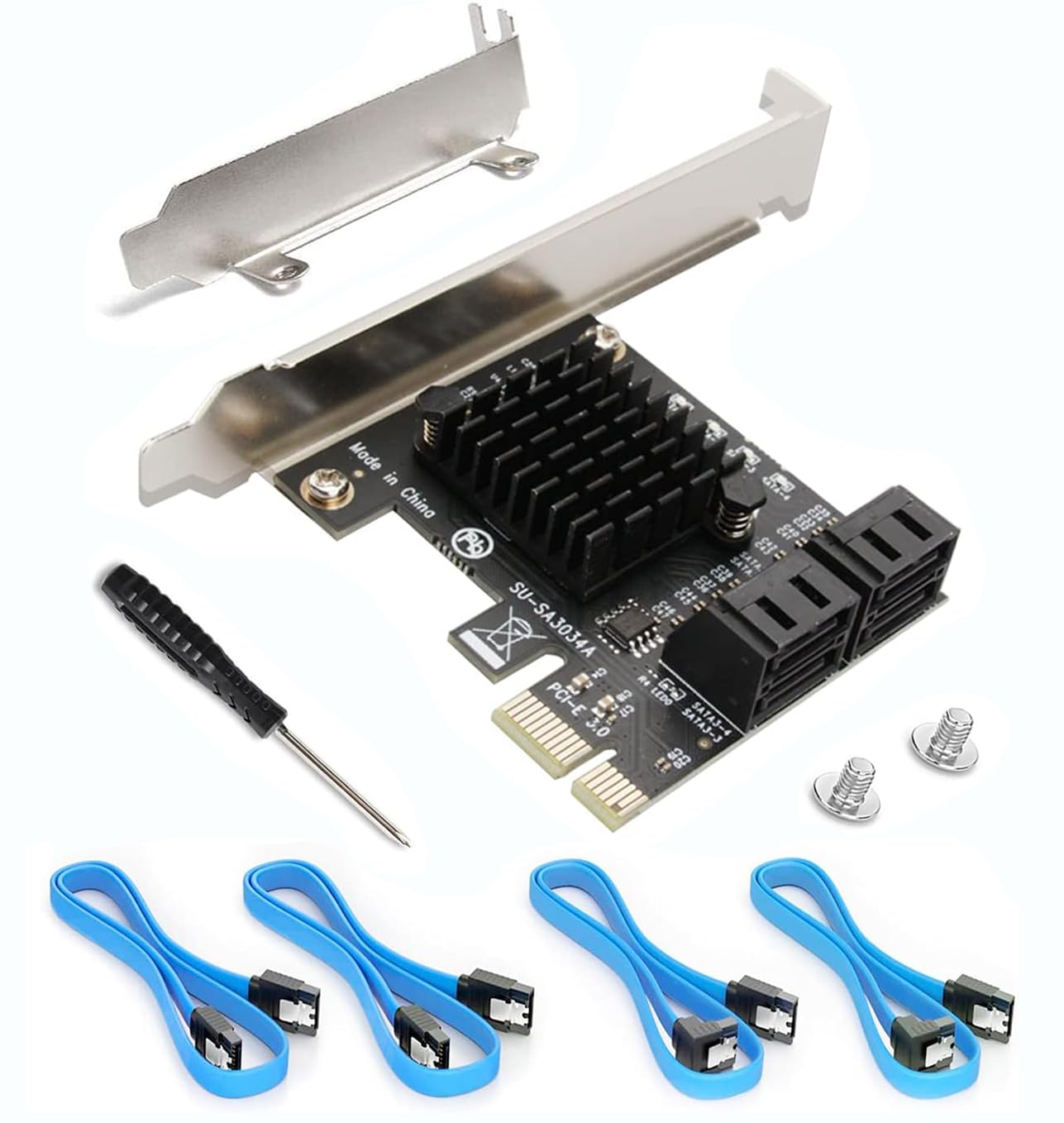
🚀 Unlock your PC’s full storage potential—because running out of ports is so last decade.
The Ziyituod SATA PCIe 3.0 expansion card delivers 4 additional 6Gb/s SATA ports with included cables and a low-profile bracket, enabling bootable system disk support without RAID. Powered by the stable Asmedia1064 chipset, it fits 99% of PC cases and supports major operating systems including Windows, Mac, Linux, and NAS. Ideal for professionals needing reliable, hassle-free storage expansion.


| ASIN | B07SZDK6CZ |
| Brand | Ziyituod |
| Customer Reviews | 4.5 4.5 out of 5 stars (921) |
| Date First Available | July 17, 2019 |
| Item Weight | 3.52 ounces |
| Item model number | ZYT-SA3014 |
| Manufacturer | Ziyituod |
| Operating System | Linux |
| Package Dimensions | 10.43 x 10.35 x 6.69 inches |
E**S
Rock-Solid SATA Expansion That Just Works
Rock-Solid SATA Expansion That Just Works This PCIe SATA expansion card is one of those upgrades that instantly makes a system feel more capable. I installed it in a mid-tower build that was running out of SATA ports, and it picked up my extra SSDs and HDDs without any fuss. The included cables and low-profile bracket were a nice touch—no need to buy extras or hunt around for the right fit. Performance has been steady. Drives are recognized immediately at boot, and transfer speeds are right where they should be for SATA 3.0. I’ve even tested it as a boot device with an SSD, and it worked flawlessly, which isn’t always the case with lower-end cards. The build quality is solid, and nothing about it feels cheap or flimsy. One thing to keep in mind is that while this is non-RAID (which is exactly what I wanted), it’s purely for adding ports—don’t expect fancy RAID management or enterprise-level features. Also, airflow in smaller cases might get tight with the extra cabling, so plan your layout. Bottom line: A reliable, straightforward way to expand SATA connectivity without headaches. For home builds or small office setups, it’s a plug-and-play solution that delivers exactly what it promises.
A**Y
Great device because it works and needs no extra drivers
I had an 8-port SATA 3.0 card. It came with drivers but didn't explain which version of the two sets of drives that came on the CD. Anyway, Windows 10 found some drivers for it and it worked for the most part. I still had an issue with the fact that all of the hard drives on this card showed up in Windows 10 as removable/portable drives, which was a pain. Each one could be ejected even though they were installed inside my PC. However, my motherboard as 10 sata ports on it and two sata controllers, which two ports on the second sata controller. Those two port also showed up as removable/portable drives, even though they are installed inside the PC. After a lot of searching on the internet for a solution, I finally found a registry mod that would allow those drives to be set to not show up as portable in Windows 10. That worked for the ports on the card, but the two ports on the motherboard didn't work. So, for those, I tried to update the BIOS in the computer. Unfortunately, after doing that, they computer would not longer boot up with the 8-port sata card installed. That lead to me getting two of these 4-port cards. My computer boots fine with these and I know have 8 extra sata drives installed in addition to the 10 sata drives on the motherboard (only 8 of these are hard drives, the other two are the boot SSD and a Blu-ray player). What I like about this one this that no driver is needed. I will install a third one today and stop using those two sata ports on the motherboard that result in the two drives showing up an portable, ejectable drives in Windows 10. For anyone having similar problems with Windows 10 Pro showing your sata drives as portable/ejectable drives, there is the solution I found on the internet: I had the same problem but only had one drive. I found this in another forum and decided to save it. If Kbird's solution does not work try navigating to HKEY_LOCAL_MACHINE\SYSTEM\ControlSet001\Services\storahci\Parameters\Device in the registry. Once you are on the Device Key, In the right hand plane, right click and create a new Multi-String Value Name the new value TreatAsInternalPort Double click the new value to edit it. In the Value Data section, start with 0 then 1 2 3 depending on how many ports you have. The trick here is they must be numbered vertically. The value data section will look like this: 0 1 2 3 4 5 6 7 8 9 10 11 The example will work for twelve ports. It is important that you add a separate line for each port. This what I 'm using on Windows 10 Pro version 1809. Also, this is a registry edit so DO NOT DO THIS if you are not comfortable doing registry edits as this kind of thing could potentially trash your computer. Backups should be made first. Obviously, someone with nearly 20 SATA devices is probably not going to be a computer rookie. :)
B**E
8TB HDD
Works perfectly, with no issues, and an easy installation.
E**R
ASMedia 1064 generic card
I've tried two different ASMedia 1064 based 4 port cards like this one. I prefer the IOCrest/Syba version of this card as it's a more reputable vendor but they both use the same ASMedia chip so there's likely not much difference except perhaps in the build quality. This version has a heatsink on the ASMedia chip which is kind of useless as even the non heat sinked versions don't get very hot even under heavy use. There are some important differences to be aware of with SATA PCIe cards like this one. First, ASMedia chips tend to be much more compatible across a wider variety of operating systems than those using JMicron controllers. In fact there are lots of well documented issues with JMicron SATA controllers especially under Linux or for NAS use. If you opt for a high-end SATA controller, like those from LSI Logic/Adaptec/HP/Dell/etc, beware they run hot and use a bunch of power while offering no real performance advantage over the ASMedia options in most applications. SATA hard drives are limited to around around 500 MB/sec and the ASMedia 1064 can easily run at those speeds so anything more seems like overkill. ASMedia chips are often used on many motherboards that offer more SATA ports than the CPU/Chipset natively support. This is one reason why ASMedia is natively supported in most Windows versions and Linux distros with no added drivers needed. I can confirm the ASM1064 works great with Windows 10, Win 11, any version of Debian/Ubuntu based Linux from the last several years, Unraid, OpenMediaVault, Proxmox, etc. And it does so while using very little power. I'd suggest doing your research and see if you can find the IOcrest or Syba version of this board. They're often around the same price and have much better support.
Trustpilot
2 weeks ago
2 weeks ago