We remain fully operational. Our teams are working around the clock to ensure your deliveries continue safely.

DOWNLOAD THE APP


Customer Services
Copyright © 2025 Desertcart Holdings Limited
DOWNLOAD THE APP

💧 Stay dry, stay worry-free — leak alerts that never sleep!
The Govee Water Leak Detectors 5 Pack offers ultra-sensitive leak detection with triple probes and a powerful 100dB adjustable alarm. Designed for high-moisture areas, these IP66 waterproof sensors provide reliable, wireless monitoring when paired with the H5040 gateway app. With long-lasting batteries and low battery alerts, this pack is a cost-effective, proactive solution to protect your home from costly water damage.


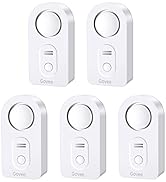
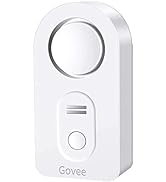


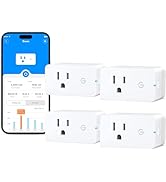

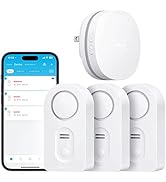


| ASIN | B07QSFRSJX |
| Batteries Included? | Yes |
| Batteries Required? | Yes |
| Battery Cell Type | Alkaline |
| Battery Description | Alkaline |
| Best Sellers Rank | #8,877 in Tools & Home Improvement ( See Top 100 in Tools & Home Improvement ) #13 in Water Detectors & Alarms |
| Control Method | App, Touch |
| Customer Reviews | 4.6 4.6 out of 5 stars (5,759) |
| Date First Available | January 22, 2016 |
| Description Pile | Alkaline |
| Is Discontinued By Manufacturer | No |
| Item Package Quantity | 1 |
| Item Weight | 15.8 ounces |
| Item model number | B5054002 |
| Manufacturer | Govee |
| Mounting Type | Tabletop Mount |
| Noise Level | 100 Decibels |
| Part Number | B5054002 |
| Product Dimensions | 3.46 x 1.77 x 1.04 inches |
| Sensor Technology | Contact Sensor |
| Size | 5 Pack |
| UPC | 741663591640 732840697507 |
| Voltage | 1.5 Volts (DC) |
N**D
TAKE AWAY YOUR HOMEOWNER WORRIES!
Have had these over 5 years. They are work horses. I forgot about one of them and the battery lasted over 2 years. Still tripped loudly. They take 2 triple-A batteries. I have them in various places around the house including below the dishwasher in the 3-sided drain pan it sits on. That alarm saved my wood floor!! The one in a second floor bath tripped just from me spraying a cleaner near it. I do place all 5 on top of a cloth that is larger than their small footprint just in case the water doesn't quite make it exactly to the alarm. This again saved my wood floor when my water dispenser spigot was knocked and was trickling water onto the wood floor. I couldn't keep the alarm under foot, so the rag that it sat on caught the water and tripped the alarm in time for us to see the water dripping before expensive damage was done. ( I do put them on a piece of cloth also to ensure that if there is water then the sensors on the bottom of the alarm will trigger quicker.) Also have one in the 2nd floor laundry machine drain pan, even though the drain does go all the way to the basement to prevent damage to that 2nd floor. Otherwise I probably wouldn't notice that there was a leak at all until I happened into the basement (where I have another alarm!) Every year I test them and replace the batteries when I do my smoke alarms which are still battery back up ( Haven't upgraded to 10 year batteries yet). The price of this 5 pack is a pittance when you think about the money it has saved me not just once but multiple times. Piece of mind rarely comes this cheap. I highly recommend these alarms!!
F**R
Great product. Very decently priced. It works as expected and saved future headache
Initially I bought GoVee hub with a kit and additional 3 sensors for over 3 yrs. In those years they all worked so well to alert me on a couple of occasions that I recently ordered additional sensors. Now I can have one sensor for each place that has valves, either toilet, bath or kitchen sinks. Each Battery set lasts around 3 yrs and simple to replace. The alarm is so loud that i can hear anywhere in my big home. The app is so great that it can provide battery level of each sensor. It can alert when there is leak around the sensor while you are away. NOTE: it can only alert you if there is a leak so you can intervene. It does NOT stop the leak or shut your water.
G**E
Excellent, with one significant caveat
Like swblake noted, the instructions for pairing, in the instruction manual are not correct. To pair a water sensor with a hub, assuming that you have already plugged the hub into an electrical outlet and successfully connected to the hub via the Govee app (Android/iOS), long press the lower button on the hub, for about 3 seconds. That will put the hub into pairing mode. Then, bring the water sensor very close to the hub (a few inches away), and long press the water sensor's button for about 3 seconds. Give it another 5-10 seconds for it to finish pairing. From the lights, it's pretty obvious when it's paired successfully. Once it's been paired successfully, you can then relocate the water sensor to your desired location. Interestingly, one of the water sensors actually detected an occasional, minor drip, that was occurring in one of my bathrooms, that I had not previously noticed at all. As a test of the battery levels, I replaced the batteries on one unit with older batteries, having a voltage of 1.17 volts each. I was pleased to note that when I refreshed the Govee hub app, it picked up that the battery level on that water sensor had gone down, from 5 bars to 2 bars. CAVEAT: I did another test where I removed the batteries entirely. Unfortunately, when I did this, and then refreshed the hub app's device list, the water sensor, from which I had removed the batteries, still showed up in the list, with NOTHING to indicate that there was anything wrong with the water sensor. In fact, as an additional test, I left out the batteries for 30 minutes, and the Govee hub was UNABLE to detect that the water sensor was no longer operational.. This is a problem because, if a water sensor suddenly dies, the user has NO WAY to tell that it's died. And so they're left in a situation where they think the water sensor is still working when it actually isn't. This could very well result in a catastrophic situation where the user ends up suffering thousands of dollars in water damage due to this software fault. A better way to handle this situation is, if the Govee hub cannot detect a device, upon device list refresh, simply flag/highlight the device and, ideally email the user, regarding the water sensor that is no longer sending messages to the hub. Optionally, allow the user to specify the timeout duration, beyond which they want to receive an alert. For example, if the Govee hub hasn't received a status update from a device within a 5 minute time period, have the Govee hub send an alert to the user regarding said device.. Hopefully, Govee will push out an update to resolve this important issue. Getting notifications on my Android phone, when a water leak is detected is pretty awesome! I actually created a custom ringtone, of a dripping sound, to associate with water leak notifications. Which helps to determine that it's a HIGHLY IMPORTANT notification.. Getting app notifications, for water leaks, is a killer feature, for water sensors. Love it. And the idea of transmitting on 433 MHz frequency, to the Govee hub, instead of having each sensor connected directly via WiFi, is probably an excellent design decision, in terms of conserving, prolonging battery life, as direct Wifi connections would probably have required much bigger capacity batteries, due to their relatively higher energy requirements.
C**N
El producto no se vincula con la aplicación. Y al ser un producto de un tercero y no ser de un proveedor oficial de la marca, govee no te brinda el soporte.
D**Y
Pairing these to my existing gateway was simple and painless; just hold the button on the gateway for 3 seconds until the light flashes, then press the button on the sensor. These sensors are perfect; they detect water both below and splashing from above, they have a loud audible alarm, plus alerts on your phone, and the batteries last a long time and are easy to change. They support Alexa, so you can have Alexa announce when a leak is detected. They also support IFTTT, so you can create even more advanced automations like automatically turning off a water valve when a leak is detected.
T**M
These are great...nice and loud so you can hear them when they are tucked away under your sink cabinet. I test them periodically and the always work.
B**E
I bought the Govee Gateway and 3 sensors PLUS this Govee 5 sensor package. Following the instructions for connecting the Gateway to my 2.4g WiFi worked perfectly. Installing the Govee Home app from the Google Play Store worked perfectly as well on my Samsung 22+ Android phone and the app found the Govee Gateway correctly. The 3 sensors that came with the Gateway are already paired to the Gateway. Each of the 5 extra sensors had to be paired to the Gateway using the instructions. Most paired and showed up on the "devices" menu in the Govee Home app, but a couple looked like they paired, but didn't show up in the app. All I had to do was place those sensors on a wet rag to force the alarm and then they showed up in the app with the sensor ID in RED which you clear by clicking "Got it" to the warning, AND, then they showed up with all the other sensor devices currently paired to the Gateway. A word about the Sensor IDs for each sensor - format H5054_NNNN. The Senor IDs are unique for each sensor, but are not printed on the sensor, so I placed each sensor one at a time on a damp cloth to test it's alarm which pops up in the Govee app with the sensor ID in RED. So I wrote the ID in felt pen on each sensor which allows you to identify which sensor is sensing water. I had no trouble using the APP to create four rooms - Main Bathroom, Utility Room, Kitchen and 2nd Bathroom, AND, then adding my labeled sensors in each room. I really like that the sensors use triple AAA batteries that will be easy to replace (I cannot say how long they'll last since my 8 sensors are now only 2 weeks old). I also really like that when water is detected, the Govee app shows you which sensor is alarming and also sends an email warning to my defined email address. So far the system is working perfectly. 5 stars from me.
A**R
Too early to give an complete review but the alarm is nice and loud and there appears to be a delay before the alarm sounds when water is detected, otherwise it seems to work well. Delay is only a few seconds. At this point I would purchase these again and recommend them.
Trustpilot
2 months ago
3 weeks ago