


🖨️ Print smarter, save bigger, and stay effortlessly connected!
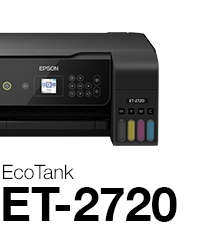
The Epson EcoTank ET-2720 is a compact wireless all-in-one printer featuring cartridge-free EcoTank technology with supersized refillable ink tanks that deliver up to 7,500 color pages per refill. It offers high-resolution printing (5760 x 1440 dpi), a built-in scanner and copier, and modern connectivity including Wi-Fi and voice-activated printing via Alexa and Google Assistant. Designed for cost-efficiency and sustainability, it reduces ink costs by up to 90% and minimizes cartridge waste, backed by a 2-year limited warranty with registration.




| ASIN | B07PW3Q92W |
| Additional Printer Functions | Copy |
| B&W Pages per Minute | 10 ppm |
| Best Sellers Rank | #276,181 in Office Products ( See Top 100 in Office Products ) #180 in Ink Tank Printers |
| Brand | Epson |
| Built-In Media | EcoTank ET-2720 all-in-one, manual, CD-ROM for product setup, power cord, 1x bottle 522 Black (65 mL) and, 1x bottle each 522 Cyan, Magenta, Yellow (65 mL)(2) |
| Color | Black |
| Color Depth | 24 bpp |
| Color Pages per Minute | 5 ppm |
| Compatible Devices | Tablets |
| Connectivity Technology | Wi-Fi |
| Control Method | Voice |
| Controller Type | Amazon Alexa, Android, Vera |
| Customer Reviews | 4.3 out of 5 stars 5,652 Reviews |
| Display Type | LCD |
| Dual-sided printing | Yes |
| Duplex | Simplex |
| Global Trade Identification Number | 00010343946927 |
| Hardware Interface | USB |
| Ink Color | Cyan, Magenta, Yellow, Black |
| Item Dimensions D x W x H | 13.7"D x 14.8"W x 8.7"H |
| Item Height | 8.7 inches |
| Item Type Name | Multifunction Printer |
| Item Weight | 8.8 Pounds |
| Manufacturer | EPSON PRINT |
| Maximum Copy Resolution Black and White | 2400 dpi |
| Maximum Copy Resolution Color | 5760 x 1440 dpi |
| Maximum Copy Speed Black and White | 10 ppm |
| Maximum Print Resolution Black and White | 5760 x 1440 dpi |
| Maximum Sheet Capacity | 100 |
| Maximum print Resolution Color | 5760 x 1440 dpi |
| Media Size Maximum | 8.5 x 14 inch |
| Model Name | ET-2720 |
| Model Number | ET-2720 |
| Model Series | EcoTank |
| Number of Trays | 1 |
| Other Special Features of the Product | Borderless Printing, Compact, Display Screen, Voice-Activation |
| Paper Size | 4" x 6", 5" x 7", A6, Half Letter, Letter, A4, Executive, Legal, User definable (from 2.2" x 3.4" to 8.5" x 47.2") |
| Print media | Paper (plain) |
| Printer Connectivity Type | Wi-Fi |
| Printer Output Type | Color |
| Printer Type | Inkjet |
| Printing Technology | Inkjet |
| Processor Count | 1 |
| Resolution | 5760 x 1440 |
| Scanner Type | Sheetfed |
| Series Number | 2720 |
| Special Feature | Borderless Printing , Compact, Display Screen, Voice-Activation |
| Specific Uses For Product | Home, Office |
| Total USB 2.0 Ports | 1 |
| Total Usb Ports | 1 |
| UPC | 010343946927 |
| Unit Count | 1.0 Count |
| Warranty Description | 2-year limited warranty in the U.S. and Canada, second year requires product registration |
| Warranty Type | limited warranty |
| Wattage | 13 watts |
S**E
Amazing print quality
Let’s start off with the fact that I am so glad I bought this printer. My whole life I have used an inkjet printer with those ridiculously priced cartridges and enough was enough. I am a college student in a STEM field so I print pretty much everyday roughly 10-70 pages depending on my assignments. Printer comes sealed and taped down very nicely and safely. It comes with the cord to connect it and turn it on, the packets with instructions and the cd, and the four bottles of ink. No the CD is not necessary for setting up via WiFi, also your WiFi needs to be atleast 2.4GHz in order for this to work. Setting it up through the computer didn’t work for us so we just did it through the printer, the manual entry was a bit tedious but only necessary the one time and now we can print from anywhere around the house. The set up is pretty self explanatory, follow the steps on the paper and you’ll be set, don’t cut corners because the printer does need to register the ink and everything in order to work properly. Do the ink first before turning it on! While there’s ink in the printer do not flip it. When you fill up the ink you should be left with maybe 2-3 ml but after the whole setup is done you can fill the rest of it up and throw the bottles away. Once everything is being setup, for the best ink quality you’re going to want to do the setup which will use a bit of your ink but it’s worth it, it’s going to print out different boxes and ask which ones are the better quality. This is important for good printing quality! Printer quality is awesome, we did the setup and took our time with it and it prints great! I don’t see anything wrong so far with it, and like I previously mentioned it has been a very pleasant purchase. I’m glad I switched to this type of printer, If you’re debating it still...I think you should do it! Thanks for tuning in to this long but hopefully helpful review :)!
A**A
Easy to use dual voltage printer
Love this printer! Was hesitant originally due to the price, so bought a cheaper HP printer...spent more on ink for that one within a few weeks than this printer costs. I did have a few issues getting the wireless printing to set up, but that may be that my internet isn't great (it prints fine wirelessly from anywhere in the house now that it's set up). I had to put my computer directly on top of the printer for it to properly set up wireless printing. It's easy to use, the paper tray holds a good amount of paper, reducing the number of times needed to reload, I'm able to highlight immediately without smearing ink, and I've printed a decent amount and the black ink tank is still mostly full. Not listed on the Amazon description, the printer is dual voltage (100-240V) and can be used worldwide. Update August 29, 2021: I've had this printer for over a year and a half now. Printed over two thousand pages and I've only had to refill the black ink once so far, and still haven't had to refill the color (though we don't print a lot of color). During a school break where I hadn't been using it as often, I did have an issue where the yellow ink wasn't working, but if you just go to "maintenance" on the menu and do a nozzle check, you can follow instructions to clean the nozzle tips. If that doesn't work, you can do a full clean, which does use a decent amount of ink, but it does the trick. I assume the ink had just dried on the nozzle so it wasn't getting onto the paper, which I knew from previous printers happens if you don't use the printer for a while. But the difference here is that, unlike a cartridge that you would have to replace when that happens (which can get expensive, especially if only one color isn't working and you have tricolor cartridges), you can just have the printer clean itself. It was a higher up front cost, but I have saved so much money on not having to replace cartridges, it was DEFINITELY worth the price!
T**G
So far, I'm loving this printer!
I don't do a lot of printing. A recipe here and there, some pictures on photo paper for my daughter's class projects, occasional other documents. I've had this printer a few weeks now and I just love it. It was incredibly easy to set up, the instructions were clear and easy to understand, the wireless setup worked without a hitch and the printer just works. The software is great, too. It detected new updates during the install and I grabbed the Epson Photo+. It's just a simple, "print my photo now" type application that does exactly what I wanted to do in a way that was intuitive. So far, I've printed a number of photos on premium glossy photo paper as well as documents on plain printer paper. The text is sharp, and photos look at least as good as prints I would order from a 1 hour photo printing place. I've read some reviews that print quality degrades over time. If so, I'll post an update if that happens. This printer is a dream compared to my last. I fought with that thing, had so many paper jams and lockups - I hated it. This printer is a dream compared to what I had before. (Different manufacturer, fyi) Update: I've had this printer for over 8 months now and still loving it. I can print from anything, tablet, phone, laptop, computer, and it never glitches. It's worked flawlessly and the print quality is excellent. So far, it's been very easy on the ink. The ink tanks are still nearly full, although it seems to go through black faster than other colors. I've also done a fair amount of photo quality printing for my daughters' school projects and they turn out great. I could definitely recommend this printer if you want something that "just works".
D**U
I really wanted to like this printer, but...
Update... I replaced this printer with a Brother laser printer. In the two weeks since the new printer has been installed there has not been one hiccup with the wireless networking. All this time I was told it was my wifi router issue, instead it was an Epson issue. Never buying another Epson again. ****† I'm writing this review about a year after I got the printer. There was so much to like about this printer - good price, compact design, affordable ink. I was really excited at first but a year later, I'm about to toss this printer. My network: Home setting, 4 Windows 10 computers share this printer via wifi. Usage: probably about 25 sheets a week. First 6 months, things were going well and I was happy. People were printing and no one had any issues. Hardly used any ink. UI is not the greatest, but that isn't a big issue when printer is working. Then started having network issues, the printer will just intermittently drop the wifi (this happened with print requests from all computers). Sometimes it would reconnect, sometimes I would have to manually reconnect. Sometimes it would be connected but the data connection was really slow (like take 15 minutes to print out a b/w graphic). Not helping is the "Error Printer Connection Checker" app that would detect the error (good!), but it could never solve the problem (bad!) and the alert was constantly coming up on my PC and disturbing my other work (bad!). A month of two later, I had to replace my wifi router for other reasons and so I thought that would help things with the printer. Nope - things didn't change. Just recently, there was an error message on the printer that said "Wifi out of order, contact support. 202620". I thought to myself, that makes sense, maybe it was a bad wifi board. So I called support and sure enough, error message disappeared and everything was working fine at that moment. Tech support rep was a little short / rude and berated me not placing printer within 6 feet of router (if that's the case why have wifi in the first place!) Understanding that this was an intermittent issue, they said call back when it happens again. Who has time for that?!? Then on top of all that, there is occasional smearing on the printouts and the printer is now extremely squeaky. If the printer was working well, I might try to open it up and oil a roller or two and/or do a deep nozzle clean, but with these latest problems, I'm on the cusp of getting another printer.
R**A
I think it's great - not simple but great.
What I like: + The photo print quality on glossy photo paper is, in my opinion of being a tech guy for 15+ years, astonishing for a multi-function printer. With most multi-function printers I notice there's an effect looking at glossy print at an angle; It's difficult to describe, the print almost has a "layered" look where dark and light contrasting boarders meet in the picture. This printer has none of that. All of the pictures are beautifully flat and glossy. Seriously, they look like they came from a store, I'm blown away considering it uses only the three colors and black. + Included ink fills the ink tanks completely and ink use appears to be quite slow. Over 10 months I've printed at least 250 color powerpoint slides (white background), 35 full color 4x6 borderless photos, 10 full color 8x10 photos (on high print quality) and ran >9 head cleaning cycles (more on that later). Still on the original ink, black is 2/3rds full, each color is above 3/4ths full with two of the colors still above 7/8ths. I will not have to buy ink anytime soon. Quite a change from the starter cartridges that come with inexpensive printers. + Wi-Fi setup is possible on the printer. No need to connect a USB cable to a computer. I have printed borderless photos from my Android phone over wi-fi with ease (needs an Epson enabler app, but then works like a normal printer). + Epson apps installed on the PC aren't annoying. Scanning to a PC and making copies over Wi-Fi works great. + The print head cleaning. This seems to be a necessary evil of this type of printer which has print heads that are not changed like cartridge based printers. I knew it going into the purchase and wondered how it would fare after I let the printer sit unused for long periods of time. (this is why I finally wrote a review) After sitting for 6 months, of no use, three cleaning cycles is all it took to be back to printing normally. The cleaning cycles don't seem to use much ink at all and are easy to access from the front panel + When I change the paper, it asks me on the front panel what type of paper was inserted. I've never seen another printer do this and it makes setting the paper type simple. + The front panel in general, you can do just about everything from it. Easy to navigate menus, easy to make a color or B/W copy. + Filling the ink tanks was new and fun, but then again I am easily entertained. What I dislike: - It does not work well when colder than room temperature. While I had it next to a drafty, single pane window over the great-lakes area winter, two problems occurred. 1. While it was next to the drafty window, the print heads would be unable to feed the thicker, cold ink. A photo would print 3/4 of the picture correctly then lines of color would be missing. Or some pages would just be missing lines of a color entirely. 2. When cold, the paper pickup rollers had a difficult time gripping 4x6 Epson glossy photo paper. It would fail to feed the photo paper, stating "load paper" to which you have to take the paper out and put it back in making it frustrating to use. Neither of these problems persisted when the device got to room temperature. - The photo prints aren't perfect. I can see a moire of ink dots upon unreasonably close inspection of a print. At normal viewing distance no pattern can be seen. - The rollers leave a couple lines of tiny tiny divots on glossy photos. Only noticeable on close inspection of a print. - Maintenance If not used for long periods of time it will need head cleanings. Need to watch the ink level (it reminds you to do so - a lot). There is a waste ink tank that will need to be replaced eventually, hopefully will be available in 5-10 years when needed. - Piano gloss faceplace picks up fingerprints (the buttons are matte though). Summary: I bought this printer for several reasons. I needed something to print normal 8.5x11 pages, but also wanted something that could print decent photos. A friend had one and told me he loved his. After reading other reviews about ink use, photo print quality and me not wanting to pay for replacement cartridges it seemed like the right choice. I think this printer is best for someone comfortable with computers. Don't need to be tech savvy, just need to understand what print head cleaning does and why its needed for this printer. Also need to understand resetting the ink level when the tanks are refilled. It's just not quite as simple as changing out ink cartridges. Its more expensive than most multi-function printers but considering it came with enough ink to fill the tanks and that I will probably be able to print at least another 100 quality photos before needing to buy ink, I think it's an excellent value and also one of my favorite pieces of tech I've bought.
L**E
Definitely worth it thus far !
Was a little skeptical about purchasing , die today the fact that there are mixed reviews out there on this printer . But I can’t see why , because this printer is everything I was looking for . I’m a tattoo artist and always need to print designs in color and I’m black and white . And it never fails that I have to replace a tiny ink cartridge in a traditional printer , and then have to mess with replacing ink and all that hassle . But with this printer , the set up was fairly simple , and filled the ink reservoirs and this puppy was up and going . The reservoirs are BIG too ! Curious to see how many hundred of peony’s there will be before I need to top the ink off . But set up was fairly easy . Prints wireless less from my network , from my pc and from my iPhone 11 Pro . Just downloaded an app for the phone and was all set . Sure this ain’t some fancy printer for photos . But I did print 8x11 photos off on it to test it , and it did a good job actually . So not a single complaint here . Very pleased ! Instructions were fairly easy to follow also . If a basic simple work horse printer ,without the crazy frills ,which you can simply refill yourself without any hassle , is what you are looking for : this is the one !
K**T
Easy to use printer
This Epson printer was bought after my Canon decided to quit working just outside of its warranty. Which isn’t the first time I’ve had a Canon product do that. So I switched to Epson with an extended warranty, making sure I get at least four covered years out of this one. It’s a standard 3 in 1, just print, copy and scan (no fax, but if you want that, shop for an office printer, not home). It feeds paper from the back and the front tray must be pulled out manually. This one also doesn’t do duplex printing (two sided) but you can still manually flip it for a two sided job. What made this most appealing is the Ecotank, which gets you a lot more ink and was so easy to line up the bottles. You hear a light chugging sound as it fills, which stops when it’s full, no mess or drips when removing either. I don’t have the steadiest hands but that didn’t make it more difficult. It’s very easy to set up to the WiFi, just make sure that both the device you’re using and the printer are on the same 2.4 bandwidth channel. If you’re not tech savvy, modern routers/modems are usually equipped with two bandwidths: whatever you named the router and usually a 2G or 5G added after it. 2G is usually slower but has better reach, while the faster one (5G) tends to have a shorter reach. Whether or not your signal reaches everywhere, this printer will only look for the 2G. For smartphones and tablets, it’s best to download the free Epson Print app to send your printer jobs from a device. If you’re using this printer in conjunction with a desktop, purchasing a printer to USB cable between them makes sure that computer can print, regardless of whether WiFi is working. Very helpful if you work with offline manuscripts and your internet service is down. Always good to have a wired solution, just in case. The start up guides make it easy to setup but if you need more options, Amazon does have the PDF manual in the product description page to help. Even easy set-ups can be intimidating for those who aren’t tech-savvy but Epson does a good job with thorough explanations that aren’t difficult for beginners to understand. While I did sacrifice some options (like printing on discs) with this Epson printer, I actually didn’t use the many features of an office printer so this pared down version actually suits my usage better. In summary, if you don’t need a huge loading tray, duplex printing or fax, this is a great choice. Ecotank printers save you tons on ink and if you’ve got the money, you can still get those options on different models. If saving money on ink is a priority, this is a definitely a must have. I’m not sure why anyone would buy generic ink for an Ecotank; Epson’s refill bottles are actually very cheap. I was paying that much for Canon’s one-time-use cartridges, if not more. They do warn you against using generics, but at the Epson prices, it’s not even a consideration.
J**L
The best home printer I've ever used
Bought this printer 4 years ago, refilled the tanks a couple of times. Always connected, always available to work, always function as expected, very affordable refills, never gave me headaches. The only minor problem is it doesn't print double-sided, but I've learned to cope with it by printing odd/even pages on both sides. I have bought a dozen different home office printers for the last few decades, overall this is simply the best printer I ever found.
Trustpilot
5 days ago
2 months ago



