We remain fully operational. Our teams are working around the clock to ensure your deliveries continue safely.

DOWNLOAD THE APP


Customer Services
Copyright © 2025 Desertcart Holdings Limited
DOWNLOAD THE APP

⚡ Power your network, not your outlets — stay connected, stay ahead.
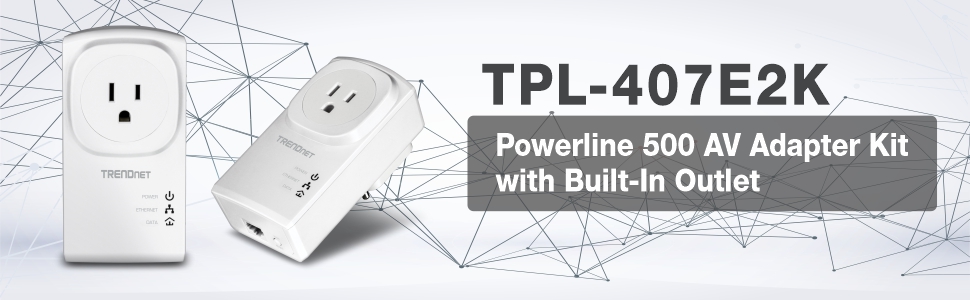
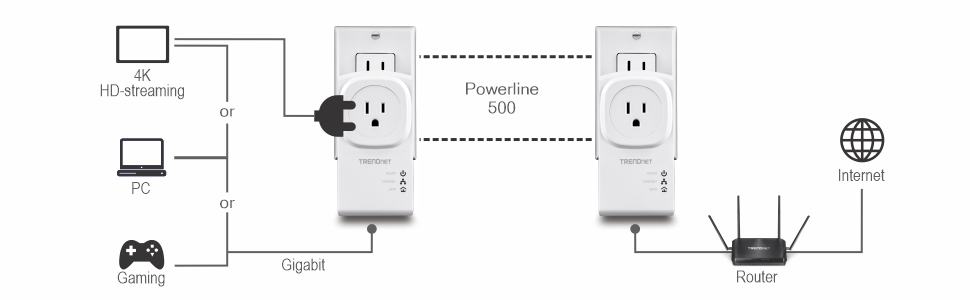
The TRENDnet Powerline 500 AV Nano Adapter Kit (TPL-407E2K) delivers up to 500 Mbps network speeds by leveraging your home’s existing electrical wiring. Featuring built-in power outlet pass-through, NDAA compliance, and a 3-year manufacturer warranty, it offers a plug-and-play solution ideal for smart TVs, gaming, and HD streaming. Backward compatible with previous Powerline adapters, it ensures ultra-stable, encrypted connectivity without sacrificing power outlets.





| ASIN | B009ZRBXMI |
| Best Sellers Rank | #61 in Powerline Network Adapters |
| Brand | TRENDnet |
| Built-In Media | 2 x Network cable (1. |
| Color | White |
| Compatible Devices | Backward compatible with all Powerline 600, 500, and 200 adapters |
| Customer Reviews | 4.0 out of 5 stars 992 Reviews |
| Data Link Protocol | Ethernet |
| Data Transfer Rate | 500 Megabits Per Second |
| External Testing Certification | CE, FCC |
| Global Trade Identification Number | 00710931506679, 00803982820266 |
| Hardware Interface | Ethernet |
| Item Dimensions L x W x H | 4.4"L x 2.7"W x 1.1"H |
| Item Type Name | TrendNet 500Mbps Nano Powerline AV Kit (TPL-407E2K) |
| Item Weight | 102 Grams |
| Manufacturer | TRENDnet |
| Mfr Part Number | TPL-407E2K |
| Model Number | TPL-407E2K |
| Product Dimensions | 4.4"L x 2.7"W x 1.1"H |
| UPC | 163120658565 163121400972 031112862071 151903617359 132017935072 898029712130 069060118292 172302743685 079531859630 014445566403 939647622767 523160957552 172304262016 803982820266 168141529108 710931506655 031112050416 031112580913 710931506679 012304278214 |
| Warranty Description | 3 year Warranty |
D**.
Works surprisingly well, streams HD video
I've never tried Powerline adapters before. Reviews of the first-generation models were all terrible, and I was one of those people who wrote the technology off completely. But fast-forward a few years, and I'm moving into a large apartment with a cable modem in the bedroom and my HDTV in the living room. I can pick up 40 Wi-Fi SSIDs on my laptop, I can't get into the ceiling so I can't do drop cables, and my girlfriend would kill me if I started stringing up cat-5 cable along the walls. I needed something fast, cheap, and largely invisible, and while I was skeptical since this apartment's wiring is so old it still has an honest-to-goodness fuse box, I still figured I'd at least try a Powerline adapter. I settled on the Trendnet brand because they'd gotten some fairly decent reviews on sites like SmallNetBuilder, and seemed pretty fast at least compared to other brands. Installation was simple; basically you plug them both in, press and hold the sync button on the side (I had to do it a few times before I learned how long to hold the button down) on one and then the other, and then wait for them to sync up. Once they do, you're all set! I connected one to my router in the bedroom, and the other to a gigabit switch in the living room, and then plugged all my home theater devices into the switch. AV receiver, Roku, Blu-Ray player, Xbox, they all appeared on the network right away, and voila, Internet access for my entertainment center. Roku does streaming Internet radio, and within minutes I had Pandora playing to my heart's content. The real test, though, was whether I could stream video. I've been using this setup for a couple of weeks now, and let me tell you, Hulu, Netflix, and Amazon Prime all work like a charm. I can stream Bones, Castle, and even Downtown Abbey now in HD with Dolby Digital and I've never had a hiccup. Satisfaction with these really comes down to what you need. The "500 Mbps" claim is a little misleading, because these things only have 10/100 Ethernet and can only connect to your router/switch/Roku at up to 100 Mbps. But like all other Powerline adapters, they're actually slow enough that it doesn't matter; I've read lots of reviews where these "500 Mbps" routers never really work at higher than 50 Mbps in real-world testing. If you're a power user, don't buy these things to connect your workstation and your NAS. But if you're like me, and you have 15 Mbps cable service and want to stream HD video to your Roku, these things may be just what you need.
A**O
FOR PC GAMERS WHO DON'T HAVE AN ETHERNET CONNECTION - BUY THIS
I built my gaming pc in June, and as a complete newbie to the scene I did not realize the important of an ethernet connection. I've tried multiple different usb wifi antennas, and nothing could provide a stable enough connection for my to play games reliably on. I'd get about 10-15 seconds of gameplay before a random PING spike would interfere. So my $1000 build was effectively rendered useless for online gaming, and since I don't play much single-player on my PC, I was basically only using this computer for school, work, and web-browsing. After months of reading through various Reddit posts, I was on the fence about trying powerline. Boy am I glad I went for it. Let me just say this right off the bat - if you for whatever reason can't use an ethernet connection of any kind and you want to play games online, TRY THIS. I'm only pulling about 75 mbps when I typically get about 150mbps on wifi, but with how stable the connection is, I have no PING issues whatsoever. If any of you play Rocket League, you'd know how annoying PING spikes are that cause your car to start flying all over the field. With my powerline connection, I've put in about 8 hours of online playing without one ping spike, and I'm finally able to take advantage of my hardware. Seriously, if you're on the fence and you play online games, GIVE THIS A SHOT. I've tried so many wifi antennas in all different price ranges, and none have come close to the performance I get here. Yes, the connection is much slower, but the stability is what matters most especially for online games. Don't listen to the Redditors who completely write this off - if you have no other options and can't use ethernet, give this a try and see if it works. Super simple to setup and a true plug and play. If I could give it 6 stars I would. Seriously, I'm so shocked at how well it works, and I'm glad I decided just to give it a try. A true job well done by this company.
G**G
Broken Unit Replaced
They both worked great for a while, with one connected to my router and the other to an iMac. Even with the iMac on a sub panel off the main electrical panel it worked great. Based on that I bought the non-pass-through model with 4 ethernet ports for my home theater, also on a sub panel circuit. But shortly afterward, the pass-through model on the iMac quit. Of the 3 lights on it, only power (PWR) is lit, no powerline (PL), no ethernet (ETH). I tried it all over the house in different outlets and no change. I also tried all the suggested tricks to make it work again, including resetting all units to factory settings, nothing worked. 4/20/14 Update: TrendNet replaced the broken unit and I installed it 8 days ago. It works fine. The other 2 units continue to work as well. Overall I'm very pleased with the speed increases, so am upgrading my rating from 2 to 4 stars. The design considerations must be difficult for this type of device. It can't have a surge supressor or UPS between it and the electrical outlet, so the electronics must be more robust and resistant to surge damage, or not - maybe they are not robust and that's what caused my one unit to fail. I set up a cheap wireless N router as a wireless access point at the other end of the house and connected it to one of the TrendNet units. It works great and my iPad now has MUCH better connectively and speed.
J**N
Should have bought these years ago
Pros: Worked right out of the box with no real setup; connection speed is as fast as my internet connection can keep up with Cons: Form factor eats both plugs Description: I had heard mixed rumors about networking over outlets, which led me to keep trying at improving my wireless connection. I wasted an incredible amount of time, money, and sanity points on this problem, and I should've just gone for this years ago. To step back--I have a constrained apartment setup with limited options for placing the cable box with respect to the items that rely on internet. My cable plug at the wall is in one room, while the TV/roku/consoles are in a different room. they're only separated by about 30 feet, but the signal bounces through a lot of walls and fights neighbors' networks. I tried different signal strengths, dual band, 5ghz ac... I really spent a stupid amount of money on routers. Really, I was fighting the wrong battle. After installing these, I've had zero problems with dropouts and gotten downloads around 25 Mb/s regularly. (I have no real need to transfer between computers, and given that the bandwidth I use is typically limited by the provider, this speed is as high as I reasonably need. I don't know if I'm saturating the connection or content server, but that speed has not caused me any problems.) The very minor quibble I have is that the design of these units is such that they will cover over both jacks of an outlet. This can be an issue, as the sort of setup that has you routing network cables will typically eat more than a couple power outlets as well. I had to get a slightly nicer power strip. Totally worth the tradeoff. Unequivocal recommendation.
P**S
DO NOT BUY (THEY ARE NOT RELIABLE)
These are worse than useless. They work well enough at first to raise your hopes but they break connection maybe once every 10 hours or so (absolutely no pattern I could discern). The internet disappears at your machine but the modem is healthy, so you can push the little buttons to resync, or pull them out of the wall, wait, then put them back in, and reboot the digital modem and then they begin to work for a while, then later you find that internet connection is again broken, so you try various options to isolate the problem and get more and more disgusted. Nice concept, but they don't replace hard wire or WIFI, if you wish to stay solidly connected. I have carefully ensured that they are on one common breaker circuit, and that the electrical supply was not interrupted accidentally. The TRENDnet Powerline 500 simply cannot be relied upon, which is the whole purpose of it. I'll run hard Category 6, and in the meantime use WIFI, which stays rock solid. My recommendation is don't waste your time, and don't hope, like I did, that you will not have the problems that some others reported about connections breaking. Infuriating!
T**M
Works surprisingly well, but I found setup to be painful.
I'm very impressed with the range and the speed. I'm running this from an outlet next to my load center to an outlet off a sub-panel in my detached garage. Real world speed is around 20Mbs which is plenty fast for my needs. The devices were plug and play if you use the default encryption key, but I was utterly unsuccessful at having the devices generate their own keys. The instructions say hold the button for 3 seconds and repeat on the second device. It never worked for me. Also, I was only successful resetting the devices back to factory once by holding the button for 10 seconds. I gave up and installed the software. The software requires you download WinPcap - mentioned nowhere in the documentation that I noticed. It's also not particularly intuitive to use. I failed the first time until I realized that it won't display the new key that you choose. If you are willing to live with the security risk of the default key - this is a 5 star device. If you want better security be prepared for some additional work.
B**.
Fantastic speed, dead simple installation, very pleased with my purchase!
I have to admit that I was a little hesitant to trust powerline networking kits. Back when powerline networking was first introduced, I bought one of the first-generation sets and it did not work very well at all. Based on the positive reviews on this set, and a great lighting deal price, I decided to take a shot. And boy am I glad I did! I purchased this unit because our wireless router is in the basement and my kids were struggling to get a reliable wireless signal on their Wii on the second floor of our house. As other reviewers recommended, I checked my breaker box before purchasing to ensure that the power outlets I intended to use are both on the same "side" of my breaker box. As luck would have it, they are. Installation could not have been easier ... plug one unit into the wall and run an ethernet cable to my nearby router. I plugged the other unit into another outlet and connected my kids' Wii. The Wii immediately "found" the internet and Netflix works very well. I plugged my laptop into the adapter as well and am able to max out our 15Mbps cable internet. Further, I can transfer files from another machine in the house as quickly as I can connected directly to our 300Mbps wifi. Overall, I am VERY pleased with the performance of this unit. I would absolutely recommend this kit to others.
K**.
Doesn't get easier than this
I was using a WIFI extender to get my HD Homerun TV tuner (in the attic) signal to my network. My TV signal would pause frequently due to WIFI connection disruptions. So I ordered the TRENDnet Powerline 500 AV Nano Adapter Kit as I had read it could provide a more stable signal. Installation was super simple. Literally plugged one of the adapters into the outlet in my attic and plugged the HD Homerun network cable into it. Downstairs, I plugged the other adapter into an outlet near my router and ran a network cable between them. Boom, connected. I started a continuous ping to monitor stability and began watching TV. Rock solid for 2 hours so far. I can't speak to the speed as I did not care too much about that (don't need much for watching HD-TV). But I can say it was super easy to install and works great! Ken
Trustpilot
1 month ago
3 weeks ago