
DOWNLOAD THE APP


Customer Services
Copyright © 2025 Desertcart Holdings Limited
DOWNLOAD THE APP


⚡ Power up your home network—fast, simple, unstoppable!
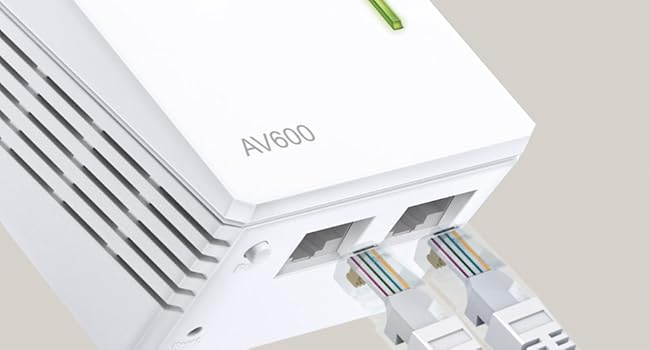
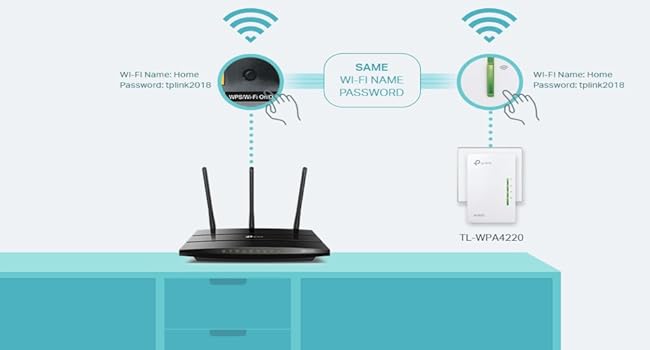
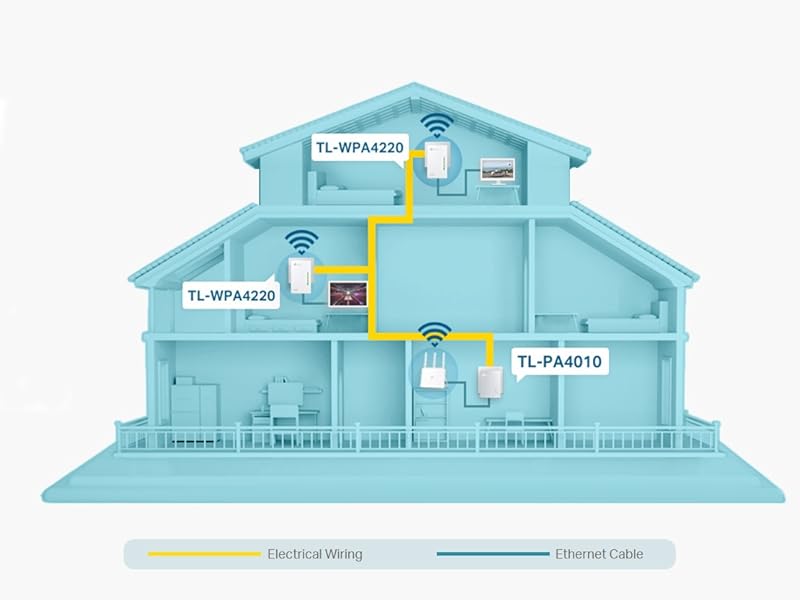
The TP-Link TL-WPA4220 TKIT is a 2-port powerline adapter starter kit delivering up to 600Mbps over your home electrical wiring, with a 300Mbps WiFi extender to eliminate dead zones. Featuring easy one-touch WiFi cloning, dual Ethernet ports for wired devices, and intuitive app management, it’s designed for quick setup and reliable high-speed connectivity across large or challenging spaces. Ideal for professionals craving seamless streaming, gaming, and remote work without the hassle of new cabling.


| ASIN | B07N1HDMFR |
| Best Sellers Rank | 1,022 in Computers & Accessories ( See Top 100 in Computers & Accessories ) 5 in Powerline Network Adapters |
| Box Contents | Powerline Wi-Fi extender (TL-WPA4220T KIT), Quick installation guide, RJ-45 Ethernet cable |
| Brand | TP-Link |
| Brand Name | TP-Link |
| Color | White |
| Colour | White |
| Compatible Devices | Desktop |
| Compatible devices | Desktop |
| Country of Origin | China |
| Customer Reviews | 4.2 out of 5 stars 6,858 Reviews |
| Data Link Protocol | Ethernet |
| Data Transfer Rate | 300 Megabits Per Second |
| Data link protocol | Ethernet |
| Hardware Interface | Ethernet |
| Hardware interface | Ethernet |
| Item Dimensions L x W x H | 5.4L x 4W x 9.4H centimetres |
| Item Type Name | 2-Port Powerline Adapter WiFi 3-pack Kit, , Range Extender, Broadband/WiFi Extender, WiFi Booster/Hotspot |
| Item Weight | 650 Grams |
| Manufacturer | TP-Link |
| Product Warranty | Manufacturer's 3 Years Warranty |
| Product dimensions | 5.4L x 4W x 9.4H centimetres |
S**T
Brilliant devices
We stream TV, game and video conference using these. Very easy to configure, just press the pair buttons; more detailed configuration (which many might not need and there is a detailed user manual you can download from tp-link) using the web interface is self explanatory but I have more IT experience than is typical; you should bear this in mind if you are less experienced. The web interface offers great flexibility, crucially it offers the all important MAC address white listing (I won't entertain any WiFi without this capability), for fun you can even schedule when the LEDs turn off at night which is actually useful in a bedroom. Find the web interface at the private IP address your broadband router assigns it, most likely starting '192.168', or download the tpPLC utility from tp-link and access your device's web interface via tpPLC by clicking on the little globe which pops out to the right of your device (give tpPLC a few minutes to sort itself out, then hover over your device and watch the globe pop out). Clicking the globe will open a browser at the appropriate IP address, the first time in you'll need to set a device access password (this isn't the SSID WiFi password). Each WiFi capable tp-link device will have a different IP address. The default device IP is provided by your router's DHCP server but you can statically configure. The TL-WPA8631P also provides a DHCP server with configurable address range (you can disable it). The WiFi has WPA/WPA2/WPA3 security, 3 power levels, a guest network off by default, parental controls for specified MACs, 2.4GHz and/or 5GHz can be switched off. There's facility to backup/restore settings, some settings can be synchronized (or not) across devices, you can list connected clients. I downloaded the user manual from tp-link to check it had the features I needed, it's comprehensive and runs to about 45 pages. My house has brick internal walls dating from mid 20th century and covers an area large enough to make WiFi difficult. The house wiring is approximately 15 years old, I have no ethernet cables between rooms, I rely on powerline data transmission using the house ring circuits. I find no problem running powerline devices on simple inexpensive extension leads (without power filtering) and somewhat surprisingly find these devices work between ring circuits; I don't understand why this is but it's likely because I don't understand my house wiring well enough (it was rewired before I moved in). The takeaway is that in my house the powerline works very well everywhere, even in the 'garden office' which has its own ring circuit and is 60ft from the house, but it might not follow you will get the same performance; from what I read your house electrical wiring is critical to your experience. I currently have four AV1000 (max 1000Mbps over powerline and with 1Gbps wired ethernet) and two AV1300 (max 1300Mbps over powerline with dual band wifi and 1Gbps wired ethernet). I downloaded the tpPLC utility from tp-link and run it on Windows 11; it shows the powerline speed being achieved between the various devices in my house is more or less half the max theoretical speed of the slowest device. Thus AV1300 to AV1300 is typically ~700Mbps, AV1300 to AV1000 is typically 400/500Mbps and AV1000 to AV1000 is also 400/500Mbps. The tpPLC utility shows these numbers vary over time over a small range. Whether these speeds are a realisable data rate for connected devices I don't know, I assume there are loses and actual connection speeds for equipment will be slower. The broadband speed to my house over fibre is 130Mbps. Speed tests from computers to the internet using ethernet cable connected to the 1Gbps ports show me achieving 120/134Mbps so powerline isn't causing a bottleneck and I'm seeing my full broadband speed. When I increase my broadband speed to 264Mbps it will be interesting to see if I see this greater speed over powerline. The AV1300 TL-WPA8631P offer 2.4GHz & 5GHz wifi. At 5Ghz I also achieve 120/134Mbps, at 2.4GHz this speed seems to drop sometimes to 100+Mbps; I was surprised by this because the TL-WPA8631P is rated at 300Mbps for the 2.4Ghz wifi. Otherwise horses for courses, 2.4GHz penetrates brick walls much better than the 5GHz and I switch off whichever wifi frequency works less well in the environment it is being used, typically using 5GHz only within a room and 2.4GHz between rooms through brick walls; it stops connected wireless devices sometimes choosing the less strong/fast signal; that's a typical wifi issue not limited to these devices. The wifi TL-WPA8631P have excellent configuration options when using their web interfaces, including MAC white listing which I use extensively, and one can restrict a MAC (eg a child's smartphone) so it can't access WiFi at night. Being able to restrict MACs on a school night is essential, they learn soon enough not to use up their 4G phone data. I have not tried using OneMesh, my broadband router doesn't support it and I don't find the need for Mesh WiFi. Rather than have all network names (SSID) the same and experience the commonplace wifi issue of a computer hanging on too long to a weak signal from a distant access point and not knowing which access point you are connected to, all SSID names are different and we know where we are connected; that is fine for us. If you walk around your house while in a video conference your mileage might be different and need Mesh wifi. Overall I have found these powerline devices amazing; for my purposes these devices beat dragging ethernet cables around the house. If you have Gigabit broadband and want to see it in distant parts of your property then wired ethernet might be the way to go (though I note powerline equipment with speeds faster than AV1300 are available which I have not tested) but for more modest speeds, like my 130Mbps broadband, and good house wiring, this might be all you need. I have not tried mixing different vendors, all our devices are tp-link. I've updated the firmware on both of the TL-WPA8631P, because it was there not because I needed to, I used the web interface but the downloaded tpPLC utility also has the facility to do this.
D**G
Finally found a wifi extender that works long range outdoors
Finally found a wifi extender that works! I needed wifi in our summerhouse for projector streaming and general browsing. I had tried various other types of extenders but nothing reached that far. This TP-link pass through powerline wi-fi extender is amazing. It reaches the summerhouse which is approx 50m away from the house and another 20m up on the terraced part of the garden in the tree tops 70m in total. Although it claims to work upto 300m, Wifi streaming and browsing is very fast. We have fibre speed to the house and the electric powerline to the summerhouse comes directly from the house electric supply. The extender comes with two ethernet cable cat5 but I bought and used cat8 cables instead for fast steaming. It was so easy to set up, just plug them into the electric supply close together. Plug in ethernet cable to router and wait until they pair up. Then just plug one of them in to the electric supply in the summerhouse. Its that easy, I couldn't be more pleased.
G**J
Great kit
### Overview The TP-Link TL-WPA4220 TKIT is a comprehensive solution aimed at improving the WiFi coverage in your home using Powerline technology. This kit includes a base unit and an extender that work together to deliver wired and wireless connectivity through your home’s electrical wiring. Designed for ease of use and flexibility. ### Setup and Installation Setting up the TL-WPA4220 TKIT is straightforward, requiring no technical expertise. The kit consists of two devices: the Powerline adapter and the WiFi extender. 1. **Plug and Play**: The base unit (Powerline adapter) connects to your router via an Ethernet cable and is then plugged into a power outlet. The extender is placed in a different room where enhanced connectivity is needed and plugged into a power outlet there. 2. **Pairing**: A simple press of the “Pair” button on both units establishes a secure Powerline connection. This process is quick, taking just a few minutes. ### Performance Over an extended period, the performance of the TL-WPA4220 TKIT remains reliable, with several key points of note: 1. **Consistency**: The connection is stable with minimal drops. The Powerline technology effectively leverages existing electrical wiring to extend network coverage, maintaining decent speeds. 2. **Speed**: While not the fastest solution available, the kit offers speeds up to 600 Mbps over Powerline and up to 300 Mbps over WiFi. This is sufficient for streaming HD videos, online gaming, and general web browsing. 3. **Range**: The extender significantly improves WiFi coverage, reaching areas that were previously dead zones. However, performance can vary depending on the quality of the home’s electrical wiring and the distance between units. ### Features 1. **Dual Ethernet Ports**: The WiFi extender includes two Ethernet ports, allowing for wired connections to devices such as smart TVs, gaming consoles, or desktop computers. This is particularly useful for devices that benefit from a more stable, wired connection. 2. **WiFi Clone**: The WiFi Clone button copies your router’s SSID and password, creating a seamless network experience. This means devices will automatically connect to the strongest signal without manual switching. 3. **Energy Efficient**: The kit includes a power-saving mode that reduces energy consumption by up to 85% when the network is idle. ### Reliability and Durability After prolonged use, the TP-Link TL-WPA4220 TKIT has proven to be a durable and reliable solution. The build quality is robust, and the devices have shown no signs of wear or degradation in performance over time. They continue to function efficiently, making them a dependable choice for long-term use. ### Pros and Cons **Pros:** - **Ease of Setup**: Simple plug-and-play installation with no technical configuration required. - **Stable Connection**: Consistent performance with minimal dropouts. - **Extended Coverage**: Effectively eliminates WiFi dead zones in larger homes. - **Wired and Wireless Flexibility**: Dual Ethernet ports for wired connections alongside improved WiFi coverage. - **Energy Efficient**: Power-saving mode helps reduce energy consumption. **Cons:** - **Speed Limitations**: Not the fastest speeds available compared to newer Powerline adapters or mesh systems. - **Electrical Wiring Dependency**: Performance can vary based on the quality and layout of home electrical wiring. - **Interference**: Potential for interference from other electrical devices, although this is generally minimal. ### Conclusion The TP-Link TL-WPA4220 TKIT 2-Port Powerline Adapter WiFi Starter Kit is a solid investment for those looking to extend their network coverage with minimal hassle. Its easy setup, reliable performance, and practical features make it a suitable choice for enhancing connectivity in various parts of the home. While it may not offer the highest speeds on the market, its overall stability and ease of use make it a valuable addition to any household looking to improve their internet experience.
J**S
Working, no dropouts, ping still good for gaming, speed depends on individual case-by-case
Why did you choose this product over others?: Not had this for one month yet, but so far, so good. I have tried a direct Ethernet cable to the hub and had slightly higher speeds, but in terms of practicality, this device does the job. It is very much faster the the old generation from 10 years ago. Having wifi also built into the remote endpoint does help with devices that require the lower 2.4 GHz range and has a split for 2.4 and 5 GHz so you can get the best out of Wifi equipment, like wifi light bulbs etc... The pass-through power point on the device is really helpful as I have limited sockets and need the device to be connected directly to the socket, not through a surge protector as per instructions... The only way to know how good the speed is will be to try the unit, as it is a case-by-case basis with a building's wiring and many other factors affecting it. Works for me. Wifi signal: Separate 2.4 GHz/5 GHz is useful, allowing 2.4 GHz only devices to connect without compromising on higher speeds for 5 GHz compatible devices. Speed: It can vary, however, my network is showing 543 Mbps on the tpPLC desktop app. The tpPLC app is what is needed to determine how the units are working on the mains wiring and for wifi configuration. The number fluctuates, but the connection has been good and working with games, downloads and streaming video. If I wanted to fully utilise a 1 Gbps connection, Ethernet direct link would be the only way, but for 100-120 Mbps internet, this device works well. Build quality: The device seems well constructed. Design: The design includes buttons for pairing on the mains between the hub-connected endpoint and the remote extension endpoint, making installation easier. There are clear instructions. It is best to check which button is which before plugging in the unit because it is harder to see once on the wall! Wireless connectivity: Again, having a separate 2.4 GHz is helpful as the hub I was connecting to did not have a feature to split this. Using this product has completely negated the 2.4 vs 5 GHz wifi issue. Gaming capability: Working fine with current ping (including ISP) at 13ms using an Ethernet cable connected to the device and stable data connection, and thus far no drop-outs.
T**D
Great
Great easy to set up, and use powerline wifi externer. Used to extend wifi capability in barn conversion where foil backed wall insulation was stopping signal. Works a treat. Not super fast but getting between 56 and 66 maps more than enough for our use. Un-intrusive design and at a great price point when I bought.
J**N
Wifi is poor
**Yes! This is a known and widespread issue** with your specific model. I found multiple user reports confirming exactly what you're experiencing: ## Known Issues with TL-WPA8631P Series: ### 1. **Documented WiFi Performance Problems** Multiple users report WiFi speeds of only 4-8 Mbps download despite good ethernet speeds (65 Mbps), with users noting "there's a fundamental problem with the wi-fi on these units" ### 2. **Ping Spike Issues** Users report ping spikes every 15-30 minutes that freeze games for 2-3 seconds, similar to your latency variation ### 3. **V4 Hardware Specifically Problematic** One user reported that their V4 replacement performed significantly worse than their older V2 devices in the exact same setup, getting 30-36 Mbps vs 55 Mbps with the older version ### 4. **Hardware vs Firmware Issue** Users tried firmware updates and different settings with "no difference," and multiple units showed identical poor performance, suggesting "a fundamental problem" ## **Confirmed Solution from Similar Model:** A user with the TL-WPA8630P (very similar model) fixed ping spike issues by "turning off IPv6 for LAN" on their router ## **Your Issue is Real and Known:** - ❌ **Not normal WiFi behavior** - ✅ **Documented problem with this model series** - ✅ **Particularly affects V4 hardware** - ✅ **Multiple users experiencing identical issues** ## **Next Steps:** 1. **Try the IPv6 fix** - disable IPv6 on your router's LAN settings 2. **Consider returning/exchanging** for a different model 3. **Use ethernet connections** where possible for critical devices **You're not imagining this** - it's a real hardware/firmware limitation affecting many users with this specific model.
J**.
Speed not great when connected to booster
Whilst they do provide WiFi in dead spots, the speed isn’t half where near the same as being connected to the main router. I tried one in my home office where WiFi technically reaches, but the speed connected to the booster isn’t even a third of what I get. I can no longer have these boosters synced with my WiFi settings otherwise my devices closer to the boosters (but still in range of the main router) will connect to the boosters instead, resulting in a lower speed. I have to keep the boosters with their own separate WiFi settings so that I can manually choose to connect to my main router (when in range) or these boosters, which is a shame. As a test, my phone connected to a booster got 17.9mbps right next to it, but connected to my main router which is on the floor below and at the other side of the house got 57.7mbps. Not returning due to the fact they do provide WiFi in dead spots, just a shame the speed is no where close to what I get from the main router connection.
M**Y
Almost boxed it up for a return. Glad I didn't!
UPDATE: After using this wonderful piece of kit now for several days, I can truly say - it is more than magnificent at what it does. Despite owning the title of 'grumpy, moany old man, I simply cannot find fault in this incredible bit of kit. I am so happy that I can watch smart TV, listen to my iPod Touch through my B&W speaker, use my iPad, my MacBook, heck, even my android phone hits in to it. I even tried it at the end of the very long garden just because I could and heck, I have a full on signal. I am simply over joyed 'Sometimes on a review you kind of feel excited and don't actually know where to start. On the one hand I find 'War & Peace' reviews about as helpful as the proverbial chocolate teapot; although, I have see some nice ones. I digress, so here it goes FWIW. This was a case of third time lucky. I'd purchased and returned two of the so-called things that plug in to a socket , press the WPS button while pressing the button on the router and job done. Sadly my new build cottage is protected by kingpin insulation lined on both sides with foil. No wifi is getting through it. I was on the cusp of giving up when I stumbled on this offering from TP-Link. Once I got my thick head around the fact it does not bounce a signal through wifi I was home and dry. Setting up is a breeze. I plugged in the ethernet cable to the smallest unit and it had a 'chat' with my router and set itself up. Then I plugged in the bigger unit, switched it on (don't press pair). And sorted; I thought all was good. All I wanted to do was use my iPod Touch to play music through a Bowers and Wilkins A7 in my den which is about thirty metres from my cottage. Nothing! Totally useless. Speaker I had plugged into the ethernet and into the unit; no worries light stopped flashing on my B&W unit. Turned on the iPod and nothing, it so would not pick up. In the box it all went while I went off to do other things, in a huff. Then I wondered. No good following the instructions, useless. Fine if you just want to power ups a TV or similar. Once you want to stream music or use an iPod there is something you NEED to do. Go into your iPod wifi settings and wait until you see the TP link highlighted. Click on it and enter the password which is handily printed on top of the TP Link unit. All went well. Choose music, hit the A7 speaker and voila, perfect signal. Been listening to my music all afternoon without dropping once. I now fully understand how these things work. I used the smaller unit as mentioned plugged into my router and only one of the two larger units. I suppose should I wish to use a TV in my shed or garage, I will use the second unit. I cannot tell you how pleased I am. JUST be sure if you have issues to look on your TV, speaker or whatever if it asks to join your TP Link unit. Enter th password and you really are JOB DONE! I got there for under £100.
Trustpilot
2 weeks ago
1 month ago