
![QNINE NVME Enclosure [Upgraded Version], Included 2 USB Cables, Fit for Samsung 960 970 EVO PRO WD Black NVME SSD](https://m.media-amazon.com/images/I/41XcW+BfhiL._AC_SL3840_.jpg)


desertcart.com: QNINE NVME Enclosure [Upgraded Version], Included 2 USB Cables, Fit for Samsung 960 970 EVO PRO WD Black NVME SSD : Electronics Review: Works great, includes good extras in the box - Looking at the available USB to NVMe drive kits out there, it is clear that there are a couple/few models that various companies re-package as their own. So it's always nice to find such a model that includes a couple of extras that address the shortcomings of the original. Immediately upon opening the QNINE box, it was clear that they got a few things right. First, inside the box was a plastic "kit box", which can hold the main unit plus a screwdriver and cables. For anyone who has purchased these types of kits, one of the annoying things is that the small pieces get lost over the years, so the inclusion of a kit box is very much appreciated. The QNINE box also includes an extra USB-C (both ends) cable, addressing a shortcoming of the original kit that only includes USB-C to USB-A. And it also includes an additional screwdriver that is much higher quality than the tiny one included in the original kit. (The extra screwdriver is the one thing that can't fit into the plastic kit box.) Disassembling the unit to insert the NVMe drive was easy. Take out two screws on the end and the circuit board slides out. The main difference between attaching the NVMe drive in this unit vs. a motherboard is the screw holding down the drive to the board. Instead of fastening an attachment screw to the top of a standoff, you actually detach the standoff from the bottom, and the reattach it by slotting the board into the groove at the top of the standoff. Then you re-fasten the screw on the bottom. Upon plugging it into a USB port, the NVMe drive was immediately recognized, and the drive helpfully has a blue indicator light right next to the USB port showing that it is connected. Like any hard drive, if the drive has never been initialized, you need to go into Disk Management and initialize and format the drive before it can be used. (Windows 10 users can get to Disk Management by right-clicking the Start button and selecting Disk Management from the popup menu.) Performance seems to be just what you would expect from any USB connection. It will never have the full speed potential of a Thunderbolt 3 connection, but it does seem to perform up to what you're used to with USB devices. Perfect for an extremely portable drive that can plug into any USB port and provide up to 2TB of storage. (That's the largest NVMe drive at the present.) Review: Best for my application MacOS - I borrowed my brothers original QNine Enclosure, because I installed the Gigabyte 1TB NVME SSD. When installing MacOS 10.15.5 on that drive, I was able to boot up the OS, and even if the computer went into sleep mode, I was able to wake it up. Although it was a bit slow on wake up, so I went out to try and find a faster drive. The problem is, with the Speedbyte enclosure with fan and the TDBT enclosure, whenever the computer would go into sleep mode, the drive wouldn't "wake" up quickly, so it would stall and freeze because I can only assume it couldn't find the OS quick enough. So I returned each one. I found this QNine and it works just like the older model, so I'm keeping this one and giving my brother back his enclosure. The Speedbyte and the TDBT enclosure seem perfectly suitable to being used like a Thumb Drive.


| ASIN | B07J9WNN9H |
| Brand | QNINE |
| Compatible Devices | Laptop |
| Connectivity Technology | USB |
| Customer Reviews | 4.3 out of 5 stars 195 Reviews |
| Hardware Interface | Solid State Drive |
| Manufacturer | QNINE |
| Max Number of Supported Devices | 1 |
| Memory Storage Capacity | 953.87 GB |
| Supported Devices Quantity | 1 |
| UPC | 680580415144 |
T**D
Works great, includes good extras in the box
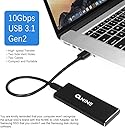
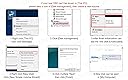
Looking at the available USB to NVMe drive kits out there, it is clear that there are a couple/few models that various companies re-package as their own. So it's always nice to find such a model that includes a couple of extras that address the shortcomings of the original. Immediately upon opening the QNINE box, it was clear that they got a few things right. First, inside the box was a plastic "kit box", which can hold the main unit plus a screwdriver and cables. For anyone who has purchased these types of kits, one of the annoying things is that the small pieces get lost over the years, so the inclusion of a kit box is very much appreciated. The QNINE box also includes an extra USB-C (both ends) cable, addressing a shortcoming of the original kit that only includes USB-C to USB-A. And it also includes an additional screwdriver that is much higher quality than the tiny one included in the original kit. (The extra screwdriver is the one thing that can't fit into the plastic kit box.) Disassembling the unit to insert the NVMe drive was easy. Take out two screws on the end and the circuit board slides out. The main difference between attaching the NVMe drive in this unit vs. a motherboard is the screw holding down the drive to the board. Instead of fastening an attachment screw to the top of a standoff, you actually detach the standoff from the bottom, and the reattach it by slotting the board into the groove at the top of the standoff. Then you re-fasten the screw on the bottom. Upon plugging it into a USB port, the NVMe drive was immediately recognized, and the drive helpfully has a blue indicator light right next to the USB port showing that it is connected. Like any hard drive, if the drive has never been initialized, you need to go into Disk Management and initialize and format the drive before it can be used. (Windows 10 users can get to Disk Management by right-clicking the Start button and selecting Disk Management from the popup menu.) Performance seems to be just what you would expect from any USB connection. It will never have the full speed potential of a Thunderbolt 3 connection, but it does seem to perform up to what you're used to with USB devices. Perfect for an extremely portable drive that can plug into any USB port and provide up to 2TB of storage. (That's the largest NVMe drive at the present.)
J**Z
Best for my application MacOS
I borrowed my brothers original QNine Enclosure, because I installed the Gigabyte 1TB NVME SSD. When installing MacOS 10.15.5 on that drive, I was able to boot up the OS, and even if the computer went into sleep mode, I was able to wake it up. Although it was a bit slow on wake up, so I went out to try and find a faster drive. The problem is, with the Speedbyte enclosure with fan and the TDBT enclosure, whenever the computer would go into sleep mode, the drive wouldn't "wake" up quickly, so it would stall and freeze because I can only assume it couldn't find the OS quick enough. So I returned each one. I found this QNine and it works just like the older model, so I'm keeping this one and giving my brother back his enclosure. The Speedbyte and the TDBT enclosure seem perfectly suitable to being used like a Thumb Drive.
P**Z
Solid Performance - Heat Control and Info Provided could be better.
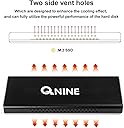
Really 3.5 stars... but extra 1/2 for value. Pros- - Solid metal case. Feels and looks nice - Good performance - just shy of 1GB/sec read and writes. Nearly 2X as fast as traditional SATA SSDs or even the Samsung T5. This is about the max you can expect from USB3.1. (see cons below). - Drive get hot, but apparently not hot enough to throttle performance. Drive longevity? Cons - - No thermal pads included - would be nice to control temp more. Also the slide-in construction, rather than closing like a clamshell might prevent the use of these anyways. "Vent holes" seem pointless and I can't imagine they do much for temperature. - The info provided here that you could expect performance of up to 2,100mb/sec... yes, from the NVME drive but NOT IN THIS ENCLOSURE. Vendor should remove graphic included here (crossed out with red X). - The enclosure's USB-C socket seems to be too shallow for the cable... and it does not plug in as deeply as it should.
S**N
works very well
SSD throttled though, had to add a thermal pad to the SSD controller so it could touch the enclosure otherwise the SSD controller got too hot and the speed got lower and lower when copying large files it disconnects sometimes when copying lots of files, and i have to unplug it and plug it back in 99% of the time it works super well though and is very fast
R**G
Super fast!
(Note: I got the medium-sized one, with the air holes in the sides, that says "USB3.1 to PCI-e NVMe SSD ENCLOSURE" on it.) I'm very happy with this enclosure. It comes with a nice little clear hard plastic travel case, and both a USB-A and USB-C cable, as well as 2 high-quality screwdrivers! It takes about 2 minutes to pop an SSD in or out of the enclosure, and requires these screwdrivers, but it's very nice because one of the included screwdrivers is small enough to fit (with the enclosure and cables) in the travel case. The instructions could be a little better -- the screw that pegs down the free end of the SSD drive looks initially like it's missing, but then you realize that it's actually that gold cylinder already attached; to the board; you have to unscrew the peg, fit the SSD into the notch in it, and then screw the gold peg itself back in. I was able to get the following speeds writing to it: (MB = megaByte) 460 MB/sec using USB-C port on Dell TB16 dock 300 MB/sec using direct USB-A to side port on Dell XPS 15 9570 laptop 160 MB/sec using USB-A port on Dell TB16 dock The read speeds are almost double that. I got about 700 MB/sec read speeds when connected to the USB-C port on my Dell TB16 dock.
W**G
Connected for only a few times
I enclosed my desktop's SSD in it hoping to using it as a external drive. When connected this thing doesn't show up in devices and drives, it shows up in disk management but I a not able to initialize it due to a 'fatal error'. When I was desperate I plug/unplug this thing many times and suddenly it worked, shows up right away and I was able to copy some of my older files to my new laptop. The other time it worked it only showed up for two minutes and I was never able to access it ever since. I thought it was the cable' problem s I switched another USB-C, doesn't work. Now I bought another encasement and the drive works perfectly fine. So I know its not the drive's problem nor the cables. The electronics inside this product isn't doing what it was supposed to. Poor quality overall.
E**A
the included thermal heat pad
make sure when you apply the included thermal heat transfer pad, that you peel off the clear plastic protective layer off both sides of it first before you apply it otherwise heat transfer will not be optimum - do not apply it to the topside of your NVME device, it will come off as you are inserting the assembled device back into the metal case, apply it on the underside of your NVME device and the PCB, the PCB will be a better method to dissipate the heat generated rather than having no thermal pad at all. you may need to fold the thermal heat transfer pad in order to obtain proper contact between the IC chips on your NVME device and the controller PCB to effectively transfer the heat from your NVME device. i recommend purchasing additional thermal heat transfer pads as the included pad is simply not enough to accommodate the surface area of the NVME device, the included thermal heat transfer pad is too thin. additionally, if you are careful and comfortable operating the device outside of the metal case, i recommend it as heat is trapped within the metal case, the device will certainly stay cooler outside of the metal case. by all means, the metal case needs much more ventilation holes in order for this to operate without over heating, not just on the sides but on the top and bottom. i am operating mine outside of the metal case with additional thermal pads between the NVME device and the PCB.
R**F
Can be found cheaper, but works as advertised.
I knocked two stars off of this because I think it is being sold at an inflated price. You can find these elsewhere for as low as $20. That being said, they gave me a nice screwdriver and two cables with it. One type c to a and one type c to c. Other than that it worked perfectly and it does what it is supposed to
Trustpilot
3 weeks ago
2 days ago