Buy anything from 5,000+ international stores. One checkout price. No surprise fees. Join 2M+ shoppers on Desertcart.
Desertcart purchases this item on your behalf and handles shipping, customs, and support to Brazil.
🖱️ Elevate your workflow with ergonomic precision and unstoppable comfort!
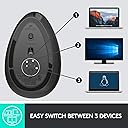
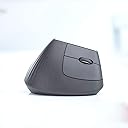
The Logitech MX Vertical Wireless Mouse is a scientifically designed ergonomic mouse featuring a 57° vertical angle and natural handshake position to reduce wrist and forearm strain by 10%. Equipped with a 4000 DPI high-precision optical sensor, it requires 4x less hand movement, enhancing accuracy and reducing fatigue. It supports seamless switching between three devices via Bluetooth or USB receiver, and boasts a rechargeable battery lasting up to 4 months with quick-charge capability. Its textured rubber surface and thumb rest provide superior comfort, making it ideal for professionals seeking to boost productivity while protecting their posture.


| ASIN | B07FNJB8TT |
| Additional Features | Wireless |
| Antenna Location | Office |
| Are Batteries Included | Yes |
| Are Batteries Required | Yes |
| Battery Average Life | 4 months |
| Best Sellers Rank | #27 in Computer Mice |
| Brand | Logitech |
| Built-In Media | mx vertical, quickstart guide, receiver, usb C cable |
| Button Quantity | 4 |
| Color | GRAPHITE |
| Compatible Devices | Windows + macOS + iPadOS |
| Connectivity Technology | USB |
| Customer Reviews | 4.4 out of 5 stars 14,838 Reviews |
| Enclosure Material | Graphite,Rubber |
| Global Trade Identification Number | 00097855144461 |
| Hand Orientation | Right |
| Hardware Platform | Laptop, PC |
| Item Dimensions L x W | 7.5"L x 6"W |
| Item Type Name | Logitech MX Vertical Advanced Ergonomic Mouse, Wireless via Bluetooth or included USB receiver |
| Item Weight | 0.5 Pounds |
| Manufacturer | Logitech |
| Mfr Part Number | 910-005447 |
| Minimum Required Operating System Version | Windows 10 |
| Model Name | MX Vertical Advanced Ergonomic Mouse |
| Model Number | 910-005447 |
| Mouse Maximum Sensitivity | 4000 Dots per Inch |
| Movement Detection | Optical |
| Movement Detection Technology | Optical |
| Number of Batteries | 1 Lithium Polymer batteries required. (included) |
| Number of Buttons | 4 |
| Operating System | Windows 10, 11 or later, Linux, Chrome OS, macOS, iPadOS, Android |
| Power Source | Battery Powered |
| Range | 10.0 meters |
| Special Feature | Wireless |
| Style Name | Right-Handed |
| Theme | Computer Accessories, Ergonomic Design, Office |
| UPC | 097855144461 |
| Unit Count | 1.0 Count |
| Warranty Description | Manufacturer’s warranty can be requested from customer service. |
J**S
Finally, a comfortable vertical mouse for guys with large hands!
I've been using the Logitech MX Vertical Wireless Mouse for about 8 years now, and I love it. Any time I have to use a traditional mouse it's an uncomfortable disappointment. If you haven't used a vertical mouse yet, there are a couple things you need to know. First - this is just a normal mouse, but it's turned about 60-degrees to the right. This let's your hand rest on the mouse in the natural position your arm wants it to be in without any effort to rotate. Second - you will knock it over, repeatedly, for a few weeks. Because you're used to a mouse that's a just an inch and a half or so tall, your natural movement from keyboard to mouse is going to be interrupted by the height of the MX Vertical. In time, you will get used to this, but for a week or two, you will knock it over when moving to the mouse, and when moving back to the keyboard. Don't worry, your muscle memory will change and this will stop. Third - once you get used to using the MX Vertical, you won't want to use any other mouse. It's a dramatic change in ergonomics, and you will feel the strain your wrist and forearm are under any time you have to use a traditional mouse. There are other verticals that are also great, but as a guy with large hands, this is the best I've found. I have 4 of these now - one at my office, one at my dining room table, one at my desk, and one that travels in my backpack. I don't need all of these, but its handy having them where I need them. Another reason for this is the mouse can pair with 3 devices. I have different devices in each of these locations, so it's handy not having to re-pair when I move between locations. The MX Vertical fits my hand perfect, and all buttons are where my fingers and thumb are naturally positioned. I've dropped them, knocked them down, bumped and tossed them and they keep on working properly, so from a durability standpoint, this will last. It's easy to pair with a push of a button - working with my Windows computers, MacBook, android phone and iPad. This thing just works great! The only downside I'd mention is the coating. After a couple of years, the coating tends to migrate where you apply pressure. This is most apparent where the thumb and pinky finger rest. This doesn't cause any functional issues, and is entirely cosmetic, but just be aware that after a couple years it won't look pristine. All-in-all, this is the vertical mouse to buy if you're a guy with larger hands. Get one, get used to it, and you won't regret it.
R**9
A Truly Ergonomic Mouse
Other not completely flat mice claim to be "ergonomic", but the only way to completely remove stress from your forearm when using a mouse is with a "vertical" mouse. My 2020 K75575WW Kensington ergonomic vertical mouse developed a problem with the left button "stuttering" so that it sent multiple button clicks when pressed just once. I liked the Kensington quite a bit. But it always just a little bit on the "not quite as solid as I would like" side, and failing after just 2.5 years confirmed this. So I wanted a more solidly build mouse. A search for "ergonomic mouse review" showed that the Logitech MX Master 3S was clearly the best ergonomic mouse available. At $100 it was several times more expensive as others including the latest Kensington vertical mouse. But sometimes furgal doesn't mean the least expensive. Sometimes it can mean the most expensive if that comes with better performance, features and lifespan. So I ordered it. And while it is indeed an incredible mouse, the angle is only about 20 degrees. The result is that while there is some reduction in forearm stress compared to a flat mouse, it wasn't enough for me. By the end of my very long days driving my mouse almost as much as I drive my keyboard, I could feel the tension building up in my forearm. So after a week I returned it and bought this Logitech MX Vertical. It is slightly less expensive than the MX Master 3S, but still much more expensive relative to other options. And while it is lighter and a little less substantial feeling in my hand than the MX Master 3S, it still feels very firm and solid. Most importantly keeps my hand in the neutral position with my fingers at about 70 degrees. A great feature of the MX Vertical shares with the MX Master 3S is the thumb rest. The Kensington didn't have this and so my thumb rested on the desktop. If it was a bit warm and my hands would sweat my thumb wouldn't slide smoothly and I would have to lift my thumb off the desk when I went to move the mouse. Not a horrible thing, but if you spend 8+ hours mousing around it gets tiresome. The button clicks are crisp. Best of all when the button bottoms out it feels like it is pressing against the case. It doesn't feel like travel is being limited by the switch itself bottoming out like the Kensington felt like it did. My hope is that this will keep the switch from wearing out so fast as happened with the Kensington. One slight negative of the MX Vertical is that I don't feel like I am quite as accurate in being able to move the cursor to a specific spot on the screen without some amount of conscious effort. Instead it doesn't go exactly in the direction I intended and overshoots where wanted it to stop. As such it might not make the best mouse for video games. [UPDATE: There is a bit of a learning curve in moving the mouse accurately. In the last couple weeks my need to make a more conscious effort to move the mouse to a specific spot on the screen is going down. Still think it is likely to not be as accurate as a flater mouse]
S**E
Ergonomic, Comfortable, and Highly Functional Mouse
The Logitech MX Vertical Wireless Mouse is an outstanding ergonomic mouse that truly reduces wrist and forearm strain. Its vertical design feels natural and comfortable, even during long hours of use, making it a great choice for anyone concerned about repetitive strain or discomfort. The mouse connects seamlessly via Bluetooth or the included USB receiver, and the ability to switch between three different devices is incredibly convenient for multitasking. The precision and smooth tracking make it excellent for both work and creative tasks. Overall, this mouse combines comfort, functionality, and versatility in one sleek package. It’s well worth the investment for anyone looking to improve ergonomics and productivity.
J**.
Excellent mouse
Excellent vertical mouse. Much more comfortable than a regular mouse. The scroll wheel works as a third button which is useful in the CAD (computer aided design) program. The better resolution is important with the CAD work too. It allows me to pick line end points easily and quickly. The reason for deducting one star is that the first one only lasted about a year or so before the scroll wheel stopped scrolling. It works intermittingly now. But I bought another to replace it.
T**A
High quality, Comfortable.
Works good, battery life is very long never had problem, connectivity is always stable, is comfortable in hand(for me at least), had some problems of arm pain sometimes before using this mouse, but never after using this mouse.
A**Z
Highly recommend! Best in the market bar none
I would like to say this is the perfect mouse and probably the best mouse you could buy on the market and it doesn't even come close. You can modify the mouse however you like with a click on the app. It's truly been a life changing experience with this mouse. With that being said, the perfect mouse does have a few flaws but nothing that would make me not recommend it to anyone only just be aware of these things. 1. It's a vertical mouse, sometimes it gets in the way and your wrist will knock it over, it will happen I promise you. 2. Logitech has a Flow feature meaning you can connect the mouse to three different computers at once if need be, qyeah I'll say it again, three computers connection! Wow! Well I only use it for two computers, the Flow works flawlessly but my gripe is how it sometimes doesn't sync with my Logitech keyboard Ergo K860, unfortunately, the keyboard doesn't come with the same Flow feature meaning I have to depend on the mouse to do it and it doesn't work sometimes and I have to switch between the mouse transition button to the key board transition button which makes for a long headache sometimes. 3. Believe it or not connection is sometimes an issue, it losses Bluetooth connection often and it doesn't matter which computer I use I have the same issues at work and home so I use the dongle for straight connection. Oh wait there are issues with the dongle connection too? Say it ain't so? It is! The issue comes when you have two dongles like me, the keyboard and the mouse, and try to connect both, like I said I have two computers and Logitech will not allow for their ”universal dongle” to connect to two different computers at the same time terrible design flaw. 4. Again, this mouse is incredible but it can sometimes be a little too much incredible, I know, I know but hear me out. The mouse is flawless fast, one quick wrist jerk and that mouse pointer on the screen is jumping all over the place, it's been hard to find a happy medium with the pointer, it's either you adjust to slow it down, making it too slow, or adjust to make it fast, which is too fast, again no happy medium even though there are plenty of settings to toggle with. I believe most vertical mouse tend to be that way anyway only with this mouse you can really tell the difference and that could be a good thing or bad thing depending on your perspective, it's sometimes a bad thing for me on Excel sheets. So the final verdict is this is still the best mouse out there and worth every penny and I would still give this 10 stars if possible, it's been a wonderful experience with this mouse. Again, the negatives are not bad or to make someone not buy it and considering the other features this mouse can do I recommend anyone who works all day on a computer to buy this product I highly recommend it.
A**Y
9.8/10, would buy again!
I bought this mouse in Sept 2020 and it's been absolutely fantastic. Only now, 5 YEARS later, and under extremely heavy usage in both work and gaming pretty much every day, has it started to wear out and develop an issue with the left click button. Most mice don't last anywhere near that long under the same conditions but this thing was a freaking soldier! Pros: Vertical angle - this is the main reason to buy this mouse and I did notice after extended use sessions, significantly less strain on my wrist at the end of the day/night. FYI I also have a wrist wrest on my mouse pad to fully maximize this benefit. The 57 degree angle felt really good to me and didn't inhibit my usage or performance in any way. Build Quality - Solidly built to handle the needs of the most demanding power users. Battery - The battery life lasts a super long time and it warns you when its getting low, plus you can still use it while its plugged it and charging. Charging time is fast and I haven't noticed any significant drop in battery lifetime over many charge/discharge cycles. Sensor - The DPI is high enough for gaming and also variable enough that you can lower it with a single button push to allow a 'normie' to use it when needed. Doesn't require a larger initial movement to begin tracking, making very fine and intermittent adjustments possible. Scroll Wheel - Each single 'tick' of the scroll wheel is soft enough that if you need to scroll a lot you can make it go several at a time easily for faster scrolling. Also its completely silent when scrolling slowly. Coating/Materials - The rubber grip is nice and not difficult to clean with a good spray and a microfiber cloth. The glide coating on the bottom held up very well and it still slides across the pad smooth as butter. The buttons have a matte texture to them that feels premium, which held up fairly well to being worn down. Weight - Well balanced, not too heavy, not too light. It's not adjustable like some high end gaming mice but tbh it doesn't really need adjusting anyway. Bells and Whistles - The multi device sync also works flawlessly and connects to the other devices very quickly when you switch with the button on the bottom. I never got to playing around with 'Flow'. Software - Come free of any bloatware extras and doesn't appear to consume any more system resources than it needs to while running in the background. Cons: The price maybe? You could easily spend more than this on a mouse and end up with an inferior product. ~$90 every five years isn't terribly unreasonable for something that works this well for >8 hours a day every day. If you don't clean it regularly the coating can get a bit oily after a while, and you pretty much have to use a microfiber cloth as nothing else leaves it clean. Sometimes on a hot day it can leave your hand getting a bit sweaty, not because the mouse produces any heat (it doesn't) but because the grippy coating will absorb warmth from your hand and hold on to it for a bit. Maybe the texture on the main buttons could be a little more wear resistant. Eventually I wore off a small fingerpad sized spot on the left click button and that super smooth bit of plastic ends up feeling kind of oily even though its clean. Final thoughts: 9.8/10, would buy again. The only thing I really wish this had was the ability to adjust the vertical angle. After some very long use sessions being able to switch to a slightly shallower angle would help to reduce the eventual strain even further. And if we're shooting for the moon here, I'd love it if you could swap out the outer body to a ventilated/open style body like GravaStar's mice to keep your hand from ever getting sweaty.
T**E
Experience after one year of usage
I had mainly used a MX Master 2S before this and because of my heavy usage I did start to feel uncomfortable after a few hours of use every day and that's when I decided to purchase MX Vertical. Now after almost 9 months of usage this has become the mouse I use on a daily basis, completely replacing MX Master 2S. Comfort: It took me about a day or two to really get used to using it because of the positioning and ever since then my wrist has never felt any discomfort, literally. I don't have a mouse pad but because of the angle that my wrist is contact with the desk when I use it, this has never been a problem. What I also love about the ergonomic design is that my hand can actually just rest on it when not doing specific tasks, and it just fits my palm perfectly. Functionality: I don't use it for gaming so I can't comment on that. However, comparing it with my Master 2S, there are some very obvious disadvantages. If you use Excel sheets a lot, or anything that requires horizontal viewing, the scrolling option is terrible. You can set up the function key on Logi Options+ and I use the side buttons for scroll right+left mainly because how easy it was to use with the Master 2S's side scrolling buttons. It is not comparable at all. With Master 2s, horizontal scrolling is smooth and precise. With this, it's basically useless. There are sites that just aren't responsive to the side buttons and when they do, you can never get to the precise point you want. Huge disappointment with that because I don't really use the side buttons for anything else. There is also no scrolling control with the middle button unlike the Master 2S, so you can't really scroll vertically as fast as you can when using Master 2S either. However I do use the middle button sometimes to just do the job for me so I'm ok with its basic functionality. The top button is mainly used as a look-up button for me, so far its working pretty well and honestly it probably makes not much difference if they just completely take this button out for me. Maybe some people can find use in it as a switch for scrolling or mouse speed, or something else. Overall, the customizability of these buttons is very good, and depending on personal use, I can see it being very useful. Battery life: Battery life is fantastic, never had any problem with it yet. I haven't really kept track but with my heavy daily usage (probably 10+ hours with no intense gaming), it can usually go for more than a month. You can also use it while it's being charged. Durability: I have unfortunately knocked it over the desk a couple times on hard vinyl floor and there seems to be no problem with it at all. Before purchasing this I saw some comments about how it stopped functioning after being dropped to the floor and I was really worried about it. However that is not my case at all. It is very durable in my opinion and does its job perfectly even after dropping it a few times. Overall, extremely comfortable to use. It helped with my wrist pain tremendously and now I use it for hours without feeling any discomfort. The functionality is severely disadvantageous compared to Master 2s and 3s, and possibly other gaming mouses as well, but if you are here because of wrist pain, this is the right product.
A**Y
Ergonomic
Great product for bigger palms. Reduces the strain in the wrist.
M**R
Caminho sem volta pra qualidade!
Estou com este mouse a 5 anos e foi a melhor decisão da minha vida.Hoje ele sai em promoção e me pergunto se eu nao deveria comprar outro. Ergonômico, nao sinto incômodo usando por horas, é agradável configurável pelo logi options... esse aqui os estudos dos engenheiros valeram a pena 👌🏾🤌🏾
J**I
Cómo y de rápida adaptación
Es muy cómodo trabajar con este tipo de mouse. Antes de comprarlo me preocupaba el hecho de que no me fuera a acostumbrar, sin embargo es el único mouse que he utilizado desde que me llegó. El primer día lo hice para forzarme a utilizarlo, los siguientes días me sentía incómodo con mi anterior mouse ( Corsair M65 ). Aún no puedo asegurar que la batería, una vez cargada completamente, le dura 4 meses puesto que apenas tengo con él 3 semanas. Los materiales son de muy buena calidad y es muy agradable al tacto. Su configuración es muy sencilla. Tengo, además, un trackball Logitech ERGO M575, el cual es también muy cómodo sin embargo no lo utilizo para diseño puesto que no tiene la misma precisión. Tuve alguna vez un problema con el reconocimiento de los dispositivos a través de Logitech Unifying, el cual solucioné instalando la aplicación SetPoint, también de Logitech. Además se puede conectar a través de Bluetooth o a través del cable USB-C ( incluído ), lo cual es una gran ventaja. Cabe mencionar que, a diferencia del ERGO M575, el MX Vertical Mouse no cuenta con el compartimiento para guardar la antena Unifying. El mouse es muy ligero. Quizás me hubiera gustado que fuera ligeramente más pesado pero no es un inconveniente. Es cómo tanto en manos pequeñas como grandes. No he utilizado la característica de Logitech Flow, así que no puedo opinar al respecto.
R**.
Great mouse
One of the best if not the best mouse i have owned.
H**D
Best
One of the best, alot of options that make every thing so easy
Trustpilot
3 weeks ago
2 months ago