We remain fully operational. Our teams are working around the clock to ensure your deliveries continue safely.

DOWNLOAD THE APP


Copyright © 2025 Desertcart Holdings Limited
DOWNLOAD THE APP
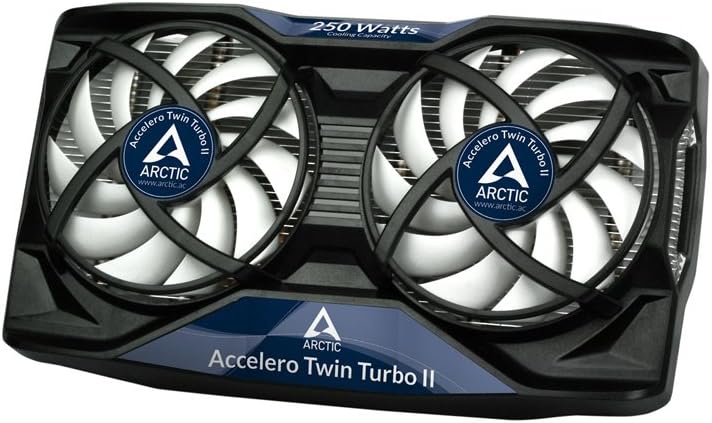


🔥 Cool down your game, heat up your performance! 🔥
The ARCTIC Accelero Twin Turbo II VGA Cooler is engineered for superior cooling performance with 5 copper heatpipes and dual 92mm PWM fans, ensuring your GPU stays cool even during intense gaming sessions. Its ultra-quiet operation, versatile compatibility with various graphics cards, and enhanced RAM and VR cooling make it a must-have for gamers and enthusiasts alike.


| ASIN | B005FYCFG8 |
| Brand Name | ARCTIC |
| Compatible Devices | AMD Radeon : RX 5700 (XT), 5600 XT, 460, R9 380(X), 370X, 285, 270 (X), R7 370, 360, 265, 260 (X), 250 (X), 240, HD 8870, 8760, 7870 (GHz), 7850, 7790, 7770 (GHz), 6970, 6950, 6870, 6850, 6790, 6770, 6750, 5870, 5850, 5830, 5770, 4890, 4870, 4850, 4830, 4770, 3870, 3850, 2600XT, X1950 (XTX, XT, Pro, GT), X1900 (XTX, XT, GT), X1800 (XT, XL, GTO), X1650 (XT, Pro), X1600 (XT, Pro), X1550, X1300 (XT, … |
| Cooling Method | Air |
| Customer Reviews | 4.3 4.3 out of 5 stars (720) |
| Global Trade Identification Number | 00872767004450 |
| Included Components | 1 |
| Item Part Number | DCACO-V540000-BL |
| Item Weight | 1.06 Pounds |
| Manufacturer | ARCTIC Inc |
| Material Type | Copper |
| Maximum Rotational Speed | 2500 RPM |
| Model | DCACO-V540000-BL |
| Noise Level | 0.5 Decibels |
| Number of Items | 1 |
| Part Number | DCACO-V540000-BL |
| UPC | 191120071794 008727670445 872767004450 |
| Unit Count | 1 Count |
| Voltage | 12 Volts |
| Warranty Description | 6 years |
| Wattage | 250 watts |
L**V
Excellent Replacement VGA Cooler
I have this item installed on a AMD Radeon HD 6950. I purchased this item for two reasons: the stock cooler was extremely loud and didn't do a very good job at cooling. INSTALLATION The installation procedure was straightforward, though the installation instructions themselves could have been more clear. You are instructed to mix the G-1 for five minutes and then apply it to heat generating circuitry components on your GPU. The problem I found was its not very clear what consistency the solution would have when its ready or the amount needed to apply to each component. Because the solution is non conductive, I ended up over coating these components significantly. There isn't a lot of the G-1 to go around, and because of the way its mixed, I didn't know if there would be enough. I did end up with enough, however. Installing the heat sink/fan assembly after the G-1 has set was easy. The offsetting spacers and the holes for mounting are specified according to your GPU model; the adhesive for these spacers are tough to remove and manipulate with only your fingers. The assembly also takes up the video card slot and, realistically speaking, the next two slots in your case, so you use a total of 3 slots including the slot the video is installed in (and you would not be able to Crossfire/SLI a card with this on it). Besides this, I have no comments except that it is advantageous to remove the fan assembly from the product while attaching the heat sink to the GPU. PERFORMANCE As stated the, the stock cooler for my GPU was loud and performed poorly. At idle, the unit maintained temperatures on the core of ~50 degrees Celsius, and still made significant noise at 5 feet. At load, the temperatures would get to ~80 degrees Celsius and the noise was unbearable. After installation of the Twin Turbo 2, the GPU maintains an idle temperature of ~40 degrees Celsius and a load temperature of ~65 degrees Celsius, with barely any noise from either scenario. I have also been able to overclock the unit ~5% more than with the stock setup. FINAL THOUGHTS Top performing aftermarket GPU cooler - the performance of this unit really shines. I have some reservations about the installation process, but if you don't know your way around computer hardware you wouldn't be installing one of these, and if you do, you'll probably work through the installation well enough anyways.
M**G
Fantastic cooler, nice and quiet.
Fair Warning: This is not a quickie installation. Make sure you have a few things on hand first before you get started. 1) Clear workspace, plenty of light. 2) Cleaning pads and nail polish remover - for the old thermal paste 3) Rubber eraser - you'll use this to clean the surfaces before mounting 4) Appropriate screwdrivers for the screws on your card I installed this on an XFX6870. The installation took about 90 minutes from start to finish as I was taking my time, pre-fitting everything, and double-checking before using the adhesive, and then I allowed the adhesive paste to cure overnight before reinstalling the card. The adhesive paste works well - I've had no issues with any of the newly mounted heat sinks for RAM or VR's drop off. While they recommend a minimum of 5 hours curing time, I would allow additional time just to be on the safe side. MAKE NOTE: You want heat sinks installed on any chip the original heatsink assembly touched. Look for thermal tape or other markers to indicate which chips need coverage. The thermal adhesive has a low set time, so make SURE you're ready to apply everything in one go as you only have about 10 minutes after mixing the 2-part adhesive to get everything applied. Once you're done, the results are spectacular. With an ambient of 70-72F, my temperatures on this card went from 90C (194F) under load (and LOUD) to whisper quiet and 60-62C (140-143F) - an absolutely amazing difference. Where my machine at idle was fairly noisy before, it's now hard to tell it's running. No other changes were made to the assembly, so the thermal drop is exclusively attributable to this HSF. For XFX users, make sure you retain the original HSF assembly to retain your warranty coverage.
K**K
Works great, quiet and cool running, if your willing to risk the moderately difficult install
So I bought a pny 970 and it had some bullcrap blower fan. Nobody likes blower fans right. This thing was louder than any fan I've ever heard, like I am in awe how NVidia can actually use these types of coolers on their reference cards and think its ok. They run hot, run loud, and just suck in all aspects. Even at like 40% speed this thing was a leaf blower. I had enough after 3 days and ordered this aftermarket cooler. VERY nervous about something like this as would be expected, spending hundreds of dollars on a graphics card you have to be careful what you do to it. I took the risk and hesitantly tore my shiny new GPU apart. After about an hour of fiddling around with instructions and youtube videos I got this puppy secured on. I plugged it in and powered it up. Wow, its actually working! PC and GPU booted up just like normal, so then begins the testing. With msi kombuster I ran the card at max load. I couldn't get it going any higher than 50 C no matter how hard I tried. Set fan speed to minimum possible of 22% speed. Still 50 C or under at max load. 26 C at idle. I overclocked 200 MHz, upped power to 105% +25.mv on the voltage. Got a nice increase in frame rate but the temps? A whopping 51 C with the fan speed forced at MINIMUM. I then forced the fan to max and the temps started dropping to like 47 C even with a pretty decent overclock. So to sum it up, this thing works. Works VERY well. And is silent at all but max fan speed. Cons- Pretty tricky to install correctly, this is not something for new pc users or people unfamiliar with PC components and building. I do not recommend it. Easy to mess one little thing up and short your GPU. And in most cases warranties are voided by removing anything from the stock card. So if you do mess things up, your out of luck. Honestly just buying a GPU with a better stock cooler to begin with such as ASUS DirctCU II or MSI frozer is a better option hands down, but if that's not an option and you already own a blower fan and cant afford a new card, this cooler will do wonders.
C**Z
Arctic Accelero Twin Turbo II Tu tarjeta de video de calienta mucho? Los abanicos dejaron de funcionar? (Como en mi caso) Pues esta podría ser la opción definitiva para esos problemas. La verdad creo que son muy poco conocidos pero SÍ, existen disipadores dedicados para GPU's, eso si, no son para cualquiera, ya que su instalación es mas compleja que la de un CPU y puede espantar a cualquiera la idea de tener que quitarle el disipador de stock a tu tarjeta. Es algo para entusiastas si, pero tampoco al grado de usar un enfriador liquido. El detalle y reto mas importante es sin duda la compatibilidad y modelo de tu tarjeta, y aunque los Arctic Accelero ofrecen un amplio rango de compatibilidad, la tarjeta de vídeo para la que se instalo, una RX 480 de 4GB marca MSI no estaba en la lista de compatibilidad oficial sin embargo investigue que si podría ser compatible ya que AMD al parecer utiliza el mismo tipo de socket. Aun así cada fabricante de tarjeta de video suele tener sus modificaciones propias asi que deberás tener pleno conocimiento del modelo especifico de tu tarjeta y sí, deberás arreglártelas para desmontar completamente el disipador de fabrica, que podría variar en complejidad si tu tarjeta tiene por ejemplo, una placa trasera, 2 o 3 abanicos, muchos cables y tornillos. Afortunadamente en este modelo relativamente sencillo que se probo, quitar el disipador de fábrica solo tomo desatornillar los unicos 4 tornillos que sostenían el disipador original y quitar completamente la pasta térmica del chip con un poco de alcohol y algodón. Una vez removido el disipador original, la instalación del Twin Turbo II fue relativamente muy sencilla y aunque el manual no explica mucho sino usa mas imágenes no fue difícil interpretar que orificios y espaciadores utilizar. La pasta térmica ya venia aplicada en el disipador con un poco del genial MX-4, asi que por ese lado no se tuvo que hacer nada! Asentar y atornillar cuidadosamente como se recomienda en los gráficos y listo ya estaba instalado sin mas que hacer. Faltaba una cosa, conectar los abanicos a la tarjeta de vídeo, estos traían un conector PWM especial pequeño que era compatible con la tarjeta, sin embargo aquí hubo un problema que comentare después. El kit incluía también unos disipadores diminutos para los módulos de VRAM o VRM con un tubo de fijador especial, pero no se utilizaron en este caso, ya que como dichos módulos estaban posicionados muy cerca del socket creo que no habrían cabido y toparían con el disipador principal! Así que no se los puse, pero a esto me refería con que la compatibilidad por diferencias en la fabricación de cada marca de tarjeta podría ser un problema. Sin embargo los chips de VRAM tipo GDDR5 en esta tarjeta no sufren de sobrecalentamiento, de hecho algunos de los módulos ni siquiera hacían contacto con el disipador original y estaban sin enfriamiento. No hay necesidad entonces, y de paso les quite las cintas térmicas que traían. A las VRM no les hice nada, ya que su disipador separado de fabrica funcionaba bien y era mas que suficiente. El resultado:....INCREÍBLE. Bueno no al principio...que paso? Los abanicos no giraban al máximo de velocidad! Por mas que le moví en el software de AMD o MSI no podía hacer que giraran mas rápido, algún problema de compatibilidad? Conector muerto? Quien sabe... Ni hablar, desconecte los abanicos de la tarjeta y los conecte a la fuente de poder con un adaptador especial que venia incluido...Arctic piensa en todo! Y AHORA SÍ, funciona a la perfección. Los abanicos ni se oyen al máximo de velocidad así que ni una queja de eso. La diferencia, pues con el disipador original, con todo y los arreglos que le hice aun así me llegaba a mas de 80º grados y casi a los 90º que era el limite corriendo a full, con el Arctic Accelero Twin Turbo II ahora se queda en los 60ºs para siempre !!! incluso corriendo a tope CON algo de Overclock, o sea una diferencia de mas de 20º grados. Era justo lo que esperaba ya que el disipador si es enorme en comparación al original, pero no demasiado, ya que cupo sin problemas en un gabinete m-ATX. Despues de esto me queda claro que los disipadores de fabrica realmente pueden ser muy malos, incluso en tarjetas gráficas mas caras y grandes simplemente parecen ser insuficientes, creo que deberían haber mas fabricantes de disipadores de GPU de terceros como Arctic, y su instalación incluso debería ser mas sencilla y estandarizada para incentivar al usuario final a cambiarlo por uno mejor, como lo que sucede con los CPU. Realmente le da nueva vida a tu tarjeta grafica y una segunda oportunidad por si no querías deshacerte de ella. Pero si tu tarjeta de video no sufre de problemas de calor y aun tiene garantía, creo que lo mejor es que la dejes como está.
S**D
Der Accelero Twin Turbo II ist für mich ein hervorragendes Grafikkarten-Kühler. Ich besaß zuvor bereits den Vorgänger (Accelero Twin Turbo) und habe nun auf meine neue Grafikkarte (EVGA GeForce GTX 770 ACX) den Accelero Twin Turbo II montiert. Die Kühlleistung ist hervorragend, die Lautstärke sehr zufriedenstellend. Ich gehe im Folgenden auf die Details ein. Die wichtigsten Charakteristika eines Grafikkartenkühlers sind mit Sicherheit die Lautstärke der Lüfter und die Kühlleistung unter Vollast. Die GTX 770 ist im Prinzip der Benchmark des Twin Turbo II: 230W TDP treffen auf eine Kühlleistung, die bis 250W spezifiziert ist. Wer eine Grafikkarte mit (deutlich) weniger TDP besitzt, kann ein (deutlich) besseres Ergebnis bei Lautstärke und Kühlleistung als hier gezeigt erwarten. Wer jedoch eine Grafikkarte mit (deutlich) höherer TDP besitzt, braucht eine (deutlich) höhere Spezifikation der abführbaren Verlustleistung. Dazu gehe ich am Ende des Reviews nochmals ein. Verarbeitung: Ich kann keine Mängel feststellen. Es gibt z.B. an meinem Exemplar keine scharfen Kanten oder dergleichen. Die Kupferplatte ist eben und frei von Beschädigungen, die Lüfter laufen ohne Störung. Dimensionen: Der Kühlkörper ist erstaunlich kompakt. Er belegt zwar mindestens 2,5 Einbau-Slots in der Höhe, aber in der Tiefe ist er recht kurz geraten. Die meisten Stock-Kühler der Grafikkarten-Hersteller dürften länger sein. Lautstärke: Im Regelfall schließt man die Lüfter an den Anschluss auf der Grafikkarte an, mit dem zuvor auch der Original-Lüfter verbunden war. Man muss dabei natürlich beachten, dass die Drehzahl der Lüfter davon abhängt, welchen Regelbereich das BIOS der Grafikkarte überhaupt zulässt. Im Fall meiner Grafikkarte sind das mindestens 28% Drehzahl, und das hört man ganz leise aus meinem PC-Gehäuse (Aerocool DS 200) heraus. Das ist jedoch kein Fehler des Twin Turbo II, denn durch die verbesserte Kühlleistung würde ja auch eine niedrigere Drehzahl reichen, um die Chips zu kühlen. Hier macht einzig die Grafikkarte einen Strich durch die Rechnung, denn diese ist natürlich auf den Betrieb mit der Kühlleistung des Original-Kühlkörpers/Lüfters optimiert. Alternativ kann man natürlich die Lüfter auch über einen Molex-Stecker mit Adapter (liegt bei) anschließen. Das habe ich aber nicht ausprobiert. Zusammenfassend muss man feststellen, dass die Lautstärke absolut gemessen sehr niedrig ist, relativ bemessen aber einfach von sehr viele anderen Faktoren abhängt, die nichts mit dem Twin Turbo II an sich zu tun haben. Kühlleistung: Mit der Kühlleistung des Twin Turbo II bin ich wie gesagt sehr zufrieden - die Grafikkarte kann nun dauerhaft im Boost-Clock betrieben werden und wird dabei maximal 71°C warm (Valley Benchmark, 3x Loop). Es besteht also durchaus auch noch Potential für Overclocking / Overvolting, aber davon nehme ich derzeit Abstand, da es mir in erster Linie um die Lautstärke geht. Dafür, dass die GTX 770 die Kühlkapazität des Twin Turbo II offiziell ziemlich ausreizt, sind das hervorragende Werte. Montage: Etwas kritisch finde ich die Mounting-Plate, mit welcher der Twin Turbo II auf der Grafikkarte befestigt wird: Die hätte gerne etwas kleiner ausfallen können. Ich hatte ursprünglich vor, den originalen Heat-Spreader des ACX-Coolers meiner Grafikkarte zu verwenden, doch dessen Schraubpositionen in GPU-Nähe kollidieren mit der Mounting-Plate, sodass ich den Heat-Spreader leider doch abschrauben musste. Die Mounting Plate des Vorgängermodells war meiner Erinnerung nach kleiner. Das ist aber kein wirklicher "Fehler" des Produkts, der halt einfach nur mit möglichst vielen Board-Layouts kompatibel sein soll. Das gelingt gut, denn das Custom-Design meiner EVGA-Karte stellt in Sachen Kompatibilität kein Problem dar; es geht halt nur nicht in Verbindung mit dem Heat-Spreader. Außerdem liegen dem Twin Turbo II ja diverse kleine Kühlkörper zum Aufkleben auf den potentiellen Neben-Hitzequellen der Grafikkarte (v.a. Spannungswandlern) bei. Apropos Kühlkörper -- jetzt sind wir beim einzigen echten Kritikpunkt, den ich am Twin Turbo II habe: Es liegen nur 11 Kühlkörper für RAM-Chips bei. Meine 4GB-Version der GTX 770 hat jedoch 16 RAM-Module... ich habe dann einfach übrige SpaWa-Kühler zweckentfremdet. Geht auch, ist aber nicht schön. Keine Ahnung, wie Arctic Cooling hier auf die Anzahl von 11 Memory-Kühlern kommt... 16 wären meines Erachtens nach ideal gewesen. Ein Wort zum Wärmeleitkleber: Ich musste den Twin Turbo II insgesamt leider 2x bestellen. Meinem ersten Exemplar lag eine eingetrocknete Tube Kleber bei -- obwohl alles OVP und noch eingeschweißt, sowie rein optisch völlig OK war! Möglicherweise eine defekte Charge? Ich konnte den Kühler jedoch problemlos zurück schicken: Die Verklebung der Kühlkörper ist für den ordnungsgemäßen Einsatz des Produktes zwingend notwendig und somit war das Produkt defekt. Das zweite Exemplar (direkt über den FBA-Händler Arctic Cooling bestellt) hatte dann einen funktionierenden Kleber mit dabei. (Man benötigt übrigens nur einen Bruchteil der Masse, um alle Kühler festzukleben.) Fazit: + Hervorragendes Preis-/Leistungsverhältnis + Leise (in Abhängigkeit von diversen Faktoren) + Sehr gute Kühlleistung im spezifizierten Rahmen + Kompatibilität für Grafikkarten auch mit hoher Abwärme + Schafft Kapazität für Dauer-Boost und Overclocking + Sehr gute, bebilderte Anleitung + Einfach zu bewerkstelligende Monatge + Viel Zubehör (diverse Kühlkörper, Adapterkabel für Molex-Anschluss) + Für gebotene Leistung relativ kleine Abmessungen... - ... die aber dennoch 2,5 Slots belegen - Fragwürdige Anzahl an RAM-Kühlkörpern (nur relevant für Grafikkarten mit außerordentlich vielen RAM-Chips) - Möglicherweise vorübergehende Qualitätsprobleme beim Zubehör (Kleber) - Blister-Verpackung (jedoch wieder verschließbar) Kommen wir zu den Alternativen: 1) Arctic stellt mit dem "Mono Plus" einen noch kompakteren Kühlkörper mit nur einem einzelnen 120mm-Lüfter zur Verfügung. Dieser ist bis ca. 200W Verlustleistung spezifiziert. Dafür ist er ca. 5-10€ günstiger als der Twin Turbo II. 2) Es gibt auch "Extreme"-Kühler von Arctic, die aber wieder deutlich größer und teurer werden. 3) Zur Konkurrenz: Wer das Preis-/Leistungsverhältnis des TwinTurbo II hinsichtlich Lautstärke und Kühlleistung linear nach oben skalieren möchte, muss deutlich tiefer in die Tasche greifen. Das beste Ergebnis dürfte man da vermutlich mit dem wuchtigen Prolimatech MK-26 in Verbindung mit 2 Noiseblocker e-Loop B12-1 Lüftern (800rpm) erzielen. Hier fallen mindestens 100€ an. (Kühler + Lüfter + Zubehör)
P**O
Lo ho montato su una 1060 6gb windoforce oc della gigabyte che aveva un problema ad una delle sue ventole originali , e le prestazioni di questo dissipatore sono eccezionali , in uso normale da gaming la scheda supera a fatica i 50/55° con le ventole che girano al 50% circa che sono realmente inudibili , bisogna aprire il case e metterci l'orecchio vicino per sentirle , quando prima sugli stessi titoli raggiungeva i 65° circa con le ventole stock al 80% che sembrava di avere un elicottero in camera . Sotto benckmark spinti la scheda raggiunge i 60/65° con ventole cappate al 75% che realmente si sentono a malapena , basta parlare e il loro rumore sparisce , dove con il dissipatore stock la scheda raggiungeva i 75/80° con ventole al massimo . iL lato dolente e' il montaggio , le istruzioni sono abbastanza minimali e non troppo intuitive , alcuni passaggi sono stati davvero ostici come l'avvitare la coldplate cercando di tenere le 4 viti in sede nei loro fori giusti , visto che questa versione manca di una backplate/supporto per il retro della pcb della scheda . In oltre bisogna avere un minimo di conoscenza per sapere dove montare i minidissipatori con la colla termica , ci sono delle indicazioni generiche , ma uno insperto rischia di lasciare scoperte ram o vrm il che puo' portare a vari problemi anche gravi , ma questo dissipatore si adatta a troppe schede di troppi differenti modelli , avere delle reference per ogni tipo di pcb differente e' impensabile , ma e' una cosa da tenere in considerazione prima dell'acquisto . Nonostante questi problemi , acquisto straconsigliato , dissipa alla grande e lo fa in silenzio . 5 stelle .
R**T
Being married (and having every intention of staying that way,) The noise of my Nvidia GTS250 under full load was a source of of contention, being described as similar to that of a Boeing 747 taking off. After a little investigation I settled on this cooler as the solution to my problem. First off, this thing is virtually silent even under full gaming load, I can now hear the slight rattle of a case fan above the noise of my graphics card! As for temperatures wtih stock cooling the GPU idled at 55c and hit max load at 86c, which had a knock on effect on the temps of the rest of the components. With this cooler, idle temp is 34c and max has never gone above 46c and that was on a blistering hot summers day. A cautionary note though, this is not an easy device to fit on to your graphics card. I'm an old hand at PC construction and assembly, but if I was not this would be very tricky to assemble. As others have said here, don't bother attaching the heat sinks to the memory chips, the twin fans are more than adequate at cooling them unless you are intending some serious overclocking. My only real gripe was that the power cable for attaching the fans to the graphics card is quite short and I had to run it over the back of the card to connect to the board. This may of course be an issue only with my GTS250, I can't vouch for other cards. Highly recommended for performance, but not for those unfamiliar with the inner workings of their PC.
A**X
Replaced the stock cooler on my R9 380 which was causing the card to thermal throttle and overheat. This was easy to install and dropped the temps from 90C> to ~65 under load. The cooler is also whisper quiet. Would buy again.
Trustpilot
2 months ago
1 week ago