Buy anything from 5,000+ international stores. One checkout price. No surprise fees. Join 2M+ shoppers on Desertcart.
Desertcart purchases this item on your behalf and handles shipping, customs, and support to Brazil.
🚀 Upgrade your Linux WiFi game — speed, security, and compatibility in one sleek adapter!
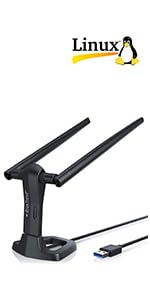
The BrosTrend AC1200 Linux USB WiFi Adapter delivers dual-band wireless speeds up to 867Mbps on 5GHz and 300Mbps on 2.4GHz, compatible with a wide range of Linux distributions (kernel 6.2+) and Windows versions. Featuring advanced encryption standards and support for multiple architectures including Raspberry Pi, it offers hassle-free installation and robust performance for professionals seeking reliable, high-speed connectivity on Linux-powered devices.


| ASIN | B07FCNP2VL |
| Best Sellers Rank | #112 in USB Computer Network Adapters |
| Brand | BrosTrend |
| Built-In Media | 1 x 1200Mbps Linux USB WiFi Adapter; 1 x Instruction Script for Linux OS |
| Color | Black |
| Compatible Devices | Supported Architectures: x86_64/x86_32 (PCs, VirtualBox..), aarch64/armhf (Raspberry Pi 2+, Odroid...) Compatible Devices Supported Architectures: x86_64/x86_32 (PCs, VirtualBox..), aarch64/armhf (Raspberry Pi 2+, Odroid...) See more |
| Compatible Operating System Family | Linux, Windows |
| Customer Reviews | 4.3 out of 5 stars 2,279 Reviews |
| Data Link Protocol | IEEE 802.11 ac/n/a 5GHz, IEEE 802.11 n/g/b 2.4GHz |
| Data Transfer Rate | 1200 Megabits Per Second |
| Hardware Interface | USB 3.0 |
| Item Dimensions L x W x H | 3.1"L x 1"W x 0.3"H |
| Item Type Name | Linux USB WiFi Adapter, Kali Linux USB WiFi Adapter, USB WiFi Adapter Linux, Linux USB WiFi Adapter, Linux Compatible WiFi Adapter |
| Item Weight | 9.9 Grams |
| Manufacturer | BrosTrend Technology LLC |
| Mfr Part Number | AC1L-Linux |
| Model Number | 1200Mbps Linux USB WiFi Adapter |
| Product Dimensions | 3.1"L x 1"W x 0.3"H |
| UPC | 742186982236 |
| Warranty Description | Register for 2-Year Warranty |
W**.
Drivers need NOT be a problem
BrosTrend Model AC1L, 1200Mbps Wi-Fi adapter. Excellent durability, functionality, signal strength, compatibility with Ubuntu, and value for money. There is NO driver issue IF you run a supported Linux distro AND if your OS is UP TO DATE. I run the Debian-based Ubuntu 24.04.2 (Kubuntu flavor). "Up to date" in this case means the Linux kernel should be 6.2 or greater in order to utilize the adapter without needing to install drivers because they are included in the supported OS software. The supplied mini-CD disc includes other driver options, well explained. My computer was already connected to the Internet via Ethernet, which I keep connected to an Ethernet switch box in order to disconnect the computer from the Internet by turning the switch box dial to a vacant Ethernet port. To activate Wi-Fi connectivity, the switch box dial was used to disconnect the wired connection. After 15 seconds or so, the available Wi-Fi networks in my apartment building were displayed. Configuring the Wi-Fi connection amounted to entering the password for my network. Simple. I chose the 2.4 Ghz band (about one-third the speed of the 5 Ghz band) so that the computer would share the 2.4 ntwk with other devices of mine. It was virtually as fast as the wired connection, to my eyes. Recommended, without qualification.
T**.
Lifesaver for people working in linux machines -- should be 10 stars
Most of my daily work is heavily based on Linux based OS. The wifi chip on my laptop started malfunctioning and I had no access to wireless internet. My laptop is 8 years old, and I do not plan to buy a new one. Still a lot of life left. Working with wired internet (which I could ) at home is neither easy nor convenient. I was looking since 6 months , a wifi adapter which would be suitable for my linux OS. I tried conventional ones from TPlink and Netgear, but the online drivers available did not work for me. They were so designed for windows that you could plug in it to your windows machine they would work without driver installation. I was literally frustrated, trying to run shell scripts here and there to fix bugs and make the TPLink/ Netgear adapters work for me. But I failed. I came across the Brotrend adapter and bought one. It works like a charm. The linux installation is very easy, if you know basic shell commands (honestly you can just follow the instructions blindly). The support team is super helpful and they provide a detailed step-by-step guide for installing the linux driver. Note, they recommend internet access during driver installation since it downloads some debian package. You can use a wired ethernet connection from your router. The online internet speed check reveals the following metric: ping: 5 ms, download speed 83.40 mbps, upload speed: 75.45 mbps. The speed graphs are almost flat, with no variation. The router is in the first floor, and I work in the second floor. Very happy with my purchase, perhaps elated...I can resume normal work with my linux laptop after 6 months now. I would highly recommend this to people using linux OS, who needs speed boostup, or are interested in working in old laptops whose wifi chips are broken.
B**S
Great Product - Great Tech Support
Update - Dec 2022 - Nearly two years later and no problems with my wireless using Linux Mint. I recently switched to a completely new OS - Manjaro Linux, so needed to re-configure. It didn't install the driver on my first try because my kernel required a certain header and I missed it. I wrote to BrosTrend and they responded within 6 hrs, identified my kernel and told me how to download the proper header for it and re-install and it works perfectly. Since my WSP (xfinity) wireless speed has also increased, I'm getting 220 MBPS from this. Five stars - for the product itself and for the best tech support you could ask for. I wanted to use this with a Linux OS, so needed to be able to install the adapter's driver. BrosTrend includes a cd with installation instructions for Windows, Mac or Linux. I chose the Linux folder and in the pdf was directed to copy and paste a single command into my terminal in order to download the driver (you do need to be connected to the internet for this). The process worked perfectly on both of my computers and two different operating systems - Linux Mint and Linux Lite. I had emailed tech support before even receiving it to learn what would be involved. Jane assured me that it would all work and if it didn't, to contact them and they would walk me through it - it did work because BrosTrend has done their homework. Nice to have tech support that will answer you back if you need them. Performance is great - though it will depend on your internet service provider and other factors, I got 125 Mbps download speed on my Dell desktop using my home Xfinity wireless. My Toshiba laptop's internal wireless card averages about 25 Mbps - when turning it off and using the BrosTrend adapter instead, my download speed increased to 120 Mbps. Great product and great tech support.
I**G
You'll want the rtl88x2bu driver if you're trying to use this on Linux
My biggest dislike was the fact that instead of being able to download a driver from the brotech website, the link generates an email that requires your order number and linux version number. However, I ended up finding the correct source code for the driver on Trend-TechCN's website. Once I got the *correct* driver installed, this thing worked like a charm, but the searching around for the correct realtek drivers was enough to make me want to go all HULK SMASH! on this thing. Pros: 1) Larger size seems to mean it's got a larger antenna. It seems to have very good signal. 2) Once I got the correct driver files, installation was easy and the device came right up after a reboot. 3) They appear to be customer-conscious for their linux users by requesting your use case before providing you with instructions and drivers. Cons: 1) Needing to email the manufacturer in order to get the drivers is silly; make the drivers readily available for the advanced users please. 2) This things is HUGE. Because it's wider than one USB slot, I can only use 3 total slots on my Raspberry Pi. If I were using this on a laptop with only two USB-A slots, I'd only be able to use one device at a time unless I also purchased a USB Male-to-Female adapter cable. 3) Not plug-and-play; requires driver installation on linux in order to be made to work. Overall though, now that I've got the correct driver installed, it's working decently and I have no complaints.
B**N
Plug and play on win10
Plug and play in my win 10 desktop. Haven't tried the Linux side yet
K**O
Mine might be broke.
It says 1200Mbps. Would you believe 90Mbps? Because that's what I got. I contacted them for help and they gave me 2 things to do and some suggestions. I am using Zorin OS 17.3 6.8.0-87-generic for this test because it's listed in the description. 1 - run a script from their web site. a blind script, so I don't knw what it really did. I got 90Mbps down/20Mbps up It turns off after about 15 minutes so I have to go turn off WiFi and turn it back on. But it did run. I said - Is there a fix for speed? 2 - It comes as a USB 2.0 stick, so fix a config and make it USB 3.0 Didn't help. At all. But I did verify it was now a USB 3.0 stick. I said - It's still slow. 3 - They said to make it use 5G with a 40Mhz signal. (or something like that) What? I have 2.4Ghz and 5Ghz. That must be WiFi 6 or 7. Who has that and how would you do that? So now it sits on the table. I will test later on another PC, another distro later. I do not recommend this USB stick.
M**R
The best WiFi for Linux Mint
This is the only WiFi I will use on Linux Mint. It comes with a link to the Bros Trend Linux page and copied the terminal commands, pasted it into my terminal and it took about 1 minute and it works great. Ive tried many others with no luck until I stumbled onto this Bros Trend model.
R**R
Works with ubuntu on Raspberry pi
I have a raspberry pi that I want to use as a moisture detector in my basement. Getting cat-5 to the location is next to impossible, so I thought I would try wifi with it. A quick check online shows this model has drivers for linux, including the raspberry. As I have the pi already connected to my network via cat 5, so I can write my code, I kept it there to install the drivers for the wireless adaptor, so having to have it online to install the drivers is no big deal. In my case, with the low powered cpu in the raspberry, and limited memory, the install process appeared to hang, and it would throw an error (in the error was a line that I was told to enter to finish the install, which I promptly ignored the first time, dumb-me that I am.) So I emailed BrosTrend, sending the requested info, asking what to do. I promptly received a reply saying they received my mail and would have someone get back to me. Sometime overnight I received an email with the answer... run the command in the error message and wait it out. Both emails were very polite, and I felt comfortable 'talking' to them. Anyway, after a bit of time, the drivers were installed! It turns out the ubuntu autoupdate routine interfered with the driver install, due to the low processing power of the pi. However, running speed tests on my gig service and Ubiquiti wireless network delivers some impressive speeds approaching 500mbps, and this is on my 25$ raspberry pi. Linux reports it is a stable 870mbit connection. I plan to connect the BrosTrend adapter to my laptop and see what kind of speeds I can get. I would highly recommend this to anyone, and already had a work-mate write the name down to reference for his own use! The picture makes it look large, but that's because the computer is so tiny! It is about as long as a pack of gum and about half as thick.
G**O
Compatibile anche con Linux Mint
Acquistato per collegare wireless un vecchio pc in dual boot con win10 e Linux Mint funziona abbastanza bene . I driver si scaricano dal sito del produttore e l'installazione procede senza difficoltà. Arrivato nei tempi stabiliti da Amazon.
S**8
Linux Friendly
Linux Mint 22 - Works out of box, no messing about. 👏👏👏
J**E
Funciona en Linux.
Perfecto para linux, después de leer comentarios que siempre se agradecen, porque evitan "meter la pata" compre este adaptador para un linux Mint Virginia, con el ultimo núcleo 6.8.0-52- y funciona perfectamente, no he tenido que instalar nada, lo detecto automáticamente, el controlador que trae el núcleo es el mismo que en la pagina de descargas del adaptador.Me da 218 de descarga y 274 de subida.bastante mas que con la antena del PC, lo recomiendo si usas linux y lo tienes actualizado a las ultimas versiones.si no es así, puedes cargar el núcleo manualmente en el gestor de actualizaciones fácilmente.
A**U
Güzel
Sağlam geldi
D**N
Installation hyper-aisée sous Linux Debian et PiOS
Je confirme ce que j'écrivais il y a 7 semaine à la réception de cette clé USB WiFI. Je n'ai jamais eu de problème de connexion avec ce produit qui fonctionne impeccablement bien sur un RapsBerry Pi4 depuis tout ce temps. Aujourd'hui j'ai procédé à une grosse mise à jour du système pour passer à sa version 6.6.28 : le pilote a été automatiquement recompilé et tout fonctionne à nouveau sans souci. Je ne regrette absolument pas mon investissement. Procédure d'installation on ne peut plus simple quand la machine hôte dispose d'un accès Internet (sinon le site BrosTrend documente des alternatives). Juste une ligne de commande à recopier dans un terminal et le processus démarre : - téléchargement de l'utilitaire d'installation, - détection automatique de la distribution Linux en place, - installation des outils de compilation, - compilation du module, - installation du pilote. Un jeu d'enfant ! Je l'ai installé sur deux machines différentes : un PC de bureau sous Debian 12 BookWorm et un RaspBerry Pi4 B sous PiOS. : tout fonctionne bien. je suis très content de mon achat. Je n'ai donc pas eu l'occasion d'évaluer le support technique.
Trustpilot
1 month ago
3 weeks ago