🚀 Power Your Network Like a Pro — Smart, Fast & Built to Last!
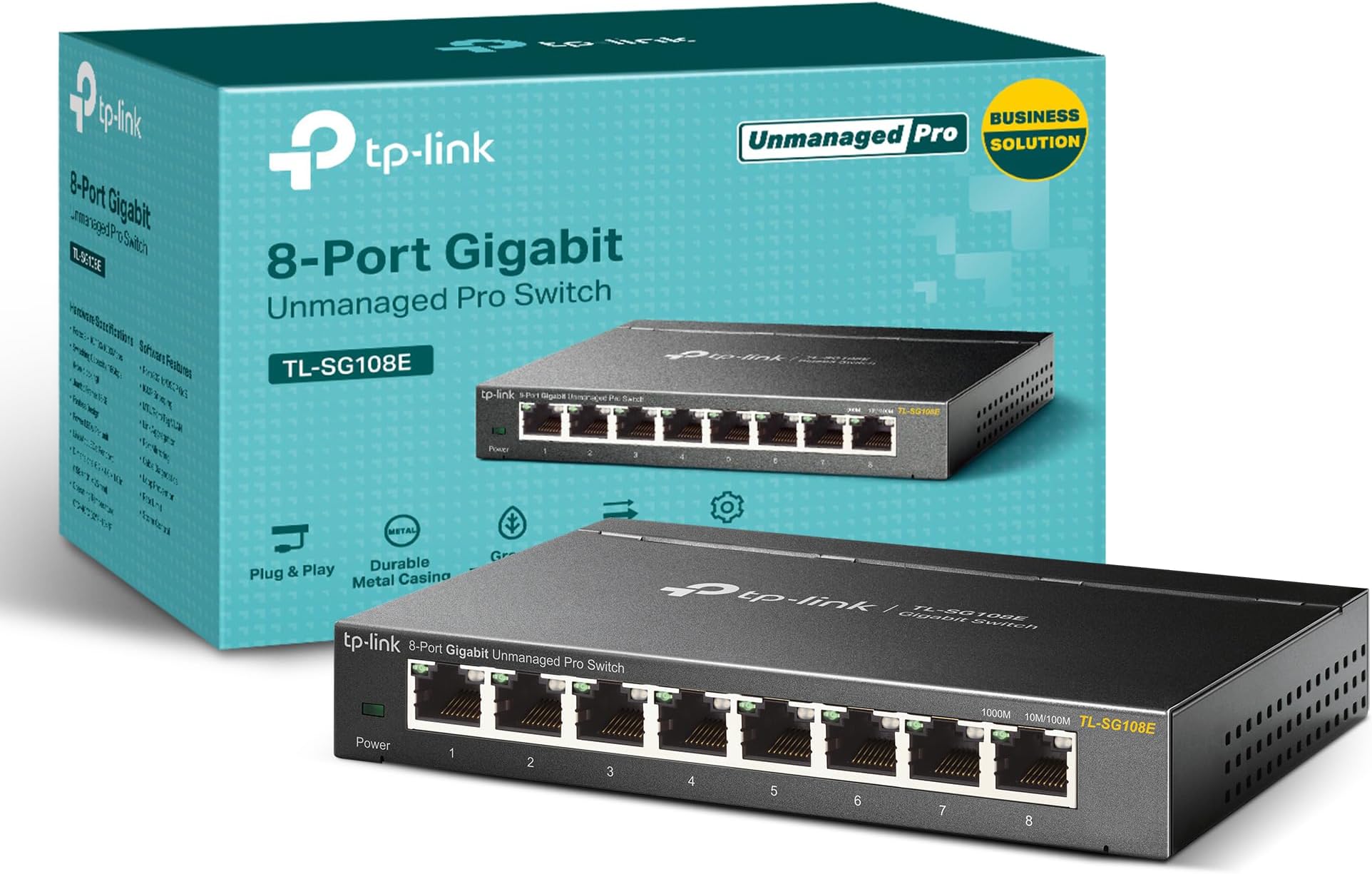
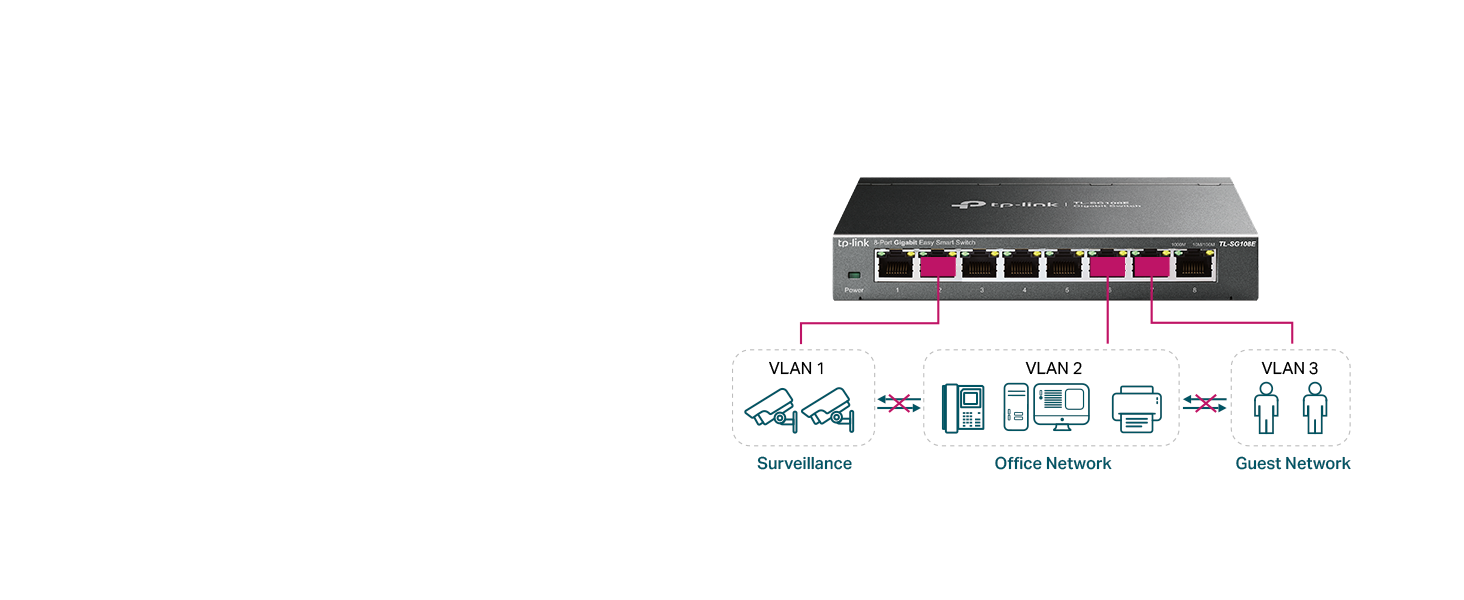
The TP-Link TL-SG108E is an 8-port gigabit Easy Smart switch designed for small to medium businesses and savvy home users. Featuring a durable metal case, shielded ports, and advanced network management tools like VLAN, QoS, and IGMP snooping, it delivers high-speed, secure, and efficient connectivity. With plug-and-play setup, energy-saving technology, and a 5-year warranty, it’s the ultimate upgrade for anyone serious about a reliable, scalable network.


| ASIN | B00K4DS5KU |
| Best Sellers Rank | #1 in Computer Networking Switches |
| Brand | TP-Link |
| Built-In Media | TL-SG108E Power Adapter Installation Guide Rubber Feet |
| Case Material Type | Metal |
| Color | Black |
| Compatible Devices | Desktop |
| Current Rating | 1 Amps |
| Customer Reviews | 4.7 out of 5 stars 6,371 Reviews |
| Data Transfer Rate | 11.9 Megabits Per Second |
| EU Spare Part Availability Duration | 2 Years |
| Global Trade Identification Number | 06935364021863 |
| Interface | RJ45 |
| Item Dimensions L x W x H | 6.2"L x 4"W x 1"H |
| Item Type Name | SWITCHTPLINK8PTOSGIGABITTLSG108E |
| Item Weight | 1.12 Pounds |
| Manufacturer | TP-Link |
| Maximum Power | 1000 Watts |
| Mfr Part Number | TL-SG108E |
| Model Number | TL-SG108E |
| Number of Layers | 3 |
| Number of Ports | 8 |
| Platform | Windows |
| Product Dimensions | 6.2"L x 4"W x 1"H |
| Switch Type | Rotary |
| UPC | 840460604086 845973021856 |
| Upper Temperature Rating | 40 Degrees Celsius |
| Voltage | 9 Volts (DC) |
| Warranty Description | 5-year |
A**N
update
I have been using this switch since November going on basically two months, I have been using tp-link products for a few years. This item seems well built and stand up to the name trusted. My only issue when i need to log in i have to keep resetting the switch to do anything with the software. It ask me to set password but log out and to log back in, it is say password or user name error. Since i don't need to log in more than once or so it really dosn't bother me. Thats just for someone who might be annoyed needing to log in every now and again. It showed up the weak points on my old network which was just a basic router i realized i was using a basic 100mbps router. I wanted gigabit service so i resort to a old mikrotik i have home to get gigabit into the switch. Did some minor adjustment reprogramming and it work. I might have to get a TP-link router later on but for now i can manage. So basically i am using it on two tv, the old router for wifi untili can improve that router, a printer and copier, a cable box which all of those items are 100mbps full duplex. My laptop is recieving full gigabit full duplex. The quality of my tv and cable box has improve significantly my router is no longer over loaded and bottle necking. Very few freezing i get on the cable box which i can live with and that is for just a few stations which sometimes servers over load and not IP issue or your equipment may just be at fault. Also use a wifi expander for out side and may add another later on. i would recommend this product if your just doing basic networking accross the home and office nothing complex easy plug and play if you know your way around it. It cane also work for gaming consoles Cabling is very important to your network let me say, because i had to rebuild some of my cables. Cat5e/cat6 recommended and it is also good to colour code the cables so you don't have a bondle of cables same colour. Make sure to use a good gigabit router or other equipment with good managment for your switch to get full potential from it. I have no regret buying this equipment for now and not hopping for any in new future. Make sure to also back up your network system with a ups for outages, outages can be very harsh on these sensative equipment they are very delicate. When ever there is a power outage and power returns there normally what is call spikes (voltage may increase) so a good ups is importantant for set up with surge protector. So you can properly shut down and save your hard earn investment. My ups 1000watts gives me up 7hrs or a little less of back up time if needs be but planning on adding a second back up system which maybe a complex idea if your not tech savvy. Its good to get a professional do this for you if going so far. Networking is becoming more complex not for only office and business but also for homes because cameras, gaming, iptv ect, is becoing more advanced. The challenges is getting proper set up into homes for satisfaction and these little equipment and make a great difference in dealing with some of the challenges we all face from day to day. Getting and choosing equipment can be very challenging because there are so many on the market but getting the right one can make such a difference. If your having challenges tp-link will solve the issues long as you know how to setting up their products or get a good pro to do it for you. Update on the switch i believe there is a lock switch on this device that allow you to log into the switch whenever time needed with out resetting it. For some reason i had to make a adjustment and saw it after logging out i was able to login now without doing a reset. Incredible product thinking about doing a upgrade in the near future to a managed switch and sure tp-link is my choice.
D**G
Perfect Gaming Switch: TP-Link TL-GS108E Easy Smart 8 Port Switch
This smart TP-Link Smart switch [Model# TL-SG108E] is so easy to set up and has additional software in case you want to play administrator with your home/office network. (This is not a review of a highly technical nature so if you are a Tech Admin look elsewhere. Thank you.) First some information that should be included right off the bat. :: Steel Housing; 6-1/4”W x 4”D x 1-1/4”H (w/ 4 rubber feet) :: Unlimited Tech Support 24/7 by phone. (I have not used it) :: 5 year Warranty -- System Requirements (Listed on the box) -- :: RJ45 Ethernet Cables :: Computer with Windows 8/7/Vista/XP, Mac OS or Linux operating system (No issues using Windows 10 Pro) :: Network Adapter (I used my internet router with multiple Ethernet ports) -- Package Contents -- :: The 8-Port Smart Switch (Yellow and Green LEDs for connected speed indication) :: Power Adapter :: Installation Guide (2-pages) :: Resource CD (3-inch mini-size) I purchased this switch because my son has friends over to the house and they bring their laptops to play games on-line. They had been using the Wi-Fi but it is slow and unreliable, in our household, and bandwidth was at a premium. I decided to buy a switch so all the friends could tap into the TP-Link switch and use the fiber optics internet access. I only had to furnish six Ethernet cables and off they went. They are able to play on line games using the switch and I have heard of no problems so far. Well, except for a tangle of Ethernet cables. Watch your step in the living room while the gamers camp and play. This switch was made for the home office, or small business, but I decided to use it for a home network because it appeared durable in its steel box, has 8 ports up to 1000Mbps each and the price was so right after a $15.00 rebate. This switch is more than is needed at this time, but for the price point after the rebate, I have no regrets. I would list all the features and benefits of this switch but most of them mean little to nothing to me. A network admin would understand what this switch is capable of doing for a network. The switch is a simple dark metal steel box, with LEDs that show your System Power, Link, with Speed (Green or Yellow) and activity indicators for each port. The box sits just under the edge of my TV set for easy access. It feels cool to the touch even after operating for hours. Nice. When you set up the switch box you use one of the 8 ports to take the Ethernet cable from the router and use the other 7 ports as outputs. Each of the 8 Ethernet ports are Auto-negotiating. That means you do nothing but plug in the cable. So this leaves you with 7 ports to use as outputs for any Ethernet-ready electronic device. This can include gaming consoles, TVs, media boxes like Amazon Fire TV, Roku etc. as well as a laptops. I was able to run an Ethernet cable from one room, from the cable router, and set the switch box under my TV in the next room. (The entire length from the router to the switch should be less than 328 feet). That's one port used so far. I also needed to run my Amazon Fire TV box out of the next Ethernet port to the television. That left 6 Ethernet ports for the gamers. I looked at the Configuration Utility software, after installation, to see what information would be available. This is not a web-based graphical interface (GUI) but a software interface on this particular model (TL-SG108E). The Utility CD is a 3 inch mini-disk. If your player cannot play a mini-disk you will need to download the Configuration Utility software from TP-Link. The software, after installation, provides you with the ‘Discovered Switches’ interface with the headings: Product, Device Description, MAC Address, IP Address, Located on IP Network, IP Setting, and Login. I do know that the MAC Address of any device can be used to help secure the network. I use them with all the devices using the cable router, whether it be iPod, laptop, desktop computer, Amazon Fire TV box, etc. To be clear I did nothing with the provided software to be able to hook up the box and use it. I did need to open my cable router’s Admin software and entered the TP-Link switch’s MAC Address so my router would securely recognize it, but other than that, nada. Ez Pz. 5 Stars for TP-Link Easy Smart switch’s plug and play set-up, ease of use by its intended user-gamers, sturdy steel construction, and a wonderful after-rebate price point. There have been no issues since it was installed October 2015. If you can find an ‘Unmanaged’ switch for this price, size and durability go for it. NOTE: Besides the included Installation Guide, a 2-sided paper guide with instructions and images, you should also download from Customer Service the PDF files that will provide more specifications and detailed information about the switch and its software.
G**G
Reliable & Simple – TP-Link 8-Port Gigabit Switch That Just Works
The TP-Link 8-Port Gigabit Switch works exactly as expected. Setup couldn’t be easier — it’s truly plug and play. I connected my devices, and everything was up and running instantly with fast, stable speeds. It’s compact, quiet, and perfect for expanding a home or small office network without any complicated configuration. If you need extra Ethernet ports and want something dependable that just does its job, this is a great choice.
S**N
The Ultimate Network Powerhouse!
As an avid tech enthusiast, I have been searching for the perfect network switch to optimize my home network, and the TP-Link TL-SG108E exceeded all my expectations! This little powerhouse has truly transformed my network setup, and I can confidently say that it deserves a solid 5-star rating. The setup process was a breeze – just "plug and play," as they say. I connected all my devices to the switch, and it instantly recognized them without any hassle. The user-friendly web interface made it a breeze to customize various features, such as Quality of Service (QoS), Virtual LAN (VLAN), Internet Group Management Protocol (IGMP), and Link Aggregation (LAG). This switch has taken my network management to a whole new level. One feature I absolutely love is the Limited Lifetime Protection, offering peace of mind and assurance in the longevity of this product. The sturdy metal construction with shielded ports adds to its durability, ensuring it can handle the demands of my network for years to come. The switch's compact design is perfect for my needs, and the option to wall-mount it is a bonus, saving valuable desktop space. The LEDs indicating each port's status are quite helpful for quick diagnostics. In terms of performance, this TP-Link switch delivers impeccable speed and stability. Whether it's streaming high-definition videos, online gaming, or heavy file transfers, the TL-SG108E handles it all like a champ. As for customer support, TP-Link has been exemplary. They promptly responded to my queries and provided clear solutions whenever I needed assistance. Overall, I couldn't be happier with my purchase of the TP-Link TL-SG108E 8 Port Gigabit Switch. Its reliability, ease of use, and robust features make it a must-have for any home or small business network. If you want to take your network to the next level with ease, I highly recommend this switch!
X**R
Great little managed GBe switch at the cost of a cheap non-managed version
First, this is really a 5 star for the cost, but I am going to give it 4 because no one reads the 5 stars, and there is room for improvement. This switch does it's job and seems to do it well so far. I have a trunk port setup on port 1 with two VLANS that are then broken out for my untagged devices. One VLAN is on ports 2-4 and the other is 5-8. Things are working well. If all you need is some VLAN tagging, to be able to look at the web gui for some basic statistics (port up/down, errors, negotiated speeds/duplex, etc) and maybe some QOS - or even some LAG mixed in - then this will work for you. You can even mirror a port if needed. One thing that would be nice but is completely missing is SNMP. You can backup/restore configs which is great. It appears it only supports one user account. So, that all said - this is a very basic managed switch with some useful features that will work for most needs that this switch is appropriate for. SNMP would be a very nice addition, but I suppose if you want that, you're going to have to spend more than what lunch would cost you at a fast food joint these days LOL!
J**T
Good product
I’ve had two of these for 3 years now and they’ve worked perfectly. I’ve never had any issues with them and never had to do any cleaning or maintenance. I glued on a command strip and stuck one to the bottom of my desk and it’s been there for years keeping me online. Durable, compact, inexpensive, and easy to use.
R**L
Value for money, straightforward use.
Works perfectly, plug and play setup, easy to manage software.
P**P
Great little switch for homelabs or small networks
I originally bought this when I was studying IT and building out a small homelab to practice networking, group policy, admin roles, email servers, all that kind of stuff. Life ended up taking me in a different direction, but while I had this running it definitely served its purpose well. It looks nice not too cheap or expensive looking. It was compatible with all my devices and lan computers, it hardly consumes much power. Setup was easy. Plug and play out of the box and I had multiple machines talking to each other without any issues. Speeds were solid and consistent. No random disconnects or slowdowns, everything stayed stable while I was running my lab environment. It does have some smart features you can access through the software, so you’re not completely locked down. You can do basic management and configuration, but it’s not a true enterprise managed switch. It’s more software managed than command line or console managed. So you get some control, just not super advanced flexibility. Build quality was good. Not too big, not too heavy, fit and finish felt solid. I never had any reliability problems with it. It was still running strong when I eventually parted ways with it. If you’re setting up a small homelab, managing devices on a home network, or even running a small office setup, this works great. You can segment devices and manage traffic at a basic level without needing enterprise gear. If you need deep enterprise controls or advanced configurations, you’ll probably want to step up to something more commercial grade. But for home use or learning environments this switch does exactly what it’s supposed to do and does it reliably.
Trustpilot
2 weeks ago
1 month ago