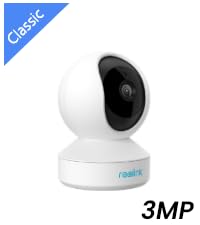
🔒 Elevate your home security game—because peace of mind is the ultimate luxury.
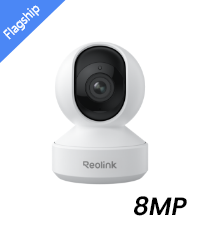
The Reolink E1 Pro is a sleek indoor security camera offering 4MP HD video with 360° pan and tilt, dual-band WiFi connectivity, and advanced night vision up to 40 feet. Designed for versatile use as a baby monitor or pet cam, it features smart motion alerts and supports multiple storage options including microSD cards, FTP servers, and NVR integration, making it a powerful yet user-friendly solution for modern home security.


| ASIN | B07THQDSBD |
| Alert Type | Motion Only |
| Antenna Location | Home Security, Night Vision |
| Are Batteries Required | No |
| Brand | REOLINK |
| Colour | white |
| Compatible Devices | Laptop |
| Connectivity Protocol | Wi-Fi |
| Connectivity Technology | Wireless |
| Control Method | App |
| Controller Type | Android |
| Customer Reviews | 4.3 out of 5 stars 6,118 Reviews |
| Effective Still Resolution | 5 MP |
| Effective Video Resolution | 5.0 |
| Form Factor | Dome |
| Indoor Outdoor Usage | Indoor |
| Indoor/Outdoor Usage | Indoor |
| Item Dimensions | 7.6 x 7 x 10.7 Centimeters |
| Item Weight | 0.44 Pounds |
| Light Source | Infrared |
| Manufacturer | china |
| Model Name | Reolink E1 Pro |
| Model Number | E1 Pro |
| Mount Type | Surface Mount |
| Network Connectivity Technology | Wireless |
| Night Vision | Night Color |
| Night Vision Range | 40 Feet |
| Number of Channels | 1 |
| Number of IR LEDs | 8 |
| Number of Items | 1 |
| Other Special Features of the Product | HD Resolution, Motion Sensor, Night Vision |
| Photo Sensor Resolution | 5 MP |
| Photo Sensor Technology | CMOS |
| Recommended Uses For Product | Home Security, Night Vision |
| Room Type | Nursery, Office |
| Special Feature | HD Resolution , Motion Sensor, Night Vision |
| Unit Count | 1.0 Count |
| Upper Temperature Rating | 40 Degrees Celsius |
| Video Capture Resolution | 1080p |
| Viewing Angle | 360 Degrees |
| Voltage | 5 Volts |
| Water Resistance Level | Not Water Resistant |
| Waterproof Rating | Indoor Use |
| Wattage | 6 Watts |
| Wireless Technology Type | Wi-Fi |
E**Z
camara accesible
Trabaja muy con router 20.4 G o 5G; no necesita adaptar nada; Vale su precio
し**ん
光学ズームがあって便利です。
ペットの監視用で使ってます。 多頭飼いなので、どのこがお腹が緩くてピーピーなのか、確認するのに重宝してます。ズーム機能もあって便利です。
A**S
Awful software keeps disconnecting
Awful and stressful software. I changed my network and ever since I cant get the camera to work. It keeps disconnecting after resetting it and installing it on the app. Camera also keeps rotating every min...Just pure frustration
I**X
Non-trivial install - not for the tech faint of heart
Note that I already have a Reolink 420 and a C1-Pro (no longer made). I had previously bought the E1 with a single 2.4Ghz frequency which stubbornly refused to connect with the iPhone Reolink app. I have an XFinity Arris dual frequency cable modem router where the 2 frequencies are bound to the same name, rather than with separate names as is more usual. After much communication with tech support, as well as posting questions, I was persuaded to give the dual frequency E1-Pro a shot. Using the Reolink app on my iPhone, the ca,era could not get any further than the multi-language request to load the app. This was worse than the E1 which at least got to the end of the process but would not connect. However, as I was told that this camera should work, I connected it to an ethernet cable and used the Reolink Windows software to make the connection. This worked. I was then able to configure the WiFi using the WiFi name and password. So far, so good. However, I use iSpy as my software to manage my cameras and motion detection recordings. The latest version did have the E1-Pro listed as installable with the IP camera wizard. No joy. It was clearly not able to detect the camera. However, knowing that the camera used ONVIF, I was able to connect this camera using the ONVIF menu item., and using the camera's name and password that was required by the Reolink Windows app. Bottom line: 1. The camera does work and can be connected. 2. It would not connect with the Reolink app from the Apple iTunes Appstore 3. It did need to be connected using an ethernet cable from the cable modem router and using the Reolink Window software. This required adding a name and p[password (actually good for privacy). Once the WiFi is configured, the ethernet cable can be disconnected and the camera then works via WiFi on the Reolink Windows app. 4. If you use iSpy software to manage security cameras, it needs to be installed using the ONVIF menu item when adding a camera, and NOT the IP camera wizard as it cannot detect the camera. This is not a camera to give to a technical novice as it will generate hours of frustration. Once connected, it is a nice camera, with good resolution and like the discontinued C1-Pro, has sound as well as vision. AFAICS, the only improvement over the C1-Pro is that the external antennas are absent giving it a smaller form factor for placement (and, a minor factor, is more esthetically pleasing).
B**I
使いやすいです
設定も簡単で、とても使いやすいです。 録画設定や追尾設定も簡単で、音声で声かけできるので、遠方の両親の見守りに複数台購入して設置してます。 共有出来るので、複数台に登録して使ってます。 アプリも簡単です
Trustpilot
2 months ago
1 month ago