Buy anything from 5,000+ international stores. One checkout price. No surprise fees. Join 2M+ shoppers on Desertcart.
Desertcart purchases this item on your behalf and handles shipping, customs, and support to Brazil.
📚 Scan smarter, not harder — the future of document digitization is here!
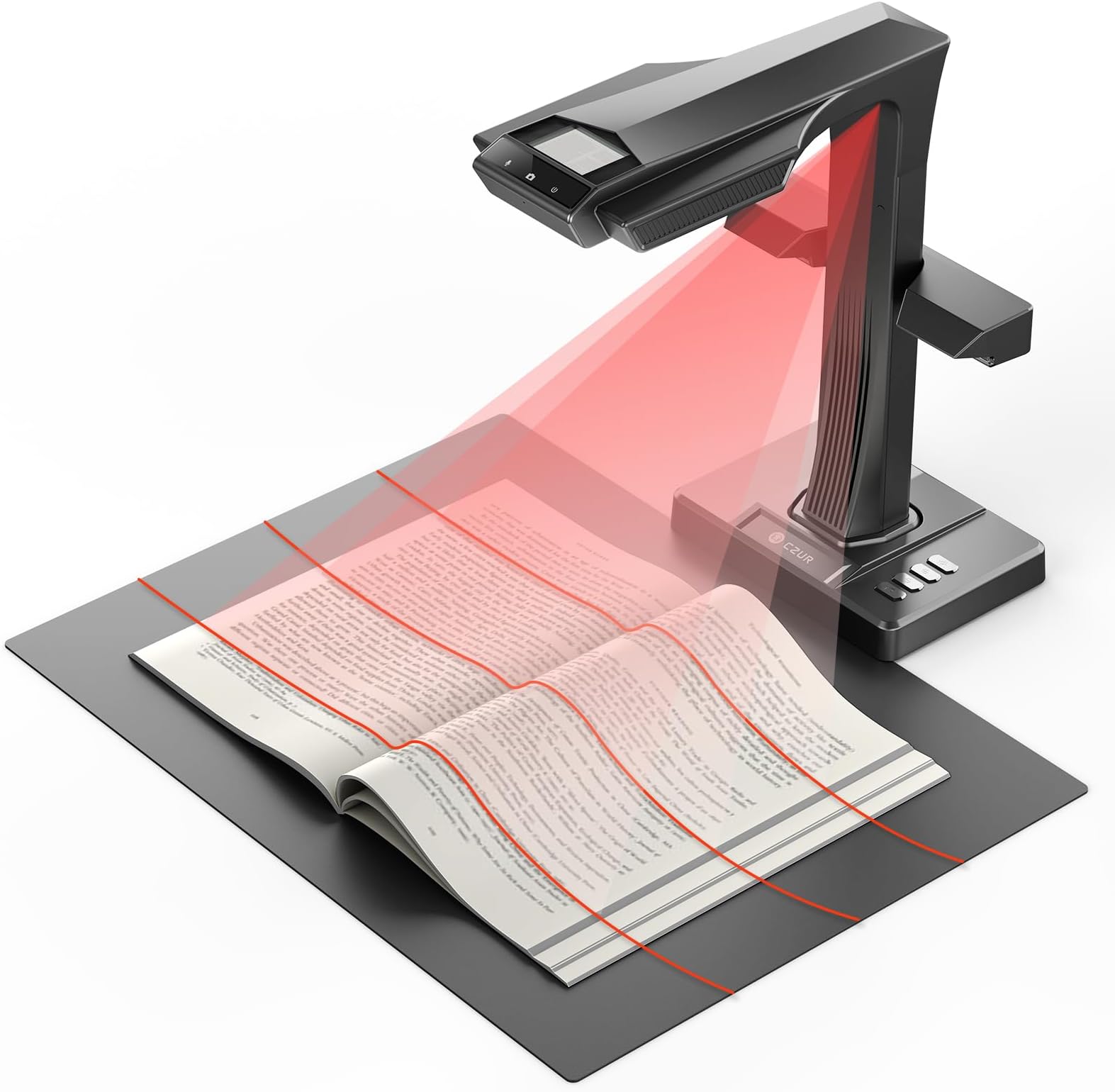
The CZUR ET MAX is a professional-grade book scanner featuring a 38MP CMOS sensor for ultra-high resolution scans, patented curve-flattening technology for distortion-free images, and lightning-fast 1.5-second scan speeds. Supporting documents up to A3 size and OCR in over 180 languages, it seamlessly integrates with Windows, macOS, and select Linux systems. HDMI output enables real-time projection, making it ideal for professionals who demand precision, speed, and versatility in document digitization.


| ASIN | B0FCBVYMC6 |
| Best Sellers Rank | #80,922 in Computers ( See Top 100 in Computers ) #129 in Document Scanners |
| Brand | CZUR |
| Color Depth | 24 bits_per_pixel |
| Connection Type | USB |
| Connectivity technology | USB |
| Customer Reviews | 4.4 out of 5 stars 34 Reviews |
| Item Weight | 1 Kilograms |
| Item weight | 1 Kilograms |
| Light Source Type | LED |
| Manufacturer | CZUR |
| Media Type | USB |
| Minimum System Requirements | Windows, macOS, Linux (Kubuntu 22.04, Linux mint 21.2, MX-3.1, Ubuntu 16.04, Ubuntu 18.04.2, Ubuntu 20.04, Ubuntu 22.04, TUXEDO-OS-2) |
| Model Name | CZUR ET MAX |
| Model name | CZUR ET MAX |
| Optical Sensor Technology | CMOS |
| Resolution | 7168*5376 |
| Scanner Type | Book, Document |
| Scanner type | Book, Document |
| Unit Count | 1.0 Count |
A**Z
Great
Great scanner
J**.
Game-changer for digitizing books and documents
I've been using the CZUR ET MAX for a bit over a week now and it has completely transformed how I handle document scanning. The 38MP camera and 410 DPI resolution deliver sharp, detailed scans, and the Laser Curve-Flatten Technology is a standout — it automatically corrects page curvature without needing to press pages flat by hand, which saves a ton of time. Being able to scan 30–40 pages per minute using the foot pedal (which frees both hands to hold and flip pages) makes the whole process surprisingly fast and effortless. The software is intuitive and the ABBYY-powered OCR is impressive, supporting over 180 languages and exporting cleanly to PDF or Word. The auto finger-removal and page separation features are small touches that make a big difference in the final output quality. If you're looking to digitize a large number of books or documents without destroying the binding, this is hard to beat. Highly recommended!
E**O
Absolutely Outstanding Book Scanner — Exceeded All Expectations
The CZUR ET MAX has been a game-changer for my workflow. The 38MP camera captures incredibly sharp images, and the flattening technology works beautifully even with thick books. Scanning is fast, accurate, and consistent, saving me hours compared to traditional flatbed scanners. The software is intuitive, the OCR is surprisingly precise, and the device handles everything from books to loose documents effortlessly. Build quality feels premium, and setup was simple. One small area for improvement: out of five notebooks I scanned, a couple of pages came out slightly tilted. It’s not a major issue, and I’m confident this can be addressed in future software updates. Everything else works flawlessly. Overall, the ET MAX is a professional-grade tool with outstanding value. If you work with books, archives, or documents regularly, this scanner is absolutely worth it. Highly recommended.
D**O
Excellent for Scanning Old Books and Documents Clearly
This book scanner ended up being extremely useful for digitizing older books and printed materials while still keeping the text surprisingly clear and readable. I used it specifically for scanning older historical books, and the scans came out much more legible than I expected. One thing I appreciated was how convenient the overhead scanner design made the process compared to trying to force old books onto a traditional flatbed scanner. It felt much safer and easier on older bindings while still capturing clean images of the pages. The image quality was very solid overall, especially for preserving readable text from aging documents. The curve-flattening features also helped improve readability when scanning pages near the center of books. Setup and use were fairly straightforward, and once configured it became a very handy tool for archiving or preserving printed materials digitally. Overall, this worked very well for my use case and exceeded my expectations for scanning older books and documents clearly and efficiently.
D**S
Powerful software and affordable price
If you have frequent scanning needs, it is recommended to get this device because you only pay once, though it’s not cheap. By contrast, I have found many book-scanning solutions that require a fee for every scan, which makes the CZUR ET Max a more affordable option in the long run. The real magic kicks in after you snap a photo! The three laser lines and registration marks on the finger cots work together to align, straighten, and unwarp the final scan. These two hardware perks make the software way smarter at processing images—meaning fewer duds, fewer rescans, and way better OCR results. OCR (Optical Character Recognition) has been around for decades. I’ve never used CZUR’s OCR engine before, but I’ve got tons of experience with Adobe Acrobat Pro’s OCR and have messed around with various open-source tools over the years. My expectations for OCR are pretty high these days, mostly because online OCR services have gotten so much better than they used to be. CZUR went with ABBYY’s OCR solution—they’ve been in the game since the 1980s. The ABBYY engine is multilingual, which let me accurately OCR texts packed with old Norse vocabulary and their phonetic characters. I picked English and every Germanic language I could think of, and the final output caught every UTF-8 character from the original text perfectly. That said, the feature isn’t perfect: I have a small Thai tarot book that the software can’t OCR. Overall, this OCR engine is more accurate than Adobe’s. I end up correcting way fewer words in the final result. The software also tries to preserve the original formatting when exporting to Word (it supports both DOCX and the old DOC format). That worked really well for me—indentations, font size differences, and inline formatting all stayed intact nicely.
S**K
Without the software, it's very, very expensive overhead projector
I really like this device's design and I wanted to give it at least 4 stars but there are too many reasons for a lower rating. Tech support is fast to reply, but not really helpful, worthless actually. This device is only worth $800 because of its software. However, the software was very unreliable on Windows; it doesn't work on Linux Mint, or any version of Linux other than Ubuntu. Tech support didn't seem interesting in troubleshooting Windows (45 minutes of scanning saved to a non-existent location), so we have no choice but to return it. It's not entirely CZUR's fault, Windows is not a very reliable OS. But the goal is to spend time scanning, not troubleshooting Windows. Without working software, it's better for us to buy an $800 camera, slap it on a tripod with a cheap ring light, and wait a year for AI to be able to do the same thing that the CZUR software is supposed to do.
Trustpilot
2 weeks ago
2 weeks ago