We remain fully operational. Our teams are working around the clock to ensure your deliveries continue safely.

DOWNLOAD THE APP


Customer Services
Copyright © 2025 Desertcart Holdings Limited
DOWNLOAD THE APP


🎯 Print Fast, Print Smart, Print in Color!
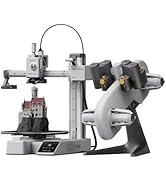
The Bambu Lab A1 Combo pairs high-speed FDM 3D printing with multi-color capabilities via AMS lite, delivering precise models with automatic calibration and active flow correction. Its ultra-quiet design (≤48 dB) and easy assembly make it ideal for professionals seeking efficient, vibrant, and hassle-free 3D printing.




| ASIN | B0D17V4SKM |
| Item model number | PF002-A |
| Product Dimensions | 58.45 x 53.49 x 42.6 cm; 12.93 kg |
A**7
Perfect Beginner-Friendly 3D Printer That Exceeded My Expectations
This review is exactly what I wish I had read when I first started researching this printer. As a beginner, this printer was more than enough to take me to the next level in 3D printing. It is an excellent printer, very beginner-friendly, easy to use, and simple to operate for daily printing tasks. The setup process was straightforward, and the printing quality has been consistently impressive. One important note: the printer does NOT come with filament included, so you will need to purchase filament separately before you start printing.
H**0
جميله جدا وعلى الوصف
M**M
أنة منتج جيداً من احسن الطابعات التي ريتها واتمني الجديد وشكرا
R**D
Bambu lab a1
Very good condition, everything works great!
P**A
Didn’t come with filaments (not combo)
Just received but didn’t come with the filaments.
R**L
瑣末な設定が多すぎる。少し神経質傾向。、確かにモデルの精度は高いね。でもガンガン造形スキルを上げるには向いていないかな?そんな悩んでいる時間があるならば時間をデッサン、モデリングに使いたい。anybubicのamsを今度は買う。あくまでもマシンは目的ではなく手段なので足を引っ張られたく無い、ストレスない方がいい。 何度か使っているがフィラメントを選びすぎるし、何度も失敗する。各種プリンターを様々使って10年程、所詮、機械は目的ではなく創作を手助けする手段であるはず。高尚な立ち位置であるならば必要はないその点では失格。やはり自分の中ではダメな機種という評価になる。
M**E
Super impressed. This model has had some safety upgrades since its been reviewed by some of the big youtube 3d print folks. The set up took about 30 minutes and was relatively easy. Remove some screws, plug in some wires and set up the filament. The AMS section is huge and not listed in the dimensions of the printer. Sounds obvious, but I bought a table based on the listed dimensions and obviously they dont both fit. This also doesnt come with filament and the printer is kind of picky about what it would prefer to interact with. I bought some filament that would come quickly and it just didnt work right - the filament had a knot in it, it broke inside the tube and it took about an hour of fiddling to clear everything. This has been the only problem so far. here is what I like - bear in mind I had a creatly CR10s that was a lot more difficult to set up and I am still not sure that it properly leveled. I cant say that the CR10 had one good print out of it that I really loved. The leveling is done automatically - takes about 20 minutes on the first boot then is an optional thing for every print at the beginning. The printer has four modes of printing - stealth, standard, sport and ludacrous. Standard is fine, but I will say that I run most of my prints on stealth mode as it reduces the amount of wobble and vibration put out by the machine. Another recommendation here is to find a surface that you can secure to a wall. The 3d printer table I have was not stable enough to provide a good base for this and prints can lose quality with the amount of movement this printer is capable of. Lets talk about finding things to print. Normally I would scour the internet, download somethings, pay for some items and figure out how to create the settings. Not so here. The bambu community has made some great files and found the best settings for things you might want to print. There is a lot there and most of those things are coming out looking premium. The community has things they recommend printing as essential add ons, which I will describe next. I did the get AMS combo, but ended up not using it yet because of space and the previously mentioned jam. One of the essential add ons is a top mounted system for this which I will be printing shortly. Also the machine likes to fling filament across the room as part of its constant cleaning process. I recommend making a waste catcher as the very second thing you print after the benchy. The slicer this uses is really cool. I havent gone deep into the settings fully but one of the problems I used to come across was printing a file that had multiple parts that didnt fit on the plate. In this slicer, you can set up multiple plates, choose which one to slice first, send that to the printer - this all works wirelessly and seamlessly - and watch it go. For some items i have printed, I first tried to print something with multiple pieces, decided not to try and run the machine for 16 hours and opted instead to add a new plate, clone one of the items and go one at a time. The plate is also cool. On the CR10, it was a glass plate that never felt like it was as clean as the first time it came out of the box. Here we have a metal, textured plate that has enough bend in it to pop off a print and has great adhesion. It magnetises to the machine and is easy to pop off and then requires a bit of lining up to get back on. The build plate is a little small, but so far everythign i have found on the app has been for my printer. I will start looking into bigger cosplay prints soon and am thrilled to see that the slicer also has a feature for cutting prints into smaller pieces. no 3rd party apps required. There is nothing beginner about this hobby, but if you are looking for a first printer and am budget conscious this is a good option. The CR10s made me 3d printer engineer and repair guy... the A1 combo has allowed me to print and enjoy making.
D**W
After reading many reviews about 3D printers, I settled on this one with AMS Lite. I was not disappointed. The Bambu Lab A1 was recommended as an excellent unit for beginners and intermediate users, at an affordable price point. I have to admit that I am a complete 3D printing novice but reasonably tech savvy and quick learner. I was still a little nervous about setting it up, but the instructions from Bambu were very clear, and all the parts were well labelled and packaged. With lots of care, I took about 90 minutes to set it all up and needed about another hour or so to figure out the basic configuration and settings. After downloading the Bambu Handy app for my iPhone and later, Bambu Studio for my computer, I was off and running. Depending on your level of familiarity with tech devices and 3D printing, your experience could be quite different. The initial learn could take some time. But I am pleased to say that I managed to set up my printer including my AMS Lite (external filament spooler) and completed my first print job in the same afternoon. The printer comes with some 3D models preloaded into the printer and I selected a simple scraper which can be used to scrape the printer bed. By the next day, I was able to download 3D models from the internet and had them imported into Bambu Studio and successfully printed off on the Bambu Lab A1. But a word of caution, you do have to be patient as 3D printing takes time and there are many concepts and terminology that you have to become familiar with, and I still have a long way to go. But it was very satisfying to have my first 3D printer fully set up in an afternoon and successfully get my first few 3D prints working. I have already printed off 4 models, one taking up to 8 hours to complete. But if my experience is anything to go by, the Bambu printer is an excellent unit to get started with and offers so much more. The results so far have been amazing. I'm very happy with my purchase.
J**L
Great 3D printer for someone starting out or just a hobbyist. Easy to use and quiet. My wife set it up herself and used it first. I bought this for my wife for Christmas and we've printed gifts for people, containers for fruits and vegetables, and light switches. I've also printed shelves and holders for the network gear and hubs on the office desk. It's compatible with many filament types - you can even print your own shoes similar Crocs. Recommend any first timer for any 3D printer watch a few videos about protecting filament from moisture in the air and you'll have great success with print jobs. I've found the Bambu filaments the most reliable and easiest to use - especially since their spools are tagged so the printer automatically knows what kind and color filament is on the roll. The AMS lets you keep four different spools loaded which is great for multi-color prints
A**ー
購入しましたがすぐにプリントできなくなりました。様子を見ているとヘッドの調子が悪いように思われましたので、その旨カスタマーセンターにメールしましたが、異様に返事が遅く、何日も経ってからやっと来た返事でも、初期不良に対する対応はすべて終了しておりすでに対応はできないという簡単でそっけないものでした。 実際に、使用してすぐに壊れたのでまた使えるようにできないか修理の方法をお聞きしたかっただけですが、 クレーマーのように扱われて非常に不快でした。 機械もそうですが、会社としては誠実な印象は受けませんでした。 調子よく使えているうちはよいのかもしれませんが、いったん調子が悪くなると厳しいのかもしれません。そして、それが使い始めて早い段階の場合はなかなかつらい状態です。
Trustpilot
2 days ago
1 month ago