We remain fully operational. Our teams are working around the clock to ensure your deliveries continue safely.

DOWNLOAD THE APP


Copyright © 2025 Desertcart Holdings Limited
DOWNLOAD THE APP





Buy anything from 5,000+ international stores. One checkout price. No surprise fees. Join 2M+ shoppers on Desertcart.
Desertcart purchases this item on your behalf and handles shipping, customs, and support to Brazil.
🚀 Elevate your workspace: Quad displays, rapid charging, and pro-grade power in one sleek dock!
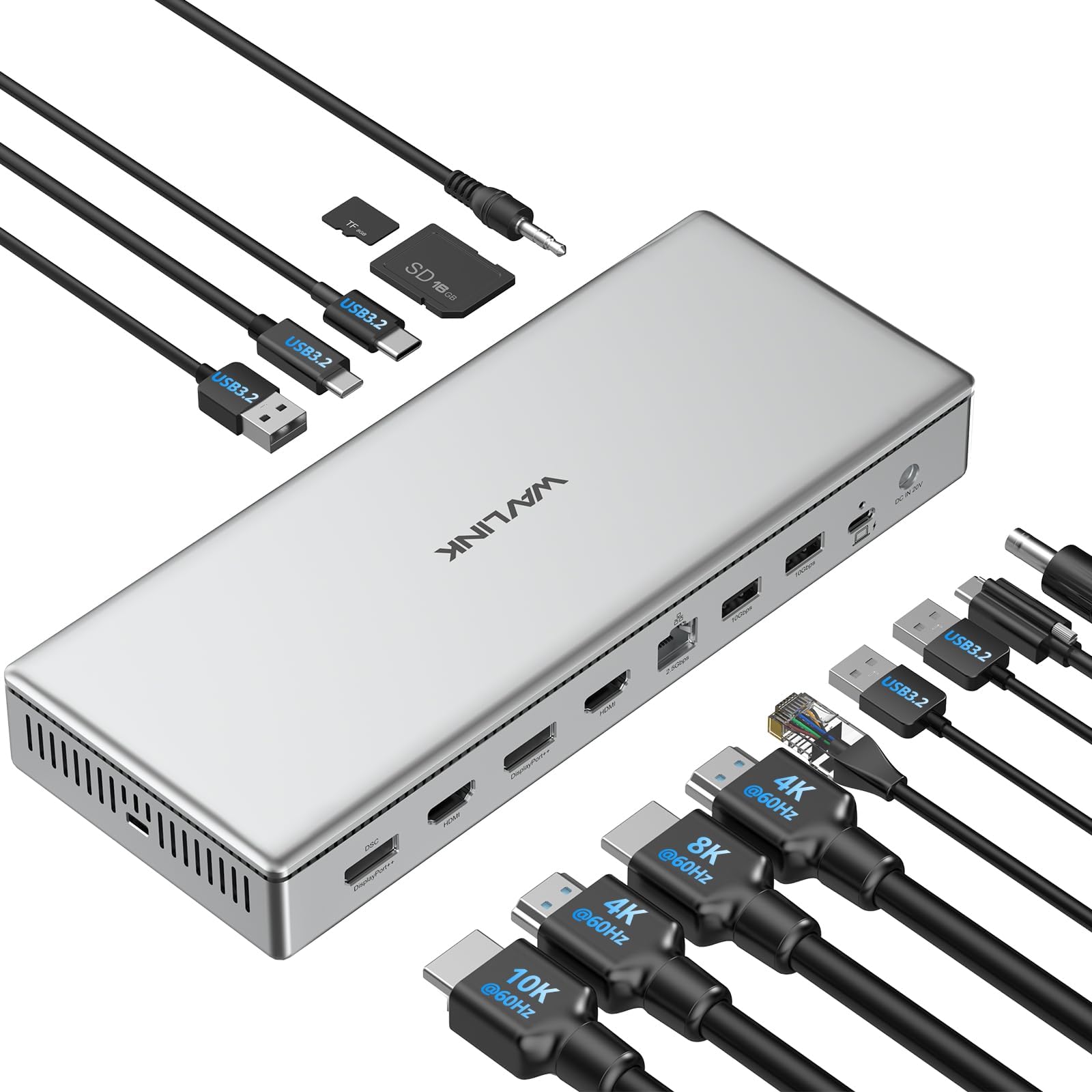
The WAVLINK DL7400 USB C DisplayLink Premium Docking Station is a cutting-edge 15-in-1 hub designed for professionals demanding ultra-high resolution multi-monitor setups (up to single 10K@60Hz, dual 8K@60Hz, or quad 4K@60Hz). It delivers 100W laptop charging, 2.5G Ethernet, and blazing-fast USB 3.2 data transfer, all housed in a premium aluminum body compatible with the latest Mac and Windows systems. This dock breaks Apple’s triple display barrier, making it the ultimate productivity booster for the modern manager.


| ASIN | B0DH1XC33Z |
| Best Sellers Rank | 72,618 in Computers & Accessories ( See Top 100 in Computers & Accessories ) 596 in Docking Stations |
| Brand Name | WAVLINK |
| Colour | Silver |
| Compatible Devices | Laptop, Mobile phone, Tablet, computers |
| Country of Origin | China |
| Customer Reviews | 4.3 4.3 out of 5 stars (49) |
| Hardware Interface | USB 3.2 Gen 2 |
| Item Weight | 1.6 Kilograms |
| Manufacturer | Wistars Technology Limited |
| Number of Ports | 15 |
| Product Warranty | 1 year manufacturer |
| Total HDMI Port | 2 |
| Total USB Ports | 5 |
| Wattage | 100 |
B**A
Wow, brilliant docking station
I have taken my time to review this item as I wanted to test it in various real world scenarios and I have to say that this is the best docking station I have every used. Yes it is expensive but you really do get what you pay for with this. The build quality is excellent and you really couldn't wish for any more ports. Charging up my iPhone 15 Pro max took no time at all with this and it was really convenient to have this on my desk rather that charging the phone on one of the shelves. Looks and works fantastically and as I say it is expensive but it will be the only one you need to buy.
L**R
A versatile, comprehensive and powerful multi-port and multi-monitor high-end docking station
Attention to detail and a high-end finish were clearly on the agenda when Wavlink sat down to talk about developing this multi-port docking station. Even the retail packaging feels satisfying to open. From a design perspective this highly functional and pro-grade docking station is an aesthetically attractive and impressive versatile device. The universal dock is a satisfyingly weighty gadget and is supplied with a power adapter that’s provides silent operation and it runs cool too. Encased in an aluminium body the dock looks right at home sat beside a silver MacBook Pro and doesn’t look out of place in any computer setup; home or professional. The provided thunderbolt cable and the ports offer generally super fast transfer speeds across the board and transferring data from connected devices should be fast enough for all but the most data-transfer-intensive power user. The dock was tested using a 2018 Intel i9 MacBook Pro 15.6 and an M2 MacBook Pro 16, both of which had no troubles running a quad of external monitors, which felt like an impressive feat, especially whilst connected with the 6-7 year old laptop. Whilst there’s a wide variety of connectivity options I will admit I’d have preferred it if a couple more USB-A and USB-C ports were included, but that’s just my presence and definitely not a deal breaker. I was pleased to see mounting screws on the reverse of the dock, and there’s a lock point for securing it down to the desk if required. With lots of ports and power, good ventilation, great looks and functionality this docking station is a fantastic bit of kit that should serve my needs for years.
C**E
Best Dock I have used, looks good, 4 monitors on a Mac, power users need faster ports though
Wrapped in its silver aluminium finish this Wavlink USB-C docking station looks great alongside a silver MacBook pro. It works with my MacBook with a thunderbolt 4 cable, though the dock itself doesn’t have any thunderbolt ports. On the front you will find two 10Gb SS usb-c 3 ports these are 40Gb ports but will deliver unless you need the highest speeds. If you are a videographer or photographer the SD card slots are UHS-II so read far faster than any other dock, I have tried. Aside the higher speed usb there are 3 usb-a ports you can use for keyboard and mouse dongles. An ethernet port that delivers 2.5 GB/s on my home network. Though if you load up those Superspeed USB and 4 monitors at the same time you get some speed reductions across the board. It would be better if the dock used USB4 or 5 or thunderbolt to deliver the best performance. It’s powered by a big (160w I think) power adaptor that has about 3m of cord between the two halves. This big power supply is a large for 2025 and needs some GaN technology to shrink it down. The upside is I can run my office laptop from the dock taking power over the thunderbolt cable. It can’t deliver the 140w high power that my development MacBook needs though; it can only push 100w – if you aren’t editing huge videos or programming tasks this shouldn’t be a limitation for you. This does mean there is power in the dock for peripherals; it fast charged my iPhone when it’s plugged into a usb. The party trick in this dock is the Synaptics Display link DL7400 chipset. This lets me and you plug up-to 4 4k screens via 2 HDMI and 2 DisplayPort sockets, or some very high-resolution displays into my MacBook; where Apple say the limit is 3. You can’t play protected content on the screens as the dock doesn’t do HDCP. This works: I was able to plug into my 4 LG 28” dual up monitors, though I couldn’t run them at full resolution – needing to reduce the resolution down. It works reasonably well though not without the odd glitch on screens I wasn’t actively working in. I needed to carefully set the screen resolution and refresh rate to make it work. It’s a very versatile dock; if you need lots of monitors on your mac it’s a great choice; though just be aware it won’t do high refresh rates on 4 screens, and I had the odd glitch. If you don’t need all high-speed features I yearn for; the silver finish looks good on your desk; and matches nicely to silver laptops. It is quite wide, though sitting under a big monitor it doesn’t make much of a difference. It’s the best dock I have tried; in finish and performance; and being able to drive that 4th screen is a big step forward.
S**E
A solid dock for all your needs
This item was provided to me free of charge through Amazon's wonderful vine program, it gives me the opportunity to test and evaluate products I wouldn't normally look at, in return I leave an unbiased product review as to whether I like a product or not. what makes a product good, or in some cases what makes a product bad, these are my opinions and my opinions alone, they are in no way swayed by Amazon or the manufactures of the product. I have been using this for a while now and I have to say I am impressed with it. It is very simple to setup and get up and running with the. The construction quality feels phenomenal, really well made, solid and built to last. My previous dock couldn't handle numerous hard drives plugged into it, I have had no such issues with this, every drive plugged into it has run flawlessly. Overall this is a very nice dock, yes it is a little more expensive than some, with this you do get what you pay for, and that is quality. Highly recommended.
T**2
This works for my needs. I have 4 monitors i needed to connect and I've had zero issues thus far.
D**S
Ich habe schon viele Dockingstationen ausprobiert – besonders für mein MacBook Pro mit M1-Chip war die Auswahl bisher immer etwas eingeschränkt, vor allem wenn es um echtes Multimonitor-Setup geht. Die meisten USB-C-Docks unterstützen maximal ein oder zwei externe Bildschirme. Mit dieser Dockingstation von WAVLINK wird das Limit gesprengt. Quad-Display-Unterstützung mit DisplayLink DL7400 Der größte Vorteil dieser Dock ist die Nutzung des neuen DisplayLink DL7400-Chipsatzes, der in der Lage ist, die bekannten Limitierungen von macOS (M1/M2/M3-Chips) zu umgehen. Damit kann ich problemlos vier externe Bildschirme gleichzeitig betreiben, jeweils in 4K@60Hz, oder auch zwei Bildschirme in 8K@60Hz. Die Bildqualität ist kristallklar, ruckelfrei, und besonders bei kreativer Arbeit wie Videoschnitt, Grafikdesign oder Softwareentwicklung ein echter Boost für den Workflow. 15-in-1 Anschlussvielfalt – Alle Ports, die man braucht Die Dockingstation ist mit einer enormen Anzahl an Ports ausgestattet: • 4 Displayausgänge: 2x HDMI 2.0, 2x DisplayPort++ 1.4 – das erlaubt viele Kombinationsmöglichkeiten (HDMI + DP oder vier gleiche). • 5 USB-Ports mit 10 Gbps: 2x USB-C und 3x USB-A – ideal für externe SSDs, Maus, Tastatur, Kameras. • 1x USB-C PD 100W: Für das Laden des Host-Laptops – mein MacBook wird zuverlässig mit voller Geschwindigkeit geladen. • 1x USB-C PD 30W (Front): Zum Schnellladen von Handy oder Tablet, ebenfalls mit 10 Gbps Datenübertragung. • 2.5G Ethernet-Port: Doppelt so schnell wie klassisches Gigabit-LAN – perfekt für schnelle Backups oder große Dateiübertragungen. • SD 4.0-Kartenleser: Lesegeschwindigkeit bis zu 312 MB/s – deutlich schneller als die meisten integrierten Slots. • 3,5 mm Audio-Kombi-Port: Für Headset oder Mikrofon, praktisch und stabil. • DC-In Anschluss mit 160W Netzteil: Starke Stromversorgung für alle angeschlossenen Geräte. Leistung im Alltag In der Praxis habe ich die Dockingstation an ein MacBook Pro M2 mit macOS Sonoma angeschlossen. Nach der Installation des aktuellen DisplayLink-Treibers (schnell und unkompliziert über die offizielle Seite) lief alles sofort rund. Ich betreibe daran derzeit: • 1x 4K Monitor in 144Hz • 2x 4K Monitore in 60Hz • 1x 2K Monitor als Vorschau-Display Zusätzlich habe ich mehrere USB-Geräte angeschlossen (externe SSDs, Kamera, Mikrofon), eine kabelgebundene Maus und Tastatur, sowie eine SD-Karte für den schnellen Foto-Import. Alles funktioniert einwandfrei und ohne merkbare Latenz oder Leistungseinbußen. Design, Kühlung & Verarbeitung Die Dock ist hochwertig verarbeitet, das Gehäuse besteht aus massivem Aluminium – optisch und haptisch ein echter Hingucker. Das Gehäuse wird bei Dauerbetrieb angenehm warm, aber nicht heiß. Lüfter oder andere Geräusche gibt es nicht, was mir als Home-Office-User besonders wichtig ist. Die Status-LED ist dezent und nicht störend hell. Wichtige Hinweise zur Nutzung • HDCP wird nicht unterstützt – das bedeutet, dass Dienste wie Netflix oder Amazon Prime Video über Apps (nicht über den Browser) eventuell nicht korrekt funktionieren, da sie Kopierschutz verlangen. • DisplayLink-Treiber ist Pflicht, sowohl unter Windows als auch unter macOS – ohne den geht keine Videoausgabe über die Dock. • Nicht geeignet für Gaming mit G-Sync/Freesync, da es sich nicht um native GPU-Ausgabe handelt. Fazit: Für wen ist diese Dockingstation geeignet? Diese Dockingstation ist meiner Meinung nach ideal für: • Professionelle Nutzer, die mehrere Monitore gleichzeitig benötigen (Trader, Entwickler, Videoeditoren, Fotografen). • Mac-User mit M1/M2/M3-Chips, die endlich mehr als 1 externes Display nutzen wollen. • Windows-Nutzer, die maximale Performance, Anschlussvielfalt und Ladeleistung suchen. • Power-User, die auf Performance, schnelles Laden und stabiles Multitasking Wert legen. Bewertung: 10/10 – Eine der leistungsfähigsten und zuverlässigsten Dockingstationen auf dem Markt. Sie ist nicht ganz billig, aber wer maximale Performance sucht, bekommt hier ein Premium-Gerät mit vielen Extras.
W**Y
Un produit magnifique en aluminium argenté qui ira à merveille avec un bureau pommé. La qualité de fabrication est de très haut niveau. L’appareil fonctionne dans un silence absolue et ENFIN la prise hôte est à l’arrière ! De nombreux ports, des lecteurs de cartes en façade, de l’ethernet 2,5 Gb/s… Quasiment un sans faute. Malheureusement à ce prix j’aurai aimé du Thunderbolt. Même si les possibilités de l’USB-C sont multiples et que les performances sont de haut vol, il m’est impossible de brancher mon écran Thunderbolt… C’est plus que dommage sur un produit de cette qualité avec un tarif premium. Néanmoins ça reste un excellent produit qui alimentera en plus votre ordinateur jusqu’à 100W. Je recommande ce produit qui répondra à de très nombreux usages
R**A
Excellente station d’accueil, bien pensée et très performante. Dès la sortie de la boîte, on sent la qualité avec un boîtier en aluminium robuste et élégant qui s’intègre parfaitement à un bureau moderne. L’installation est simple et rapide, et la connectique est ultra-complète : 2 ports HDMI, 2 DisplayPort, Ethernet 2,5 Gb/s, plusieurs ports USB-A et USB-C, ainsi qu’un lecteur de cartes SD. Idéal pour ceux qui ont besoin d’un setup multi-écrans allant jusqu’en 8K ou 4K selon la configuration. L’alimentation de 100W est un vrai plus, permettant de recharger un ordinateur portable tout en gardant une connexion stable avec tous les périphériques. La gestion des écrans via DisplayLink est fluide, et la compatibilité avec Windows et macOS est assurée, même sur les modèles Mac équipés de puces M1, M2 et M3. Autre point fort, l’appareil est totalement silencieux et bien ventilé, ce qui le rend agréable à utiliser au quotidien. Les nombreux ports sont bien disposés, notamment les lecteurs de cartes et certaines prises en façade, rendant l’accès facile. Le seul petit point négatif reste son prix, qui représente un investissement non négligeable. Cependant, au vu de la qualité de fabrication et des performances, c’est un produit fiable et durable qui simplifie vraiment l’organisation d’un espace de travail.
M**S
Excellent docking station!! This solved all of my laptop hookup challenges and delivers flawless sound and video for my X-Plane 12 airplane simulator setup. I just added a USB splitter to connect some extra accessories. I literally pull up and plug in my laptop to a usb C cord and I am ready to go.
Trustpilot
1 week ago
1 week ago