


Desertcart purchases this item on your behalf and handles shipping, customs, and support to Brazil.
๐ฌ Elevate your streaming game with the Mag 544W3 โ where power meets crystal-clear 4K brilliance!
The 2024 Genuine Mag 544W3 is a premium 4K Linux set-top box featuring a powerful Amlogic S905Y4-B Quad Core CPU, 1GB DDR4 RAM, and dual-band WiFi for superior connectivity. It supports 4K HDR 60fps video playback with HEVC codec and Dolby Digital Plus audio, making it an ideal replacement for older Mag models. Designed and manufactured by Infomir in Ukraine, this compact device ensures a smooth, high-quality streaming experience on a stable Linux 4.9 platform.
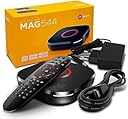
| Asin | B0D33QZJLN |
| Best Sellers Rank | 28,819 in Electronics & Photo (See Top 100 in Electronics & Photo) 16,927 in Home Cinema, TV & Video |
| Box Contents | 2 AAA batteries required. (included) |
| Brand Name | Infomir |
| Colour | Black |
| Compatible Devices | Television |
| Connector Type | HDMI |
| Controller Type | Remote Control |
| Customer Reviews | 4.0 4.0 out of 5 stars (110) 4.0 out of 5 stars |
| Form Factor | Set-top-box |
| Item Dimensions L X W X H | 11.5L x 11.5W x 2.8H centimetres |
| Item Weight | 0.5 Kilograms |
| Manufacturer | Infomir |
| Manufacturer Part Number | MAG544 |
| Memory Storage Capacity | 4 GB |
| Model Name | Mag 544W3 |
| Model Number | Mag 544 W3 |
| Network Connectivity Technology | Wireless |
| Number Of Items | 1 |
| Number Of Packs | 1 |
| Other Special Features Of The Product | Browser |
| Ram Memory Installed | 1 GB |
| Resolution | 4k |
| Supported Internet Services | Browser |
| Video Codec | HEVC |
| Video Output Resolution | 4K |
User
Works excellently
Absolutely does the job it is supposed to do and does it well. If your old MAG box is playing-up at all, get this new one.
User
Gjjfthbcfgnkkk
Excellent product
User
Initial problems but found a fixโฆ
The product looks very sleek out of the box. When I plugged it in however it was was not recognizing any of my hdmi ports. I continued to move it to different hdmi ports and although it would connect to some it would flicker and was an inconsistent connection.When I googled it I found this suggestion which I did and it now works perfectly.MAG Box Settings (If you can see the menu)1. HDMI Event Reaction: Go to Settings >Video > HDMI Event Reaction and set it to Ignore.2. Video/Graphic Settings: In the inner portal settings (or Video/System settings), adjust these:1. Set Video Output Mode to 1080p or1080i (instead of Auto).2. Set Graphic Resolution to 1920x1080 or 1280x720.
User
Selling bad quality product
Seller sold a diffective device. Try to contact the seller, but always goes to the voice message.The setop box stops working after using for few days, every time I have to restart and It also fails to update the software.
User
Exactly what I was looking for!
Easy to set up!
User
Fast and accurate
Fast and accurate
Trustpilot
1 month ago
4 days ago