


📡 Stay connected, even off the grid—security that moves with you!
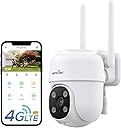
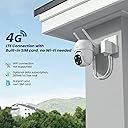
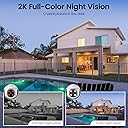
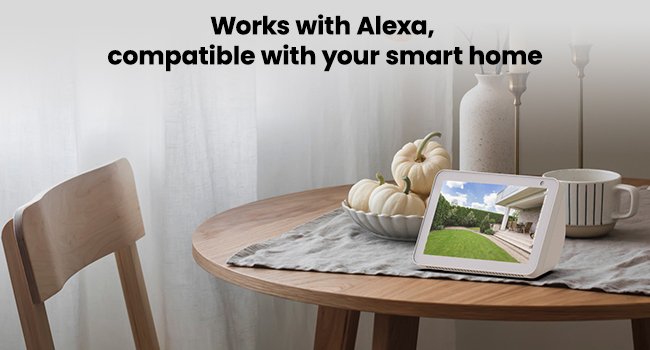
The Wansview W7 is a robust outdoor security camera featuring a 4G LTE cellular connection that eliminates the need for WiFi, ideal for remote or WiFi-challenged locations. It delivers sharp 2K resolution video with advanced color night vision modes and offers 360° pan-tilt-zoom control for comprehensive coverage. Equipped with two-way audio and 24/7 SD card storage, it supports local data retention without cloud fees. Compatible with Alexa and Google Home, it integrates smoothly into smart home ecosystems. Powered by corded electric supply and built with durable aluminum, it’s designed for reliable outdoor surveillance in diverse environments.





| ASIN | B0D5HMYVH2 |
| Batteries Required? | No |
| Best Sellers Rank | #534 in Bullet Surveillance Cameras |
| Color | White |
| Compatible Devices | Smartphone |
| Connectivity Protocol | 4G |
| Controller Type | Android |
| Customer Reviews | 4.3 4.3 out of 5 stars (2,491) |
| Date First Available | May 29, 2024 |
| Included Components | camera*1, 12V DC power cable*1, plug *1, and installation guide*1 and packs of mounting screws*2 |
| Indoor/Outdoor Usage | Indoor, Outdoor |
| Item Weight | 1.26 pounds |
| Item dimensions L x W x H | 4.5 x 3.44 x 4.8 inches |
| Item model number | W7 |
| Manufacturer | wansview |
| Material | Aluminum |
| Mounting Type | Wall Mount |
| Number of Items | 1 |
| Power Source | Corded Electric |
| Product Dimensions | 4.5 x 3.44 x 4.8 inches |
| Specific Uses For Product | Barn, Farm, Surveillance, Trail, Warehouse |
| Unit Count | 1.0 Count |
| Video Capture Format | MPEG-4 |
| Video Capture Resolution | 1296p |
| Video encoding | H.264 |
| Water Resistance Level | Water Resistant |
| Wireless Communication Technology | 4G |
| Zoom Type | Digital Zoom |
K**Y
Buy it now! It's a steal at less than $30
I would rate Wansview W7 camera AND their customer support 6 stars if it were available. Before I justify my evaluation, let me point out that my primary need for an outdoor camera is for surveillance purposes only. I do not need two-way talk, nor recording, nor photos, and not even pan and tilt. So for the first three features are not part of my 5-star rating. Having said that, I’ll comment first on the virtues of the W7 then on the customer support. The Wansview W7 provides 2K (2x better than 1080P) resolution and the color is accurate. For those two features alone is it a steal at less than $30. I realized that the virtual pan and tilt feature serves two very useful purposes: first, it permits simple adjustments to keep direct sunlight from entering into the camera due to seasonal changes and second, it allows fine adjustments when there’s a need to see something just outside the current view. What separates the W7 from name brand cameras is the field of view. The W7 camera views the street in front of my house and the street is straight line. Name brand cameras attempts to widen its field of view to maximize coverage but would make the street curved on the left and right side of the view. A little disorienting for me. Even a great camera at any price isn’t good unless you can fully operate and maintain it. Wansview customer support is outstanding! I emailed Wansview about camera setup and operational questions and received a response in less than 24 hours. Not only are they courteous, patient, and respectful but I always got the same person each time, not just “whomever is available”. So it is easy to build a one-to-one relationship with one customer support technician. Realize, the customer, me, may not accurately describe the problem precisely so it may take several emails isolate the real issue. But the customer support technician stuck with me until the issue was satisfactorily resolved. I commend Wansview for their policy to serve the customer ahead of simply making a profit. Since every customer’s need for the W7 is different, allow me to list a few tips that I used to make your installation a simple as could be. I’ll admit, the written instructions need improvement. 1) be sure there is a power outlet within 9’ of where you plan to mount the camera; allow for the thickness of walls if the outlet is indoors 2) check that your planned camera mounting position has a strong wifi signal; I had to use a wifi extender in the garage for the camera I installed outside and above the garage door 3) after detaching the usb power adaptor from the W7 power cable, tape it to the end of an 12-18” dowel to help guide it through the hole in the wall if your nearest outlet is indoors 4 the camera comes with a full size self sticking template to show exactly where to drill the three mounting holes; be sure the two holes are at the top 5) the camera has a detachable camera mounting plate that needs to be removed before it can be mounted to a wall; see the photo below; it may require some thumb pressure (press and push) to release the “tongue” of the mounting plate from the camera’s base; the camera is very well constructed so you’ll have to take a real close look where the pieces separate 6) when using the Wansview Air app to connect the camera to the home wifi, there will be a step where a QR code will appear on your iPad or iPhone, whichever you’re using; the app directs you to face that QR code to the camera; you may have to move the iPhone/iPad toward or away from the camera in order for the camera to "see the whole QR code" 7) when proceeding through each setup step on your iPhone/iPad, be sure to scroll up on each screen because sometimes a fixed banner at the bottom hides a command/direction behind it I hope this evaluation helps you decide that you may not need the name brand cameras to meet your needs. For me, Wansview is an excellent choice. Think: quality, performance, and customer support are Wansview’s high marks.
S**E
Great camera with great features
Setup was easy, after downloading the app, if you look at pictures 1 thru 3 you will see. You select the plus sign in the app at top right corner (Pic #1) then (2nd Pic), you select the camera which here was the W7, then (the 3rd picture) I chose the second option. I scanned the top of the camera's QR code then followed the screen prompts. It took maybe 5 minutes. I do want to say that when removing the camera from the mounting bracket, pull it straight out,not up. It's a bit difficult especially when there's nothing that says how to do it. (Pic #4 ) shows the features. When you are in the app you'll see all the camera's you have set up. When you click on one of them to open it you'll see a settings button in the top right corner. Click that and it will open all the options pic #5. The first one is to invite family members, this is how you'll share with others in the household or others in general. They will need to have the app installed on their phone first. The one for motion detection, you can select the sensitivity here to detect movement by sliding the dot from low to high (pic #6). I kept mine at normal. If you put it on high, it will detect every tiny movement like leaves blowing from the wind. When you click on detection area above the sensitivity level. You can select an area that you want to get notified about movement. Drag the box side's until you get the area that you want (pic #6A). In my case, I didn't want to be notified of people just walking by so I moved the box to select just the area I wanted to monitor. It will still record that area, just not notify me of movement. When you click on Motion alert, you can turn on alerts or turn them off. Light and night vision you can see the options see Pic#7. Device management (pic #8), here you can reset the camera without going outside to physically do it or do it while away from home when it's not functioning correctly. You can also reset it to factory settings or delete it from your app all together here. Pic #9 is a picture of the motion, you can find these under "alerts" on the main page in the app. The quality of the picture is great, you can zoom in with 2 fingers like how you do on your phone when looking at a picture. You can pan the camera from the app to look around and change the view you have. If you tap the picture, you'll see a box on the bottom right, if you tap the box, you'll make the picture full screen. You can still use pan just by tapping the screen, the pan option will show right on the picture to use. Pic #10 is night vision The last 2 pictures are the two camera views during the day. I did not purchase the cloud that was offered, I use an SD card. But the cloud is offered to you if you want to use it for a monthly fee starting at $2.99. I had first purchased an indoor camera from Wainsview to check on my dogs while I'm out and had been using it for more than a year. I also had already purchased the w7 outdoor camera for my mother about 2 months ago and have been impressed with that as well before getting these for myself. Mom with very little tech knowledge, can use the app with ease. I'm impressed with the company overall and their costumer service too. I would recommend Wainsview to anyone. The camera's are an inexpensive way to add security to your home.
B**S
Wansview 4G LTE Cellular Camera
I’ve been using the Wansview security camera for a while now, and honestly, it’s been a game-changer for keeping an eye on my house and dogs. Setting it up was super straightforward—just plug it in, connect it to 4G, and you’re good to go. The video quality is surprisingly clear, even at night, which I didn’t expect for the price. The app is really user-friendly, and I love that I can check in on my pups anytime from my phone. The motion detection feature is a nice bonus—it sends me alerts when the dogs are moving around or (ahem) causing mischief. I also appreciate the two-way audio; it’s fun to talk to them and watch them get all confused trying to find me. 😂 Overall, this camera gives me peace of mind when I’m away from home, and it’s super affordable compared to some other options out there. If you’re looking for a solid, no-fuss camera to keep an eye on your home or furry friends, I’d definitely recommend it!
H**.
the alert does not seem to be accurate, keep sending me messages, and there is no thing no movement, so this is really useless. i even used partial area to be covered for alerting, still not working, also sensitivity changed but still sending useless alert. could i be doing some thing wrong? i do not think so, but let me know help appreciated if any
Trustpilot
4 days ago
3 weeks ago