Buy anything from 5,000+ international stores. One checkout price. No surprise fees. Join 2M+ shoppers on Desertcart.
Desertcart purchases this item on your behalf and handles shipping, customs, and support to Brazil.
☀️ Ride farther, ride smarter—power your journey with COROS DURA.
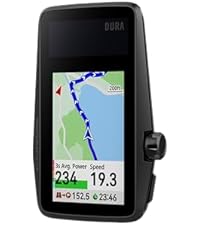
The COROS DURA Solar GPS Bike Computer delivers industry-leading 120-hour battery life with solar charging that adds 2 hours of ride time per hour in sunlight. Featuring a 2.7-inch color touchscreen, tactile dial, and single-button design, it ensures effortless control even with gloves on. Compatible with iPhone and multiple cycling sensors, it offers worldwide maps and live Strava segments for precise navigation and performance tracking.


| ASIN | B0D6TQWRCN |
| Battery Average Life | 120 Hours |
| Battery Type | Lithium Ion |
| Best Sellers Rank | #32,870 in Sporting Goods ( See Top 100 in Sporting Goods ) #43 in Cycling Computers |
| Brand Name | COROS |
| Color | Black |
| Connectivity Technology | Bluetooth |
| Customer Reviews | 4.6 4.6 out of 5 stars (338) |
| Display | Colour display |
| Display Size | 2.7 Inches |
| Global Trade Identification Number | 00810005783200 |
| Human Interface Input | Touchscreen |
| Included Components | COROS DURA GPS Cycling Units |
| International Protection Rating | IP67 |
| Item Dimensions L x W x H | 5L x 1W x 8H millimeters |
| Item Type Name | COROS DURA Solar GPS Cycling Units |
| Item Weight | 102 Grams |
| Manufacturer | COROS |
| Model Number | COROS DURA Solar GPS Bike Computer |
| Mounting Type | Handlebar Mount |
| Native Resolution | 480x240 |
| Sensor Type | GPS Sensor |
| UPC | 810005783200 |
| Unit Count | 1.0 Count |
A**.
Amazing
Battery life is unbelievable, navigation, strava live segments, very good reports after.
コ**ン
Garmin Edge530からの乗り換え。ガチ勢だと少しデータ量が少なく感じるかも。 【良い】 ・バッテリー持ちの良さが他社を凌駕(4月の7時間ライドで4%しか減らない※ソーラーで+4増加含む) ・マウントがGarmin汎用で破損時交換可(乗り換え者には便利) ・アクティビティの終了誤操作が無い(Garminでは停止中に決定ボタンを押さないように注意が必要だった) ・アクティビティ実行中のパワー、心拍ゾーンに色が付いていて分かりやすい ・マップが非常に見やすい ・アプリで設定や項目設定がやりやすい ・corosアプリ(coros Training Hub)の内容が直感的に分かりやすい 【ダメ】 ・音量調整ができない ・レーダーの警告解除の判定が甘い?(後ろに車がいても一定時間同じ速度で走ると警告を解除してしまう) ・全体のサイズに対する画面が小さい(バッテリー持ちとのトレードオフだが) ・TSS表示ができない(人によっては別アプリで管理が必要になる) ・サイクリングVO2Maxが計算されない ・アクティビティ終了時に保存 or 破棄を選べず、強制保存される(色々調整等を行っているときは破棄したい時がある) ・サイクルコンピュータなのにラン用語が使用されている(例:接地ピッチ※ケイデンスと表示してほしい) 【賛否】 ・使用しない時はスリープ状態が基本運用方法のようだ ・この状態だとスマホとBluetooth接続されたまま ・スリープ状態からの再開は爆速 ・電源OFFはメニューからしか実行できず非常に面倒臭い
N**I
Qualità prezzo vincente. Preciso, chiaro, semplice nei menu. Autonomia pazzesca. Compatibilità perfetta con ogni accessorio (cardio, potenziometro, sensori cadenza, radar posteriore). Consigliato come ottima alternativa a Garmin 540/840
D**K
So far this Dura bike GPS has been great. I also own the Garmin Explore 2 (Garmin E2) to compare it to. I just bought the Coros Dura in August 2025. And it installed the latest update upon turning it on. It has Firmware v 3.1011.0 dated Jul 28, 2025. I understand the earlier versions had issues that were resolved in later releases. I have no experience with the old Dura software, only this July 28, 2025 version. So my comments may differ from others that bought the device in 2024. The battery on the Dura so far appears great, no complaints. So far i have 37.5 hours of use on the first charge. I have not charged it after the first charge yet. Given it has 70.8% battery left, I will not charge until it gets below 50%. I think if I put it in the sun when not riding it would never need to be charged with AC. Solar charging while riding is dependent on sun and angle of the sun. I find when I ride I'm rarely riding into the sun for any length of time. When the sun is behind me the solar panel is shaded. The most sun it gets is when I stop for a break. Then I angle it into the sun and get good solar charging. The maps lack street names on the Dura device but i find I don't really need or use them. It does show the street name to turn on about 500 ft early. That's all I find I need. Also, while the Garmin has street names, it only displays some street names and sometimes no street names. I never really noticed it on the Garmin while on the trail until I watched for it. Typically bike paths and most streets are not labeled on the Garmin while in route. The routes on the Dura are much better than the routes on the Garmin. I know everyone says they use the same maps and routes but that has not been my experience. The Garmin will route me on streets with a 45mph speed limit and no shoulder. That's crazy when there are local streets that will take you to the same location. I feel the Garmin routing is based closely on their car routes. The Dura has routed me on local 25mph streets and bike paths. And surprisingly it has routed me on some short cut bike cutaways between streets, thru parking lots, etc. I'm amazed at the routes it finds. I have been on some crazy great short cuts. Not sure how it knows about them, I didn't know them. On the other hand garmin will route around underground tunnels built for bikes. Not sure why it misses those great shortcuts that are much safer to cross a road. And fun to go thru. I had gone off route a few times already with the Dura. The Dura rerouted me quickly and on a decent route, not a fast busy road. I think it uses the phone to reroute but no issue and fast. I'm not sure what all the reroute complaints are really about. I always have my cell phone with me and of course the app is running. It does not drain the battery anymore than any of my other 100 apps. I say the reroute is no issue in this version of the firmware. Obviously if you bike in a no cell phone signal area you would lose the reroute ability for those moments but you might lose GPS signal too. Once you get back into range you can reroute. I'm never really in any zone with no cell coverage and certainly not for any great length of time. The Garmin E2 had been a major headache to use. It is a very difficult to use device, particularly when all you want or need is a GPS for navigation. I already have an odometer, speedometer, and time on my bike. I have miles, calories, heart rate, temp on my watch. Only need Navigation. The Garmin has this incredibly complicated user interface. Full of features I would never use. I don't care about calories or what it thinks I burned or energy I used. I'm all about riding no matter how many calories. The first few times using the garmin i had to abort using the gps. My later adventures with the Garmin were better but still frustrating. For example, at one point i took a long break at a restaurant. I could not get the Garmin to turn off to save battery. For some reason it thought i was still riding. But I did stop the navigation so it was confusing. And the timer on the Garmin requires too much hand holding. Great for cheating on route time but why cannot the GPS figure out the timer why do I need to be involved. The Dura does all the timer stop/start activity on its own, like a computer should. The Garmin has major issues in routing friendly paths and roads. I don't like the routes from the Garmin. And the rerouting keeps wanting to take you back to the original route. It does not like to find a new route forward unless you stop the current route and plan another from your current location. And usually it directs you on a busy high speed street. Very flustrating. While the screen size on the Dura is 2.75" the map space is larger than the garmin explorer 2 with its 3" screen. The Garmin E2 has a block on the top of the map and a block at the bottom. Dura uses all the screen for the map and only uses the top of map to show the road to turn on when you are 500 ft away. Both GPS units have the same screen resolution of 240 x 400 pixels. Both look clear and have good graphics images. Garmin Explore 2 Steps to get to the Map: Open app, there is a home page with 5 links on the bottom. Home Challenges Calendar News Feed More Oddly to get to the Map you need to choose More. Why more on a GPS ?? Seems like Calendar or News Feed would be a More… After choosing More, then there are around 15 items to choose from. Need to choose Training & Planning down into the menu. Then another menu is displayed with 6 items to choose from. Choose Courses and that takes you to a listing of courses you have created. Need to click on Create Course, then choose a Course type among 7. I chose Gravel/Unpaved Cycling. That takes you to another menu of 2 choices. Choosing Custom will finally bring up a Map. My question, why so menus to get to a map on a navigation GPS? That is crazy. At that point you need to choose a starting point. Dura just assumes the current location and you can change it if you want. Not on the Garmin, you need to pick it. Then there is no address entry so you need to zoom out and move around to find your final location. On the Coros app, it has 4 menus on the bottom of the main page. Progress, Activities, Explore, and Profile. Explore is the map, I would have just called it Map but ok Explore works. Click on the Explore option and yes, it takes you right into the map. Looks like Google Maps It is that easy to get there. Put in an address or choose Create Route and then move around the map and drop an end point. What a relief to see it just make the mapping easy enough. Taking a 12 mile route on both Dura and Garmin yield different results. The Dura has lots of side streets, many turns on various roads. Looks ok to me at a glance. The Garmin takes the least number of roads but looking at it, it chose a great route for a car. On streets that are 50 MPH and other main streets. No idea why it chose that route but no way, not on a bike. I would not take that route. You can create a route street by street. But it takes time and if you venture off course Garmin will be happy to route you back on a main high speed street. And with all this Garmin nonsense, it was 4 miles longer. Just confusing for a navigation GPS made for a bike. If you live in a rural area and the number of roads are limited then the Garmin would likely choose the only possible path and all is great. But with lots of side streets around it does not make use of them. Garmin just seems to use the routing it has on their car GPS’s. One other area of different between Garmin E2 and Dura is the data transfer. The Garmin Explore 2 only has bluetooth and it is very slow to download and install a firmware update. The last update I installed this year took me 3 days. In the first day it ran for an hour and I had to run so I stopped the download. I started it back up later and let it run for 2 hours and had to stop it for a call. It was on the final and third day I let it sit until it was done but it took a very long time. I feel the process is too slow, but it does work. The Coros Dura has both bluetooth and wifi. The wifi is much faster. The firmware update I did only took a few minutes. That is how this should work. Bluetooth is just too slow for transferring data. If I had to pick one thing to like about the Dura it would be the routing. The routes are crazy good for bikes. No high speed roads, lots of bike only routes. It chooses a better path than I could. The battery use and charging are great too. But it is the routing that amazes me the most. The screen on the Dura is very good during the day. I have not been on a night ride with it yet. The Garmin screen is as good. No issues with either unit. Have no idea why Garmin cannot use the same routes. I have sat and picked the same routes on Dura and Garmin side by side and Garmin always chooses some high speed road for 10 miles or so. I hate that. The Dura just picks a great biking route. Bike paths whenever it can and low speed roads when needed. I am very happy with the routing on the Dura. I have compared to other apps like Komoot and Strava. Although those both nag you about a monthly feed. Getting thru that, they still choose bad routes down busy high speed streets. I like whatever Coros Dura is doing with their routing. After using the Dura for a few weeks I have some further comments. Surprisingly I have not charged the Dura since the initial charge. Thats is really good. There is no need to worry about the charge on this guy, just go biking. The zoom level by default is one level out too far. When you come up to a turn and there are several streets that could be turned on, the map is hard to tell which one at the default zoom level. If you zoom in one level then no problem. It would be nice if that was defaulted. Trying to change the zoom level while riding is a challenge. The road is bumpy and riding one handed sometimes feels like riding a bull. And in general, I find changing screens a challenge while riding too. And the zoom level cannot be changed after the upcoming street is displayed. Also, the zoom level is reset after a turn. If on a smooth street then all is good but those smooth streets are rare in my area. Creating routes, one day I tried to create a new route on the road and in the rain. But the device kept saying I had too many routes and need to delete a route to make room. I was not sure where this action was needed, on the app or device. And removing one route on each it still did not work. After removing a few routes I was able to get a new route on Dura. Flustrating in the rain. Would have been nice to just replace the oldest route and not show any error message. Interestingly, last week a new software update came thru and it said it fixed the limited routing. I'm not sure if that is the same routing issue or not but good to hear.
J**J
Wow! My first bike computer for my first touring bike (I'm ready for both at the age of 73). After much net research chose the Coros Dura because of the 60 hour+ battery life. I hike and bike in the Scottish Highlands so the only power is from my solar panel (mostly a joke in Scotland), my power bank, and the bike's dynamo. No chance of charging a hungry Garmin with all my other devices in the wilderness so I ignored that brand and chose Coros. The Dura comes in a smart box with cables, instructions, and a mount. I purchased a screen protector separately. Syncing with Corus app was a breeze. I had already saved half a dozen imminent routes to the app on my smartphone and whizzed them over to the Dura. Pleased about that as trying to avoid hefty subscriptions to Komoot or any other navigation platform for a route transfer facility. The Corus maps may be a little limited but they seem to be fine for the Dura. The controls on the Dura's wheel are intuitive once you discover the back button. I'm going to fit the (supplied) Dura holder to the bike handlebars next and it looks excellent. The Dura's bike alarm feature looks potentially useful for parking up outside shops etc without having to drag in the bike's valuables. So far..brilliant.
G**E
Un compteur avec une autonomie de fou. Je ne l’ai toujours pas recharger et il est toujours à plus de 70% après quelques semaines.
Trustpilot
2 weeks ago
2 weeks ago