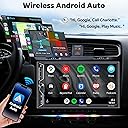
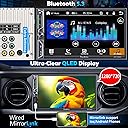
![[QLED Screen Upgrade] Double Din Car Stereo with Wireless Apple CarPlay and Android Auto, Bluetooth, 4.2-Channel Audio Output, MirrorLink, 7" HD QLED Touchscreen, Backup Camera, AM/FM Car Radio](https://m.media-amazon.com/images/I/71dmmWFMGQL._AC_SL3840_.jpg)


Desertcart purchases this item on your behalf and handles shipping, customs, and support to Brazil.
🚗 Upgrade your drive with next-gen tech and sound — because your car deserves the best!
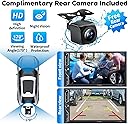
The SJOYBRING Double Din Car Stereo is a cutting-edge infotainment upgrade featuring wireless Apple CarPlay and Android Auto, a vibrant 7-inch QLED HD touchscreen, and a powerful 4.2-channel audio system with subwoofer outputs. It includes a free HD night vision backup camera for safer parking and supports seamless Bluetooth connectivity with voice control. Designed to fit a wide range of vehicles, it offers easy installation with multiple dashboard size compatibility and steering wheel control integration, making it the ultimate smart upgrade for modern drivers.


| Asin | B0CWRM74FR |
| Audio Output Mode | Stereo, Surround |
| Audio Output Type | Speakers |
| Brand | SJOYBRING |
| Built In Media | head unit, charging cable, backup camera |
| Color | Black Wireless Carplay+QLED Screen+Dash Cam |
| Compatible Devices | Smartphone, Amplifier, Speaker, Television, Personal Computer, Tablet, Game Console |
| Connectivity Technology | Bluetooth, HDMI, USB, Wi-Fi |
| Connector Type | RCA |
| Control Method | Voice |
| Controller Type | Google Assistant |
| Customer Reviews | 4.2 4.2 out of 5 stars (938) 4.2 out of 5 stars |
| Format | Unknown format |
| Item Dimensions D X W X H | 9.3D x 17.8W x 10H centimeters |
| Manufacturer | SJOYBRING |
| Mfr Part Number | JOY-W021 |
| Model Number | JOY-W021 |
| Number Of Channels | 4 |
| Number Of Items | 1 |
| Other Special Features Of The Product | Built-In Wi-Fi |
| Output Power | 240 Watts |
| Output Wattage | 240 Watts |
| Supported Internet Services | Apple Music, Google Play Music |
| Surround Sound Channel Configuration | 4.2 |
| Total Number Of Hdmi Ports | 4 |
| Video Encoding | H.264 or H.265 (HEVC) |
| Wattage | 240 watts |
| Wireless Technology | Bluetooth |
User
Inexpensive Exceeds Expectations.... borders on impressive!
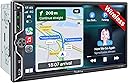
tldr; This thing is really solid for the price! If you're looking for good value that doesn't break the bank, grab it. You'll love it.Pros: Tons of features, wireless android auto and carplay work great, sharp display, great sound, easy to hookup, clear directions, responsive support so far.Cons: No real cons, some areas that could be improved as noted below.Would love to see: Ability to load a custom boot logo or background from a usb stick without going through support, Ability to switch wireless devices from the head unit, USB port on the back of the unit.The long review and a little background...I just finished helping my stepson get his first car, an extremely clean,low mileage 2007 Pontiac G6 GXP hardtop convertible. We paid $800 because it's older and the transmission was blown. Awesome little first car for him and great experience together as we rebuilt the transmission and went through everything else it needed. Soon he had a pretty sick looking car to drive to school... He didn't even complain about the fact that the stock radio sounded like someone trying to sing through a tin can and that the only way he could stream to it was by using a radio adapter.I'm a big fan of rewarding hard work and grateful attitudes, but I'm also a father with 5 kids that I'm constantly helping fix their cars, bicycles etc so while I wanted to surprise him with a nice new stereo, I was on a tight budget. After a LOT of research I settled on this radio, crossed my fingers, and ordered it for him.I've installed plenty of radios, expensive Pioneer ones, and cheapo space fillers so I'm very familiar with how much quality and value can vary.I received the stereo in 2 days flat. It was well packed, in a nice box and came with what were easily the best instructions of any inexpensive radio I've ever installed. I could actually read the directions without laughing! Even better, they were clear, clean, and even gave helpful tips for folks that aren't so familiar with these systems.It was pretty simple to install the radio. I opted to use a Metra universal steering control adapter and schosche harness and canbus adapter. We did a quick test to insure it powered on (always do this first) then we soldered the harnesses all together, plugged it in, and powered it up.WOW!!!! This thing kicks! The screen is sharp, bright and easily readable. It is glossy, and while I would prefer a matte finish, there is really no glare so it's just a matter of preference. The brightness can be controlled by the illumination wire, and the brightness level can be adjusted independently for headlights on or off. This works great and keeps the screen at perfect levels. No problems day or night.The audio was really good at first, but lacked a little punch. Looking in the settings revealed a loudness option and adjusting this took the sound from good to absolutely awesome. I will state that this is running through a stock Monsoon amp, and that will make a difference, but regardless, the sound is incredible. Crisp, clean, great punch, and the equalizer actually works well! So many of these cheap radios have equalizers that do, well, nothing. This one actually works and very well!Interfacing with Apple Carplay over wireless was easy and smooth as was Android Auto. The only thing that was a bummer is that there does not appear to be any button to disconnect the existing android/apple connection and switch to another one. The radio just reconnects to whatever was last connected and you have to disconnect from your cellphone to switch to a different phone. Small problem, but would love to see a way to switch to known connections.The backup camera is very sharp and has a great picture! I would recommend that when you install you add a capacitor in parallel to the power source if you're hooking up to the backup wires. If you're hooking up to a constant power source you should be fine.Responsiveness is on point. There is the tiniest bit of input lag but it is hardly noticeable and I am told that an update will address this. I'm waiting on the vendor for that.Background and boot logo are customizable, but loading a custom boot logo requires going through the vendor. It would be great to be able to load a background or boot logo through the menu via USB. This seems (as a programmer/developer) to be a very simple thing to integrate.Speaking of USB it would be great to have a USB port on the back so a cable could be added for an external drive etc.Overall I am extremely impressed with this unit and my stepson is beyond thrilled! I highly recommend this specific head unit if you are looking for an inexpensive but solid performer. I will update this if anything fails.
User
Perfect upgrade for my Xterra
2006 Nissan Xterra (w/Rockford Fosgate system). So let me say that this unit is awesome and just what I was looking for to upgrade the factory head unit.Packaging (5/5)*Everything was nicely packaged and secure. No loose items or damage. All items were in the box and labeled clearly.Quality (5/5)After doing a lot of research and scouring forums, I was a little skeptical like a lot of others buying a fairly inexpensive head unit online. Many folks said just go with the major brands and stay away from off brands. To be honest, reviews say a lot and I took the plunge due to the positive reviews, price range, features, and backing of Amazon. I'm glad I did. I was very pleased to find the screen, finish, connectors, harness, rear camera all seemed top notch and fitment was great. I've only used it for a few weeks so hopefully we'll see on the longevity. Navigating the menus, options, features were a breeze with no issues.Instructions/Installation (5/5)The instructions that came with the unit were very clear and helpful. I will admit that I didn't use one of the harnesses (speaker wires one) due to the fact that I have the optional RF factory amp that powers the speakers and sub. I purchased this harness specifically for this setup (# 70-7551). What I really liked about this unit was the fact that it had the separate SWC harness included. This made it extremely easy to connect my SW to the unit. On my Xterra, there were 3 SWC wires (Red, Blue, Grey) on a 16pin connector (only had 3 cables connected so I knew it was the right one). SWC1 was Red, SWC2 was Grey, and Ground was Blue. I did NOT have to buy one of the adapters or special kits for the SWC to work (PAC or Axxess). This saved time and money.SWC matchup:OEM SWC1 (Red) ---- Headunit (SWC 1 Grey)OEM SWC2 (Grey) ---- Headunit (SWC 2 Green)OEM Ground (Blue) ---- Headunit (SWC Black Ground)I ended up grounding the brown brake detect wire also...RF Specific setup:Everything is simple, just make sure to connect AMP Power (blue/white cable) from the 70-7551 harness to the Blue cable on the harness coming from the unit. **You won't use the Blue only wire from 70-7551)Function (5/5)Haven't gone through all the features but everything works great (love the wireless Android Auto/Carplay), Waze, phone calls (I did purchase a separate MIC for the bluetooth mounted on the A-pillar). haven't really tested out the remote control but a fun bonus.Rear Camera install (4/5)Connections were easy. Every car is different when running the wires. Just take your time and ensure you properly wire to the "reverse" light wires. The camera cable is long but if you have a really large SUV, you may need to get a 4pin extension cable for the last few feet....just for awareness. I actually needed to do that with mine unfortunately which is why the 4 of 5 stars. I wouldn't been nice to have it longer for longer vehicles.Customer Service (5/5)Although you have to reach out to the company as they don't provide the specific firmware upgrades online with instructions, they were extremely quick to response (being a 12 hour difference) and provided all the instructions and files. I asked for the Nissan logo and they were able to provide that which was super cool. Please follow the INSTRUCTIONS exactly (re-read the instructions and take your time). You don't want to brink your device.Overall, very satisfied with the purchase for under $200.
User
This is exactly what we were looking for at a price lower than we expected
This is a fantastic upgrade from the stock CD/radio in my daughter's 2009 base-model Toyota Corolla. Once you are used to having a backup camera, navigating by GPS audio/video map directions, streaming music from your phone, and hearing/sending text messages by voice, those conveniences can be sorely missed. I worried she would try to mess with her phone while she was driving (especially for navigation), so this was a birthday present for both my daughter and us parents. The wireless CarPlay connection is fast and (so far) solidly reliable, so she can plug in her phone to charge and tuck it away before she starts to drive.To prep for the install, I also purchased a 2009-2013 Toyota Corolla stereo double DIN dash kit and a Toyota wire harness (2 pieces), making the connections to the wire leads from this new unit to the OEM plugs used by the original stereo literally plug-and-play. No steering wheel controls in her base model, so I didn't have that complication to deal with, but even that didn't seem too hard based on the directions, just one more adapter to possibly purchase. Fishing the wires to support the backup camera was the hardest part of the install and between the printed instructions and the videos, there weren't really any outstanding questions about how everything should go. My total install time was probably 2.5 hours, but I'm the methodical detail-oriented type, so probably spent an hour tucking away the wires and lining up the trim in the dash "just right". Once it was all connected, the setup and bluetooth connection were straight-forward and easy, and we were ready to go in no time.As others have stated, the customer service is very responsive, and they quickly sent over instructions for updating the unit to the latest firmware versions and adding a nice OEM-looking boot screen, which was a very professional touch. Some of the nicer settings available for this unit are the home/call button backlight colors, a digital equalizer to tune the speaker sound, adjusting the audio attenuation to turn down music volume when audio like driving directions play over it, and setting a default volume when the stereo first comes on. There is also a screen brightness control which may be important if you drive at night. While the screen is very easy to read in the daytime, it can be distractingly bright in your field of vision at night. I think we found a good balance that works for both day and night, but I was happy to see that setting was available.Overall, very happy with this purchase, and would buy it again if I had it to do over. The only feature that would be nice to add would be an auto-dimmer of the screen (and maybe button backlight) based on the ambient light inside the vehicle. Apps like maps flip to dark mode based on sunset times, and that helps, but having the screen itself dim automatically would be a great feature to at least make available as a setting in some future version.
User
So far so good
TL/DR I’m happy with this unit, and it’s def better than what I had. There have been a few glitches but overall works great and sounds great. Customer service was very helpful and install was reasonable. I recommend giving it a shot.The longer version.Installed this in a Nissan Frontier using the Metra wiring harness. Install was pretty easy- it’s the first time I’ve done this. The actual vehicle was more difficult to deal with than the radio. All the colors on the wiring harness matched the radio and I was able to connect an existing backup camera to the system. I used snap down wiring connectors which let me change wiring around without re-crimping.ProsCarPlay is nice- takes a minute to boot. Bluetooth is pretty consistent. Touch screen has a brief delay, so at first I was double tapping and skipping what I wanted to hear.Sound quality is great. The stereo cranks. Rock, jazz, musicals, etc. handled it all.Love the analog volume knob. Tbh it’s one of the reasons I got this unit.Customer service hooked me up with the Nissan logo for the boot screen. That install was pretty simple too.Cons.Not too many, but I think if I try and backup before everything has fully booted, I throw it off. Once CarPlay didn’t connect at all and recently CarPlay went black and I had to hit the analog home button to get to the main screen. Ended up having to turn the car off and on to get it to reset, which it did. Not sure if it’s a software or hardware glitch, but it’s inconvenient.I’m not impressed with the microphone. I may need to see about installing an aftermarket mic to see if that makes an improvement, otherwise making calls will be limited.All in all, it’s an upgrade from what I had and the price is right. Like others I noticed the two sets of backup lines but I was able to shut off the radio’s native line in setup. Hopefully I can adapt to the glitches I associate with putting it in reverse too quickly and as long as that’s all it is it’s something I can deal with.So yea! I recommend it! YMMV
User
This is a fantastic unit!
I bought this to put in a 2012 Toyota Rav4 that we bought new. The Rav4 wasn't built with a backup camera, and the stereo was kind of awful, so I wanted to give it an upgrade. I installed it myself and it was not difficult, although I do have an electronics background. I used a different backup camera that was made specifically for the Rav4, instead of the generic one that comes with this unit because I wanted to have a stock look. Everything on the unit works really well. The audio is way better than the factory stereo, even though I'm using the factory speakers. It boots up quickly and wireless Carplay works flawlessly. The FM radio sounds awesome. I bought harnesses here on Amazon that allowed me to go directly from the car's plugs to the unit without soldering or wire nuts. I didn't have to cut any wires in the car, and the steering wheel controls work great, although I did have to buy a harness to make that work in my case. Also, don't forget to also order an antenna adapter, you will probably need it unless you have a very old vehicle. The screen is high quality, and the touch interface works great. The backup camera is great too. I'm so glad I now have navigation now that I have Carplay. I also used a dash kit that I bought here on Amazon to adapt this to my car. Also, their customer support was awesome. I emailed them to get a Toyota boot logo, and also a MCU software update and they were quick to respond with links to download the files and instructions on how to do it. So now I have a fully upgraded unit with the logo I wanted! Overall, I'm really impressed with this unit, especially for the price. I strongly recommend it!
Trustpilot
3 weeks ago
1 day ago