Buy anything from 5,000+ international stores. One checkout price. No surprise fees. Join 2M+ shoppers on Desertcart.
Desertcart purchases this item on your behalf and handles shipping, customs, and support to Brazil.
🎯 Dominate Every Game with Precision and Power
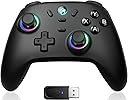
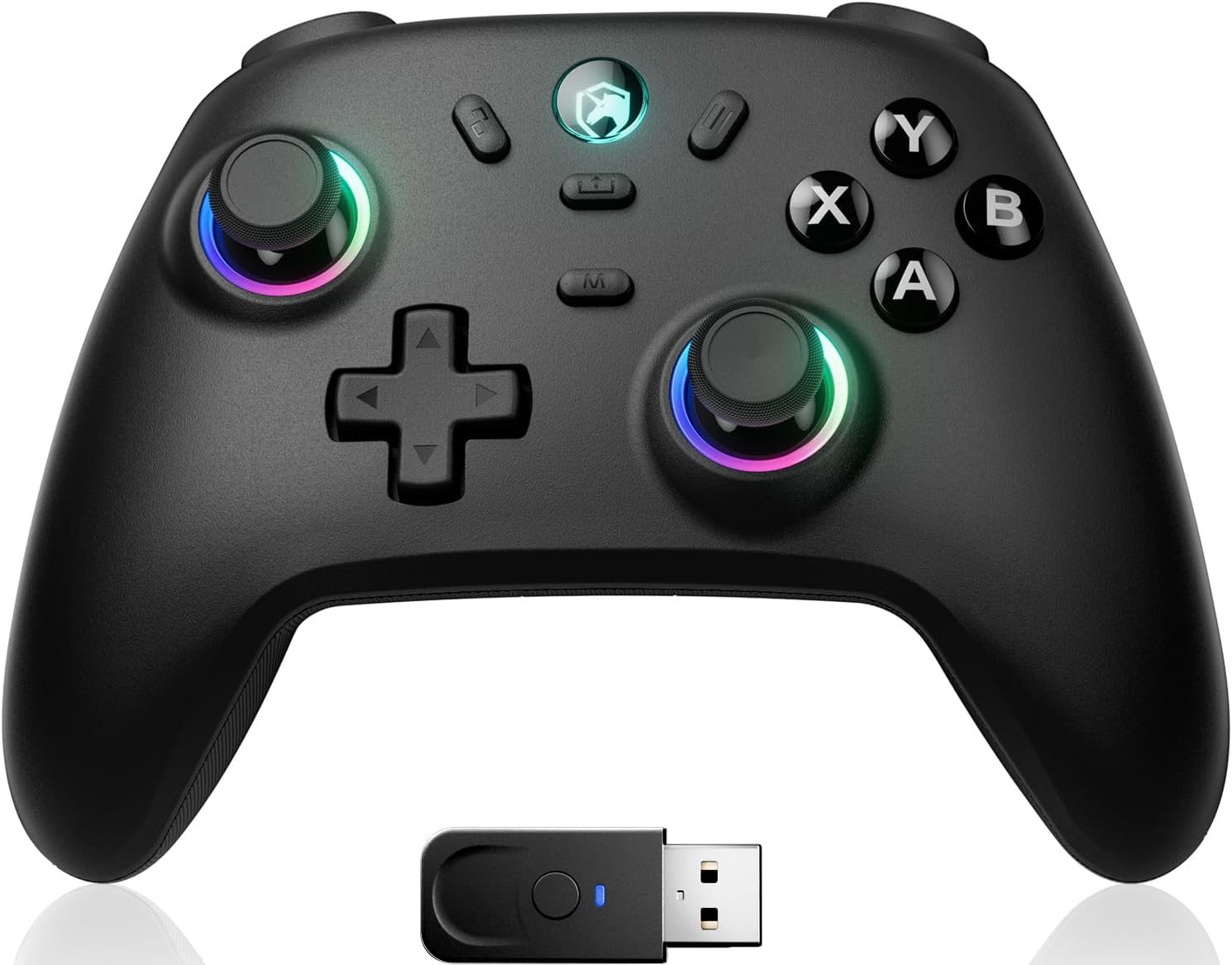
The ECHTPower Wireless PC Gaming Controller combines Hall Effect joystick technology for drift-free control, a blazing 1000Hz polling rate for ultra-responsive input, and an 800mAh battery offering up to 15 hours of playtime. Compatible across PC, Nintendo Switch, iOS, and Android, it features customizable turbo and vibration settings plus dynamic RGB lighting, making it a versatile, high-performance controller designed for serious gamers who demand precision and endurance without the premium price.


| ASIN | B0DMNWV89Q |
| Additional Features | Ergonomic, Wireless |
| Best Sellers Rank | #311 in Video Games ( See Top 100 in Video Games ) #11 in PC Gamepads & Standard Controllers |
| Brand Name | ECHTPower |
| Button Quantity | 1 |
| Color | Black |
| Compatible Devices | PC |
| Connectivity Technology | Wireless |
| Controller Type | Gamepad, PC Controller |
| Customer Reviews | 4.2 4.2 out of 5 stars (7,345) |
| Hardware Platform | Desktop |
| Item Dimensions | 6.29 x 2.36 x 4.7 inches |
| Manufacturer | ECHTPOWER |
| Package Quantity | 1 |
| Power Source | Battery Powered |
I**1
Worked on Samsung TV
Worked great for me. I recently bought a 75 "Samsung TV and needed a game controller for it. My old TV didnt have games on it. It installs as an Xbox controller and works great.
J**A
Great Budget Controller
I’ve been playing on my pc since early 2020 and have been using mouse and keyboard for every single game I’ve played since then. Obviously there’s some games out there that are significantly easier to play using a controller, I’ve just been stubborn, until now. In light of Super Bowl 60, I purchased madden 26 (gross, I know) and could not for the life of me understand how to play on keyboard, it’s so awkward. So I thought of getting a controller, and this one is actually perfect. It’s obviously not gonna live up to a real, legit Xbox controller, but it feels great in the hands. The buttons and triggers have amazing input and scratch just the right spot of my brain. This could just be me not being used to holding a controller but the thumb sticks feel so much better and responsive than previous licensed controllers I’ve used during my console days. The bluetooth works flawlessly, within 1 minute of unboxing I was already using the controller in game. Super simple to set up. The battery life is another plus, I played for a good 4-5 hours last night without the battery dying and I haven’t even charged it yet. The type C cord that comes with the controller is just a bit short for my liking but that is an issue so far down the list I shouldn’t even be mentioning it. In short, if you’re looking for a cheap controller and have a past of loving the ergonomic feel of Xbox controllers, this is the one for you. You will not regret it.
T**K
Pretty much perfect third party Switch controller, with a minor modification
I'll start off by saying I love the official Switch Pro Controller from Nintendo. I think it's super comfortable. The only thing I want is a controller just like it with extra programmable buttons, and this thing is the best controller I've found that fit the bill! I love how the button layout is exactly like the Switch Pro Controller - a lot of other third party controllers will swap the Home buttons with turbo or something else and it messes me up because of my muscle memory. The shape is pretty close with the handles being a bit thicker, which I have found I like. It's just as comfortable to hold for long periods, if not more.. The plastic feels very nice and high quality! I love the black on white aesthetic as well and the RGB lights are just a bonus (do wish it had a color fading mode that just rotates through colors without breathing/turning off though. Also wish the ABXY buttons could be changed and match the color of the sticks instead of always Xbox colors, but it still looks nice). I also love how easy and intuitive it is to set the programmable buttons or create a macro (and the LEDs for that matter). I've tried other controllers with these features where if you don't do it for a while, you forget how the hell to set it and have to reference the manual. I don't have a big need for macros right now, but I have tested it out and it works super well! It's pretty robust honestly. You can even record analog stick movements to the macros which opens up a lot of possibilities! As well, you can set the buttons to be one specific direction on a stick, so you could hold the button to simulate holding the stick in that direction. Seriously the best macro feature I've seen on a cheap controller like this! The wake function is very realiable! More reliable than the official Nintendo controller actually. It works flawlessly the first time every time. Now the main issue I had was the placement of the macro setting buttons. They really should be further away from where your middle fingers test, because I found that I would often hit them by mistake, which doing so would reset the macro button to do nothing. I got this controller pretty much just for Tears of the Kingdom so I could run with XL and jump with XR, thereby being able to move the camera around while running and jumping. This really is a game changer if you like exploring on foot like I do. However, pressing your jump button, expecting to jump, and not jumping (because the macro button got accidentally unset) obviously is a frustrating problem that led to many goofs and deaths. They could fix this issue a few different ways. Either by moving the buttons further in or up, or even a simple software change so you had to long press the button to unset it and otherwise pressing it without any other button simultaneously would be ignored. That would probably be the best way to solve it. Or they could recess the buttons so they're not easy to press by mistake - and that's exactly what I took it upon myself to do! I opened the controller up with a screwdriver and sanded down the macro setting buttons so now they're about 2-3mm in and it's impossible to press them by mistake. I have to intentionally push the tip of my finger into the hole to hit the button. Completely solved the problem! There is another minor issue I've seen other reviewers mention: the very short disconnect/sleep time, but this is entirely fixable as well—and officially! All you have to do is use the KeyLinker app on your smartphone. Pair the controller to your phone (in the app, not in your Bluetooth settings). You'll see all the settings you can play with. On the last tab to the right "Other", you'll find "no operation shutdown time". It's set to 5 minutes by default, but you can set it anywhere up to 30 minutes or to never shut off. Perfect! The only thing that isn't fixable but I can live with is the battery life. It's not bad but I wish it was better. The official Nintendo Switch Pro Controller has crazy good battery life. Whenever I use it I feel like I don't have to charge it for days. This, I feel like I have to plug in at least once a day or every other day (tbh I haven't properly measured). Also to be fair, this has LEDs sucking the juice up too and I have not tested the battery life with them off. I like the lights and have a cable nearby so it's no problem to plug it in when I need to. Though, I wouldn't have minded this having a slightly higher price tag to have a larger battery inside. But I'm happy with it either way. Only other minor issue is I wish the screenshot and home buttons weren't so raised - they can more easily be pressed accidentally, and I find myself hitting screenshot sometimes when I'm reaching for -, but this isn't a deal breaker. Overall, this thing is great and the only real issues were easily fixable, so I totally recommend it!
M**X
Awesome controller (with asterisks)
I was really excited to try this controller. Here's are some things to consider if you're looking at this as a new or replacement controller. Pros - It was super easy to set up and you get multiple options to connect to your devices. The single is stored inside the controller, you just have to remove the face plate. - The faceplate is magnetic and very simple to remove. Just quickly pop off the D-pad and the plate comes right off. - Directly inside the faceplate, you can manually switch between button layouts for the Nintendo Switch and Xbox. - Some people might not like it, bit I thought it was really cool that the buttons are effectively blank. When you turn the controller on, the letters on the controller are backlit and show the button mapping for whichever setting you prefer (Switch or Xbox) - The back buttons are easy to program and require no external software. - The hall effect joysticks are very responsive - The buttons, triggers, and bumpers feel really nice. - Comes with a charging dock Cons - The controller doesn't feel cheap, but also not quite as premium as I would like for the price. For a $70 controller, it is competing with the likes of the Flydigi Vader 4 Pro, which is a much nicer feeling controller with more buttons and customizability where it matters, like joystick tension and thumbsticks. - The thumbsticks were a big issue for me. I prefer to play my games with extended thumbsticks. This controller does not have swappable thumbsticks, nor can I use my KontrolFreaks because the thumbsticks are not the same size as the Xbox. This was my biggest issue because of how I use my controllers. - Another issue I have with the controller is that I like having additional buttons for certain games. This controller has two additional buttons on the back that are minimally distracting and responsive. If it had two more, I would like this controller quite a bit more. - The magnetic faceplate.... It's such an awesome feature for customizability and yet I can't find any faceplates on Amazon or from the manufacturer. If you're going to provide a feature like this when you launch an item, it would be a great idea to have at least a few options available. - The turbo button is a cool feature but sometimes gets stuck on and I have to turn the controller off to turn the turbo off. This controller is very nice and I think it has a lot of potential, but the price is a bit high for the feature set offered. I would absolutely recommend the controller based on performance and features. But at this cost, I would choose the Vader 4 Pro over this. I would choose it over an Xbox controller, absolutely. And if it's on sale, that helps, not even then it's competing against established competition like the EasySMX, which offers a near identical experience for slightly less, especially on sale. In short, don't overlook this controller. There is a lot to love and be impressed by, but I personally need a better value proposition and improvements to customizability before I can give this controller 5 stars.
A**H
Very VERY weak USB Dongle, Worse Bluetooth
TLDR: Don't buy for the wireless USB capabilities. It doesn't work. I purchased a BLACK 2 model to use with a BC-250 Linux system being utilized as a steam machine. My system does not have any native Bluetooth capabilities and has a hard-wired Ethernet connection. So buying a Wifi/Bluetooth dongle to use with a Bluetooth controller was less than ideal. Hence why I purchased this product. Currently, I am using a wired MSI controller that kids keep tripping up on and/or pulling. So I was hopeful getting a wireless controller with a charging dock. However, I have been nothing but disappointed by this controller. Before I drove into the negative aspects of the controller, there was a couple expectations that were met. The build quality is similar to a $20 Nintendo switch wired controller. For a $30 wireless controller with a dock, I expected this. The controller has multiple connection options, which is a nice to have, but unused by me. RGB is a fun touch too. HOWEVER, I cannot use this controller as I intended to. Since I already have a wired controller and my system didn't have native Bluetooth, I wanted to use the system with the wireless USB dongle. My system is inside of an ikea fjallbo tv unit. Think metal mesh. All of my game consoles (PS5, Wii, etc) are in there and have no problem with controller connections. However, they use Bluetooth connections for their controllers. When I plugged in the USB dongle for this controller and shut the metal mesh cabinet door, the controller had no connection and promptly shut off when I tried to use it. However, the wireless keyboard/mouse I have that also uses a wireless USB dongle has no such issues. When I opened the door to my TV cabinet, the controller was able to connect. Having to open the cabinet defeated the purpose of the cabinet since it no longer kept a young child out of the cabinet. However, after further testing, the controller only occasionally connected to the USB dongle (it often failed even if adjacent to the dongle) and if the controller lost line of sight to the dongle it dropped/missed inputs, experienced major lag, and constant disconnections. Essentially, the controller was less reliable than a wii controller's IR pointing functionality. And since I already have a wired controller, this was worthless. EDIT: Tried giving the device the benefit of the doubt and tried using it as a Bluetooth device. I purchased a third party Bluetooth dongle to use on the BC-250 and this device would not connect. I tried to use it on my Windows PC as well and this device would not connect. I've tried resetting the device and no luck. I pulled up the ECHTPower website to see if there was a firmware update, but the website was WORSE than the controller. I HIGHLY advise you to stay away from this controller.
A**B
Works with Luna through my Smart TV
I bought this controller because of the ability to switch from Xbox to Nintendo Switch settings. I am using this for the Luna app through my Smart TV and it works great. Most of the generic wireless controllers on here are only for Switch so I was glad when I found this option. Also, it does come with a dongle, but it was not needed to connect directly to my TV. No lag, battery has lasted 10+ hours, Bluetooth connected easily. Also, the controller itself feels like it will last and it is cute (there's a unicorn in the little light, which I love). Charging is easy, comes with a USB-C cord. All around great and works with Luna! Yay!
J**N
A PC gamer's review on the ECHTPower wireless controller
This is a great value controller for those that want more features than what the official controllers offer but don't want to break the bank. Pros: - TMR joysticks. A must nowadays in the era of stick drift. - Very unique and cool looking design while still being relatively subdued. - Feels solid in the hands and not cheap. - Has a bit of weight but not too heavy. - Trigger switches to go from a more traditional trigger to clicky triggers. I personally prefer this so its a great feature to see. - Being able to switch between Xbox and Switch button layouts easily by popping off the magnetic faceplate. Personally I'm not someone that needs or cares about this too much but its nice for those that need the labels to match the platform. As a result the ABXY buttons aren't labeled in the traditional way and instead they use RGB lights to show the buttons, it looks pretty cool. - Being able to switch between 2.4ghz/Bluetooth with a simple switch and easily being to switch between Xinput/Dinput. Personally I always use Xinput and 2.4ghz since in my experience its always the best experience but great nonetheless. - Pretty low latency in games. I play Call of Duty, Halo and other games with it and it felt pretty good and responsive. - You can turbo every button! One of my biggest gripes with companies like 8bitdo is their controllers don't let you turbo the triggers. This controller can, a great feature. Pro/Con depending on your tastes: - Minimal RGB. I'm a staunch hater of RGB and too many flashing lights so the controller only lighting up the ABXY buttons and the charging light is right up my alley. - Clicky DPAD. Personally I like clicky dpads, I like the feedback it gives me and it feels nice to me but I know some people don't care for it. - Charging dock/built in battery. This might be a deal breaker for some. The controller has the option to use it wired through USB in case of anything. Cons: - No software on PC. It's not the end of the world but there are a LOT of button combinations on this controller to do specific actions. Some are straightforward (most of the important ones are) but others not so much so you'll be keeping the manual handy at all times. I would have liked to see a software that streamlined this. - The dpad is a little too tall. Unlike the rest of the buttons on the controller, the dpad is above the magnetic faceplate. As a result the dpad ends up being a little tall for my liking. I got used to it but if they do a revision/successor to this controller then I would like the faceplate to have a bigger cutout to accomodate the dpad and for it to be more inside the controller. - No way to completely turn off the RGB. You can adjust the brightness but for me the best option is off. I have another ECHTPower controller that lets you turn off all the RGB so I was surprised by the absence. It's not a deal breaker by any means but in a future revision I would like to see this added. - No simple way to see battery status on 2.4ghz. The cons are nowhere near enough to ruin this controller for me. It's a very good controller, I give it a 4.6/5, a great effort by ECHTPower.
T**.
Probably Get A Different Controller
Should be cheaper since it is the same price of controllers that outperform it. I was having frequent connnectivity breaks while gaming and lots of drofting incidents. Besides that it was a good controller i just dont like that they try to get away with charging the same as clearly dominant products.
C**V
Ottimo
Acquistato per Tesla Model3. Perfetto
R**N
Excellente manette : confortable et réactive
Très bonne manette ! Utilisée principalement sur Switch, elle est confortable en main et agréable même sur de longues sessions. Les boutons répondent parfaitement, sans aucune latence. Très bon rapport qualité. Je recommande !
C**A
Esta increíble
Muy lindo. Me encanta que cambia de colores! Aparte por el precio, se siente de muy buena calidad!
G**Y
Top
Top
C**A
Gran mando calidad precio.
Esta muy bien. Se nota buena calidad, responde muy bien y es muy cómodo, similar al de xbox. La base de carga es muy útil para mantenerlo siempre cargado y ordenado en su lugar. Recomendado!!
Trustpilot
2 weeks ago
1 month ago