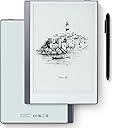
📝 Elevate your note game—where paper meets future tech!
The Geniatech KloudNote Mini 9.7" is a sleek silver digital notebook featuring a 9.7-inch high-resolution E-ink display designed for eye comfort and outdoor readability. Powered by a 1.5GHz quad-core processor and Android 8.1, it offers 32GB storage, 40 hours of battery life, and advanced 4096-level pressure-sensitive stylus input. With cloud synchronization, handwriting-to-text conversion, and voice recording capabilities, it’s tailored for professionals seeking a seamless blend of traditional note-taking and modern productivity.


| ASIN | B0D5Y7DLXQ |
| Active Surface Area | 9.7 square inches |
| Additional Features | Cloud Data Synchronization, Eye Protection |
| Best Sellers Rank | #68,646 in Computers ( See Top 100 in Computers ) #185 in Graphic Tablets |
| Brand | Geniatech |
| Built-In Media | Protective Case, Two Digital Pens, Type-C Charging Cable |
| Color | Silver |
| Compatible Devices | [GENERIC] Tablets, smartphones, laptops, desktops |
| Connectivity Technology | Wi-Fi |
| Connectivity technology | Wi-Fi |
| Customer Reviews | 3.8 out of 5 stars 112 Reviews |
| Display Type | E-ink Glass Screen |
| Item Dimensions L x W | 25L x 17.5W centimeters |
| Item Weight | 420 Grams |
| Manufacturer | Geniatech |
| Mfr Part Number | KloudNote mini |
| Model Name | Kloudnote Mini |
| Model Number | Kloudnote Mini |
| Model name | Kloudnote Mini |
| Native Resolution | 4096 levels per inch |
| Operating System | Android |
| Operating system | Android |
| Pressure Sensitivity | 4096 Levels |
| Pressure sensitivity | 4096 Levels |
| Screen Size | 9.7 Inches |
| Special features | Cloud Data Synchronization, Eye Protection |
| Specific Uses For Product | Drawing, E-Book Reading, Writing |
| Target Audience | Frequent note-takers |
M**T
Sí lo recomiendo: funciona bien
No es la mejor tablet para escritura, pero funcina bien, el lápiz y la interacción en pantalla es bastante aceptable.
J**Y
Great tablet for reading ebook and taking notes
This tablet is excellent for reading and writing. The e-ink screen is far more comfortable on the eyes compared to a regular display, and it genuinely feels like reading and writing on real paper, I also like the texture of the screen, it gives you this paper texture when writing on it which feels a lot more natural compare to a smooth glass panel. It comes with two styluses, which is a nice. Importing files from PC is pretty easy, just connect via USB-C and drag and drop into the tablet’s folder. There’s also an SD card slot if you need more storage, which makes it cheap and easy to upgrade. Overall, I’m very satisfied with this product.
T**D
Great eReader and Note-taking/Drawing Tablet
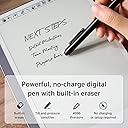
Summary: The Kloud Mini eInk tablet is a solid device for reading books and taking/sharing notes on the go. You can load the Android Kindle eReader app from the included app store, and the built in Notes app has a slew innovative features built in for sharing your notes to others nearby or online using standard file sharing services. The UI experience is a little rough around the edges, but if you stick to the main uses of an eInk tablet, it's a good experience. Oh, and make sure you perform the update that is offered during the initial setup for the best experience. Details: The built in Notes app uses the included stylus to allow you to not only take notes, but also draw pictures with a pressure sensitive tip. If you make a mistake, just flip over the stylus to use the other end as an eraser just as you would a normal pencil. The feel is excellent and it is very speedy to update for eInk. You can also convert your notes using optical character recognition although you will need to create an account on the Kloudnote server to do that. Now the real jewels here are the multiple of features to allow you to share your notes and drawings. If you're having a family game night playing a game that requires sharing a drawing, you can cast your screen to nearby displays that support casting for all to see rather than breaking out a big pad of paper. I was easily able to cast this to my Roku on my living room TV. It would also work well for ideation sessions in the conference room at the office. Once you have some notes or drawings you want to share with your team or family, you can also share files in a multitude of ways: -Generate a QR code to be scanned by nearby phones -Send by email -OneDrive or Dropbox file sharing (need to log into your account for these) Overall, the Notes app works well and offers a lot of ways to move or share your content. As far as an eReader, my only minor nit is that you have to download the Kindle app yourself and this was a little slower than I expected. Nevertheless, if you've used the Kindle app from the Android store, it's the same experience. The display works great in full sunlight and much easier on your eyes than a backlit LCD screen. One other item I need to point out is that unlike other Android tablets where you swipe up to bring up the navigation keys, this has a small button centered on the right edge of the screen (you can slide it up or down) for navigation. You tap it twice to get to the controls, but from there you have your "back", "home", "power", and a couple of other controls. It takes a little getting used to, but it does work well. Last Word: It bears repeating that this is an eInk tablet and if you stick to using it for things that eInk accels at, you'll have an enjoyable experience. But if you insist on trying to shove a round peg through a square hole, then not so much, but that isn't the device's fault.
A**E
The size and weight is excellent.
I’m excited to use the note taking and I’m looking forward to using the other features. I which that the front was also covered as the back.
S**D
Doesn't even turn on...
When you get the new tablet, open it up, plug it in to charge and check on it several hours later, and you turn it on. Well, half on. Screen doesn't refresh. I figure maybe I didn't plug it in to charge correctly so I try again. Except this time the light is red, like it wasn't charging for hours already. Don't waste your money...get something from a reputable company like Remarkable. And so close to Xmas too. Deeply disappointed that Amazon will allow such garbage to be sold in their store.
Trustpilot
1 week ago
1 month ago