Desertcart purchases this item on your behalf and handles shipping, customs, and support to Brazil.
🎯 Own your workspace with precision and comfort — the ProtoArc EM01 NL trackball mouse.
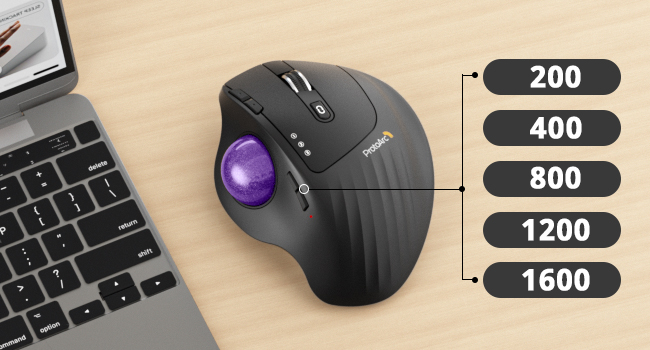
The ProtoArc EM01 NL Wireless Trackball Mouse combines ergonomic design with advanced Bluetooth connectivity, allowing seamless switching between three devices. Featuring a rechargeable battery lasting up to 12 months and 1600 DPI precision, it supports multiple operating systems including Windows, MacOS, Linux, and mobile platforms. Its adjustable angle and thumb rollerball provide comfortable, accurate control for professionals seeking productivity and style.


| ASIN | B0CWTY6Z99 |
| Antenna Location | Office |
| Are Batteries Included? | No |
| Are Batteries Required | Yes |
| Battery Average Life | 12 Months |
| Best Sellers Rank | #25,302 in Computers & Accessories ( See Top 100 in Computers & Accessories ) #1,815 in Mice |
| Box Contents | A Type C Charging Cable, A USB Receiver, A User Manual, An Ergonomic Trackball Mouse |
| Brand | ProtoArc |
| Brand Name | ProtoArc |
| Button Quantity | 6 |
| Colour | Gray Ball |
| Compatible Devices | MacOS,iOS, iPadOS, Win,Android |
| Connectivity Technology | Bluetooth |
| Country of Origin | USA |
| Customer Reviews | 4.3 out of 5 stars 3,064 Reviews |
| Enclosure Material | Plastic |
| Hand Orientation | Right |
| Hardware Platform | Linux, Mac, PC |
| Item Dimensions L x W | 9L x 7W Centimeters |
| Item Type Name | Mouse |
| Item Weight Unit of Measure | 0.35 Kilograms |
| Manufacturer | ProtoArc, ProtoArc |
| Manufacturer Contact Information | ProtoArc |
| Manufacturer Part Number | Protoarc B0CWTY6Z99 |
| Model Name | EM01 NL |
| Model Number | EM01 NL |
| Mouse Maximum Sensitivity | 1600 Dots per Inch |
| Movement Detection | Trackball |
| Movement Detection Technology | Trackball |
| Network Connectivity Technology | Bluetooth |
| Number of Batteries | 1 Lithium Ion batteries required. |
| Number of Buttons | 6 |
| Operating System | Linux, Windows 7, Windows XP |
| Packer Contact Information | ProtoArc |
| Power Source | Battery Powered |
| Product Features | Ergonomic Design |
| Product Finish Type | Matte |
| Range | 10 |
| Special Feature | Ergonomic Design |
| Style Name | Modern |
| Theme | Video Game |
| Unit Count | 1 Piece |
| Warranty Description | 1 Year |
J**R
Perfect
A perfect mouse for multiple device use, and switching is easier within devices. Very comfortable to use.
G**E
Protoarc mouse
The trackball doesnt work
D**N
FRUSTATING SCROLL INPUT AND INTENTLY DEFECTIVE PRODUCT
Inherently defective scrolling input and scroll wheel and this directly leads to unusability, after few days the scroll become jittery than starts registering opposite scroll inputs to what you give than altogether becomes frustatingly unusable. I returned even though i got a better deal of 3650 instead of usual price of 4100
B**H
Scrolling is very bad
Initial 2 days working well after that scrolling is very bad and scrolling speed is very bad, it unstable.
Z**6
bonne aide quotidienne
avec clavier virtuel car arthrite +++++ aux mains
N**N
Great trackball without LED lights
Nice stylish black trackball with (I choose) a red ball. Luckily no fancy LED lights, and connects to PC and MAC. Great!! What could be improved is a small storage area in the trackball for the dongle (wifi/bluetooth)
G**L
Buena calidad, cumple con lo que se espera.
Es un mouse de trackball de muy buena calidad. Yo estaba usando el Logi ERGO M575 por casi 5 años, pero empezó a dar problemas con sensibilidad de los botones, mala recepcion y se empezó a pelar la parte donde se apoya la muñeca. Desgaste normal. Cuando busque el reemplazo, me decidi por este ProtoArc, principalmente por precio. En casi todo lo demas son muy parecidos. PROS: es de buena calidad. Se puede conectar por 4G USB (adaptador incluido) o por Bluetooth. Botones silenciosos. Puede conectarse a 3 dispositivos. Se siente muy similar al Logi ERGO, si es que lo venian ya usando. Puede configurarse a distintos DPI, por lo que no solo funciona para trabajo, sino que puede dar batalla en juegos tambien. Se puede angular a 0º o 20º para mas ergonomia. La carga es via USB 3.0, que practicamente es ya un estandar para todo. El empaque es como de producto premium... no importa mucho, pero desde ahi se ve calidad. Diseño: se ve bien y no se siente "barato". En general, es un muy buen trackball. CONTRAS: la base no es removible fácil como la del Logi ERGO, eso podria ser un problema a la hora de limpiarlo. Los botones no son configurables mas allá de lo que permita Windows (o el sistema operativo que usen)... gran diferencia del Logi ERGO que permitia incluso perfiles de botones por aplicacion. En general es muy buena alternativa al Logi ERGO a un precio mas bajo, salvo que busquen configurar botones de una manera muy particular para distintas aplicaciones. YO si lo recomiendo bastante por la relacion calidad/funcion/precio
D**E
Logitec MX Ergo Relacement!!
I bought this to replace my Logi Mx Ergo as it was suffering from the dreaded left click fault.. I can honestly say this is a worthy replacement at less than half the cost. truly brilliant Trackball mouse, every ergonomic in fact it feels just like the Logi MX Erco it replaced .. 5 Stars all round and highly recommended
A**X
Perfect Alternative to the MX Ergo series
I have been an MX Ergo user since 2018. I purchased this mouse as an alternative to the Ergo, due to a notable decline in their overall quality and the length of their service life. In previous years, the MX Ergo could be expected to last 1-2 years of near constant use before replacement, but over time, this figure has decreased to roughly 3-4 months. Given its high price point, the value proposition no longer makes sense. I stumbled on this product in my search for alternatives, and given its lower price point, I decided to take a chance. Below are my observations so far: 1. The build quality of the ProtoArc EM01 NL is outstanding. It is lightweight, it feels robust in your hand, and it is not coated in the same rubberized coating that inevitably decays with use and becomes sticky. 2. The outer dome on which you rest your palm is comfortable, and the vertical ridges on its surface help keep your hand from sliding from side to side. 3. The trackball itself is on par with the MX Ergo, despite being a bit lighter. The ball's rotation within the enclosure isn't as smooth as the Ergo, but it is acceptable nonetheless. 4. Having the ability to switch between DPI settings via physical buttons on the mouse itself is extremely useful. The fact that this can be done without installing additional software makes this feature even more useful. 5. The left and right click buttons are smooth and quiet, which offers a more "premium" feeling than the alternatives I've tried. 6. The scroll wheel functions in a consistent manner, without any jumps or similar annoyances. 7. The battery life has been great so far, and charging times are more than adequate. 8. The device can be charged through a USB-C port, which is a clear upgrade over micro USB, as it reduces the total amount of cables you need to have on hand. 9. The mouse can pair with up to 3 devices. Although a USB receiver is provided, I primarily use Bluetooth, and the experience has been flawless. I have had no issues with pairing across all devices and operating systems I've used it with. 10. The price simply can't be beat. For the price of one MX Ergo, you can purchase multiple EM01s, which are, in my opinion, a better quality product than the Ergo. Overall, I am delighted with this device. If you're looking for an alternative to the MX Ergo series, I would highly recommend you try this product instead. It is a high quality item, and the user experience is better in almost every way.
Trustpilot
1 month ago
2 months ago