


⚡ Elevate your Surface experience—write, draw, and create without limits!
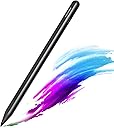
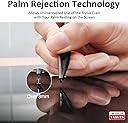
The RENAISSER Raphael 510 Stylus Pen is a premium, ergonomically designed digital pen compatible with a wide range of Microsoft Surface devices and MPP-enabled laptops. Featuring 1024 pressure sensitivity levels, palm rejection, and an eraser button, it delivers precise, lag-free input. Its lightweight aluminum body ensures comfort during extended use, while USB-C fast charging offers up to 100 hours of battery life with smart power management. Designed in Houston and crafted in Taiwan, it combines quality craftsmanship with cutting-edge technology for professionals and creatives seeking a reliable, stylish stylus.



| Asin | B0D4M7K2L2 |
| Battery Average Life Standby | 100 hours |
| Battery Description | Lithium-Ion |
| Best Sellers Rank | #262 in Digital Pens |
| Brand | RENAISSER |
| Charging Time | 1 hours |
| Color | Dark |
| Compatible Devices | Surface Pro 12/Pro 11/Pro 10/Pro 9/Pro 8/Pro 7+/Pro 7/Pro X/Pro 6/Pro 5/Pro 4/Pro 3, Surface Duo/Duo 2, Surface Go/Go 2/Go 3/Go 4, Surface Book/Book 2/Book 3, Surface Studio 1st Gen/2/2+, Surface Laptop 1-5, Surface Laptop Studio, Kobo Libra Colour,Kobo Sage,Kobo Elipsa, Kobo Elipsa 2E,other device with MPP(Microsoft Pen Protocol) |
| Compatible Tablet Computer Models | Microsoft Surface Duo, Microsoft Surface Go, Microsoft Surface Pro 10, Microsoft Surface Pro 11, Microsoft Surface Pro 4, Microsoft Surface Pro 5, Microsoft Surface Pro 6, Microsoft Surface Pro 7, Microsoft Surface Pro 7+, Microsoft Surface Pro 8, Microsoft Surface Pro 9, Microsoft Surface Pro X |
| Customer Reviews | 4.0 4.0 out of 5 stars (383) 4.0 out of 5 stars |
| Enclosure Material | Aluminum |
| Item Diameter | 9.2 millimeters |
| Item Weight | 14 g |
| Manufacturer | RENAISSER |
| Minimum Required Operating System Version | Windows 10 |
| Model Number | Raphael 510 |
| Number Of Batteries | 1 Lithium Ion batteries required. |
| Number Of Packs | 1 |
| Pressure Sensitivity | 1024 levels |
| Unit Count | 1 Count |
| Warranty Description | 1 Year Warranty Against Manufacturer Defects |
User
Works Great for ASUS Flow X16
Purchased Nov 2024Functionality:This pen works very well with my laptop which is the ASUS Flow X16 (a laptop that flips to a tablet). This laptop isn't listed, so it'll be helpful to those considering buying it with an ASUS laptop. The Asus computer offers pen settings so you can change pen shortcuts.The button works well, although the pen's sleek slim design does make it hard to find the button when writing. To use the button I release my grip to find the button and press, then return to my grip. If you are an artist or plan to use this for taking notes, I doubt you'll use the button feature as much.The charging port is placed in a good position to charge your pen and use it at the same time. It also doesn't take long before the pen is charged enough to use.Feel:This pen feels slim. I was working with a larger pen stylus before, so the grip was something to adjust to. I would consider the size when purchasing to ensure it's a size you would be comfortable using. An advantage is that it fits in my narrow pencil pouch.Overall, very slick design. Feels like holding a pencil.Personal Experience:I use this pen to take notes for classes on Goodnotes and draw on Krita. The pen works very well for those apps. As previously mentioned, I don't use the button much since I haven't gotten used to it. The button is a good addition, but it doesn't make my experience any better. Overall, I would highly recommend purchasing this pen since it works as intended and is an affordable option.
User
As Good As The Orginal
Works really well, very easy to use, no bluetooth required and its very responsive.Its really easy to write and draw with this. And I love the eraser button too!Also came with 2 spare nibs (tips)Its very well made, great packaging and a bargain for the price.Also very magnetic and holds really well to the right side of my Pro XVery pleased with this. I note that it is made in Taiwan.Highly recommended…
User
Better than what came with my computer.
I have an hp spectre touch screen laptop that came with the original hp pen. For an entire year I tried using the original for college notes, art, etc. And it was totally dysfunctional. It would split lines, disconnect and the battery didn't last very long. I decided to give this one a shot and let me tell you after owning this one for over a year, it is miles better than the original product. It connected automatically straight out of the box, has an insanely long battery life, charges really fast, and has never given Me calibration issues.
User
Good pen
Pros:Pairs to my HP Envy 360 immediately upon turning it onNo set up requiredLightweightHas a flat side to prevent it from rolling aroundLight on the side to tell you when it's on off or low batteryRechargeable with a USBC cord (which comes with the pen or you can buy them basically anywhere)Charging port is out of the way so it doesn't press into your hand while writingSleek-lookingCons:Buttons are at a weird place to access toggle buttonsHave to turn on pen each time you use itFeels sort of thinTip can come out sort of easily. Like it'll never come out on its own but it doesn't take a whole lot of pressure to pull it out.But maybe it's just my weirdly long fingers lolOverall this pen works pretty well. If it were to break I'd consider buying it again if nothing else wowed me.
User
Not very sensitive
While the pen technically works, there are gaps when you are writng and inconsistent lines. It doesn't seem to work with one note commands and you can't change the color, thickness or anything about sketching. All you get is a thin black line. You can go back in later and cut and paste and change the formatting but who's going to do that? Not nearly as quality as an Apple pen that comes native to the iPad. This I am using on a PC but I'm wondering if the native PC pen is more responsive and works better with Windows 11. And also does not fit in the keyboard slot, and it's about an inch too long.Returning this item
User
Consistently Draws Lines Without Drawing on Screen
I bought two pens, and both drew lines without touching the screen and had pressure sensitivity levels that would be kept at 90-100% strength, making them useless to draw thin lines using variable pressure and impossible to write legible text. The reason I bought these is because HP doesn't sell replacement pen nibs for the stylus they gave me, however the stylus from HP works perfectly.These issues were experienced on two different laptops. Either drawing on either of my laptops for a second caused these pens to malfunction, the quality control is not good, or the company changed the pen design recently, since no other reviews found these problems.Apart from issues with using the pen, the pen's build quality is very good compared to HP's own MPP 2.0 stylus, as this one is made of aluminum and not crack-prone plastic. It also comes with a preinstalled soft tip and 3 extra hard tips, which makes tapping the screen more comfortable than some other brands. Unlike HP, there are standalone replacement tips for this pen.However, the magnets on the pen designed to hold it to an HP laptop are misaligned, suggesting that this particular model is just a rebranded version of the one made for Surface devices. This shouldn't explain why my two are malfunctioning because a MS Slim Pen, for example, functions perfectly on both the HP and the Surface. Just know that maybe quality control is to blame.In summary:- The build quality is good- Replacement pen tips are available for purchase with a few in the box included- The magnets are misaligned- There's a chance that yours will not work properly
User
Long lasting and compatible
I use this pen for my surface after having so many issues with the brand pen. Renaisser's stylus pen is definitely compatible and responds well to the pen pressure of my art program. The battery is also long lasting & I love that it is rechargeble. I went a year without use and when I turned it on, it still had life to go
User
Great price on aftermarket device
My HP Spectre x360 did not come with the pen, so I looked at the different HP options and this was less than half the price of even the older HP pen and for me it's working fine, basically turn it on and it works. I'm just using it for text entry so I can't really comment on pressure sensitivity as an artistic instrument, but for text and simple navigation, it works great.The magnet is not that strong to hold it in place for transit, but it does hold it in place if you just want to store it on the computer but not put the computer in a case. I can't compare it to anything else so for all I know no magnet does better, but would be nice if the magnet was stronger.Also, I knew when I purchased this it did not have an eraser at the top, you have to press the button in order to activate erase mode, but that was fine with me, that type of eraser is less $$$ than the other type and I don't do much erasing, I'm not really drawing with it, just taking notes. You can use a line through the word to erase the word so you don't even need the eraser really.
User
Qualität und Design zum top Preis
Der Stift passt rein optisch perfekt zu meinem HP ENVY x 360 und hält durch das magnet auch am Gehäuse. Die Taste zum einschalten ist sehr elegant im Stift eingefügt und läßt sich sehr gut bedienen, aber steht nicht zu weit heraus. Die Reaktion auf dem Touchscreen ist sehr gut und man muss nur ganz leicht aufdrücken um zu tippen oder zu schreiben. Das mitgelieferte USB Kabel ist kurz, aber ausreichend und es sind sogar noch 2 ersatzspitzen dabei. Der Stift liegt zudem sehr gut in der Hand und hat wie ich finde die perfekte Größe.Ich bin völlig zufrieden und kann den Stift wirklich nur empfehlen.
User
Works great!
Bought this as it is compatible with my Kobo! Works great! Charges fast and keeps charge for a LONG TIME! (Over a month). Magnets that connect it to the kobo and great quality!
User
Ottiima
Perfetta in tutto
User
Buen precio/calidad
Una muy buena opción para los Kobo Libra Colour.Es muy senzillo de utilizar y tiene una gran batería. Además se apaga solo si no lo usas, haciendo que dure mucho más su bateria.
User
Guter Eingabestift
Tut,was er soll. Eindrücklich gute Qualität und preiswert.
Trustpilot
1 day ago
2 weeks ago