We remain fully operational. Our teams are working around the clock to ensure your deliveries continue safely.

DOWNLOAD THE APP


Copyright © 2025 Desertcart Holdings Limited
DOWNLOAD THE APP
Buy anything from 5,000+ international stores. One checkout price. No surprise fees. Join 2M+ shoppers on Desertcart.
Desertcart purchases this item on your behalf and handles shipping, customs, and support to Brazil.
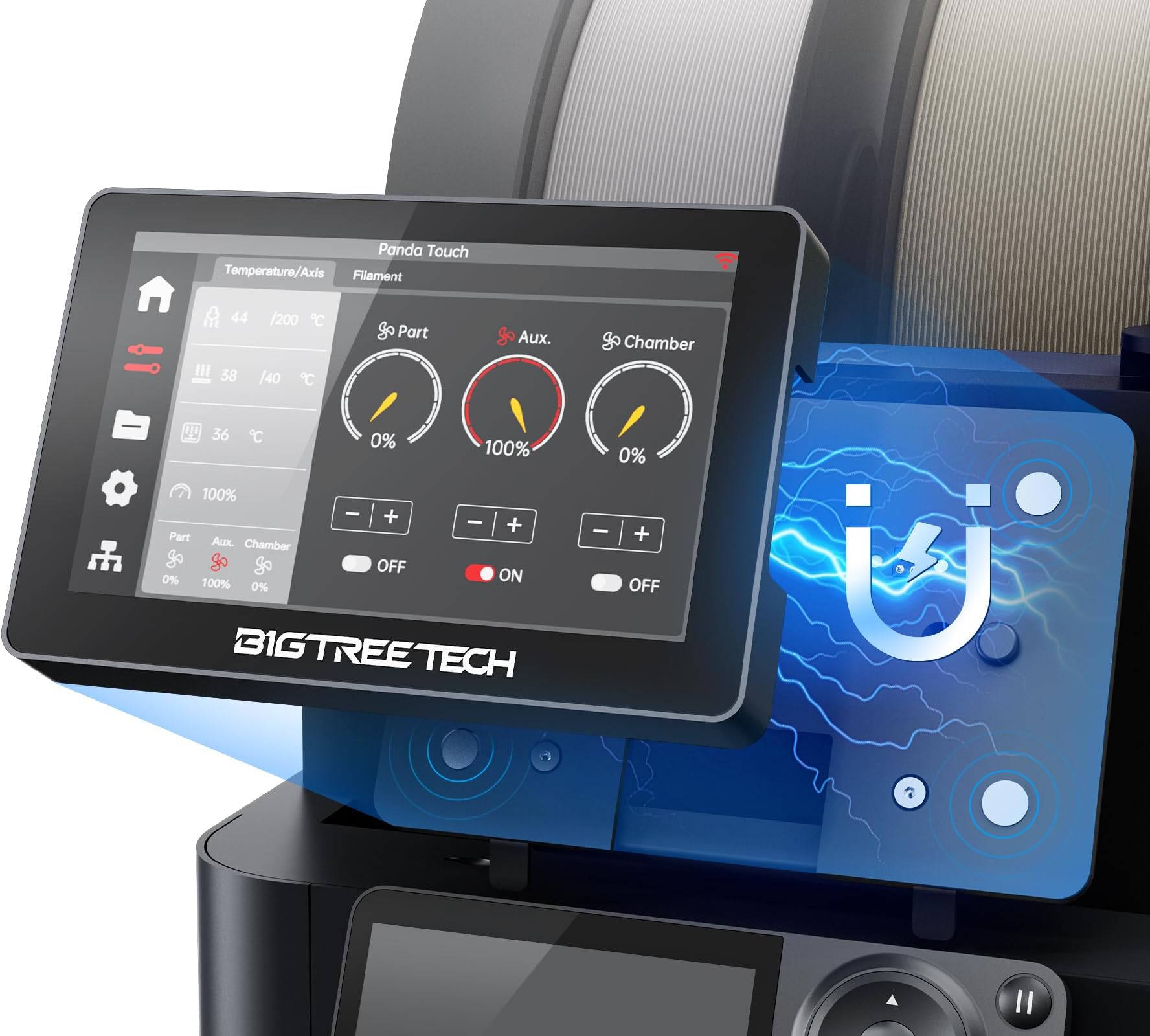
🚀 Upgrade your 3D printing game with Panda Touch — bigger screen, smarter control, zero compromises!
The BIGTREETECH Panda Touch V1.0 is a 5-inch touchscreen upgrade designed for Bambu-Lab 3D printers, offering multi-printer synchronization, AMS filament management, and dual power modes. It operates locally on your network for enhanced privacy and features a simple two-step installation. Compatible with specific firmware versions, it elevates your printing control with a sleek, responsive interface tailored for professional and enthusiast users alike.


| ASIN | B0D177DWK4 |
| Batteries | 1 Lithium Polymer batteries required. |
| Batteries required | No |
| Best Sellers Rank | 3,482 in Business, Industry & Science ( See Top 100 in Business, Industry & Science ) 73 in 3D Printer Accessories |
| Customer Reviews | 3.6 3.6 out of 5 stars (103) |
| Date First Available | 9 April 2024 |
| Included components | Panda Touch V1.0 |
| Item model number | Panda Touch |
| Package Dimensions | 19.3 x 12.2 x 5.2 cm; 320 g |
R**E
Great unit- somewhat nerfed by bambu
The unit itself is great, but has been somewhat nerfed by Bambu locking the ecosystem down (though you can roll back the firmware on the handy app)- overall though- good upgrade to add to control panel.
P**.
Looked good but half of it didnt work
bought for the P1S but half the features didn't work. It seems Bambu labs is locking its firmware down. I didn't fancy downgrading the firmware
M**T
Must‑Have Screen Upgrade for Bambu Lab P1S!
I upgraded my Bambu Lab P1S with the BIGTREETECH Panda Touch and it’s been a game‑changer! The 5″ touchscreen makes navigating menus so much easier compared to the basic stock display — finally a crisp, responsive interface that feels modern. Set‑up was straightforward and once connected, the tablet lets you manage files, control prints, and even handle multiple printers from one place. The touch controls and Wi‑Fi connectivity are smooth and intuitive, giving a much more enjoyable printing experience overall. Highly recommended if you want to take your P1S to the next level!
D**E
An Expensive Light Switch
I was looking forward to installing the Panda Touch to my P1s, if only I had known ! I was delayed in installing the Panda touch and I am outside of the return window or it would have been straight back ! I wanted to touch for the larger screen, lets be honest that is why all P1s owners like it so much, its clear, Offers many functionals and it looks good to. But here is the catch. My Panda touch came with firmware that was out of date, 1.02, the current firmware is 1.7.3 so you have to go to BTT's GIT HUB page to download the updated firmware, 2 files are required. Go to your Panda touch screen and get your Panda IP address. Enter your Panda touch IP into your browser and then you need to use the BTT screen to update your firmware ect. However when I tried this all I kept getting page unknown and could not progress any further. So no updates are able to be done. OK, point 2, the older firmware does not allow you to enter a activation 'code' that you get from Bambu lab when you log into your account. So you cannot link with your account for Bamboo cloud. Now because you have tried this, every time you open Bamboo Studio you will have to enter a verification code, which you did not have to do before. and I mean every time with every print ! As soon as I removed the Panda touch from my P1s this stopped happening, Phew! point 3. The instructions for installing and operating the Panda touch, even on their Wiki are many but absolutely awful and omit some really important steps for the set up and the install. point 4. Customer service is non existent at BTT, they do not respond so don't expect any support. point 5, Bamboo's last update removed some functionality from the Panda Touch, while this is not BTT's fault. The accumulation of the issues above means that My Panda touch is nothing more than the most expensive light switch I have ever bought. So there you have it, that is my experience with the Panda Touch, maybe they will sort some of the above out in the future but until then I am done with BTT and the Panda Touch.
R**E
Great addition to my P1s
I’m still learning how to use this but it’s definitely a step up from the screen of the p1s, I definitely recommend it.
S**S
Niiiiiccceee!!!
Great product - works well (until Bambu bugger it up with a firmware update to the P1S - now you loose features until panda sort out a patch for their firmware. Means cant authenticate at the new level Bambu insist on. I just rolled back my Bambu firmware and hey presto working again
L**S
Spend your money elsewhere
Had to return because it kept crashing and freezing. Downloading the latest firmware seems a pain in the backside. Read online that Bambu latest software update reduces the use of this item. So returned item.
L**E
Wi-Fi module
Very impressive but the WiFi module in it is awful I could be standing right next to the WiFi box and it says one bar of signal, because of that it means I can only use it where the WiFi box is which is not where the printer is I will get a WiFi booster but it’s not the point I shouldn’t have too as I don’t need to with my phone laptop of even the printer so because of this I give it 3 stars
P**T
Complete parfaitement la P1S avec deux AMS. Parfait et fiable. En ce qui concerne les mises a jour de l’imprimante P1S; ne pas upgrader au delà version 01.08.01.00 sous peine de rendre le Panda touch non fonctionnel (en grande partie). Si cela vous arrive il suffit de downgrader l’imprimante vers la version citée plus haut a partir de l’application Bambu Handy (portable ios ou android); car l’appli PC ne le permet pas. Fonction séchage filament tres pratique. Peut gérer plusieurs imprimantes; la vitesse d’impression; les ventilateurs.
M**A
La he devuelto por que la pantalla no me funciona bien. Cuando quiero empezar una impresion, la impresora no recive la orden y lo acabo programando todo desde la app de bambu handy ( puedes hacer lo mismo incluso remotamente)
V**O
Ci vuole un po’ per installarlo ma assolutamente ben fatto👍🏻 comunque per l’installazione basta navigare in rete vedere in qualche video e il gioco è fatto
R**X
Ich bin total begeistert von diesem Bildschirm für den P1S! Mit einem 3D-gedruckten Halter habe ich ihn an meinem Drucker befestigt, und nach mehreren Monaten Nutzung bin ich immer noch sehr zufrieden. Der Bildschirm bietet viele tolle Funktionen und sieht optisch um Welten besser aus als der originale, kleine Monitor. Die Bedienung ist einfach und unkompliziert. Absolut empfehlenswert!
J**P
para quem tem uma bambu série P é uma solução interessante, contudo, ao fim de algum tempo deixei de ter paciência para o tempo que demora a ligar e a estabelecer ligação com a impressora até poder comunicar com a mesma. Não é um tempo extremamente excessivo mas como disse, demora algum tempo e por isso acho que o produto deve ser melhorado nesse ponto
Trustpilot
1 month ago
1 month ago