Buy anything from 5,000+ international stores. One checkout price. No surprise fees. Join 2M+ shoppers on Desertcart.
Desertcart purchases this item on your behalf and handles shipping, customs, and support to Brazil.
โจ๏ธ๐ฑ๏ธ๐ฑ The ultimate wireless command center for pros who type fast and play smart!
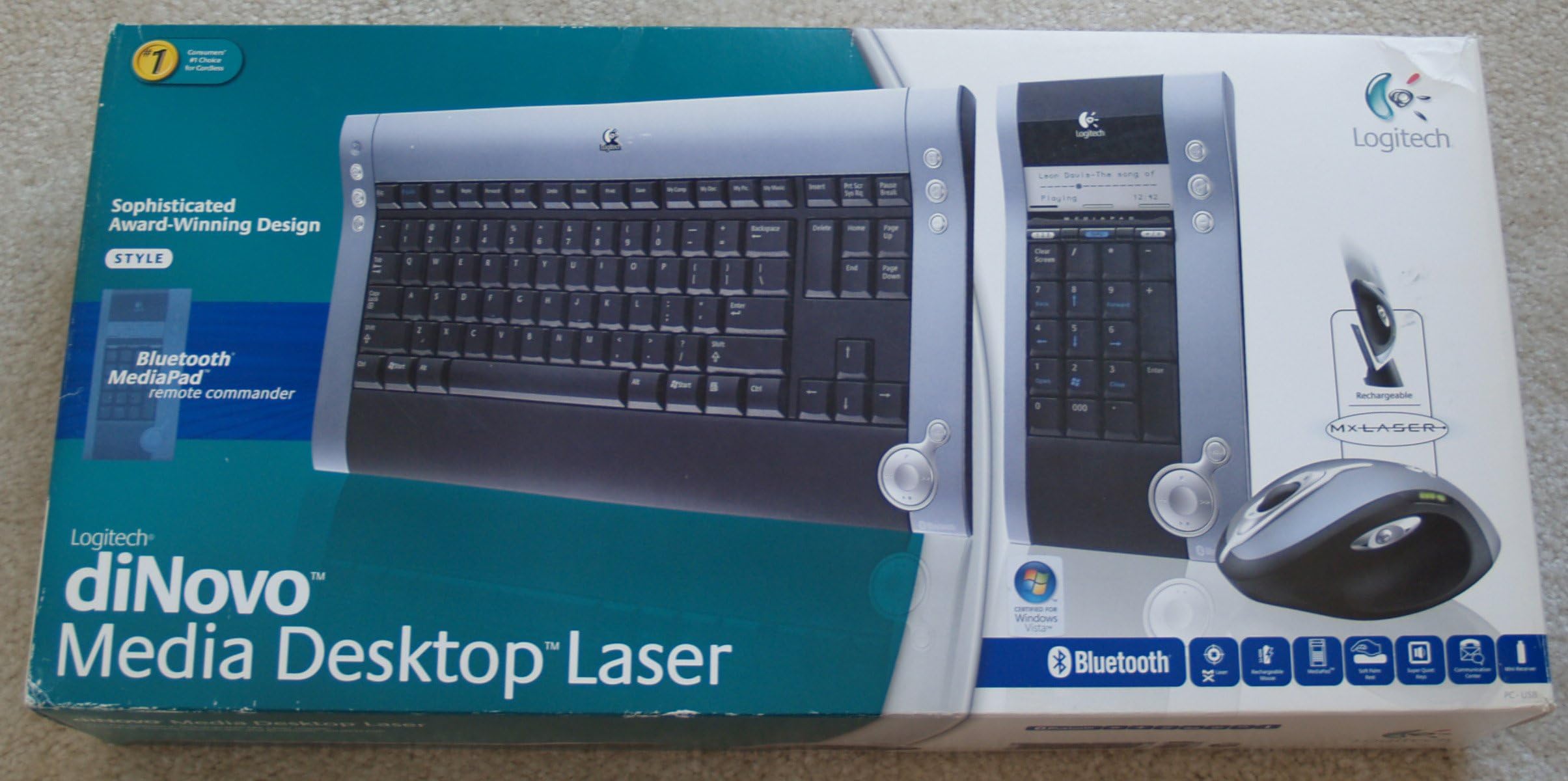
The Logitech diNovo Media Desktop Laser is a premium wireless keyboard and mouse combo featuring an ultra-slim, full-size keyboard with laptop-style keys, a precision MX 1000 Bluetooth optical mouse with rechargeable battery, and a versatile MediaPad that acts as a Bluetooth remote for media control, emails, and more. Designed for seamless Bluetooth connectivity with minimal input lag, it offers a stylish, clutter-free setup ideal for fast typists and digital media enthusiasts.
| ASIN | B000AY0IT4 |
| Antenna Location | Office |
| Are Batteries Required | Yes |
| Best Sellers Rank | #2,767 in Computer Keyboard & Mouse Combos |
| Brand | Logitech |
| Built-In Media | diNovo keyboard for Bluetooth, diNovo MediaPad remote commander for Bluetooth, MX 1000 Laser mouse for Bluetooth, USB mini-receiver for Bluetooth, Rapid-charging base station with AC adapter, 6 AA alkaline batteries, CD with Media Life software, comfort guidelines and Help Center |
| Color | Black |
| Compatible Devices | Personal Computer, Tablet |
| Compatible Operating System Family | Windows |
| Connectivity Technology | Bluetooth, Usb |
| Customer Reviews | 4.1 out of 5 stars 90 Reviews |
| Global Trade Identification Number | 00097855032232 |
| Hand Orientation | Ambidextrous |
| Item Weight | 5 Pounds |
| Keyboard Description | QWERTY |
| Keyboard Layout | QWERTY |
| Manufacturer | Logitech |
| Mfr Part Number | 967562-0403 |
| Minimum Required Operating System Version | Windows XP |
| Model Number | 967562-0403 |
| Number of Keys | 108 |
| Operating System | Windows XP |
| Other Special Features of the Product | Rechargeable |
| Power Source | Battery Powered |
| Special Feature | Rechargeable |
| UPC | 683728108021 814227017716 097855032232 |
| Unit Count | 1.0 Count |
D**A
Great piece of art with some minor flaws
These 5 stars are really 4.8 stars. I was looking forward to having this keyboard under my hands. Almost every review that I had read described the soft feedback of the keyboard and the responsiveness of the mouse... THAT's TRUE!!! I could only find minor issues. Pros: - This is the most stylish keyboard that you can find all around. - The keys feel just like those on a laptop keyboard and they are full sized. - The keyboard profile is really thin. - NO DELAY at 100 wpm. I was very dissapointed with the annoying delay of some logitech RF keyboards. This can be a pain in the neck for serious typists. At this speed, logitech RF keyboards feel like enqueuing the keystrokes and you end up receiving the last characters of every sentence delayed by something like 1/4 sec. That's ANNOYING! With the iNovo, you won't experience any perceivable delay, unless you can write at 250wpm. I was expecting it to suffer from a longer delay because of the additional processing needed for Bluetooth communication, but I was nicely surprised of not finding any delay. - The installation was straightforward, I did not experience any problems. - The mouse is fast and accurate, though I prefer the smooth movement of my microsoft standard mouse. Cons: - The layout of the media pad is a little unnatural, considering that the down arrow has been placed on the num-5 and that the num-0 has been subdivided into two separate keys: num-0 and num-000. - Personally, I would like that the media pad could be attached in some way to the central keyboard. Anyway, this is only a would-be-nice. It does not really bother me. If you're looking for a stylish, soft, responsive, well designed, light, eye-catching, different-to-the-rest and brilliant keyboard, the iNovo is the way to go. You don't have to think twice. If you like the soft touch of laptop keyboard but also like the advantages of full-size keyboards: Logitech iNovo. Don't look anywhere else!
F**S
Awesome keyboard, mediocre mouse
Bought this keyboard/mouse combo because I needed to replace my old three year old DiNovo keyboard. The keyboard is not sold alone, so one has to get the combo. I love this keyboard! The keys are very responsive and as they are only 1/4th of the hight of most the other keyboards, they really help to type fast. Love the triggerpoint on then and the klicking sound of the keyboard is nice and solid. It has all the buttons on it that I need and combinded with the small size and very sleek design, it makes for a great keyboard. Again, I bought it again because the old one was worn out. The mouse I don't like as much. It is big and heavy. I don't need all of the buttons on it and would prefer a smaller size mouse. I like the charging cradle though. I did not intall the Multimedia pad/Bluetooth hub. Don't need it and keyboard/mouse work without it. Installation was very easy. Plugged the Bluetooth dongle in, paired it with keyboard and mouse, and that was it. Keyboard works perfectly, mouse sometimes stops responding for 10 - 20 seconds and then resumes work as normal. Happened three times in a month of use. Annoying at the moment, but in the grand scheme of things no big deal. Overall assessmet is that the keyboard to me is the best on the market. Tried many keyboards, but this one really is it all. The mouse is only ok. Would not prevent me from buying the package, but would also not be the reason to buy the package. I like the recharging mechanism on it. Did not install the Mulimedia pad as I never used it on my old DiNovo set. Bluetooth works well, with the occasional drop-out of the mouse. If you are looking for a truely great keyboard, buy this combo, if your focal point is the mouse, then think twice.
P**R
GREAT BUY
This is one of Logitech's better keyboard and mouse combos. It installed without any problems. You can plug it in and it works just fine. Install the software and it's loaded with features. The remote key pad (Media Pad) is very handy. You can set back and use it as a remote for watching movies, or use it as a calculator. It beeps and has a blue flashing LED to inform you that you have new email and displays the subject line. You can set it aside so it doesn't take up desk space. One disadvantage is there is no back lighting in the display. The keyboard and media pad uses AA batteries that come in the box, but the mouse has an internal rechargeable battery that in not user replaceable, you have to send the mouse in to get the battery replaced. My old Logitech laser mouse that has the same battery is 2 years old and is still working fine. The keyboards price on the Logitech website is very high but I picked it up on the Amazon web site for have the price and free shipping.
D**E
The Best Bluetooth Mouse...
I bought this setup for my home computer because I love the small form factor of the keyboard. Little did I know that the mouse would rock my world. I had used this setup for my home PC for awhile, then one day I went on vacation, grabbed my laptop (with internal Bluetooth), snagged the MX1000 mouse, paired it with my laptop, and I had the greatest mobile mouse ever. This mouse holds one heck of a charge, it's got an on/off switch, and it's the most comfortable thing I've ever put my hands on! The best bluetooth mouse hands down. Surprisingly, Logitech doesn't make the Bluetooth version of the MX1000 mouse as a stand-alone product -- ya gotta buy this package. (The MX1000 mouse that you can buy separately uses RF.) And, oh yeah, the keyboard rocks! If you're in need of freeing up a little space, you'll love it. Sure it's expensive, but consider how much typing and mousing you do -- the same argument that's made for a quality bed can be made for a quality mouse/keyboard. One parting thought: I've had no problems with the drivers or software. And if you have Windows XP SP2, then you've already got native drivers for Bluetooth -- it should be a snap; pairing the mouse to my laptop took 15 seconds total. Enjoy if you decide to buy!
R**3
Excellent looks, not so good underneath
This is an awesome looking keyboard/mouse package but has its problems. Logitech has done a poor job of getting the software right. One of the problems is that often when the keyboard has been idle for a time and you then press a key you get a double keystroke. This seems like nothing to speak of but often results in an incorrect password or web address if you are not careful. Another problem, the mouse will sometimes lose directional control. You can use the scroll wheel but moving the mouse up or down/ left or right gives no movement on screen. You can either reboot the PC or press the Connect button to reestablish a proper connection. There seems no particular reason for the loss of connection. The final problem is with the mouse battery. The battery is rechargeable but you must recharge extremely often. I would recommend redocking the mouse every other day or you will have problems. This seems like no big deal but if you are not use to docking a mouse forgetfulness kicks in quickly. Logitech support is absolutely no help what so ever. When these problems are presented to them they only suggest moving the Bluetooth receiver to the front of your PC. Otherwise, the problems are categorized as "environmental" which seems the Logitech secret code for "we did little or no QA testing so you the customer must suffer".
E**K
bad for small hands; loud keyboard
the good: -looks really super cool. i got tons of compliments and "wows" from people at work after i set it up. -easy to set up. strictly plug-and-play, i even got it working with my laptop's internal bluetooth with very little effort. -battery life is good so far. i've had the keyboard about a month, and it's still going strong. i don't really use the media pad. the mouse is rechargeable, which is nice, and it seems to last about 3 days between charges. -wireless=awesome. i have a monitor and a laptop screen, and depending which document i'm working on, i just slide the mouse and keyboard over to the other side of the desk. or put them on the floor if i need space to work with paper. -flat keyboard is great (also has a kickstand if you like the back elevated). the keys are also "laptop style" flat, which is essential for me. -love the scroll buttons on the top of the mouse. also, the precision is great and with the software you can adjust the speed of the scroll. indispensable for my line of work, involving 150+ page documents i've got to scroll my way through. the bad: -since the mouse is rechargeable, if it runs out of batteries in the middle of the day you'll have to resort to your laptop's touchpad or a backup mouse while it sits and charges up. HOWEVER, it does go 3-4 days between charges and gets to full charge in just a couple of hours. -it's so, so, so, so loud. the "crisp" response means that the space bar can be heard down the hall, and it absolutely drive me crazy while i'm typing. the REALLY bad: ok, here's why i'm returning it or giving it away. and, granted, this probably won't be an issue for most people. but i have hands that are smaller than just about anyone else i know. i'm not a little person, i just have little hands. the most comfortable typing experience i've ever had was on my 12" sony vaio, back in the day before widescreens. sp i was looking for a keyboard that would be similar to a laptop keyboard, but obviously needed to use it with my monitor instead. after only 3 and 1/2 weeks with this keyboard, i come home with tingling and numbness in the tendons on the backs of my hands. sometimes it's so painful i can't even grip the doorknob without feeling a twinge. the reason is that, although it's just slightly taller than your average laptop keyboard (i.e., from bottom of space bar to top of numbers), it appears to be significantly WIDER than your average laptop keyboard (i.e., from caps lock button to enter key). specifically, the backspace key is so far away that i have to actually move my entire hand over there to use it, or risk serious injury. also, the "crisp" response is actually a bit too tough for me. i have to stab at the keys to actually type, which means the ends of my fingers get sore and numb and my hands are doing a lot of work putting power into the keystrokes. the same problem with the mouse - for my dad, it would be just about right. for me, it's huge! i love all the functions and the way it works, it's just so gigantic that it bends my hand all out of shape and makes it tense up, which exacerbates the problems caused by the keyboard. in short, if you're a guy or if you generally find a 15" laptop's keyboard to be too small and the touch too light, then you'll like this keyboard. but if you're like me and you've got small girlie hands (and they're even smaller than most girlies), and you've got to spend more than 2 hours per day typing, then stay away.
M**R
Quick install, solid product
I was a bit concerned that Logitech provided their own proprietary Bluetooth software, they do say you can use generic Bluetooth managers. I went ahead with the standard install. It went more smoothly than any other Bluetooth install I have ever done on any machine. The devices were quickly discovered and paired. I also tried and succeeded at pairing my Motorola stereo headphones. The construction of all three pieces is solid and seems durable. The keyboard is a bit bigger than I would have liked for use with my home media PC system. But I have the consolation of a solid, reliable product. Downsides: -I discovered is that mouse or keyboard activity seems to disconnect the stereo headphones. So either I'd have to experiment with using a generic bluetooth manager to see whether it better handles the multiple devices simultaneously. -The so called media keyboard module seems superfluous for my purposes but I suppose people who heavily use Winamp or Windows Media Player will find this handy and more compact than a fullsize keyboard.
J**N
Garbage. $200 of pure garbage.
Pros: Admittedly, this set has a very nice pinache. Complements a tasteful home media center nicely, assuming you didn't actually want to use it to, I don't know, type text or move the cursor. Cons: The mouse lags. Several seconds. Not several milliseconds, or several fractions of a second, but several seconds. Despite the logitech software telling me that my singal strength was "Good," I would move the mouse about on my table, and watch, bemusedly, as the cursor did a slow parody of the movement several seconds later. I tried moving the receiver, using different USB ports, reinstalling the software, exploring the Logitech support site (useless), and discovered that other users had experienced the same problem, only remedied by a replacement. So I replaced the setup, to no avail. The media pad that comes with the keyboard is a nightmare of poor design. The directional keys are all misplaced - normally the "2" button acts as down, but not on a Logitech media pad, no! Here, the "5" key is the down button. The "2" key is the windows start button. It's a real blast to try to play civilization four, only to escape to the desktop every time you want to scroll around in the menu using the keys (which, of course, you have to do, since the mouse is impossible to use). Verdict: Logitech should probably offer long usb or ps2 cables with their regular keyboards and mice, instead of trying to pawn off this garbage as "wireless." My kudos (and envy) to those who can make this system work. I went through two, and they weren't worth $10, let alone $200.
Trustpilot
3 days ago
1 month ago