🎮 Elevate your workflow—because multitasking like a pro is the new cool.
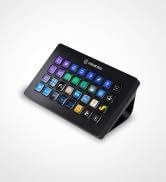
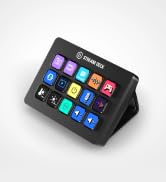
The Elgato Stream Deck Neo is a compact, USB-powered productivity controller featuring 8 customizable keys, real-time Infobar, and dual Touch Points for expanded control. Compatible with Mac and PC, it offers drag-and-drop setup through a free app, enabling seamless automation of tasks and multi-app management. Perfect for streamers, content creators, and professionals seeking to optimize workflows with a sleek, laptop-friendly design.


| ASIN | B0CVY4566H |
| Best Sellers Rank | #5,380 in Computers & Accessories ( See Top 100 in Computers & Accessories ) #76 in Gaming Keyboards |
| Country of Origin | Taiwan |
| Customer Reviews | 4.7 4.7 out of 5 stars (8,352) |
| Generic Name | Stream Deck |
| Importer | Supertron Electronics Pvt Ltd, "Supertron House", 2, Cooper Lane, Kolkata-700001, Toll Free# 1800-425-5464, [email protected] |
| Item Dimensions LxWxH | 26 x 107 x 78 Millimeters |
| Item Weight | 209 g |
| Item model number | 20GBJ9901 |
| Language | English |
| Manufacturer | Elgato, Corsair, Elgato, Corsair |
| Net Quantity | 1 Piece |
| Packer | Corsair (Hong Kong) Limited, Suite 2602-03, 26/F, Millennium City 5, 418 Kwun Tong Road, Kowloon, Hong Kong, Toll Free# 1800-425-5464, [email protected] |
| Product Dimensions | 2.6 x 10.7 x 7.8 cm; 208.65 g |
| Release date | 16 April 2024 |
Y**R
Good Quality
Very useful for streamers and even for non-streamers. It comes with plug-n-play so it is easy to use. You will need to install a software from their site to customize it. Speaking of which, there are loads of customization options including third party plugins for stuff like Discord, Spotify, etc.
S**L
Perfect For YouTubers and Streamers
It does exactly what it says and it’s just perfect. I’m loving it. You don’t need lots of buttons, you can change the page by tapping on the dot and the Neo is just a perfect fit for all streamers
A**E
Addicted to the button press 🤩
Great built quality, more customisation than you imagine, go productive in few clicks 👍
S**U
Really good , but no proper support for linux
It's useful , and looks good . But no proper support for linux . Need to use third party softwares like open deck . There's no direct support from Elgato
R**T
best product for gaming desk setup and quick action buttons
Pros : various action button configuration multipage configuration quick response Market place to download icons, plugins which is verygood Cons : only type C, for machine which is having only USB type A need to buy a converter
I**H
Great for streaming !
Good for streamers and macro users
S**.
Perfect
The best buy till now
G**R
Great accessory
Nice product to have. Bit expensive though. Good quality and great features. Very interactive and intuitive as you use.
J**J
Gekocht voor de fun, maar je kan bijvoorbeeld ook allerlei informatie vanuit HWinfo inladen dus hoe snel draaien je fans, hoe warm is je CPU temperatuur etc. Screensavers mogelijk, snelkoppelingen naar je favouriete sites, custom icoontjes etc. Handige en intuitieve software ook!
S**N
The Stream Deck Mini is ideal for folks who require only minimal programmable macros in their setup. The functionality, build quality and convenience are near identical to the bigger models. With a well integrated store to find macros & profiles, this device will improve your productivity and gaming setup many fold. Plus there's a very well supported online community that can teach you to integrate the deck with just about any software that's out there, while working on Windows, Mac & Linux! Highly recommended.
L**T
Excellent product both in terms of functionality and built quality. Highly configurable. Would buy it again.
C**A
Muito prático para colocar o início dos seus principais programas.
A**B
I don't stream but I got this product due to the convince it brings. I use it for daily tasks and it is really useful for particular people and specific use cases. I will outline some of my use cases in detail for people who might want it for the same application. Some of these features have to be enables by enabling the plugins that are extra and not enabled by default. Headphones and Mics: I use it to switch between headphones and microphones. The stream deck is great as it allows you to switch between microphones and playback devices. For example if I want to use one pair of headphones and want to switch my playback to that then i can by setting a key to do that functionality. However if i want to switch back or switch to another pair i can then click a button. But you have switch the mic and the playback separately. So for example say your headphones have a mic in them and you want to use a separate mic you can do that by selecting the mic you want through the stream deck instead of going through all the settings and then changing that one to default. For example you can have Headphone1 Mic and Headphones2 Mic and Webcam Mic as buttons and switch between them. Same situation with headphones. So that makes it really convenient as it changes the default one and then that means software's will automatically change to. Voicemod: This is a cool little extra feature that was added my Elgato to the stream deck and it is for a little fun. As mentioned before you can set a button to change to the voice mod output however it wont change the mic selected on the software you have to change that manually. You can do funny things like change your voice and censor words with a beep button and you can pick random voices but you if you want a particular one you have to buy the pro version. You can also hear yourself and can turn on and off through the elgato stream deck which is really convenient. Zoom: The elgato stream deck can be used in zoom calls and be used for a full list of things that i will list: Mute toggle, Video Toggle, Share Toggle, Focus, Leave Meeting, Cloud Record Toggle, Local record Toggle, Ask all to Unmute, Mute all Participants, Custom Shortcut. This is good for zoom calls an there is not much to add as it works seamlessly. YouTube: You can use it to control YouTube. I don't use it for this however it does allow you to chat a message through a click of a button and you also have another option of viewers. That is all you can do with YouTube as of default. Mute and Unmute: When in any call or meeting you can use the elgato stream deck to mute and unmute and it will work with any program and call because it mutes the mics internally and not through that software so if you are in 2 calls and want to mute on one then you cant through this unless that other one is a zoom call, that is where you can mute using the zoom mute button that is enables through the elgato stream deck. Games: This is useful for games as you can function it to do specific binds or to do things in games instead of binding things to using keyboard binds. It is not built to control games exactly but is useful and you have to find your own use in what games you play and what you want it for. This is too universal to gives any examples on. OBS: Whatever you could image you can do on here. You can change scenes. You can also mute your mic and also desktop audio. There are so many options that there is no limit here and you can do anything you can image through obs. There are YouTube videos that cover all the combinations as it would take too long to cover in a minor review. Twitter: You can tweet a specific tweet on that you have binded to a button and will automatically do that. This is mainly towards streams but you can bind anything you want here really. Also you can change name on here to. System: This is what you would expect that this should be able to do like open a website, hotkey switch, act as a hotkey, open something like a program, type text, and uses as multimedia controller. Spotify: There is a plugin that you can enable that allows you integrate and control Spotify from your stream deck. Lighting: You can control Philips hue with this as there is a plug in that can be enables and controls Philips hue lights and same with corsair icue. Build: The build of the elgato stream deck is great and it does not come with a stand but it does have a rubber button to stop it from being pushed back then being uses however it can be a bit annoying but nothing major. Also when you lock your computer you can keep any screen saver on the stream deck. In conclusion, there are a lot more functions that one can use this for streamers and non streamers.
Trustpilot
3 weeks ago
4 days ago