Buy anything from 5,000+ international stores. One checkout price. No surprise fees. Join 2M+ shoppers on Desertcart.
Desertcart purchases this item on your behalf and handles shipping, customs, and support to Brazil.
🚀 Upgrade your storage game with speed and simplicity!
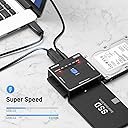
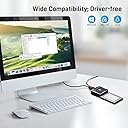
The FIDECO SATA/IDE to USB 3.0 Adapter is a versatile, high-speed cable designed for professionals needing quick access and cloning of 2.5"/3.5" SATA and IDE hard drives or SSDs. Featuring 5Gbps USB 3.0 transfer speeds, one-touch offline cloning without a PC, and broad OS compatibility, it supports dual-drive connections for efficient data management. Ideal for seamless drive upgrades, backups, and data recovery with minimal setup.


| ASIN | B077MXC8SV |
| Best Sellers Rank | #160 in SATA Cables |
| Brand | FIDECO |
| Color | SATA/IDE Cable PL06 |
| Compatible Devices | DVD Player, PC |
| Connector Type | USB 3 |
| Current Rating | 1.5 Amps |
| Customer Reviews | 4.5 out of 5 stars 2,187 Reviews |
| Finish | Glossy |
| Finish Type | Glossy |
| Input Voltage | 12 Volts |
| Item Dimensions | 2.6 x 1.06 x 1.5 inches |
| Item Weight | 11.2 Ounces |
| Item dimensions L x W x H | 2.6 x 1.06 x 1.5 inches |
| Manufacturer | FIDECO |
| Mfr Part Number | FC-PL06 |
| Model Number | FC-PL06 |
| Nominal Power | 18 Watts |
| Number of Items | 1 |
| Number of Ports | 1 |
| Package Quantity | 1 |
| Power Plug Type | No Plug |
| Smart Home Compatibility | Not Smart Home Compatible |
| UPC | 712492045673 |
| Unit Count | 1.0 Count |
| Warranty Type | Limited |
M**C
Works very well. One touch feature useful.
I've done two main things with this device. I've attached two SATA drives and cloned one to the other using the One Touch button. That worked without issue. You have to have the destination drive be the same size or larger. I also connected multiple drives to the device and then connected the device to a PC to use software for more complicated jobs. You can use a free software like Macrium or Easeus Partition, both of which are easy to use and will allow you to copy partitions from a drive to another without copying the whole disk. If you connect a single SSD (and maybe even a standard mechanical 2.5" disk) to it and connect to a PC, you don't need the power adapter. But if you attach two, you do. If you are doing something time-consuming and resource intensive such as cloning, I would recommend attaching the power cable even if you have only a single drive attached. The only issue I ever had was when I was trying to upgrade my main PC's Windows 7 installation to Windows 10, and the the program would fail because my PC was losing its connection with the attached SSD. I don't recall if that was due to my corrupted Windows 7 installation or if I had neglected to plug in the power adapter. Either way, I got it resolved and was able to complete the transfer. I had loads of trouble getting this Win7 install to upgrade to Win10, but that had nothing to do with this device. When I upgraded another Win7 install to Win10, I pulled the drive out of the laptop and did the One Touch cloning. That worked without any issue at all. I plugged the new drive into the laptop and went about upgrading to Win10 (I didn't want to upgrade the old drive to Win10 just in case there were issues during the upgrade process as there were when I upgraded the OS on my desktop). That upgrade went through without any issue. I had a 3rd laptop running Windows Vista. I wanted to upgrade it to Win7 and then upgrade that to Win10 (you can't go directly from Vista to 10). I ran into two issues, neither of which were related to this device. I ended up using this device quite a bit as I had significant software issues during this upgrade, and I ended up wiping drives and re-cloning multiple times. If you are going to upgrade from Vista to 7 to either stop there or upgrade further, you need to do one of two things if you don't have an advanced format disk and want to move to an AF disk (like a SSD, though it may be the case that any hard drive made today would be AF). If you are running Vista, chances are you do not have an AF disk, so if you want to freshen up an old PC and upgrade your OS and move to a SSD, you need to either upgrade to Win7 on the current disk before cloning or you need to download and install a couple of hotfixes and potentially some additional software. The hotfixes are KB2470478 and KB2553708. You might also need RST driver 9.6 or higher if you have an Intel SATA controller. If you clone first and try to upgrade to Win7, the install will not go through. If you clone first, you can still install the hotfixes, but you'd then have some extra steps because you won't be able to install a hotfix. It's much easier to install the hotfixes before you clone. Now back to this device. I've had it for 7 months. It's worked great for cloning but also for simply attaching a drive to it and then accessing that drive on another computer. I don't have any complaints about it in regards to its intended purpose. The one thing I would say, though, is that I wish they had included a cord, or two cords, to connect a SATA drive in a machine to this device. As it is, you connect the device directly to the drives, no cables involved (other than with the IDE drives and the power connector). I had an SSD in a desktop and had to install it with a 2.5" to 3.5" adapter so that it would sit in the case. This meant that if I wanted to clone that drive, I'd have to remove it from my case. However, if I could connect the device to the drive via cables, that would add flexibility to this. Granted, this is an edge case, and I assume that most people would be using this device because they want to replace one hard drive with another. Still, it'd be nice if I didn't have to attach all of the drives onto the device itself.
D**.
Does everything advertised
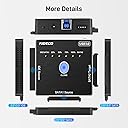
This is a great cloning device, but that's not all it does. It will handle ANY hard drive. There are 2 SATA ports and 1 IDE port that will take a 3.5" or 2.5" IDE drive if you have some really old drives laying around that you need to get data from. The cloning process is very simple. Plug 2 drives into the Source and Target ports and press the Clone button for 3 seconds and away it goes. There are 4 progress indicator lights that show 25, 50, 75 and 100% completed. I cloned a 2.5" 500gb SSD to a 2.5" 500gb SATA drive and it took just under 2 hours. The instructions say that you need to format the target drive before cloning, but that's not necessary, nor do I recommend it. I plugged in an unformatted target drive and it cloned perfectly. It did clone to a formatted drive, but the drive I used was formatted with one partition of 450gb and the rest of the drive unpartitioned. It cloned to the formatted partition but left the unformatted partition untouched. So formatting the drive is not necessary. It does require that you plug in the ac adapter because it won't draw enough power from a USB port. Connecting to a computer is simple with the included USB cable, so you can clone offline or plug it into a computer and use it as an external drive connection. The manual is small, but readable and complete with clear instructions. Very nice product, seems well made and durable.
C**T
Very nice product!
I love this thing. I didn’t give it 5 stars, only because it doesn’t allow you to copy to a smaller capacity hard drive. You can transfer from a big drive to a smaller laptop drive, no problem, as long as the laptop drive, where you’re transferring to, is the same capacity or larger. If it did, it’s 5 stars, all the way. I’ve seen other, similar products, ones sold to clone systems and I actually bought one, but it failed. That’s why, I don’t even know if there’s a product out there, that uses both 2.5 and 3.5 inch hard drives and can transfer from a larger size drive, to a smaller one and is actually dependable. Hopefully, these folks can accomplish that someday. So, unless I come across another product that can do all I said, I will stick with this. It works very well, seems to be built well, the price is comparable to others and to add a cherry on top, I think it looks Cool. I would definitely refer it to others.
L**N
Works as stated.
Works great.
H**K
Quick hookup to external hard drives
Yes, this little box can clone drives but the thing I like best is the ability to quickly connect hard drives externally for initializing, partitioning, formatting, and running diagnostics before mounting them inside a computer. Great little device for 3.5" drives. Most 2.5" drives don't need an external power source using a non-powered adapter (they get their power via the USB connection) but 3.5" drives most likely will require an additional power adapter such as provided by this device. Be careful with the connection jacks on this device as they are a bit flimsy and weak. It wouldn't be hard to damage them if bent abruptly. I typically ensure the device and connected hard drives are laying flat on a non-conductive surface while using it. Further, you don't want to jolt or move the device and connected hard drives while in use possibly jerking a connection loose causing damage to the hard drives or corrupting data. Does what it was designed for just treat it with a bit of TLC. Recommended.
C**Y
GREAT Interface ...
Had a friend give me her dad's 22 old Pentium 4 PC - which - the motherboard had expired & she wanted to see if I could pull the data off the 24 year old IDE drive which was in it. Sadly, the partition table was unresponsive & needed rebuilding. This interface saved the day on two counts. It's SUPER fast @ mounting IDE drives & the off-line copy function from IDE to SATA is a life saver. Although the IDE did mount fairly quickly - trying to rebuild the part table was painfully slow & the drive would time out against the buffer. Not really the drives fault - a 24 year old 5400rpm 35gig Maxtor - is going to have its issues. Enter the off-line copy function. Plugged a Samsung 250gb drive into the Sata2 connector - powered up the interface - off-line - meaning disconnected from the laptop I was using - so - in Stand-a-lone mode - held the copy button down for 3sec as per instructions & about 20mins later - had copied the 24 year old Maxtor over to the SATA Samsung - without any issues. Once the copy was done - used another Sata/USB interface to work off the Samsung drive & had to the part table rebuilt in under 20mins. Can't praise this interface enough for coming through for me. Also tried another interface from another vendor - this FIDECO is a CLEAR winner in terms of Speed & it's off-line copy function.
K**H
A nice SATA/ISE adapter although it won't work with all older DVD drives. Great customer support!
The product itself gets 4 stars and the excellent support I received from FIDECO earns them the fifth star. This worked well with an SSD and a SATA hard drive that I tested it on. However, I bought it to use with 2 old DVD drives I have. One, a Samsung TS-H493A, was made in 2007 and the other, a LG HL-DT-ST BD-RE WH10LS30, in 2010. It did not work with these drives. I contacted FIDECO support. After a couple of emails back and forth. they decided these drives were not compatible with this adapter, so they gave me a refund. All companies should have customer support this good.
K**N
Power supply caught fire
I was able to get data off of a couple of hard drives via USB. When I powered it on later, the hard drive did not spin up. I checked the wall wart and confirmed it was putting out 12 volts. I checked the 4-pin connector from the device itself. The 5-volt pin was at 4.58 volts, and the 12-volt pin was at 22.5 volts. Seconds later, I heard a loud snap, and smoke started pouring out of the wall wart. It was amazingly hot when I unplugged it. I tried using a much better power supply, but the 12-volt pin started putting out 26 volts, so I disconnected everything and started a return through Amazon. Based on other reviews, I don't think this was typical. That said, the whole thing feels very cheaply made, and I honestly was not surprised when it failed. I only hope the connected drives have working overvoltage protection, or this may have just made my life a lot more difficult. For the short time it worked, this was pretty solid, and quite straightforward to use. Because it failed so catastrophically and generally feels very low quality even if it had not, I will not be buying this brand again.
G**R
Extrêmement fiable je recommande
Excellent cloneur de disques, tester ide vers SSD ok tester ide vers sata ok tester sata vers SSD ok tester sata vers sata ok aucun soucis. Le tout à une vitesse respectable.
D**.
Simple and compact
It works beautifully. You can connect either an IDE or SATA drive as the source either to a computer or to clone a drive. You can attach one SATA drive as the target. USB 3 cable provided
D**G
to bem
muito bem
A**R
Works great
Have older tv and upgraded our cable system that would not hook up to our older television so needed this to be able to connect to the new cable box and it was easy to install, just note that it does not come with an usb power block so that’s something you’ll need to get too , unless like our cable box , it had a usb power port built into it so it just needed to be plugged into it and viola it worked! Yay have had it for about 6 months now and still works great. Just remember to check the switch on the converter box if you’re not getting any reception at first. Read the other reviews as well.
K**I
Ben çok beğendim
Fiyatını hakeden bir ürün başardı evde kullanışlı
Trustpilot
4 days ago
2 months ago