

Desertcart purchases this item on your behalf and handles shipping, customs, and support to Brazil.
โจ๏ธ๐ฑ๏ธ Elevate your desk gameโsilent, sleek, and spill-proof productivity awaits!
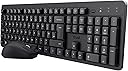
The Trust Ymo II Silent Wireless Keyboard and Mouse Set offers a full-size QWERTY UK layout with silent membrane keys and an ambidextrous mouse featuring adjustable DPI. It connects via a single USB receiver with a 10-meter wireless range, ensuring clutter-free freedom. Designed for durability, the spill-resistant keyboard and mouse come with power-saving switches and a 5-year warranty, making it an ideal choice for professionals seeking quiet, comfortable, and reliable input devices.


| ASIN | B0CPLYJC1K |
| Antenna Location | Home office, Office |
| Are Batteries Required | Yes |
| Best Sellers Rank | 403 in Computers & Accessories ( See Top 100 in Computers & Accessories ) 6 in Computer Keyboard & Mouse Combos |
| Brand | Trust |
| Brand Name | Trust |
| Colour | Black |
| Compatible Devices | Laptop, Personal Computer |
| Compatible Operating System Family | Windows |
| Compatible devices | Laptop, Personal Computer |
| Connectivity technology | Usb |
| Country of Origin | China |
| Customer Reviews | 4.4 out of 5 stars 453 Reviews |
| EU Spare Part Availability Duration | 5 Years |
| Hand Orientation | Ambidextrous |
| Item Weight | 546 Grams |
| Keyboard Backlighting Color Support | Single Color |
| Keyboard Description | Membrane |
| Keyboard Layout | QWERTY |
| Keyboard description | Membrane |
| Manufacturer | Trust |
| Manufacturer Part Number | 25168 |
| Minimum Required Operating System Version | ChromeOs 134, Windows 10 |
| Model Number | 25168 |
| Movement Detection | Optical |
| Network Connectivity Technology | Usb |
| Number of Batteries | 2 AAA batteries required. (included) |
| Number of Keys | 104 |
| Number of Packs | 1 |
| Operating System | Chrome OS, Windows 10, 11, macOS 11, 12, 13 |
| Other Special Features of the Product | Ambidextrous mouse, Full-size QWERTY UK layout, One USB receiver for both the keyboard and mouse, Silent keys and mouse buttons, Spill-resistant keyboard |
| Power Source | Battery Powered |
| Product Warranty | 5 year manufacturer |
| Special feature | Ambidextrous mouse, Full-size QWERTY UK layout, One USB receiver for both the keyboard and mouse, Silent keys and mouse buttons, Spill-resistant keyboard Special feature Ambidextrous mouse, Full-size QWERTY UK layout, One USB receiver for both the keyboard and mouse, Silent keys and mouse buttons, Spill-resistant keyboard See more |
| Unit Count | 1.0 count |
M**H
Excellent value keyboard and mouse
A very reasonably priced keyboard and mouse combo set. Even better if you can grab it on offer - currently showing as ยฃ16.99! This is my second purchase of a Trust keyboard and mouse combo set and I have no complaints. SETUP Getting setup is straightforward. Simply plug in the USB receiver to your computer's USB port. KEYBOARD FEATURES The layout is your typical UK QWERTY. The ยฃ, $, and @ keys are in the right places. There is also a โฌ symbol available by pressing CTRL + ALT + 4. The keyboard keys are fairly quiet and create a lot less noise than my previous keyboard that it has replaced - a fairly old Microsoft wireless desktop 800 keyboard and mouse combo set. Though I would say they are not completely silent. The ENTER key is a decent size. And there is a separate numeric key pad on the right hand size. There's also a Fn key placed to the right of the SPACE bar that you normally find on laptop keyboards. This is used with the Function keys. More on this later. The keyboard has an on/off switch is very useful. It also has the usual lights for Number Lock, Caps Lock and Scroll Lock. Underneath the keyboard is the cover for the battery compartment. The keyboard uses 2 AAA batteries required that come included and makes things easy. There's also the usual keyboard legs that you can flip out to raise the height or adjust the angle. The marketing blurb states the keyboard is spill resistant but not something I tested! Finally, there's also a slot to store the USB receiver which will be useful to some. MEDIA KEYS / HOT KEYS One thing to note is the keyboard's function keys (F1-F12) are set to to Hot key functionality by default. If you wish to use F1-F12 functionality, you need to hold down the Fn key. This may not suit everyone so gladly you can reverse this by simply pressing: Fn + TAB This is not easily apparent in the user manual and they could do better to explain this as I noted a few reviews not knowing this. I reached out to customer support and they were very quick in responding with an answer. MOUSE The mouse works reasonably well for my purposes but is slightly less in length so may not suit larger hands for all day use. It has the usual LEFT and RIGHT mouse buttons which work as expected. There's a scroll wheel that is also clickable but not fully silent. A DPI button sits down from the scroll wheel. Clicking this will allow you to switch between 800 and 1600 DPI as you need. Underneath the mouse has a useful on/off switch to save battery life. Also underneath is the battery compartment which takes 1AA battery and comes supplied. Inside the battery compartment there is also a handy slot to store the USB receiver. SUMMARY Overall, for the price this is a great value keyboard and mouse combo set. I can easily recommend this and certainly recommend Trust as a brand I will continue to buy.
G**Z
Some nice touches, worth buying
Good keyboard, just arrived, quiet, almost silent but I'm happy. Much better that the Logitech one I'm using. A few things ... this keyboard has visual num lock, caps lock and scroll lock indicators. Something i have not seen on a wireless keyboard before. I'm a developer too, and an earlier review said not to buy it as the the function keys are locked to shortcuts and you ned to hold fn to actually use the function keys. - Ignore that, pressing tab and fn together toggles what the function keys do. First press changes to actual function key mode, press again and back to short cuts ... volume, home web page, settings, calculator , explorer and media forward and back The mouse is a little light, but I'm not using that. I'll stick with my Logitech one, but for the price, the keyboard is a steal and will make me more productive with those function keys
R**R
Great value, shame about the function keys.
I can only comment on the keyboard as I do not use the included mouse. Nothing wrong with it I guess but I have been using another mouse brand for years and have grown used to that. So here goes with the keyboard review: Well built. Looks good. Non-slip. Silent(ish). Great price. Only problem (for me) is the Function/Hot/Media keys. As mentioned elsewhere in the reviews, the board comes with the Hot Keys active as default and you are required to hold down the Fn key to use the Function (F1 through F12) keys. This behaviour can be temporarily swapped by holding Fn and hitting the tab key. This effectively locks the Fn key so that you can use the Function keys as normal. It is only temporary though, as switching off the keyboard or changing the battery will reset the Fn key and you need to repeat the locking action. Not being a great user of the hot/media keys, I would have preferred the Function keys to be the default but I guess it's only a small thing. Unfortunately, an even smaller thing is the printing on the F1-F12 keys. The media key symbols can be relatively easily read but F1 etc. come in at what has to be the smallest sized print I have ever seen on a keyboard. I'm sure I'll get used to it but at the moment I am having to look much closer to make sure I get the right one. So the design and function of those particular keys has cost a star but otherwise the board comes highly recommended and is great value even if you don't use the mouse..
J**K
Excellent
WOW for the money its excellent, so quiet, very soft on the fingers to use, came with batteries (the usb is on the back of keyboard in case anyone can not find it), highly recommend x
M**B
Excellent!
Lovely. Much nicer than the Logi keyboard it replaced. The edges of the keys are much softer. Mouse takes a click to wake it up. Very happy with this set!
A**R
the mouse with a mind of it own
keyboard was ok it was just the mouse was faulty after a week of buying
Y**Y
The quiet keys make a bigger difference than I expected
I wanted a straightforward wireless keyboard and mouse combination, and the biggest positive for me is how quiet the keyboard is compared with a traditional keyboard. The low-profile keys are comfortable for everyday typing and don't have that loud, clunky sound, which makes this particularly useful if you share a workspace or simply find constant keyboard noise irritating. Setup is refreshingly simple because both the keyboard and mouse connect using a single USB receiver. This also means you're only using one USB port rather than needing separate receivers for each device. The mouse has adjustable DPI, which is useful for changing the cursor sensitivity, although for ordinary office work the standard settings should be perfectly adequate. Overall, it's a practical, no-fuss keyboard and mouse set that does the basics well. Particularly worth considering if quiet typing is high on your priority list.
R**S
Does what it says on the tin!!
Excellent Bluetooth keyboard and mouse. Does the job as good as more expensive ones. Good price as well!!
D**S
Great buy great price
This is my second 1 iv bought 1 for the office and 1 for home . Comfortable keyboard and nice size mouse
J**W
Silent Keys
I love this keyboard and mouse set. The keyboard is nice and silent as advertised. The white colour works well on a white desk.
L**Y
As described
As described
R**S
Unusable on arrival
Package showed up and mouse worked fine. Keyboard on the other hand would not connect for more than a few seconds before the light would turn off and it would disconnect. Tried new batteries and a variety of other fixes (moving dongle etc). Keyboard non-functional and unusable on arrival. Had to return.
T**R
diff keys to normal
found it very strange that the F1 to 12 keys are different short cuts???
Trustpilot
3 weeks ago
1 month ago