


Desertcart purchases this item on your behalf and handles shipping, customs, and support to Brazil.
🔥 Stay Cool, Stay Ahead — Your PC’s Health, Visualized!
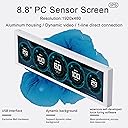
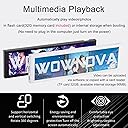
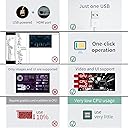
The WOWNOVA 8.8" Computer Temp Monitor is a sleek secondary IPS display designed for professionals and gamers alike. It offers real-time monitoring of CPU, GPU, RAM, HDD temperatures, and FPS via a single USB-C cable, eliminating clutter. Featuring a sharp 1920x480 resolution and customizable dynamic video themes, it blends functionality with style. Compatible with Windows 10/11, it supports easy one-click setup, energy-saving features, and a user-friendly interface, making it the ultimate tool to optimize and showcase your PC’s performance.





| ASIN | B0CBND47F5 |
| Aspect Ratio | 16:9 |
| Best Sellers Rank | #77,410 in Electronics ( See Top 100 in Electronics ) #1,878 in Computer Monitors |
| Brand | WOWNOVA |
| Color | Black |
| Connectivity Technology | USB Type C |
| Contrast Ratio | 1000:1 |
| Customer Reviews | 4.1 out of 5 stars 143 Reviews |
| Display Resolution Maximum | 1920 x 480 |
| Display Technology | LCD |
| Display Type | LCD |
| Hardware Connectivity | USB Type C |
| Image Contrast Ratio | 1000:1 |
| Item Dimensions D x W x H | 0.45"D x 9.33"W x 2.64"H |
| Item Weight | 0.42 kg |
| Manufacturer | WOWNOVA |
| Model Name | 8.8" Computer Temp Monitor |
| Model Number | 8.8" Computer Temp Monitor |
| Mounting Type | Wall Mount |
| Native Resolution | 1920 x 480 |
| Number of Component Outputs | 1 |
| Pixel Pitch | 0.56 |
| Resolution | 1920*480 |
| Screen Finish | Glossy |
| Screen Size | 8.8 inches |
| Screen Surface Description | Glossy |
| Total Number of HDMI Ports | 1 |
| Total USB 2.0 Ports | 1 |
| Total USB 3.0 Ports | 1 |
| Total Usb Ports | 2 |
| Unit Count | 1 Count |
| Viewing Angle | 170 degrees |
S**S
A highly customizable little display to monitor your computer's temperature at a glance
Updated: Added video. Their software could be better, but it's usable, as you can see from my own custom theme. Overall, I love this product so far. Works right out of the box. Someone said it was too expensive, but I have built another computer with a tiny custom screen (using HDMI) and with the software and setting up, I might have spent $100 in hardware and software (and troubleshooting). With this USB screen, it isn't really a secondary screen and uses very little resources. The $139 asking price, combined with the free software and 8.8 inch screen, I felt is a fair price. Sure, you can buy a larger display, at a cheaper price, but it's the software part that makes this a better option, in my opinion. I have the little screen sitting under my main monitor, so I can glance at the little 8.8 inch screen to get an idea of CPU temperature or the time. Software is a little clunky, it could use some polish. It comes with pre-built in themes, which works in a pinch. If you want to make your own theme, you're going to have to poke around. This might take a lot of time, as it's more or less experimenting (at least for me). If you want video animation, it's in "Background", not in the themes editor. I started putting together a Pipboy (walking animation) with the tools available in the software. Right now my theme is pretty barebones, but when I have more time, I'll have to look online for some other ideas.
C**Z
Great display to be used inside a PC build
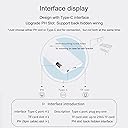
I was looking for a display that can be used inside a PC case for my new build. First I bought the Phanteks 5.5" HiRes IPS display and works great but it's an extended HDMI display that act as a monitor. You can display anything on it. There is nothing wrong with an extended display, but you need to understand the behavior. Mounting it was simple, either magnetic or directly to 120mm fans. However, after some days I've found that to display temps themes on it, either from AIDA64 or Rainmeter for example, you have to develop them or get a shared one that is optimal for the display resolution. This was tedious for me and I just wanted a display that was simple to operate and that work on its own. This is where the Wownova 8.8" display shines. Connection: There is no HDMI because this is an USB display. You connect just 1 cable, either the provided USB-C or a USB header cable that goes directly to one of available motherboard USB 2.0 headers. It doesn't get easier than this. Display: I got the 8.8" version because it suits better for my PC build, but any size/resolution from same brand model works the same, just different aspect ratio. The display is high quality with IPS, colors are bright and vibrant. Software: You download the specified software which is called Turzx to manage the display. It provides 20+ bundled themes either vertical or horizontal formats for the installed orientation. With the click of a single button, the desired theme pass to the display and it starts displaying real-time temps and other data. It doesn't get easier than this. The software also has a section to develop your custom theme and it's very simple unlike Rainmeter or AIDA64. The software is also free. Mounting: Mounting it was also simple, the included brackets allows you to hook it up to 120mm fans or any sized fans with 1 bracket. I installed with 1 bracket (in the middle) to one of my top 140mm fans with a radiator screw. It just takes a few minutes to do everything. You may spend more time deciding which theme to use from the software rather than installing the display to your PC build. Of course, because this is a "closed" USB display, software like AIDA64 or Rainmeter doesn't work with it. You need to use the Turzx software or any other collaboration software that works with this type of display. For me, the simplicity to display a fully working theme on it is worth more than the "DIY" method of using an extended type HDMI display. Highly recommended.
J**O
Died after 16 months
Purchased the Wonova 8.8 Turing Smart Screen on Match 5th 2025. It is now August 11 2026. I am using Aida64 to display the sensor data to this screen. Have been having problems with the display not functioning properly for the last 3 months. I leave my computer on most of the time. I have had to restart my computer to get the display to work again. Last week it stopped working completely. I have been trouble shooting it for the last week. Some times it works most of the time it doesn't. Am getting lines of different shades across the display. I can increase and decrease the brightness in the Aida64 app so I this Aida64 is communicating with the display properly. Just can't get the screen to show the info anymore.
A**G
Highly recommend. Makes your fishtank case “pop” like none other.
Worth every single penny. At first I was skeptical knowing that I may not have enough headroom with having the radiator and the exhaust fans up top. Turns out, I was right. HOWEVER the fix wasn’t hard either. I just had to move the radiator to the right side along with the intake fans (honestly way better option when it comes to cooling the cpu imo since I’m inviting cool air to the radiator instead of blowing warm air had I stayed with mounting it up top. ANYWAY. Just look at how aesthetically pleasing this is!! The screen is bright enough that it doesn’t get overpowered with all of my ten rgb fans!! What is also very convenient about this is how the connection gives you an option for a usb plug directly to your mobo. It’s a nice advantage as I don’t have to add any additional wires to my already frustrating cable management in the back. Software is a little tedious with instructions that took me a minute to figure out so instead I downloaded the Turzx app and it works the same. The presets could be customized like the way I did with the backgrounds. Finally, the build could be a little slimmer in my opinion. I find it a little thick for my liking but as long as it robust (which it is) I’m good!
N**S
Good display for PC monitoring
So, I bought this knowing that the software for it was going to be interesting based off other reviews. The software you need to download is off of a Google Drive that they give you the direct link to. You need to download it and then Unzip the file in order to do anything. This is where I initially had issues. I tried to unzip the file multiple times and it wasn't working. Had to download the software 6 different times before I got it to finally unzip properly to be able to run the program. Once up, the screen works great. The templates they have are ok, wish there were more but there is an editor that you can use to customize your own screen. I haven't tried to tinker with that too much yet. Also, it says you can select the city you're in, but after I save it, it still says some Chinese city as the city name. Not a big deal unless you want the weather to be accurate, which I don't care about. I tested it by playing a few games while the screen was running. It works pretty well, giving me accurate temp and % readings for both my CPU and GPU which are what I mostly wanted this for. The numbers compare pretty evenly with other programs I had ran previously. It comes with a USB 9-pin connector that connects straight to the MOBO, or is comes with a USB type-C cable that connects to a USB slot and the type-c to the screen. They give you multiple mounting options, and I went with just using the 3M tape because my case has a pretty good flat spot for it. Overall, I'm pretty satisfied with this. Is it a bit overpriced? Maybe, but from other reviews I've seen of other screens, they either come without a case, without cables, without mounting hardware. This was easy, minus the software at the beginning. I do wish the editing part of the software was a bit more intuitive, but like I said, I haven't played with it too much. 4 stars only because of the software issues I was running into.
V**.
This is the one. Best Metrics Display/Software/themes on the market by far.
This thing is absolutely beautiful and can take your build to the next level. My dual CPU, 64 core 128 thread miner build I named Hulk, needed that extra aesthetic touch and this display was perfect. It's for my YouTube channel so I needed it to look crazy and this thing definitely looks amazing on the build. If you want to check it our in action my channel is CRZY CYBR The moment important thing about this particular display, however, is not how it looks. It's the fact that it does require the God awful Aida64 software/spyware/bloateare to use the themes that are basically the entire reason you buy something like this. The themes are absolutelty beautiful, they load up with no issues, and custom themes are easy to find and install. In addition to that, you can use it as a secondary monitor, a feature I will be using to monitor my mining software at a glance in between themes. Im going to write a program that will have it display a theme for a set amount of time, and then go to my mining software output. I really cant recommend this one enough. I have bought 9 different displays like this trying to find the right one for my builds, and compared to this one, they were all trash. This is the one to buy 100% I promise you after going through 9 different displays, if you dont get this one, you WILL regret it.
T**N
Great!
Fits perfectly in my lianli Vision case! Easy to set-up, only requires 1 cable, and has a nice viewing angle. Sure a similar screen can be purchased that runs on HDMI but I didn't want to go through all the headaches of buying and setting up a sensor panel app like aida64. The only downside to this screen is there is a learning curve when setting up your own custom skin, and that there aren't many prebuilt skins available. There is a website dedicated to themes but it is mostly in Chinese and rather hard to find what you are looking for. All in all, I am very happy with my purchase, and don't regret not going with an hdmi ran solution.
C**E
Overpriced and undersupported.
The display itself is nice and vibrant but overpriced. The software is a bit glitchy and some features don't work. The support forum is not very responsive as there are months old support and feature requests that are sitting there unanswered. Building a custom theme is fairly easy but a set of proper instructions would be nice, any problems I had were answered by searching youtube for help. It's important to note that you cannot use Aida64 with this screen. The bundled software is your only option.
R**Y
ممتازة وسهلة التركيب
ممتازة جداً وأضافت جمالية للـCase حق البي سي
R**S
Buena imagen
Muy buena resolución y fácil de instalar
A**R
damaged screen in desktop mode
screen cant be used as a seconed screen as looks damaged when in this mode
S**N
Scam 8.8” !! Screen software isn’t working!!
Its a Scam, care software wont connect to display. One star for delivery
R**S
Excelente producto, pésimo software
Es un buen producto pero aquí te explico por qué 3 estrellas… Empezamos con lo malo El software TURXZ con el que trabaja es una PORQUERÍA, muchas veces no abre (Tienes que cambiar un código para que abra y ni así, funciona), muchas veces, cuando está configurando tu plantilla se cierre automáticamente y tu plantilla se pierde, cuando le metes ciertas imágenes, se queda pensando eternamente y literal no puedes hacer nada (Aunque reinicies y apagues la PC), desinstalar la app tampoco soluciono el problema. Lo bueno Es increíble toda la información que puedes meterle, viene con plantillas ya creadas y tú puedes crear las tuyas, acepte desde imágenes, GIF y videos, no se detecta como 1 panatalla extra para tu gráfica, se conecta con un solo cable USB directo a la MoBo, una vez que le agarras la onda, es una maravilla
Trustpilot
4 days ago
1 week ago