Desertcart purchases this item on your behalf and handles shipping, customs, and support to Brazil.
โก Power your productivity with Rosonwayโs sleek 7-port USB hub โ where speed meets control!
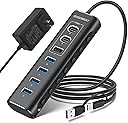
The Rosonway RSH-A107C is a 7-port powered USB hub featuring USB 3.2 Gen 2 technology for up to 10Gbps data transfer speeds. Its robust aluminum chassis ensures durability and a premium feel, while the included 12V power adapter guarantees stable performance for multiple devices. Individual switches on each port provide enhanced control and privacy, making it an ideal solution for professionals managing complex multi-PC or home office setups.


| ASIN | B0BXRY4QZ5 |
| Additional Features | Powered |
| Best Sellers Rank | #96,918 in Computers ( See Top 100 in Computers ) #1,656 in USB Hubs |
| Brand | Rosonway |
| Cable Length | 3.3 Feet |
| Color | black |
| Colour | black |
| Compatible Devices | Laptops |
| Compatible devices | Laptops |
| Customer Reviews | 4.2 out of 5 stars 1,077 Reviews |
| Data Transfer Rate | 10 Gigabits Per Second |
| Enclosure Material | Aluminum |
| Hardware Interface | Thunderbolt, USB, USB Type C |
| Hardware interface | Thunderbolt , USB, USB Type C |
| Item Dimensions L x W x H | 14.5L x 4.6W x 2.3H centimeters |
| Manufacturer | Shenzhen Rong Sheng Hui Electronics Co., Ltd |
| Model Number | RSH-A107C |
| Number of Ports | 7 |
| Special features | Powered |
| Total USB ports | 7 |
| Total Usb Ports | 7 |
F**S
Nรฃo funciona USB 3.0, apenas USB 2.1
Apesar de ser anunciado como um hub USB 3.0, essa funcionalidade nรฃo funciona - mesmo nas portas onde estรก escrito USB 3.0. Elas apenas funcionam no modo USB 2.1. Nรฃo compre se espera velocidades USB 3.0.
M**L
My 1-Year Review: The Rosonway 7-Port Powered USB 3.2 Hub (RSH-A107C)
My 1-Year Review: The Rosonway 7-Port Powered USB 3.2 Hub (RSH-A107C) Since purchasing the [Rosonway 7-Port USB 3.2 Hub]in February 2025, it has served as the reliable backbone of my home office for the past year. When managing a dual-PC docking station setup, the biggest challenge is often port exhaustion and the physical clutter of switching peripherals. This hub hasn't just solved that; it has done so with a level of build quality that is rare in todayโs accessory market. --- The "Docking Station" Solution My primary use case was to consolidate a variety of essential USB devices into a single node that connects to my 2-PC docking station. This includes: * **Audio/Visual:** My webcam and conference speakers. * **Inputs:** Wireless mouse and keyboard dongles. * **Miscellaneous:** Various thumb drives and charging cables. The hub has worked **perfectly and without fail** throughout my entire year of ownership. In a setup where I frequently switch between a work machine and a personal PC, the stability of this hub is its greatest asset. I haven't experienced any of the "ghost" disconnections or hardware handshake issues that often plague lower-end USB expanders. Build Quality: Sturdy and Tight The physical construction is where the Rosonway truly differentiates itself. The aluminum chassis isn't just for showโit gives the unit a weight and "tightness" that feels professional. * **No Rattling:** There is zero sense of looseness in the internal components or the ports themselves. * **Reliable Connections:** After a solid year of daily use, the ports remain snug and secure. High-Speed Performance Because this is a **USB 3.2 Gen 2** hub, it offers up to **10Gbps** data transfer speeds. While my mouse and keyboard don't need that bandwidth, having the 10Gbps USB-A and two USB-C ports available means that when I need to move large files from an external SSD, Iโm not throttled by the hubโs architecture. Why the 12V Power Adapter Matters One of the reasons this hub is so "very reliable" is the included **12V power adapter**. Many hubs try to draw power solely from the host PC, which leads to failure when you connect power-hungry devices like conference speakers or external hard drives. By providing its own power, the Rosonway ensures that every device stays online and performing at its peak. --- Key Takeaways My Experience | **Reliability** | 100% uptime over 1 year of daily use. | | **Build** | Industrial-grade aluminum; sturdy and durable. | | **Utility** | Consolidates complex peripheral setups into a single connection. | | **Control** | Individual switches allow for easy "hard-killing" of webcams for privacy. | Final Verdict If you are looking for a high-quality aluminum USB port expander to streamline a multi-PC or complex home office setup, this is a five-star investment. After 12 months of testing, it has proven itself to be a durable, high-performance solution for anyone dealing with the "port drought" of modern computing.
A**G
Speedy hub.
Works well, have used it for a long time now. The speed matches what it is promised.
B**A
Pleasantly Surprised
WOW was I pleasantly surprised when I opened the box! This USB Hub is awesome and is approximately 5 3/4" long and 1 3/4" wide and a 1/2" deep. Perfect for my desk space and for travel. I also like the on/off switch (on is a click and off is a held click). A previous review said it ... make sure the cord clicks into the unit or it does not work. I am very Very happy!
S**N
Nice unit. (Updated.. still happy with it)
Only had this 1 day. It wouldn't install on my Desktop to the USB-C 10Gb ports but after some investigation, discovered that's a driver issue on my motherboard and Win-7. It did however install perfectly on the USB-A 5Gb port. That's not a problem as I'm using USB-A 3.0 Drive Devices. I attached 4 drives to the 5Gb ports on the hub and everything powered up and attached without any problems. I also tested doing a backup from one of the now Hub mounted drives to another external USB drive and that all seemed to work flawless at speeds comparable to what I normally see when doing backups. Overall, very nice unit, solidly made, switches a nice feature, comes with PSU. I like the unit for its sturdiness. I like the ability to turn the ports off/on individually It works fine on a USB 3.1 port even though I have a USB-C device plugged into the 10Gb port so no issues there. I like it came with a separate PSU which I'm using Overall, pleased that it's working fine just disappointed to discover that my Motherboard is using an ASMedia 3.2 processor which doesn't appear to support external Hubs.. or at least ASMedia does have not care to provide a Driver for Win-7. The Hub appears to install ok but after much testing and powering OFF/ON, every time I connect it, Windows gives a loud Beep (The one that indicates a device has been attached/detached) every 1.5 SECOND!!!! even if there's no devices plugged into the Hub. Fortunately the 3.1 ports on my Motherboard use an Intel USB support chip so that seems to handle an external Hub without issue and it more than satisfies my current USB speed devices I'm using. UPDATE 02/13/25 ~~~~~~~~~~~~~~ I had a quirk occur which is NOT a defect but in case you hit the same. I had a USB port "Enabled" (Blue light lit) on the Hub but had no device actually configured on it. Every time I booted I would "lose" the last Internal Hard Drive. It just would not show up. This happened 4-5 times in a row. Once I realized and Disabled the port and I've never had a problem again. This could easily be a quirk of my Motherboard during it's hardware scan so I'm not blaming the hub at all. Just thought I'd mention it. As for the USB drives now connected to the Hub, they all continue to work flawlessly. Really pleased with the Hub as it provides the additional USB devices I needed in one nice easily locatable place (rather than having to keep scurrying behind the server on my hands and knees :-) Speed is great (Copying to and from devices on the Hub).
Trustpilot
1 month ago
5 days ago