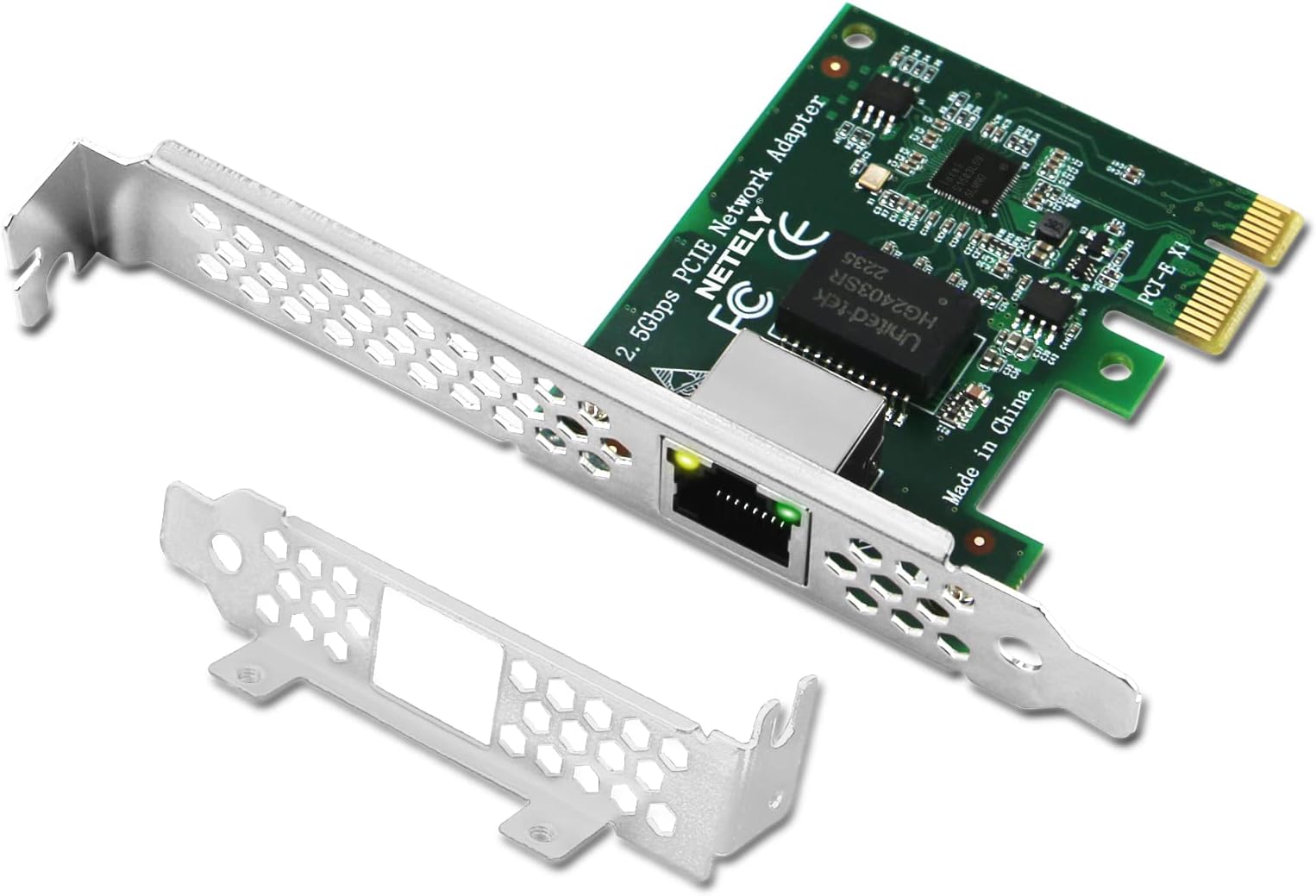
Product description PCI Express X1 Interface to 2.5GbE Copper RJ45 Ports Ethernet Adapter, PCIE Network Card The NETELY I225-T1 is a PCI Express X1 interface to 2.5GbE RJ45 ports network adapter. It is based on Intel I225V Ethernet controller , will allow users add 2.5Gbps max speed network connection on Windows 10, 11 64bit and Windows Server 2019, 2022 Desktop PCs. Supports auto speed negotiation 10/ 100/ 1000/ 2500Mbps working mode. Fully supports IEEE 802.3, 802.3u, 802.3bz , and 802.3ab standard. It also comes with low profile bracket for slim PC users. It is a low-cost way to add latest 2.5GbE network interface on Windows Desktop PCs and Windows Servers. System Requirements: Windows 10, 11 64bit and Windows Server 2019, 2022 need to install driver. Technical Specifications 2.5Gbps Max Speed Supports auto speed negotiation 10/ 100/ 1000/ 2500Mbps working mode. Windows 11,10 (64bit) Need to install driver on Windows 10 64bit and Windows Server 2019, 2022 systems. Plug and Play on Windows 11 64bit system. 2.5GbE Copper RJ45 Ports Fully supports IEEE 802.3, 802.3u, 802.3bz, and 802.3ab copper 2.5GbE RJ45 standard. Intel I225V Ethernet Controller Select the high performance Intel I225 V3 PCIE to 2.5Gbps Network Controller. Provide high performance network connection do Desktop PCs. PCI Express 3.1 X1 Interface PCI Express 3.1 standard, will compatible with PCIE 2.x, 3.x, 4.0 standard. PCIE X1 interface , will works on PCIE X1, X2, X4, X8, X16 slot. Works on Standard and Slim PCs The full hieight mounted on the network adapter for Standard Size PCs. The low profile bracket in the package for Slim PCs. Product Description Package List: 1X I225-T1 1X User Manual 1X Low Profile Bracket 1X Mount Screw 1X Mini CD Review: ATTENTION Win 2022/2019 Server Users - I have this card working with Windows 2022 Server Standard. Let me save you some trouble: 1) Skip the included drivers CD included in the box. They are only for Windows 10/11 and do not work with Windows Server 2022. The driver installer will tell you that it installed successfully, yet the card will still not be working. 2) Also, do not go to Intelโs site and try installing the latest ethernet driversโ package (28.1.1 as of this writing) from there. When you run the installer (which is almost 1GB in size) it will not detect a compatible card to install. 3) Jump directly over to Netelyโs site and click on the โdriversโ link at the bottom of the page. Find the I225-T1 entry for 2.5 Gbps PCIE Network Adapter. Next, click on the download for โWindows Server 2019 2022โ. The necessary driver will be in I225-T1.zip. Extract that to a USB Thumb Drive and sneaker walk it over to your server. Go into Device Manager, right-click on the unknown Ethernet Adapter device, and choose โUpdate Driverโ. Manually pick a location to install the drivers from and choose off the thumb drive the I225-T1>Windows-64bit folder with the search subfolders option is checked. Have it search for the driver and it will find and install it and the card will come to life and youโll be on your network. I am using this card for Windows 2022 Standard on an older AMD Ryzen B450 motherboard with a Ryzen 7 2700x CPU, 32 GB of RAM, and an older GTX 960 video card. I have not run any speed tests as I only have a 1 GB switch, but this card it is running great. I set up this machine to learn and work towards a couple Windows certifications and this card got around the problem of the onboard motherboardโs ethernet drivers from ASUS and Intel not working with Windows 2022. Take care all! Review: Easy to configure! - Great card for Multi-Gigabit home networks!


| ASIN | B0BNRJ1FTC |
| Best Sellers Rank | #784 in Internal Computer Networking Cards |
| Brand | NETELY |
| Color | Green |
| Compatible Devices | Desktop PCs & Servers |
| Compatible Operating System Family | Windows |
| Customer Reviews | 4.0 out of 5 stars 83 Reviews |
| Data Link Protocol | IEEE 802.3 |
| Data Transfer Rate | 2500 Megabytes Per Second |
| Hardware Interface | Ethernet, PCI Express 3.0, PCIE x 1 |
| Item Type Name | 2.5Gbps PCI Express X1 to RJ45 Network Adapter |
| Item Weight | 1.2 Ounces |
| Manufacturer | NETELY CO.,LTD |
| Mfr Part Number | I225T1 |
| Minimum Required Operating System Version | Windows 10, Windows 11 |
| Model Number | I225T1 |
| Unit Count | 1.0 Count |
K**N
ATTENTION Win 2022/2019 Server Users
I have this card working with Windows 2022 Server Standard. Let me save you some trouble: 1) Skip the included drivers CD included in the box. They are only for Windows 10/11 and do not work with Windows Server 2022. The driver installer will tell you that it installed successfully, yet the card will still not be working. 2) Also, do not go to Intelโs site and try installing the latest ethernet driversโ package (28.1.1 as of this writing) from there. When you run the installer (which is almost 1GB in size) it will not detect a compatible card to install. 3) Jump directly over to Netelyโs site and click on the โdriversโ link at the bottom of the page. Find the I225-T1 entry for 2.5 Gbps PCIE Network Adapter. Next, click on the download for โWindows Server 2019 2022โ. The necessary driver will be in I225-T1.zip. Extract that to a USB Thumb Drive and sneaker walk it over to your server. Go into Device Manager, right-click on the unknown Ethernet Adapter device, and choose โUpdate Driverโ. Manually pick a location to install the drivers from and choose off the thumb drive the I225-T1>Windows-64bit folder with the search subfolders option is checked. Have it search for the driver and it will find and install it and the card will come to life and youโll be on your network. I am using this card for Windows 2022 Standard on an older AMD Ryzen B450 motherboard with a Ryzen 7 2700x CPU, 32 GB of RAM, and an older GTX 960 video card. I have not run any speed tests as I only have a 1 GB switch, but this card it is running great. I set up this machine to learn and work towards a couple Windows certifications and this card got around the problem of the onboard motherboardโs ethernet drivers from ASUS and Intel not working with Windows 2022. Take care all!
S**S
Easy to configure!
Great card for Multi-Gigabit home networks!
R**C
Wont allow you to go below 10gps.
I had an issue with my network to where one of the ports wanted to throttle to 2.5 gbps. Instead of swapping speeds, this card completely dropped the connection. I installed The drivers and generic drivers trying to get it to work and it would not. Right now I just have it sitting idle in one of my slots when I upgrade to 10gp all the way around... not useable in its current condition. If you are thinking that this will be backwards comaptible, it is not. (It may work for 1gps, but not 2.5 which is pretty common (all my devices have a 2.5 option)).
D**D
Consider disabling ASPM
I upgraded my router recently to 2.5GBps interfaces, and I found that PFSense was topping out at 1.6gbps/1.4gbps, instead of the 2.1gbps my Internet service is able to do. In iperf, it showed a throughput of only 1.74gbit/s using UDP. After a firmware update on the Dell Optiplex 9020 SFF I use for PFSense, and also disabling ASPM, which I think was the causative factor, the issue resolved itself. Works advertised speeds! After checking the devices list, I found one of the NICs connecting at only 2.5GT/s (!!!!) which is PCI Express x1 1.0. I read that, the actual speed of the PCIe Bus has 20% overhead, so the maximum throughput was only 250 * 0.8 = 200MB/s. You can correct this by disabling ASPM, since it can be buggy. Now both controllers show 5GT/s, or PCI Express x1 2.0, about 500MB/s, which is enough for two cards to communicate at full speed. So, if your PFSense is not functioning properly with this card, or even in Windows, consider disabling ASPM, and verify your bus speeds if you are using multiple discrete PCIe devices.
D**.
!0GBs Dual LAN card -
Great addition to my home lab. Providing an impressive 10GBs between my Proxmox server and my PfSense Firewall, and other network elements. Making data transfers lightning fast. No more bottle-necks.
B**N
Works great with Proxmox
Had a machine with a 10gig SFP+ NIC that I wanted to swap with 2.5gb. This worked perfectly, was immediately recognized by Proxmox (Debian Linux) and I see sustained ~280MB/s transfers through it. I haven't tried with other OSes but it's a pretty widely supported chipset. Came with both full and half height brackets which is always nice.
S**T
Great product
I purchased this product so my desktop would support 2.5 GB ethernet. The product was really easy to install and didnโt require any drivers and windows. Iโve been using the product for a while and it works perfect.
A**B
Dead on arrival
This card did not function at all when it arrived. Furthermore, I had my IT friend try to help me, but he said that it is likely defective. Unfortunately, because I was sick for a couple of weeks after I ordered it, I ran over the return window by a couple of days before I realized that I should return it. I do not recommend this network card to anyone unless their intention is to just throw their money away.
J**.
RE - Use with Synology DS1821+ - Not working
Hi - I'm wondering if anyone has used this exact card in a Synology DS1821+ as it is not recognized when I put it into the correct slot. It's getting no power? Do I have to upgrade firmware or something? Any information would be helpful as I waited too long to return it and just tried it for the first time right now.
M**M
Test your card within the return period
I installed the card way too late and missed the return period. Based on other reviews, it seems my unit is faulty. 1 out of 2 ports work. The one that works can only establish connection with the router using a Cat5 cable. With a much better quality, brand new Cat6a cable no connection! Cross checked the cables with other machines, no issues there.
Trustpilot
1 week ago
3 days ago