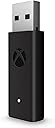
🎯 Level up your PC gaming with Xbox wireless freedom!
The Xbox Microsoft Wireless Adapter for Windows 10 lets you wirelessly connect your Xbox Wireless Controller to PCs, laptops, and tablets running Windows 7, 8.1, or 10. Supporting up to 8 controllers and multiple headsets, it delivers seamless gameplay with high-quality stereo audio and chat. Its plug-and-play design includes a USB extender cable for flexible setup, making it the go-to accessory for gamers wanting the authentic Xbox experience on their PC.
| ASIN | B00ZB7W4QU |
| Best Sellers Rank | 4,214 in PC & Video Games ( See Top 100 in PC & Video Games ) 334 in PlayStation Legacy Systems |
| Brand | Xbox |
| Colour | Black/White |
| Customer Reviews | 4.4 4.4 out of 5 stars (15,813) |
| Date First Available | 29 Jun. 2015 |
| Guaranteed software updates until | unknown |
| Item Weight | 0.1 Grams |
| Item model number | 1790 |
| Package Dimensions L x W x H | 9.4 x 5.5 x 1.8 centimetres |
| Package Weight | 0.03 Kilograms |
| Part number | HK9-00001 |
| Product Dimensions L x W x H | 13.7 x 15 x 4.6 centimetres |
P**H
Worth it. Strongly recommend.
Looks original and work like a breeze. Strongly recommend.
D**N
It Just Works
A bit more expensive than other options, but good value, as it just works. Good quality, easy to use and connection is solid.
J**E
Reliable, Compact, and Worth the Price
I recently moved from Xbox to PC for gaming and was using my Xbox controller via Bluetooth. I constantly ran into issues with disconnects, which got frustrating fast. After picking up the official Xbox Wireless Adapter for Windows, the difference was night and day. It connected instantly, and I haven’t had a single issue since. It’s smooth, stable, and feels just like using it on console. While it’s not the cheapest option out there, the quality and reliability make it well worth the price. It’s also really compact, so it doesn’t stick out or clutter your setup. There are cheaper knock-offs available, but honestly, I’d rather spend a few extra pounds on something that actually works perfectly. This adapter has been a great purchase and I highly recommend it to anyone using an Xbox controller on PC.
D**S
Great connector
I got Xbox controllers for playing steam on the pc and used Bluetooth and like others had constant disconnect issues. Since getting this not had one issue, plays perfectly and I can connect multiple controllers, it is worth the money
N**C
Official device, Works perfect with other official Xbox one controllers
Much easier to use than the 3rd party fakes. Annoyed a little I need to purchase and use this to use the elite controller functions on pc fully, but is what it is.
G**S
Official Microsoft wireless adapter windows 10/11
Purchased for use with Windows 11 PC avoided the cheaper options as I’ve seen bad reviews . Item came in original packaging from manufacturer appeared in devices straight away once plugged in paired with Xbox control pad in seconds. Very happy .
N**A
Information about the device
Amazing does what it says if you don’t have Bluetooth on your pc use this if you don’t want to use a wired controller use this! Fantastic device only down side is the price for what it is however really good technology
H**A
The XBOX wireless adapter for Windows is the logical solution for those who want to use more comfortably the excellent XBOX One and/or XBOX One Elite controller for gaming. In my humble opinion, it deserves a five-star rating because ELIMINATES the annoyance of having a wired controller, at least when you are not charging the batteries. It’s simple, discrete, even elegant, and lightweight, in comparison with the wireless adapter of the XBOX 360 controller, which was bulkier and with an odd round shape, harder to accommodate somewhere in your computer case or surroundings. Besides, the extension cable is detachable, what is very convenient when you have almost or no room for this port in the front or back of the motherboard of your computer, in contrast with the 360 controller wireless adapter, in which the extension cable was included and permanently attached, and if the cord was not necessary, you must fold the excedent cable, in order to avoid the mess in front or back of your computer. The only complaint about this adapter is that takes more time to pair a device, and you must press the pairing buttons sequentially, in order to have a one-step device pairing. First the adapter, then the controller. I have another complaint, but I think is related more to Windows, rather than the device itself. Is the inability to recognize the paired controller in the XBOX Devices subprogram in Windows. You have to try several times for the proper recognition. Nevertheless, even if the subprogram cannot recognize the controller, you can use the controller as well. I recommend this device to anyone who wants to use the XBX One controller without more cables on the computer. It works well and serves the purpose… you won’t regret it.
R**T
I can finally plug my headphones in to my controller and it works flawlessly!!! also you can connect up to 8 controllers at once. at this price this is a steal buy it without any hesitation!!!
V**V
Looks like the original product, maybe it is a very good copy, maybe it is a genuine one, I cannot understand. The label underneath hides the original barcodes, serial number and information, that date of manufacturing is "1016", which could mean October 2016. Windows recognized this dongle without a problem. Xbox controller was successfully connected via dongle,
M**M
Really, the wireless Adapter is great and excellent.
U**A
Elimde xbox one siyah (klasik) ve xbox one s var ikisi de kolayca bağlandı, bluettothla xbox one s beyaz controller bağlıyordum ama kulaklık özelliğini kullanamıyordum ve bağlantıda sıkıntı olabiliyordu. bu aletle bu hem klasiği hem beyaz olanı tam fonksiyonla kullanabiliyorum.
Trustpilot
3 weeks ago
3 days ago