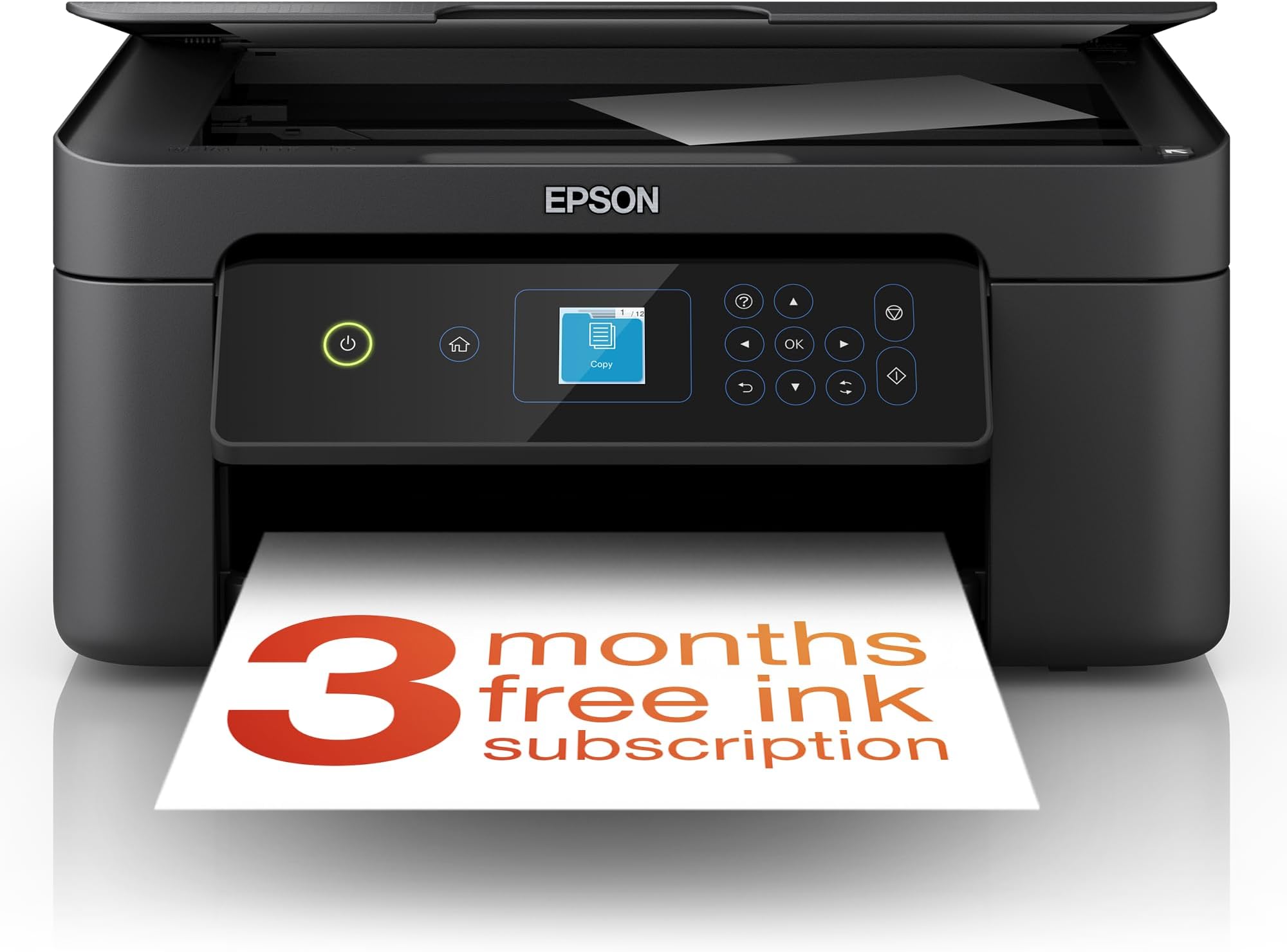
🖨️ Elevate your home office game with smart, stylish, and wireless printing!
The Epson Expression Home XP-3200 is a versatile 3-in-1 inkjet printer offering high-resolution 5760 x 1440 dpi printing, automatic duplexing, and wireless connectivity including Wi-Fi Direct. Its compact design and intuitive 1.45-inch LCD make it ideal for home or small office use, while individual ink cartridges and Epson’s Smart Panel app provide cost-effective, flexible printing and scanning from mobile devices.


| ASIN | B0BB7CPCSK |
| Additional Printer Functions | All In One |
| B&W Pages per Minute | 27 |
| Best Sellers Rank | 256 in Computers & Accessories ( See Top 100 in Computers & Accessories ) 5 in All-In-One Printers |
| Box Contents | Printer-Power lead -Inks |
| Brand | Epson |
| Brand Name | Epson |
| Color Depth | 24 bits_per_pixel |
| Color Pages per Minute | 15 ppm |
| Colour | Black |
| Compatible Cartridge | Epson-branded ink cartridges |
| Compatible Devices | Smartphones |
| Connectivity technology | Wi-Fi |
| Control Method | App |
| Controller Type | Android |
| Customer Reviews | 4.3 out of 5 stars 2,209 Reviews |
| Display Type | LCD |
| Dual-sided printing | Yes |
| Duplex | Automatic |
| Global Trade Identification Number | 08715946702728 |
| Hardware Interface | USB |
| Ink Colour | Black |
| Item Dimensions D x W x H | 17D x 37.5W x 30H centimetres |
| Item Type Name | Colour Laser Printer |
| Item Weight | 4.3 Kilograms |
| Manufacturer | Epson |
| Maximum Copies Per Run | 100 |
| Maximum Copy Resolution Black and White | 5760 x 1440 dpi |
| Maximum Copy Resolution Color | 5760 x 1440 |
| Maximum Copy Speed Black and White | 27 ppm |
| Maximum Print Resolution Black and White | 5760 x 1440 dpi |
| Maximum Sheet Capacity | 100 |
| Maximum Supported Paper Size | A4 |
| Maximum print Resolution Color | 5760 x 1440 optimized dpi |
| Model Name | XP-3200 |
| Model Number | C11CK66401 |
| Model Series | XP-3200 |
| Model name | XP-3200 |
| Network Connectivity Technology | Wi-Fi |
| Number of Trays | 1 |
| Other Special Features of the Product | Network-Ready |
| Output sheet capacity | 100 |
| Paper Size | 9x13 / 10x15 / 13x18 / 20x25 |
| Print media | Paper (plain) |
| Printer Output Type | Colour |
| Printer Resolution Vertical in Black and White | 567 Centimeters |
| Printer Type | Inkjet |
| Printing technology | Inkjet |
| Product Warranty | 28 Days DOA -12 Months |
| Resolution | 5760 x 1440 |
| Scanner Type | Photo |
| Series Number | 10 |
| Special feature | Network-Ready |
| Specific Uses For Product | General home use, small office use, wireless printing, and individual ink replacement |
| Total USB Ports | 1 |
| Warranty Type | limited warranty |
| Wattage | 1 watts |
M**T
Reliable, easy to use, and great value
The Epson Expression Home XP-4200 has been a great addition to my home office. Setup was quick and the WiFi connection worked on the first try, which isn’t always the case with printers. Printing quality is sharp and vibrant for everyday documents and photos, and the 3-in-1 features (print/scan/copy) make it really convenient. The scanner is surprisingly clear, and copies come out crisp. It’s also compact enough to fit on a small desk without feeling crowded. Overall, a reliable multifunction printer that does exactly what I need it to. Great value for the price.
M**K
Budget printer with EASY wireless printing for my iPhone & Mac
After my old printer stopped working, I’d been getting by with a cordless thermal printer which I think is okay for occasional use but it was time to upgrade to something more permanent with reliable print quality for my home office set up. I wanted something simple to use that would let me print wirelessly from my Mac and iPhone, do occasional scanning and I didn’t want to spend a lot of money either on the printer OR the inks, the price of which I researched BEFORE choosing this printer (I’m using cheaper compatible cartridges rather than official Epson ones). I actually think this is a very decent product; nothing wrong with the printing quality, it's easy to use the features via the control panel screen and it’s been reliable for me with the WIFI connectivity. Just to add, I was anxious about the setup from the outset but this was straightforward: you download the Epson Smart Panel app and it guides you through the process, step-by-step. It includes alignment/ink testing which was actually like a fun quiz to do (hehe) and felt very thorough for quality control. The only thing I got briefly stuck on was when it asked for a product PASSWORD (this is actually printed on the inside; just lift up the top, as if you were going to install the inks and you’ll see it in there). It’s a bit of a noisy beast but I can put up with it for the budget price (under £60 during Black Friday sale); I do think it’s great value for money for the functionality it offers and the ease of use. I really like the white colour too (much easier on the eyes in my white workspace).
M**N
Compact and Versatile Printer with High-Quality Scanning
I recently acquired the Epson Expression Home XP-3200 to handle my home printing, scanning, and copying needs. Overall, it has proven to be a reliable and efficient addition to my home office. ✔️ Key Advantages: High-Quality Scanning: The scanner delivers excellent results, capturing colors, details, and textures accurately. However, it's important to carefully align documents to prevent the edges from being cut off during scanning. Feature-Rich App: The accompanying app offers a wide range of customization options for printing and scanning tasks, enhancing the overall user experience. Compact Design: The printer's compact size makes it suitable for small spaces, and its multifunction capabilities eliminate the need for separate devices. ❌ Areas for Improvement: Paper Handling: The paper tray has a limited capacity, which may require frequent refilling during large print jobs. Print Speed: While adequate for occasional use, the print speed may be slower than desired for users with high-volume printing needs. 💡 Final Thoughts: The Epson Expression Home XP-3200 is a solid choice for individuals seeking a compact and versatile printer for home use. Its high-quality scanning and user-friendly app are notable strengths. However, users with heavy printing demands might find the paper capacity and print speed to be limiting factors. ✔ Best For: Home users looking for an all-in-one printer with excellent scanning capabilities and a compact footprint. ❌ Not Ideal For: Users who require high-volume printing or faster print speeds. 👉 Overall: 4/5 – A reliable and feature-rich printer that excels in scanning and is well-suited for home use.
P**S
Does the job, good value.
First impression, very good. Easy to set up using the Epson app, easy to connect to laptop, phone, tablet and by cable, to my desktop pc. Print quality appears to be excellent, though I haven't tried photo yet. Not fast, but fine for home use. Great value for money.
A**E
Easy to set up
Received today, easy to set up and connect to Wi-Fi and smartphone. It is lightweight and not so big, so it doesn’t eat up so much space on the table, and print quality is awesome. Just right for occasional use at home. It comes with ink, so it’s ready to use. It doesn’t come with a USB cable, but overall, I believe it’s a good buy.
J**M
Very poor throughout.
Over the years I've used quite a few printers, the first a dot-matrix Epson, but this one is simply the worst. The setup seemed straightforward although a little longwinded. But trying to use the thing was impossible. It just would not print via a wifi connection despite saying that the signal was good and the printer was "ready". I spent half a day trying all the tricks to get it working, cancelled print queue after print queue, stopped and started print spooler, uninstalled and re-installed printer drivers through the support website so all up to date. It printed from the front panel ok, could copy ok but would not print from my pc. I managed to connect and print via USB but I bought this printer for its wifi capability. So in desperation I contacted Epson Support which was an ordeal in itself. Negotiated the AI front end to finally "chat" to a human and spent an hour going through the problems and what I'd hoped was the solution. But no, didn't help, still no printing. In the end I resigned myself to USB connection, not ideal but it worked. Sort of. The print quality was okay, not brilliant but it is a cheap printer. But the paper handling was terrible. Sometimes it would pull through one sheet, sometimes two, then it would 1/2 pull through a sheet and jam. The final straw was when it just felt like pulling through 20 sheets without stopping, no printing just paper and all this with the recommended drivers, and updated firmware. I gave up and arranged to return it and give 5 stars to Amazon for the process. I don't know if I just had a duff one but I cannot recommend this printer at all. I'll bite the bullet and spend a bit more for a decent Printer.
P**.
Its an Epson and a good printer.
I like Epson and this xp3205 is not disappointing me. Being quite old my head needs a little time to connect with what i am doing and it has taken a while to set this printer up but now its running ok i am very pleased witbe results i am getting. Great printer !
B**O
Good specification for the price. Excellent print quality but build quality lacking in places.
I bought this printer to replace my aging Canon MG5753 as it seemed to be a like-for-like replacement, with a slightly higher specification and much faster print speed. My first impression straight out of the box wasn't that great as a slim plastic cover that fits beside the paper feed tray fell off whilst I was removing the printer from the protective bag. I soon got it clipped back on but it wasn't a great start. There are a few slightly flimsy-feeling parts to this printer - that cover, the output tray and the console buttons, which resemble the kind of keys you got on a Sinclair ZX81 computer in the early 1980s. The display console itself can be tilted upwards to give you a better view of the screen and buttons. The process of setting up the printer is very easy though and you definitely don't need an app or a laptop to do so. In the interests of research, I did it without and the most fiddly part was inputting my Wi-Fi password using the cursors on the control panel. The Wi-Fi reception is excellent and better than my previous printer. After fitting the supplied ink cartridges, you need to align the print heads and it's all done automatically as part of the setup process, which took about 15 minutes to complete. This does use a little bit of ink so it's just as well that you get some included. On the subject of ink cartridges, you can buy 'compatible' ones (as I have) complete with chips that the printer will recognise. Whilst they cost roughly the same as Original Equipment ones, they're high capacity so should last a lot longer. Remaining on the subject of ink, the heated piezo print head used on this printer apparently results in a small amount being deposited in an 'ink receptacle' which you need to unscrew and empty from time to time - perhaps an automatic job for whenever you change the cartridges. EDIT: Actually, I've since found that you have to replace it as it can't be emptied because the ink is absorbed by felt-like pads within the receptacle. I've gone through two sets of cartridges and the receptacle is only about 2% full. You can buy replacement ones for a few pounds if you shop around. Print quality really is great with smaller type faces being crisp and clear. Colour reproduction is vivid and should meet most domestic needs. The print speed doesn't appear to be quite as fast as the maker claims but A4 b/w letters take 4-5 seconds to complete. The print queue lag is quite lengthy by comparison to my last printer and takes some 45 seconds before the printer begins after clicking 'print.' You have to physically turn on the printer to start printing as it doesn't have an 'auto-awake' function if it's left plugged in to the mains but switched off at the printer. However, you can leave it on standby for as long as you want by adjusting the relevant setting. The rest of the functions (scan, copy etc.) are easy to navigate, and the dual sided print function is accessed via the print manager function on your laptop or mobile app, or on the printer console if you're using it to photocopy. The mobile app is pretty good and is easy to download and use. Besides using it to control print jobs, you can also do other things like check the ink level. On the whole, this is a very good printer for the price. It's been a while since I bought one for domestic use but this one does everything I need it to do and the print quality and speed is a definite step up from my old one.
Trustpilot
5 days ago
3 weeks ago