🚀 Elevate your workspace and playtime with vibrant visuals and sound—anywhere, anytime!
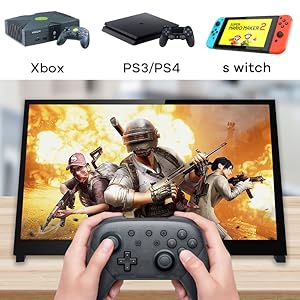
The Hosyond 10.1" IPS LCD Capacitive Touch Screen is a portable HD monitor (1024x600) featuring wide viewing angles, true colors, and five-point touch. It includes built-in dual stereo speakers and a headphone jack, supports Raspberry Pi (all major versions), Xbox, PS4, and Windows 7/8/10 without driver installation. With HDMI connectivity, volume/brightness dial, and a compact stand, it’s designed for seamless gaming, development, and productivity on the go.


| ASIN | B0BHQRSDZR |
| Aspect Ratio | 16:9 |
| Best Sellers Rank | #6,698 in Electronics ( See Top 100 in Electronics ) #250 in Computer Monitors |
| Customer Reviews | 4.4 4.4 out of 5 stars (580) |
| Date First Available | October 9, 2022 |
| Item Weight | 1.88 pounds |
| Item model number | 8bcecda9-db00-4965-91c5-3fa62b8abf7a |
| Manufacturer | Hosyond |
| Package Dimensions | 11.5 x 7.87 x 2.8 inches |
| Resolution | 1024 x 600 |
| Standing screen display size | 10.1 Inches |
| Voltage | 5 Volts (DC) |
F**O
inexpensive, easy to set up, functional and expendable.
fantastic, sharp, easy to set up screen. 10 years ago, i was "screw Chinese crap". I 've changed my tune, because they can't be beat when they produce affordable and effective products like this little screen. I hook it up to comp systems to test basic stuff w/o a regular monitor. IT uses this stuff all the time. This screen is sharp, the little speakers adequate, and it's built very well. Meantime, in the US, we have a dictator who wants to bring back coal and the 1950's. We' ve already lost to China and we're in their rearview because WE CAN'T COMPETE. Our arrogance and ignoance have won. We great yet? buy this.
L**S
Perfect for custom builds
This Hosyond 7-inch touchscreen is a great size for Raspberry Pi projects and looks sharp with the 1024×600 IPS display. Touch response is accurate, and it works easily over HDMI without driver headaches. Colors and viewing angles are surprisingly good for a small monitor. It’s a reliable, well-priced option for dashboards, kiosks, or compact builds.
H**L
Works well with Raspberry pi 4
A very good screen, nice picture and touch works well. A control wheel to change brightness for the screen and volume for the built in speakers. Cable free installation with adapters for my raspberry pi 4, nice!. I remove a star for the outdated installation guide on Internet. These instructions are for an old version (Buster) of the Rpi Linux and doesn't work on the newer version (Bookworm). When I powered up Rpi, I got a picture but with the wrong resolution 1600x900! To get the native 1024x600 resolution, I had to ( with Linux help from knowledgeable people) force the resolution during boot in an autoexec file.
S**N
Worked first time with Raspberry Pi 4B
Pros: * Easy setup with either a Pi3, 4 or 5 - Very clever design with the little connectors on a PCB. Very neat with no wires or long cables protruding. * Clear and crisp display on all resolutions athough 1920 x 1080 on a small screen like this is an eye chart. I have been using 1024 x 576 and 1152 x 648 for my applications. At this resolution the touch screen is very usable even with my fat fingers. * Colors are bright and saturated. Black is as expected for a modern TFT display. No issues. * Worked instantly, no driver issues, no editing config files to get working. Tested with the 2025 version of Raspberry PI 64 Bit OS. * No USB Sound Dongle needed for sound (as the sound comes over the HDMI connection). This saves a USB dongle and amplifier(s) + speaker(s) that would be needed otherwise. * Sound from included speakers is really pretty good and plenty loud. No driver issues at all. * There is a nice little combined brightness / volume control on the side. Works fine. * Multiple possible resolutions (see attached picture). * A little dimmer than the Official Raspberry Pi display and about the same brightness as the Raspberry Pi Display 2. Still plenty bright in an office environment. As good as your average office laptop. * Seems to use the same power as an official Raspberry Pi display. Cons: * Not as easy to mount as the official Raspberry Pi Display screens. * I didn't notice this at first, but this display has a blue color cast to it when placed next to the Official Raspberry Pi displays which seem to have a slightly warm color cast. Again I didn't notice this until I compared the two displays. * Display surface is reflective, but they all are - a limitation of touchscreens. Wishes: * I wish someone would make a good Acrylic bezel / mount for the screen like the Pimorni ones so panel mounting was easier. Bottom line: I would buy this again for sure. Especially if I wanted to try different resolutions.
R**N
Work great for my Windows environment as auxiliary monitors. Also, for Flight Simulator!
These work great, for the price point. I am using for a number of Windows 11 Desktop applications as auxiliary monitors. My main reason getting two of these for Microsoft Flight Simulator 2024 + Air Manager = Awesome aircraft components in front of my face, and can interact with them! Pros - -You can upscale in Windows to 1920x1080 so that certain apps will still fit on the screen. Small lettering has a hard time due to low actual resolution, but works for most applications that you can adjust scale on(or scale in Windows display options). -Touchscreen micro USB connection will also work to power the screen, so only one HDMI and one USB connections needed. -Multiple connection points so you can choose to have these HDMI/USB cables hidden on back, or coming out the side. -a couple of bonus feet for mounting in your choice of orientation/angle Cons - - If you dont mind connections coming directly off the side, the HDMI connector on the back is soldered on such a flat low profile that almost any HDMI connector I had on many HDMI cables that I already have did not fit. I had to take a knife and shave down the lowest profile connector I had so that I would not have any cables branching off the side connection points. - Low Resolution - This is obvious as stated the resolution in the specs here, shouldn't really be a con considering how affordable these are.
J**Y
Possibly broke my HDMI port
Possibly broke my HDMI 0 port on the Pi 5. Can't rule out the active cooler I installed but makes no sense why that would damage any thing HDMI related. Was using one of the provided HDMI circuit board connectors instead of a cable and now the display connects but no video. Not even with a cable and a different monitor. HDMI 1 still works but HDMI 0 only ever detects a plugged in monitor but never outputs video, even with hdmi_hot_plug enforced. When it worked it was nice tho, still works fine but I have to use a cable plugged into the side wich is a pain.
E**E
Great display.
Crisp display, takes very little power. I only whish the HDMI and power connectors were more inboard to help keep the overall footprint smaller.
E**S
It is a great monitor for my Raspberry Pi.
It is a great monitor for my Raspberry Pi, the touch screen is very nice to have. Feels almost like my iPad. Everything fits nicely in the back. I recommend it.
M**I
Not good
A**I
The screen and the lines are the aligned well
M**R
En una cabina de fotos, la necesitaba para saber si los usuarios ya habian terminado la sesión, cumple perfectamente con este cometido.
M**R
Knapp über 40 € für ein 5 Zoll Bildschirm der innerhalb von einem Tag bei mir war. Funktioniert einwandfrei Bildhelligkeit ist zufriedenstellend und das wichtigste ist er hat einen HDMI Eingang. Alle Bildparameter lassen sich an der Seite über Knöpfe bedienen wie Sättigung Helligkeit Backlight etc.
L**N
Because of the update of the raspberry pi Touch screen no longer works
Trustpilot
1 day ago
3 weeks ago