We remain fully operational. Our teams are working around the clock to ensure your deliveries continue safely.

DOWNLOAD THE APP


Customer Services
Copyright © 2025 Desertcart Holdings Limited
DOWNLOAD THE APP


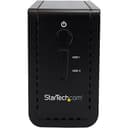


🚀 Double your storage, double your speed — the ultimate RAID-ready enclosure for pros!
The StarTech.com S352BU313R is a dual-bay 3.5" external hard drive enclosure featuring USB 3.1 Gen 2 connectivity with transfer speeds up to 10 Gbps. It supports multiple RAID configurations (0, 1, JBOD, SPAN) and SATA revisions I/II/III, housed in a durable aluminum and plastic chassis designed for desktop use. Compatible with both USB-C and USB-A, it’s ideal for professionals seeking high-speed, flexible, and reliable external storage solutions.


| ASIN | B07116PMPD |
| Best Sellers Rank | 186,727 in Computers & Accessories ( See Top 100 in Computers & Accessories ) 830 in Enclosures |
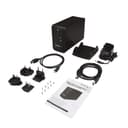
| Box Contents | USB 3.1 Dual 3.5" SATA (6Gbps) HDD Enclosure with RAID - USB-C and USB-A, 1 x Universal Power Adapter (NA/JP, UK, EU, ANZ), 1 x USB-A to USB-B Cable, 1 x USB-C to USB-B Cable, 1 x Enclosure Stand, 8 x Drive Screws, 1 x Quick-Start Guide |
| Brand | StarTech |
| Brand Name | StarTech |
| Colour | Black |
| Compatible Devices | Laptop |
| Customer Reviews | 3.8 out of 5 stars 455 Reviews |
| Data Transfer Rate | 10 Gigabits Per Second |
| Enclosure Material | Plastic |
| Global Trade Identification Number | 00065030863872 |
| Hardware Interface | Thunderbolt, USB, USB 2.0, USB 3.0, USB 3.1 Type C, USB Type C |
| Hardware Platform | Laptop |
| Hardware interface | Thunderbolt , USB, USB 2.0, USB 3.0, USB 3.1 Type C, USB Type C |
| Hardware platform | Laptop |
| Item Type Name | DAS Storage System |
| Item Weight | 998 g |
| Item weight | 998 g |
| Manufacturer | StarTech |
| Material | Plastic |
| Supported Devices Quantity | 2 |
| The Standard Size of the Hard Drive or the Bay the Hard Drive Is Compatible With (in inches) | 3.5 Inches |
| UPC | 065030863872 |
| Unit Count | 1.0 count |
J**F
Great product, sturdy build and works perfectly.
Great product. Very compact unit not much bigger than the hard drives themselves. HD installation takes seconds. The removal screw for the front cover is the worst thing about this item as it's on the bottom of the unit, not so much if you don't swap drives very often but you can always leave it off for easy access. Plug in via USB3 or eSATA and configure the drives through disk manager. Simple but understandable instructions provided for the uninitiated. Important note : When connecting with eSATA to your PC, make sure your adapter card is JBOD (Just a Bunch Of Disks) compatible otherwise you will only see the first drive. Startech.com is a good place to go to get these kind of accessories. The fan is very quiet and seems to provide adequate cooling but have yet to stress the unit yet with some large data copying. Oh one last thing, the LED indicators on the front panel are insanely bright and make it look a bit cheap but looks aren't important as overall it's great.
P**G
Excellent product, but a very noisy fan!
I originally considered purchasing the WD My Book Duo but was put off by the fact that encryption is added over the top of your data by the hardware, which cannot be disabled. This means, that if the enclosure were to die or become irreparable, all your data would be lost as you do not possess the keys! You can search for this in various forums. So I eventually settled to purchase this enclosure, and 2 3TB WD Red drives. The unit is sturdy and compact and has excellent build quality. The front of the unit slides off/upwards, and the drives slide in snugly. I wasn't sure if I needed to format the drives via my Mac, so set the unit to RAID1 and I just powered up the enclosure. I then opened up Disk Utility and noticed that my Mac saw 2 drives, so the unit had been set to a default of JBOD. This time, I shut the hub down, flicked the switch to RAID1 back and forth, and pressed the reset button on startup. This time, only 1 drive was recognised, and Disk Utility initialised the disks as RAID1 3TB. Hurray! The USB 3 interface is pretty fast and handled the transfer of 2TB of media files in a few hours. I use it as a Media Storage server where various devices streams files off it, and I have had no problems in terms of speed or contention. Excellent. Also, very handy is the two USB 3 ports on the front of the unit which can be used for charging as well as connecting other USB devices. One word of caution is the fan - it is quite loud. As I work from home, the unit's fan competes withe the quiet music I play. Even when placed under the desk, the fan can easily be heard. It's louder than my Synology NAS, and I thought that was noisy! On the odd occasion that I switch off the unit, the contrast is very apparent, so please be wary when looking at this. I did contact StarTech technical Support who confirmed that the fan could not be controlled, and recommended a discontinued model for that.
M**N
Great product as expected from StarTech
Very happy with this excellent exclosure. I am a big fan of StarTech, i'll make no apologies for that. I have a lot of their products and whilst they are maybe not as aesthetically pleasing to look at as other products, they are always reliable, fairly priced and work great. I love this enclosure, it's VERY fast, as long as your hardware has USB 3.0 or 3.1. Sure the fan is noticeable when on but it's not going to require that you but ear defenders or anything like that. I like the fact that the fan turns off when the PC goes to sleep mode. And when you eject the device it also turns off and the fan shuts off, nice touch. You do have to read the manual though if you want to change the RAID dip switches, it's not just a simple matter of changing the switches then turning on again, you have to push an internal button then turn off, trust me it's not hard just read the manual! So in summary, great product, fast, easy to use and reliable. Very happy.
B**B
Unstable, Avoid!
I purchased this to take the 4 hard drives I had in my old mac pro as I am now using a mac book pro for all work and the giant machine was just taking up space. The reviews seemed reasonable and the price was very good so I went for it and installed the 4 drives. 1 was the bootable operating system disc from my old machine, the second was an archive drive of previous work and the last 2 are my current backup drives arranged in a RAID 1 mirroring format. Initial impression was positive although the drives are not held that firmly, once in position they seemed fine. All mounted as expected when plugging in with the USB 3 cable and transfer/read speeds seemed good. However within an hour or so I started getting drive not ejected errors and after this happening several times none of the drives would mount at all. I took them out and tried placing them individually in my icy box dock but nothing, every one of the 4 was corrupted! Luckily I have a friend in IT who come round and used disk warrior to repair them so I did not lose everything (although the old mac boot disc is no longer bootable) but it was touch an go for a while! Anyway I contacted StarTech and after a brief chat with their technical support guy I was told it must have been a faulty enclose, very sorry, please send it back to amazon. I did this and wanting to give the benefit of the doubt I ordered a replacement. When this arrived the packaging had clearly been opened, cable bags torn, rubber feet already attached etc. Already wary I started with one drive and this seemed to work with no disconnections over a 3 hour period. So I went for it and put in the rest of my drives and within 20 minutes the RAID had been unmounted. At this point I cut my losses and sent the replacement back. I would recommend everyone to avoid this enclosure completely. I don't know if it is unable to deal with software RAID as it was this that went first each time or if the whole thing is just incredibly unstable but either way it comes with a real risk corrupting your data. I've spent hours just trying to get myself and my data back to the point where I started before ordering this.
B**.
Works OK in the end but beware the noise
I got this enclosure specifically to use for 2x 3.5" disks working independently, a JBOD scenario, with Mac Mini M1; I wouldn't trust RAID in a small, cheap box like this but only a dedicated NAS. With the DIP switches correctly set, I moved a 5400rpm disk from an existing single-disk USB enclosure to this Startech box, but it failed to be recognised; although formatted with GPT boot record originally, Startech would only recognise it as an MBR boot record and some random sized partition. In the end, I had to copy the data off, reformat as GPT within the Startech unit, copy data back and it was OK. Therefore there is no guarantee of portability when moving existing disks into this Startech unit. The other major downside is the noise level; adding a second 7200rpm NAS-spec 3.5" disk to this unit made it act as a miniature echo chamber; the aluminium case and lack of any dampening is horrendous. The fan, needed for this warm-running disk, is as loud as my old desktop PC that I replaced with the Mac partly to reduce energy and noise levels. I had to remove this second disk, and now it runs quite happily with the single 5400rpm 3.5 disk I first fitted with the fan turned off, without getting warm. I considered returning it, but in the end kept it because it was good value in a warehouse deal, and I will investigate a replacement fan that makes less noise. The other advantage is the physical power switch on the rear, so it will always power on after a power cut (unlike some enclosures which require a manual switch-on each time); what looks like a round power button on the front panel is actually just a green light. It's also useful that it comes with both USB-A and USB-C data cables. Mr recommendation would be go for it if you have relatively cool-running disks you're happy to run without the fan, or if you are not bothered by the noise.
M**Y
If you want to attach 4 SATA drives via Thunderbolt, this is for you
This is a splendid bit of kit. Bought it because my fully-loaded MacPro died and I figured an iMac with one of these attached would be a decent replacement. Nice design. You get a get 4 sets of pop-on rails for the SATA drives included. Not 100% obvious which way up they go from the instructions supplied but you can figure it out with a little trial and error as the rails come off easily enough with a blunt knife (it's spring-clip upwards, if you're interested). Transferring the data from my old Mac HD mounted in this rack gave me a sustained 52mb/sec. 5 super-bright blue LEDs give you power & drive status for each bay. Things I'd change to make it perfect: Fascia being attached with Allen keys rather than just a clip makes changing the drives around a .bit of a faff. Then again I guess it cuts down on vibration noise so I guess it's only an issue if you plan to swap the drives a lot. Price is a shade high for what it is. They could probably shave a few quid off by not giving you mains plugs for every country in the world… Other than that - if you need a lot of storage or you're a cautious type who'd like a 4-disk RAID I think you're pretty much sorted here. UPDATE: I already had one of these, and while it wasn't cheap it has worked perfectly for years. I was starting to acquire rather too many standalone USB backup drives and decided to bust them out and mount them in a single enclosure to keep things tidy. They daisy-chain together over Thunderbolt, they're not silent but they're not too noisy, and they're completely reliable. You can even hot-swap SATA drives if you need to although getting the front plate off is a touch fiddly. The company provide outstanding aftercare as well. so even though you're paying quite a bit for an empty box you do get your money's worth. Recommended.
S**B
Fast and cheap dual RAID
I have a mid-2010 Mac Pro, which doesn't support USB 3 or thunderbolt, so my only option for fast external HDD was e-SATA. I was attracted to the StarTech as it was cheap, well designed, and StarTech have a good reputation. Plus it has USB 3, which is good if I eventually upgrade to a machine that supports it. So far so good. I have it hooked to a Sonnet Tempo E2P PCIe card, and RAID mode is 0 (striped). I don't need the drives to be fault tolerant, just fast. There are 2 WD green 1TB drives inside. I'm getting write speeds of 110 MB/sec which I'm very happy about. If the device proves to be reliable, I'll be getting a second one, and using them both as off-site backups. Some advice if you get this drive : (1) Don't mix drive sizes in combined mode, because when one is full, it may hang. In fact only mix drive sizes in JBOD mode. (2) When you switch RAID modes, you may need to format the drives individually before the new mode is picked up correctly. So select JBOD, format each drive, then switch to the mode you actually want. This worked for me when changing from combined to striped. At the end of the day, this is a cheap case, so expect some quirks. But if you are methodical when setting up, you will get good results.
S**Y
Great price for a RAID 1 enclosure
Offers RAID 1 which is ideal, put in a couple of large pro disks and it's very fast and easily keeps up with multiple 4k60 streaming, Roon Labs library for several users, Plex etc. Backups are stored at high speed, probably as fast as the disks will go. Very good direct attached storage. Being direct attached using USB 3.1 means it's between 5x and 10x faster than a 1 gig Ethernet NAS and will also be included on all backups from Backblaze and other similar backup services unlike network attached NAS devices which Backblaze won't include in a backup. There are a lot of less than desirable storage devices out there and some cost 10x this little thing but this delivers great performance and RAID 1 resilience for not a lot of money. Very good little box and very easy to use and setup.
Trustpilot
2 weeks ago
2 weeks ago