Buy anything from 5,000+ international stores. One checkout price. No surprise fees. Join 2M+ shoppers on Desertcart.
Desertcart purchases this item on your behalf and handles shipping, customs, and support to Brazil.
🚀 Elevate your maker game with the Neptune 3 Pro — where precision meets effortless innovation!
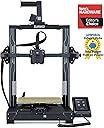
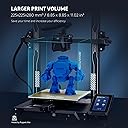
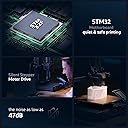
The ELEGOO Neptune 3 Pro is a professional-grade 3D printer featuring an 8.85x8.85x11 inch build volume, a robust dual-gear direct drive extruder made from SUS303 stainless steel, and a 36-point auto bed leveling system. Designed for quick assembly and quiet operation (under 47dB), it supports multiple filament types including PLA, TPU, PETG, and ABS. Its dual lead screw Z-axis and advanced nozzle cooling system ensure stable, high-quality prints, making it ideal for both beginners and experienced makers seeking reliable, precise, and hassle-free 3D printing.


| Best Sellers Rank | #2,909 in Industrial & Scientific ( See Top 100 in Industrial & Scientific ) #5 in 3D Printers |
| Brand | ELEGOO |
| Color | Black |
| Compatible Devices | Laptop, Personal Computer |
| Customer Reviews | 4.3 out of 5 stars 1,336 Reviews |
| Item Weight | 22 Pounds |
| Material | Aluminum |
| Product Dimensions | 23"D x 9"W x 19"H |
A**R
What a workhorse!
I bought this Elegoo Neptune 3 pro for my husband's birthday and he already wants another Elegoo printer. He absolutely loves it. After he got the printer and printed the test print I found some little ghosts online with pop out legs and he printed a bunch of them, they all came out great. He did have a little trouble with one large ghost he printed but a quick search on Facebook groups helped him discover what went wrong and all he needed to do was tighten some belts. This printer is easy to use and has been printing like a dream since it was purchased and for $200 it was an amazing deal. The big reason for this purchase was to help my husband make a halloween costume for our son. He was able to print a full sized kids helmet on the Neptune 3 Pro without much trouble and it looks amazing. He did have an issue with the Z offset which he accidentally did incorrectly and it led to his scratching the PEI build plate but he reached out to Elegoo about the issue and they were extremely quick to respond, sent him a new PEI build plate free of charge and shared helpful tech support videos. Really this printer is high quality at a low price, has tons of peer resources on social media, and has top notch customer service. I have seen a lot about people purchasing Creality Ender series printers because they are a little cheaper and then added a bunch of upgrades costing them more money. While I can't say if that is a good route to go or not I can say that straight out of the box, this printer took 30 minutes to set up and get printing and does not seem to need any upgrades. It is a great purchase at a great price. If you are thinking of getting a 3d Printer I highly recommend the Elegoo Neptune line of printers.
M**R
This is a great machine
I’ve only had a short time. I have zero prior experience with 3D printing. Once received, I watched many many YouTube videos. Setting up the machine. Using the supplied modified for this machine, Cura software. I have download some EZ to print from Thingiverse. Learned I had to extract the files. Then move the object to print onto the Cura print platform. Sometimes rotate the object on the Cura platform. Slice it, save to a removable microSD card. Make sure to click the pencil icon at bottom left of Cura screen and name it what you want before saving to the microSD card. Then insert card into the printer. I use nozzle temp 220 and plate 70. I only print one object at a time, unless small and I can place very close to each other in the Cura platform before I slice and save to microSD card. The Amolen silk shiny PLA is very nice to print great definition and to remove from plate when finished printing. Let it cool before removing. The Elegoo PLA works, but just not as nice. I use the full auto level between different objects. I try to print 3 of same objects before I do a full re level. I’ve discovered to check nozzle distance to plate after each full leveling. I run a sheet of typing paper under nozzle and adjust so there is a good drag. I first did not adjust nozzle close enough. I learned. I adjusted my Cura for a wide brim for greater adhesion of piece as it prints.watch YouTube for this. I watch carefully first several minutes to be sure the filament is lying down good. If not , i stopped , cleared away the mess, and did full leveling and nozzle distance adjustment. I watched a lot of YouTube videos. Once I decided to spend time in leveling, nozzle distance and set my nozzle and bed temperature up, it’s been really great pieces printed. Watch many YouTube videos as you learn about each aspect. After one or two days commitment to basic learning and adjusting your routine, you will be very happy with this machine. Take the time and learn. This is a great machine and overall satisfying little hobby. UPDATE. I have been using for awhile. GREAT MACHINE. I have printed many different items. All came out great. Make sure your bed heat is high enough and bed is thoroughly heated. Watch the first several layers, get in there with a flashlight. If not laying down perfectly. Stop and clear it out and start over. I’ve only needed to do this twice. This machine is a pleasure to use. Great Great! UPDATE. I’ve been using almost daily, running all night, for a little over 2 months. STILL GREAT. I’ve used ThingIVerse and also bought STL files, from Etsy. Dinosaurs, Astronaut, Furby, Candy dispense using mason jar, squishy turtles, many variations of whistles, Recorder, Bird shaped multi tone whistles, many different key fobs, pull helicopters, lots more, many items. Nozzle 220 and bed 70. Keep nozzle height low, a sheet of typing paper has pretty good friction to pull out, but not too tight either.Now a situation. My nozzle got clogged. I YouTube it. Easiest is replace it. Two extra came with the machine. Extras look inexpensive. YouTube has a very simple method to replace with needle nose pliers and 6mm socket. EZ and quick. Runs perfect after I did that. I think I’ll change that every month, just to be sure I don’t have a clog during a print job. This machine is simple to use. You MUST perform the total automatic re leveling of the bed before each print job. I’ve been disappointed when I skipped this. Great Quiet Simple machine that produces perfect items easily!! You can spend more money, but if you want a simple to use , reliable machine, BUY THIS.
P**R
Awesome printer easy setup. Not for beginners
This 3D printer went together fast. In the box is a USB stick with SD card with videos on assembly and software. Install the Elegoo Cura (thats the program you use to output files onto your SD card to print). Then watch the assembly video if needed, but directions were pretty clear with pictographs. After assembling I made a few quick test prints and they came out phenomenal with factory settings. To be honest, I had purchased an Ender 3 pro before I got this printer. I was semi- familiar with the process of 3D printing due to this. I've had NOTHING but bad luck with the Ender. Wasted TONS of filament and time. This printer hasn't had a failed print yet... im impressed! The process of outputting files to your card is called "slicing". Then that "slice" must be saved to the SD card as a .gcode file. Then you pop the SD card into the Elegoo and navigate to the gcode file and print it. The Elegoo Cura software is the program you can make changes to the model and fine tune the settings. Temperature, speed of print, support structures, thickness of the lines etc. are all done through the cura software. Its fairly intuitive and little info windows pop up to tell you about the area your hovering over...very helpful. There are a few draw backs to this machine but none would be a deal breaker. 1. The print Head assembly is GIANT. This makes seeing smaller pieces being printed near impossible. The first few layers of a calibration cube for example are dwarfed by the enormous print head. Hard to check adhesion and print quality that way. 2. The slot to insert the SD card is inset into the machine under the front of the build plate. It's hard to get the card inserted especially for an old fart like myself. 3. You can NOT adjust the e-steps from the display pad. E-steps are the settings we use to "fine" tune the control motors. Y axis, X axis, and Z axis; Y being for and aft, X being right and left, Z being up and down. You can edjust the steps for filament dispensing but not the rest. In order to adjust and fine tune your printers e-steps you'd have to get software to output a programming gcode file. This means you'll need to learn a new software and programming style. It's not impossible but this isn't something you'll want to buy for gramma at Christmas as she will be lost. Hopefully in the future ELEGOO will update the firmware to include this ability. As for why it's important to adjust the e-steps... these control how far a motor is actually moving. Take a calibration cube for example. The dimensions of the finished cube are expected to be 20mm tall X 20mm high X 20mm wide. With an untuned e-step your cube may come out being 21mm X 19mm X 20.5 mm. This may not seem like a big deal, but in the grand scheme of things if we are printing items with threads or a certain diameter to fit into/onto something else we need them to print exact. Out of the box this printer was within a few tenths of a mm of being dead on. Make SURE to level your bed BEFORE you do anything. The bed must be at temperature and the nozzle at temperature as well. This is not in the instructions. If you set your level with them cold or room temp your plate to nozzle distance will decrease when you start a print. Things expand when you heat them and this will decrease the gap if you don't pre-heat. The second thing you need to do after leveling is measure and extrude some filament to set the e-step of the extruder. This will make sure your not pushing too much or too little filament out. Measure 120mm of filament from the top of the print head and make a mark there. Then after preheating the nozzle to the temp your filament needs to melt, command the printer to extrude 100mm of filament. Then measure the exact amount the filament traveled. Use that distance to calibrate your e-steps using this formula... yes you're going to get math on you. Your current e-steps programmed in the machine multiplied by 100 (thats the distance we wanted extruded). Take that number and divide it by the actual amount the filament traveled when you measured it. That number will be your new e-step setting. Once you've leveled the bed, and set your filament e-steps your ready to print. My first print was a threaded funnel for my new car. It threads in to where my oil cap is so I wanted to see how precise the prints were. See my pictures. Using default settings the print came out spectacular with nylon filament. True test was threading it into my car... it went right in with no issues. All in all this is an AWESOME printer. It BY FAR outperforms the Ender 3 pro. I've had the printer running non-stop for 4 days now and not a single issue with it. If your willing to tackle a bit of a learning curve with programming e-steps this could be an amazing printer. You will NOT be disappointed.
B**N
Previous and new buyers beware….
I purchased my first Neptune Pro 3, about a month and a half ago. Thing worked great until the extruder broke. Wasn’t able to replace it bc Elegoo sold more models than they had and every model in the Neptune lineup was sold out. Trying to get in touch with Elegoo support is a headache alone and when you do, they unfortunately don’t speak English very well….so communicating your issues becomes very frustrating as it’s like talking to a 3 year old who knows a few words here and there. I gave up with support and just got ahold of Creality who ironically sold the hot end I needed and had it in stock…instead of Elegoo. When it arrived, I fixed the machine and had it running smooth until just a few days later where…another problem occurred… the bed warped. I once again reached out to Elegoo and I actually never even received a response...to this day. So…I tried Amazon support and they agreed to switch the machines out on the account that my exact model had just came back into stock but none of the others had. Tbh, I didn’t really want another one. Don’t get me wrong, the Neptunes look beautiful but mine was more of a beautiful disaster than anything. I really wanted to give this model another chance, in case it was just bad luck…so, I agreed to the switch and said if this one is the same I’ll get my money back and try the new Sovol Svo1 Plus if this goes awry again. Upon arrival the machine came in the same packaging but upon opening I noticed there was new paperwork that didn’t come with my last order. Much more details like a manual compared to the “quick-start” pamphlets I received before. The PCEI sheet was different, higher quality than my last one. Set-up was the same. I checked the voltage and switched to 115 bc I’m in the US and powered it up. Immediately upon booting up the touchscreen had a brand new firmware than my other. I was getting around to my first print, put the SD card in and wow…they upgraded the slot. On my first machine, the card recessed so far back into the machine I had to use the plastic scraper to help eject it bc your fingers just couldn’t touch it. On the upgraded machine…the card actually seats outside the machine and has a lip that allows you to perfectly insert and eject it. I placed the 2 machines side by side and started the same print and the newer Neptune finished a whooping hour sooner. A whole hour! This is just one day after receiving this product and comparing, there could be more that I’m missing. I’m just your average guy not some 3D printing guru…so I don’t know all the differences in specs and what not, I just know what I know from running my shop and having common sense. So my word to the wise would be… If you bought these machines before 4/25/23…I strongly suggest replacing them with the models that are out now, because you’re obviously missing out on upgrades that a Elegoo did not happen to mention to anyone as far as I know. I’ll be keeping this review updated as the days go by with the newer machine to see if it holds up.
K**F
The Best FDM printer I ever purchased
I got this printer because I was tired of messing with my monoprice ultimate which was heavily modified with a Bondtech direct drive, micro swiss all metal hot end, dampener bushings and other printable mods, and its enclosed which was good for ABS etc. I just got to the point where I wanted a printer that you turned on and didn't have to mess with the settings, and boy was I shocked with this printer. Everything was just perfect the assembly its simple navigation menus and its use straight out of the box. Leveling was super easy compared to my previous manual monstrosity. It was so simply that a total new user could perform the bed leveling without any issues. Elegoo knocked it out of the park with this 3D printer, I fell in love with it so much I purchased their Saturn 3 MSLA printer because I heard nothing but good things about that printer also which I will write a review under that product once I get to use it, along with Elegoo's cleaning station set. Bottom line if your new to 3D printing and don't want to spend your entire life savings on a $5K printer this budget friendly model is plain out amazing. If this one goes years down the line I would purchase another with no questions asked. The software is good and I haven't ran into any crazy printing issues, however I use Simplify3D which is an amazing slicer but is geared more towards advanced users because of all the granular controls it offers over your FDM printers. I ran two models through both the slicer that came with the printer which is Cura, not a fan of it but it gets things done. And I did the same print with Simplify3D and the base settings for this printer and it pushed the model quality even further to a really good level that you could see with a close inspection. When a company creates a printer that you can just use the default setings on a another slicer that is next level quality. My monoprice under Cura was ok under simplify3D was a literal train wreck. Granted the monoprice was fully enclosed and built and weighed like a tank but at the time I purchased that one they were running for $600 to $700 bucks. They are more of a tweakers printer than anything else, I learned a lot from that printer but at a high price tag and lots of invested time learning all the ins and outs of that printer. The Elegoo has been my favorite printer since I bought it, the build quality is exceptional and the nice added touch of the removable magnet build plate just makes it that much better. They also include a glue stick which is funny, I haven't had to use a glass plate, glue stick, or NASA tape on the bed at all everything like I said just works with no fuss or Macgyvering anything. Here is another thing since I got this printer I have been running it hard with some complex FDM models non stop and I have not got a single peep out of printer about any issue. Thank You ELEGOO and keep up this fantastic work you do, I highly appreciate it!
C**M
decent prints, easy upgrades, fairly slow printing, only supports 32GB or smaller cards.
Slow and strings a LOT... upgraded to 3rd party all metal hotend and the stringing has greatly reduced. But still a slow printer vs more modern machines, even when using a 1.0mm nozzle for "rapid printing". My biggest gripe, it only supports memory cards up to 32GB... This was released in 2022 - 1TB microSD cards were released in 2019. I have about a dozen 64GB MicroSD cards (for photography) which do not work with Elegoo :( I only have 6 cards 32GB or less: 3 4GB (I use for my laser engraver), 1 8GB (came with the printer), 2 32GB. The 32GB cards I use as secondary backups for photos. Very disappointing that I'll have to purchase some new memory cards as I ramp up use of the printer, though many reliable brands are no longer making memory cards smaller than 64GB.... Printing speed is a close second... Even using a 1.0mm nozzle for printing, it's disappointing how long it takes to print. It is nice in that there are plenty of 3rd party accessories for the printer. I mentioned the all-metal hotend upgrade, also purchased nozzles, two different build plates, extra print head assembly, extra hotend assembly, additional extra parts to repair as needed. Good print quality when you get the right mix of filament, print speed, & nozzle size!
A**Y
Incredible First Printer for the Tinkerer
I have now spent a few months with the Neptune 3 Pro printing almost daily and running through 6 or so kg of various materials (highly recommend Elegoo Rapid PLA+) and could not be happier. Out of the box this is a reliable, easy to assemble machine that will require a little bit of learning but serve your every day needs with minimal fuss. The real power, however, comes if you are willing to put in some extra time learning and tinkering. Here are your first steps: swap ELEGOO's Cura branch for the latest Ultimaker version, swap the Marlin Firmware for Klipper (I am running on an RPI 3b+ I had lying around) and spend a day calibrating it. You now have a reliable, inexpensive and fully tuneable platform that you can really explore on. After this you have a lot of options, but you are probably now looking for speed. For this my number #1 upgrade is a set of Bonditech CHT nozzles in 0.4, 0.6 and 0.8mm these nozzles cut the filament as it feeds so they can melt it faster and get better flow rates. Paired with ELEGOOs outstanding PLA+ or Rapid PLA+ I have been able to push my speed a bit with low layer heights while maintaining detail, or print nice fat layers (which also have the advantage of being stronger) for functional items in fractions of the time from the stock setup. If that is your cut-off point I think you will be happy, but if you want to take it further you can now look in to input shaping (my next step), hot end upgrades (whether that be heater blocks, fan shrouds or something else), linear rails or something else. One way or the other, you have a solid machine that is going to serve well for a variety of projects for a long time to come. If you are looking for a printer to really learn and grow on, you cannot go wrong with the Elegoo Neptune 3 Pro. Some of the many things I have printed so far: home organization (gridfinity!), electric and acoustic ukuleles, calibrated torque wrenches, toys, gifts, and figurines, cable ties, mounting hardware, printer add-ons, the list goes on.
A**R
I love this thing
**Before I talk about this printer I want to talk about the last one I had: a Monoprice Maker Select v2, a <$200 printer that I bought in 2018.** The problems I had with that printer were: - Loud steppers - Bad UI (LCD + Knob) - No auto bed leveling, and doing it manually was virtually impossible - Bad bed surface - Bad board/firmware (Octoprint would constantly warn me about it being a fire hazard) - Bad extrusion, would often under-extrude making prints frail - The connector for the heated bed actually DID catch fire rendering the board unusable - The power supply began to fail and shut off randomly - Finding/retrofitting replacement parts was not worth the time Both of these printers I got for under $200 at the time of purchase. It is actually crazy how far budget printers have come in 5 years. None of the problems I listed apply to this printer. Do you have ANY idea how much time auto-leveling saves? It's incomprehensible if you haven't had to struggle with it. I have the printer hooked up to a Pi with Octoprint and have a smart plug to turn the printer on automatically. I hit print in Cura and it just goes. I don't have to babysit the first layer to make sure it adheres, I don't have to check up on it to make sure it didn't fail mid-print, I just hit print and it goes and it just WORKS. The only thing I have had to tweak with this is I had to tighten something with the extruder once which I was able to do from the outside with an allen wrench. I love this thing and I'll let you know if that stops.
A**Z
Muy buena impresora
Hasta ahora no he tenido ningún inconveniente, he probado con PLA y TPU y todo bien, me falta probar con PETG y como la veo no creo tener problemas, además de económica muy completa, la recomiendo ampliamente
L**Z
Conectar y usar
No trae fallas de nada. Solo hay que calibrar la altura z con una hoja de papel, esto después de que detecte la superficie con el menú de calibración.
M**O
Exelente producto
Un exelente producto solo me tomo tres intentos para hacer una impresión 3d de muy buena calidad...la máquina fabulosa la recomiendo
J**L
Muestra un error que no permitió nivelar la base, se trató con el buda de muestra varias veces..
Lo probé al inicio y no funcionó adecuadamente en repetidas ocasiones, siguiendo al pie de la letra las instrucciones
P**E
Excelente
Es una buena opción si empiezas a incursionar en el tema de impresiones 3D. Muy fácil de calibrar y operarla.
Trustpilot
3 weeks ago
2 months ago