🚀 Elevate your workflow with wireless freedom and marathon battery life!
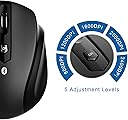
The JETech M0884 Bluetooth Wireless Mouse offers reliable, cable-free control with Bluetooth 3.0 connectivity and a 10-meter range. Featuring a high-definition optical sensor with adjustable 2400 CPI sensitivity, it adapts to diverse work styles. Its slim, ergonomic design ensures comfort, while a single AA battery powers up to 6 months of continuous use. Compatible with PC, Mac, and Android tablets, this mouse is a durable, efficient companion for professionals seeking seamless productivity on the move.

| ASIN | B01B1PZ4HG |
| Antenna Location | General computer use |
| Are Batteries Included? | No |
| Are Batteries Required | No |
| Battery Average Life | 6 months |
| Brand | JETech |
| Brand Name | JETech |
| Button Quantity | 4 |
| Colour | Bluetooth Mouse - M0884 |
| Compatible Devices | Personal Computer |
| Connectivity technology | Bluetooth |
| Customer Reviews | 4.1 out of 5 stars 5,259 Reviews |
| Hand Orientation | Ambidextrous |
| Hardware Platform | PC |
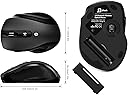
| Item Weight | 132 Grams |
| Manufacturer | JETech |
| Manufacturer Part Number | 0884- |
| Model Name | M0884 |
| Model Number | 0884-Mouse-BT-bk |
| Mouse Maximum Sensitivity | 2400 Dots per Inch |
| Movement Detection | Optical |
| Movement detection technology | Optical |
| Network Connectivity Technology | Bluetooth |
| Number of buttons | 4 |
| Operating System | Windows, Mac OS |
| Power Source | Battery Powered |
| Product Features | Wireless |
| Range | 10 Meters |
| Special feature | Wireless |
| Style Name | Modern |
| UPC | 815000021050 |
| Unit Count | 1.0 count |
P**.
NOW WORKS WITH IPAD! (With IOS 13.4)
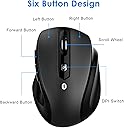
Despite the description saying, categorically, that this mouse will NOT work with an iPad, I bought one anyway (don’t ask!). Sure enough, I couldn’t even get it to connect via Bluetooth, to any Apple device, let alone get it to work as any form of mouse! Worked fine on my PC though, straight out of the box (once I’d put a battery in). After a bit of Googling, I found some information regarding my current IOS versions. Apparently, it ‘should’ work (as should any Bluetooth mouse) under IOS 13.4. So, I then updated the IOS on both iPads. Eureka! The mouse was then found on Bluetooth immediately, but with a different name, depending on the device; mouse on iPad Air, JETech 0884 on iPad 7th Gen. Just press the RoHS button on the bottom of the mouse, the red light flashes on the top, and it’s in Bluetooth connect mode. The red light goes out once it’s connected. The mouse is very comfortable to use, with the normal left and right buttons. There are two extra button on the left side, handy for a thumb click (if you are right handed, of course!?!). The scroll wheel works well (but see later) and you can also click it for extra functionality. So, five buttons, that can all be configured to do different things on Apple devices! (Yes, I know!) The last button on the top also changes the resolution, and works very well. It scrolls though 5 DPI settings from slow and steady to super fast! I do have two minor issues that are more to do with Apple than the mouse: The scroll wheel seems to work the opposite of what I’m used to, but still work perfectly for scrolling up and down lists, documents and web pages. I haven’t yet found a way to ‘reverse’ that action... To get full button functionality on an IPad, you appear to have to use ‘assistive touch’. Works incredibly well, but leaves a transparent grey ‘button’ on the screen (although you can move this to one corner, just out of the way). Perhaps I’ll get used to it... I can’t comment on battery life as I have only had it a short time. It takes one AA and it will be simple enough to use a rechargeable. As far as sleep mode, I left it quite a while before I came back to it, and as soon as I moved it or pressed a button, the iPad ‘woke up’. So 5 stars for the mouse, 4 stars for Apple... If you want a Bluetooth mouse to use with and iPad (or a PC) you can’t go wrong with this, especially at this price!
G**T
Reliable and tough
Voluntary review of a product that I purchased and paid for. Purchased in September 2020 as (at that time) essential peripheral device for my tablet. When working away from comfort of home office, on a small device (10” screen), it felt really uncomfortable to use touchscreen while emailing delivery reports or data spread sheets. Tablet alone is just not enough when fielded to work in the middle of nowhere. I have acquired mouse and keyboard. Call it a desktop/laptop habit but work got much easier ever since. Mouse is exactly as described by seller. Strongest factor of my purchase decision was (no doubt) price £8.98, cheapest I could find at that time I admit by that I didn’t expected much from that device and… I was for a surprise. Mouse is very energy efficient (it still runs on a battery installed in September 2020), ergonomically designed, delivering smooth performance and definitely stands out as one tough peripheral device. For days on end it had to cope with work on rough surface, dirt, dust, damp or hot air, interference of other devices connected via Bluetooth to tablet or working nearby, you name it. I’m more than just satisfied with its performance and durability (just slight signs of wear and tear, please see the pictures). It still runs on the battery placed in September 2020! Although is not used as frequently as before. It is same efficient while connected to my laptop (Acer Aspire, MS Windows 10). I can’t see any difference between its and wired mouse or touchpad performance. I must admit that I have no comparison to other similar devices available on the market but from my experience this mouse is really good and I would recommend it to anyone looking for that kind of device.
M**G
Very good for price. Initial issues all due to Windows 10.
Great for around £9-£10. Had issues initially, but they were Windows 10 related. Of course. Must turn off power saving for bluetooth module. Roll the scroll wheel if they mouse has gone into power save. Moving the mouse around won't help. The scroll wheel doesn't move side-to-side, but that's a feature I hardly ever use anyway. A flywheel function like some Logitech mice has would have been awesome, but as far as clicking wheels go, this one is very nice. Used the DPI switch on the top to get the right speed, not even bothering to go into the mouse settings. Ergonomic, and even feels and looks quite premium with rubber for the thumb, and matte top. Don't know yet how it will wear with time. Great alternative to overpriced Logitech. Bought 3 of these now. Added info: Periodically freezes up, and needs taking out and re-inserting the batteries. Once a day or so. Annoying.
J**A
Excellent bluetooth mouse.
I already owned the Microsoft Sculpt Comfort bluetooth mouse, which a consider a very good one but, althoug the size is nice for me it's too heavy with 2 AA batteries (it doesn't work with one battery as the Microsoft wireless 900 do for example). So, after reading some reviews, namely at youtube, I decided to buy this one. I was afraid the mouse would be too small for me but after some time working it's really a very nice and ergonomic mouse and in the end I loved it. The pairing it's a blink, very easy to do and smooth. So far the signal is very stable and I didn't find irregularities as some reviewers complains. One thing I find interesting to mention it's that I didn't need to remove the bluetooth connection of the Sculpt Comfort which means that I may use either one. To conclude I find the mouse excellent with a remarkable ratio Quality/Price and I strong recommend it to anyone looking for a bluetooth mouse. There is no need to expend a lot of monney,just stop looking as you already found it.
M**X
It's gone in the bin.
I don't usually write a product review so soon after getting it, but unlike a fine wine, I'm pretty sure this won't get better with age. I found the battery connection to be very hit and miss ... the insertion of a small piece of tin foil at the +ve end helped a little but didn't solve the problem entirely. Pairing usually takes me under 2 minutes for a device, but this mouse was an unwilling participant, sometimes not pairing at all, sometimes pairing but not connecting. It took repeated pairing attempts before it would connect. Once connected, it worked fine. Sensitivity was easily changed with the button on top, with the setting reflected by the number of flashes from the light on top. Put the mouse back in its box and took it away with me last weekend. Whilst away, on taking the mouse from the box, I noticed the top light was on. Then I couldn't get it to connect and gave up after several attempts. On returning home, I couldn't get any signs of life from it, and on testing the battery, found that the brand new black copper-topped battery had been drained inside of a week .... not particularly good for the 5 minutes actual use I've had from it. So the upshot is, this mouse has gone in the bin and I've replaced it with a cheaper model identical to the other mouse I have and whose On/Off switch, not present on the JETech model, has given the 2 AAA rechargeable batteries over 3 months of use without recharge. Sorry JETech ... way too much buggering about for me. I like things to work when I need them and to give clear indications that they are doing so.
C**.
Good value bluetooth mouse
This is a pretty good wireless mouse for the money. Very comfortable in the hand, works fine for me with my linux laptop. The construction of it is a little on the light side, which is understandable at this price point, as is the fact that the battery lid is a little tricky to remove. It works really well for me at home, and keeps a stable bluetooth link once paired, but really struggles in my office, which is a little bit noisy with radio interference. The power management on it is a little enthusiastic and it will go into sleep after quite a short period of inactivity and then have a little pause before being usable again. I would recommend this item for a light mouse user such as myself, if you are happy with the compromises I have outlined.
D**Y
Great little Bluetooth mouse at a low price
I bought this for use with a new laptop, because I didn't want to tie up one of my USB ports with the little RF receiver that most other wireless mice use. This one is Bluetooth, so if your computer already has Bluetooth built in - and most laptops made in the last few years probably do - you won't need to use a USB port. Initial pairing was easy, and after that you don't need to re-pair. Just turn your laptop on, and when it's finished booting up just click one of the buttons on your mouse to reconnect. The pointer movement is fine, and you can change the DPI with a little button if you want to. The scroll wheel is nice and not too clunky. The shape is quite contoured and very much suited to a right handed person. If you are left handed you may want a mouse with a more neutral shape.
W**N
Works well with Surface Pro 4 computer.
Works well with Microsoft Surface Pro 4 / Win10. Good quality feel and construction. Fits very well into the natural curve of the hand and is an adequately large size - it is the size of the old original wired Microsoft mouse but a centimetre shorter. I find it excellent to use with a Surface Pro 4 as being Bluetooth it will leave the single USB port the Pro 4 has free for other uses. Highly recommended; compared to MS or Logitech bluetooth mice which will cost you £25-40! TIP FOR USE WITH SURFACE PRO 4 : In Devices>Bluetooth>MoreBluetoothOptions, turn ON "Allow bluetooth devices to find this PC". This seems to be turned Off by default in the Pro 4 and I had some difficulty pairing the mouse with the computer until I turned this on. Also, have your computer connected to the internet while you are pairing as Win10 I think downloads some sort of driver specific for this mouse while you are pairing/setting it up. The JETech instructions in the box are not really adequate.
W**E
Great value!
Excellent value for money, works straight out of the box and it has a quality feel! Had it 3 months now, better than my old logitech
R**O
Goede bluetooth muis voor een zacht prijsje
Prima muis voor deze prijs! Let er wel op dat er geen batterijen bijgeleverd zijn.
密**た
結構使いやすいマウスです!
今までELECOM「SCOPE NODE」を長く使ってきました。 ScopeNodeに全く不満はありませんでしたが、MacBookProのUSBポートを空けたくなり、Bluetoothタイプのものを探していました。 ScopeNodeのBluetooth版があればとこちらのマウスを発見、レビューの評価が軒並み高かったので購入しました。 使用環境は次のとおりです。 MacBook Pro (15-inch, Mid 2010) / OS X Yosemite 10.10.5 数日で商品が届いて、早速接続してみました。 裏面のボタンを押すだけと接続は非常に簡単でしたが、残念なことに肝心な動作が良くありませんでした。 たまに…ではあるのですが、ポインターがカクカクうろうろぴょんぴょんとワープしてしまい、しかもそれがしばらく続くために、全く使い物になりません。挙げ句には接続も切れたり繋がったりを繰り返す(自動的に切れるアレではないです)始末です。 ただ、この現象がマウスの不具合なのか、Macに原因があることなのか(もう5年以上使っており、他にも怪しい所作が認められる)、その判別がつきません。どうしたものかと思っていたら、ちょうどJEDirectさんからレビュー書いてメールが届いたので、こんなことになってますと書いて返信しました。すると、若干怪しい日本語で返信があって、それから1〜2回ほどのやりとりののち、ご親切にも素早く代替品を送ってくださいました。 代替品が届き早速接続してみると、今度は不自然な動きは全くありませんでした。短い時間での切断・再接続も起こりません。 正直なところMacの方に原因があるのでは…と思っていましたので、けっこうほっとしました。マウスの不具合だったという結果ですが、JEDirectさんの対応が良かったので助かりました。不良品自体はなかなかなくならないものでしょうから、そういう場合の対応は大事だと思います。評価★5つのうち、マウスの評価としては4つ程度です。残りはJEDirectさんへの評価ということで。 以下、ScopeNode(有線)を基準とした、使用2日目の感想です。 ポインターの動きは、もっと微妙に遅延を感じるものと危惧しておりましたが、明らかにそう感じるような動作は全くありません。この点が、有線のものを使い続けた最大の理由だったのですが、こんなものならもっと早く変えれば良かったと思うほどです。 ただ、デザインは今ひとつかなと感じます。かっこいいかどうかではなく、手になじむかどうかということです。これはまさにScopeNodeとの比較になるのですが、写真から判断した以上にRがきついというか、置いた手の指先の角度がかなり下向きになってしまう感覚に、今はまだ違和感が強く残ります。おそらくはじきに慣れて、ともすればScopeNodeの平べったさは何だったのか?と思うようになるのかな…とも思いはしますが。 ScopeNodeより少しだけ小さい点も違和感の原因と思いますが、小ぶり過ぎて使いづらいという小ささではありません。 なお、かっこいいかどうかで言えばかっこいいと思います。質感も安っぽくはありません。写真通りのものが届きました。 あとはバッテリーの保ちがどうかですが、これはまだわかりません。 総合的には、購入価格分以上に満足できる商品ではないかと思います。せめて2年ぐらい保ってくれたら言うことないですね。
J**S
Gut und günstig!
Die Maus ist perfekt! Die letzten günstigeren Mäuse, die ich erstanden habe, hatten stets eine recht kurze Lebenszeit und ein meist billiges Aussehen gepaart mit einer mehr-schlecht-als-recht-Haptik. Da für ein Convertible dann der Kauf einer Bluetooth-Maus anstand, habe ich mich erst einmal bei Logitech, Microsoft, Cherry und Konsorten umgesehen. Was mir da leider so gar nicht gefiel war der Kaufpreis, weswegen ich es noch einmal mit dieser Maus probieren wollte. Haptik - Look&Feel Super! Die Maus ist ergonomisch geformt und liegt dank Gummierung an der linken Seite super in der Hand. Diese Gummierungsschicht ist dabei sehr angenehm und fühlt sich gut an - auch da habe ich schon ganz anderes erlebt! Die Auflage hat eine Haptik, die ich am ehesten mit Samt vergleichen würde. Die Finger gleiten angenehm darüber und es fühlt sich fast schon wertig an. Durch die matte Oberfläche sieht man keine FIngerabdrücke und man muss sich Mühe geben, sichtbaren Dreck auf der Maus zu hinterlassen. Das Mausrad ist auch gummiert und geriffelt, was es angenehm macht. Die zusätzlichen vor- und zurück-Tasten an der linken Seite der Maus sind gut bedienbar. Lautstärke Klingt vielleicht merkwürdig bei einer Maus - aber ich finde, gerade im Hörsaal, der Schulklasse, im Büro mit mehreren den Punkt der lauten Klickgeräusche gar nicht zu unterschätzen. Die Maus lässt hier deutlich wahrnehmbare Klickgeräusche von sich hören. Ich würde sie eher lauter bezeichnen für eine Maus - gestört hat es mich aber bisher nicht. Batterielaufzeit Hier kann ich noch eine abschließende Meinung zu kund tun, aber gerade für eine Bluetooth Maus schlägt sie sich aktuell echt gut. Dadurch, dass sie mit einer Standard-Batterie auskommt ist dies aber auch ein absolut verkraftbarer Umstand, wenn mal ein Batteriewechsel anfällt. Ich habe die Maus seit mittlerweile knapp zwei Monaten und die Batterie hat bisher keine Anstalten gemacht, sich dem Ende zu neigen. Verschleiß Nach nun knapp zwei Monaten lässt sich natürlich noch nicht viel zum Verschleiß erzählen - bisher ist alles super und kein Verschleiß erkennbar. Fazit Wer eine günstige Bluetooth-Maus benötigt, kann hier meiner Meinung nach bedenkenlos zuschlagen. Mal ein günstiges Produkt, was mich wirklich überzeugt hat! -= Edit vom 22.02.2018 =- Auch weiterhin alles gut. Die Maus ist viel in Nutzung. Batterielaufzeit nun nach beinahe 3 Monaten erschöpft. Kein besonders guter Wert, allerdings stürzt man sich auch nicht gerade in Unkosten. Mit Alkaline-Batterien aus dem Discounter gerechnet käme man also auf etwa 80 Cent pro Jahr Batteriekosten.
J**A
Muy contenta
Tras perder el usb de mi último ratón inalámbrico decidí hacerme con uno que funcionase por Bluetooth para evitarme pasar otro mal rato por culpa de esos dichosos usb y sinceramente no puedo estar más contenta. Llegó a los dos días de pedirlo, perfectamente embalado y el paquete sin ni un rasguño. Utilizo Mac y un lenovo por lo que para mi era importante que funcionase con ambos y la verdad es que va a las mil maravillas con ambos. Es súper fácil de conectar y no he tenido ningún problema de interferencia, incluso con el IMac encendido mientras trabajo con el Lenovo, el raton sigue operando sin ningún problema. Además el tacto es agradable y el tamaño es perfecto.
Trustpilot
2 months ago
3 days ago