Buy anything from 5,000+ international stores. One checkout price. No surprise fees. Join 2M+ shoppers on Desertcart.
Desertcart purchases this item on your behalf and handles shipping, customs, and support to Brazil.
🚀 Upgrade your storage game with speed, style, and zero fuss!
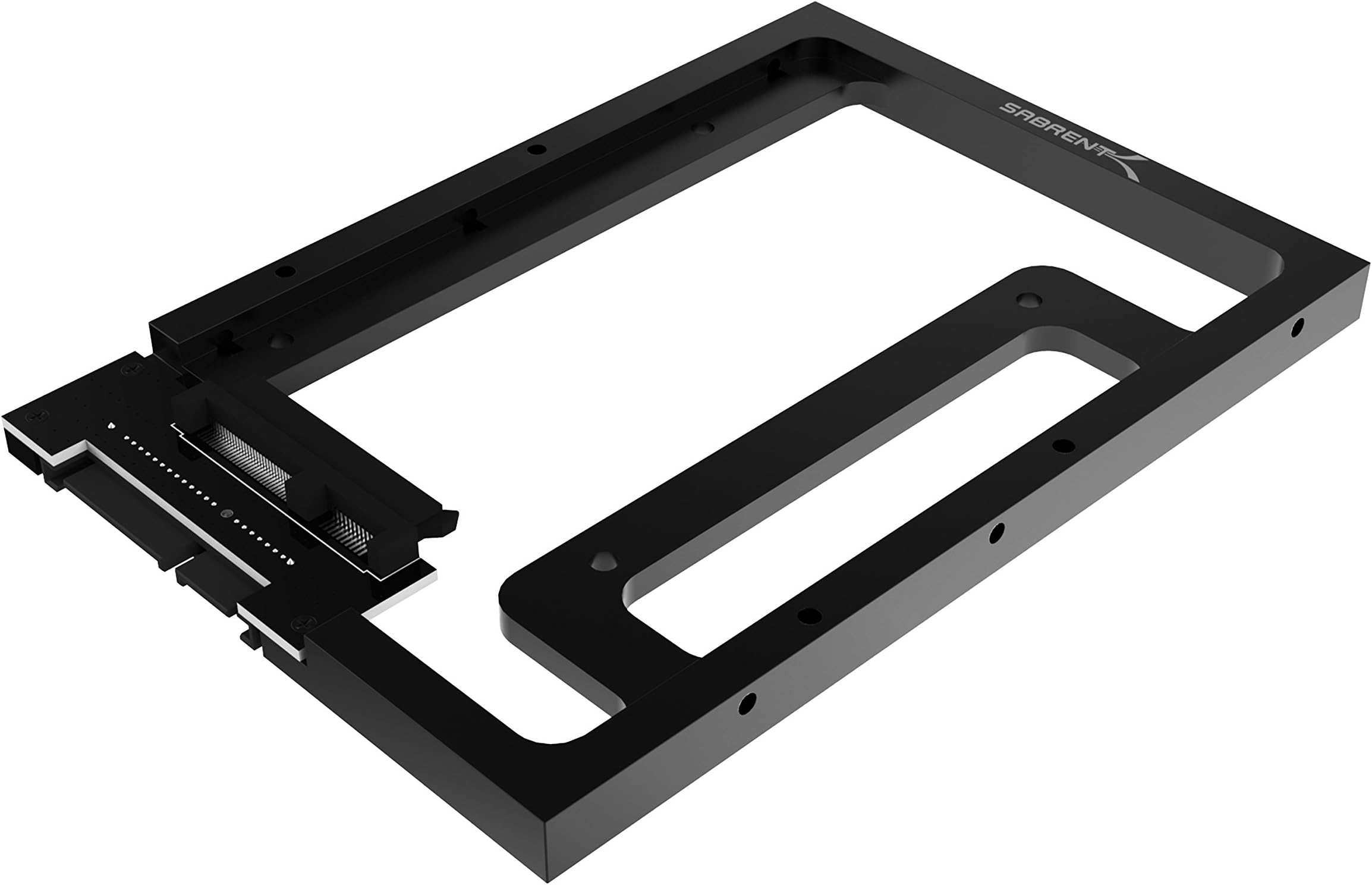
The SABRENT 2.5" to 3.5" SSD Mounting Bracket is a sleek, tool-free adapter designed to securely fit any 7mm to 15mm 2.5" SATA SSD or HDD into a standard 3.5" bay. Engineered with a durable aluminum frame for enhanced cooling and vibration resistance, it supports full SATA III speeds up to 6Gbps, ensuring fast and reliable data transfer. Perfect for desktop and server environments, it also integrates seamlessly with SABRENT docking stations, making it a versatile solution for professional-grade storage upgrades.


| ASIN | B00UN550AC |
| Best Sellers Rank | 11,994 in Computers & Accessories ( See Top 100 in Computers & Accessories ) 10 in Mounting Brackets (Computers & Accessories) |
| Brand | SABRENT |
| Colour | Black |
| Country of Origin | China |
| Customer Reviews | 4.6 4.6 out of 5 stars (6,390) |
| Finish | Black |
| Global Trade Identification Number | 00819921011886 |
| Included Components | Pack of screws |
| Item Depth | 7.03 inches |
| Item Dimensions | 17.9 x 1.5 x 10.7 centimetres |
| Item Type Name | Mounting Bracket |
| Item Weight | 113 Grams |
| Manufacturer | SABRENT |
| Manufacturer Warranty Description | 1 year limited warranty. When you register your new sabrent product online within 90 days of purchase, your standard 1-year warranty coverage is extended to 2-years. |
| Material | Alloy Steel |
| Model Number | BK-PCBS |
| Mounting Type | Tabletop Mount |
| Part Number | BK-PCBS |
| Set Name | Single Unit |
| UPC | 819921011886 |
| Unit Count | 1.0 gram |
B**L
well built
A nice sturdy well built tray for 2.5" drives compared to the more tinny offerings of other makes. This has no nasty edges and is compact. Worth the price IMO
A**S
Does the job well, and it COMES WITH FIXING SCREWS
I used mine to fix a new SSD into a 3.5" bay, the SSD is smaller and needs to be held in place. This item used to be called a caddy in the good old days - but things have moved on. This one has a female power and female data connection array at one end. You take the SSD and slide it into that female socket array, then, using the fixing screws, one on each corner, you simply screw the drive onto the tray. Don't overdo the tightness, you're not fixing a shelf in the kitchen! Once you have the drive secured in the tray, you locate a vacant 3.5" bay in your desktop computer case, and fix the tray into it, it is really easy, just align the holes and use the screws provided. The only thing that can go wrong is you could fix it backwards and not be able to access the cable connections. Check that before you fix the screws!. Once in place, the tray has male pins projecting out from one end, to which you just connected your SSD on the other, female, side. Find these pins and then push carefully, the power connector, and the SATA 3 cable, probably you'll need a sata cable with a right hand end on one end, or the cable may sail a bit close to the edge of the case. Once you've done this, connect the other end of the sata 3 cable into one of the free motherboard sata 3 sockets - if you're not sure, follow the data cable from one of your other drives to see where it is connected on the motherboard - the sata sockets on my motherboard are all in a straight row, two in use (the HDD and the Optical Drive - dvd drive) and there were two sockets free. Once you've done that, close up the case and get on with your work! - if you are fitting an optical drive, or another HDD the procedure is the same, though most HDD drives ARE 3.5" so you shouldnt need this tray anyway. Good product, easy to use, and most important, they supply the screws you will need to fix it into your pride and joy computer!
K**Y
Very well engineered
This is the third of these that I have purchased for ym Synology NAS. they are lightweight, very high quality, solid, and allow plenty of airflow. No issues fitting my 2.5" SATA SSDS
E**E
great assembly but poor machining finishing
I chose this over and above the normal, cheaper, 3.5" mounting frames for SSD's purely because not only did it allow the smaller SSD to be mounted, but it actually contained a daughter-board to locate the SATA interface in exactly the right position to per standard 3.5" drive spec, which was super important for me as I was using this to mount some SSD's into my homelab server backplane, via a caddy on rails. Another benefit of this was that it was solid aluminium which means that it will help channel and dissipate the heat from the drive, especially as my drive itself has a metal chasis. The fit has been perfect, the kid has everything I needed. Literally the only downside is that the machining of the aluminium frame was poor, it hadn't been tumbled smooth or even basically deburred, the machined mounting holes even had large burrs that were still partially attached and had just been powder coated over - I had to cut these off. If this has better finishing for a smoother final product it would be a solid five stars all day long.
D**.
Well made, fits perfectly
Makes a 2.5in disk the same width dimension as a 3.5in which is handy for inserting into my drive duplicator as I no longer have to unscrew the 2.5in disk from its drive caddy. The 'skeleton' frame allows good airflow around the drive plus being made of a decent bit of alloy will also act as a heatsink (if the drive internals conduct heat to the contact areas obvs). All mounting screws are provided. Instructions are a bit sparse but if you need them you're probably not the target market :-) Installed into my NAS and working nicely
C**K
Good solid brackets for older systems
Good brackets for mounting 2.5" SATA HDD/SSD's for older systems (PowerMac G5 and most mass manufactured computers of that era)
S**P
Sturdy and fits perfectly
Solid construction and a precise fit for the iMac. Easy to install and good value for money.
W**H
holds the 2.5" Drive in place.
holds the 2.5" Drive in place. no problems with it.
A**I
Fits and slots into the HDD bay perfectly
H**T
Ich benutze für meine Arbeit unter anderem einen iMac von 2009. In letzter Zeit häuften sich diverse Hänger, Ausfälle sowie andere unangenehme und Zeit raubende Unregelmäßigkeiten. Meine Analysen deckten die interne, noch originale Festplatte als Verursacher auf, welche sich laut S.M.A.R.T. bereits in einem kritischen Zustand befand, bald zu versagen drohte und offenbar am Ende ihres Lebens angekommen war. Ich beschloss, die somit notwendig gewordene Reparatur zu nutzen, um ein Upgrade auf eine SSD vorzunehmen, deren Vorteile gegenüber einer gewöhnlichen Festplatte ja in vielen Bereichen unabstreitbar sind. Im ersten Durchgang - zu einem Zeitpunkt, als ich noch nie einen iMac von innen gesehen hatte - demontierte ich die alte 3,5" HDD und erstattete diese mit der neu gekauften 2,5" SSD. Da letztere aber natürlich nicht in die Montagehalterung der wesentlich größeren HDD passte, befestigte ich sie zunächst nur mit Klettpunkten. Mit einem gewissen unguten Gefühl, schlampig vorgegangen zu sein, machte ich mich auf die Suche nach einem geeigneten Montagerahmen, welcher eine sichere und professionelle Montage gewährleisten sollte. Ich fand und bestellte diesen nach längerer intensiver Suche schließlich hier bei Amazon. Die Lieferungszeit hielt sich in Grenzen und letzte Woche hatte ich dann einen ruhigen Vormittag, der es mir gestattete, den Umbau vorzunehmen. Was soll ich sagen, der Einbau des Rahmens gestaltete sich (auch aufgrund meiner ersten Erfahrungen beim Öffnen des iMac) reibungslos. Der Montagerahmen passt 100%ig. Er ist stabil, aus Aluminium gefräst, nicht nur aus Billigblech gepresst, hat keine scharfen Kanten und macht insgesamt auch einen sehr hochwertigen Eindruck. Alle nötigen Gewinde sind vorhanden und leichtgängig, die benötigten Schrauben liegen bei. Die SSD wird innen im Montagerahmen an eine dort vorhandene Steckverbindung angeschlossen, auf der anderen Seite steckt man die beiden Kabel des iMac an. Zur Befestigung des Montagerahmens im iMac benutzte ich die speziellen Schrauben und die Halterung der alten HDD. Völlig problemlos, der Umbau war in wenigen Minuten beendet. Da der original an der HDD angeschlossene Temperatursensor bei Benutzung einer SSD keine Verwendung mehr hat und am Montagerahmen dafür auch kein Steckplatz vorhanden ist, befestigte ich dessen Kabel an einer geeigneten Stelle mit einem kleinen Kabelbinder, falls ich es irgendwann doch mal noch brauchen sollte. Bei offen gelassenem Messkreis ohne Wärmesensor geht die zuständige Überwachungssoftware jedoch von einer starken Erwärmung der HDD aus und lässt den Lüfter ständig auf vollen Touren laufen, was nervt und ihn vorzeitig verschleißen lässt. Dieses Problem habe ich mittels Macs Fan Control 1.4.12 gelöst, damit kann man alle internen Lüfter des iMac nach Belieben konfigurieren. Fazit: Der Montagerahmen hat meine Erwartungen nicht nur erfüllt, sondern übertroffen. Wer eine ähnliche Problematik zu lösen hat, ist mit diesem Teil auf der sichern Seite und wird keine Schwierigkeiten haben. Eine absolute Kaufempfehlung von meiner Seite!
J**R
Worked perfectly for my build. It is a quality product. At a good price.
4**5
Adattatore perfetto sotto ogni punto di vista. Costruzione solida in lega, non in plastica.... incredibile. Compatibile in modo perfetto con i NAS Sinology, motivo appunto del mio acquisto. Consigliatissimo!!++++
S**O
Me han servido mucho, de buena calidad, primero compre 2 y me fueron tan útiles y de buena calidad que compre otros 2.
Trustpilot
1 week ago
1 month ago