📺 Elevate your screen game—ditch cables, not style!
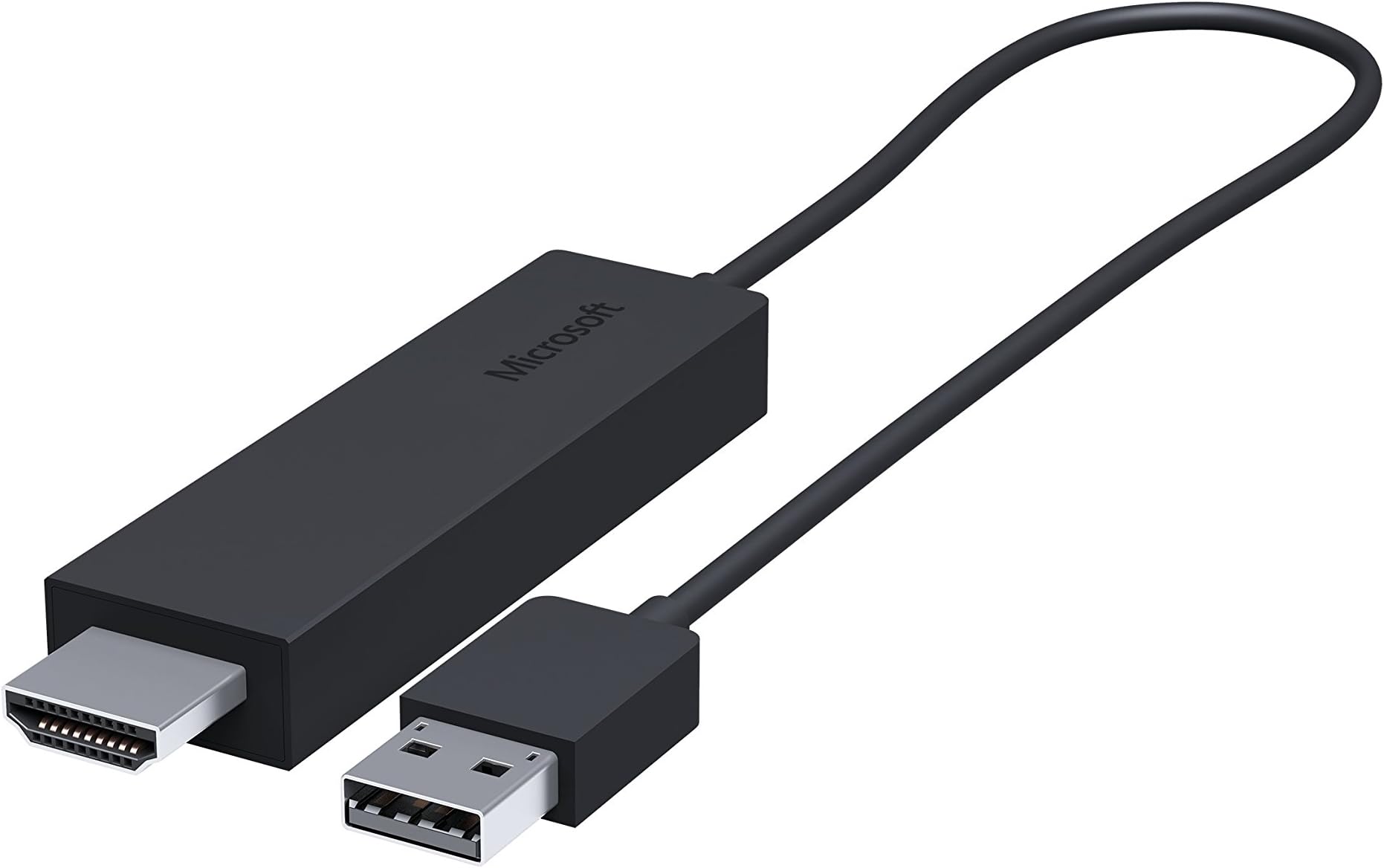
The Microsoft Wireless Display Adapter transforms any HDMI-enabled screen into a wireless display hub using Miracast and WiDi technology. USB-powered and easy to set up, it streams both video and audio with minimal lag and perfect synchronization. Ideal for professionals and media lovers alike, it supports most Android and Windows devices, offers PIN security for privacy, and modernizes meetings and entertainment with a sleek, minimalist design.


| ASIN | B00J9C2JDG |
| Batteries | 2 AA batteries required. |
| Best Sellers Rank | 278,426 in Computers & Accessories ( See Top 100 in Computers & Accessories ) 7,901 in Adapters |
| Colour | Black |
| Customer Reviews | 3.1 3.1 out of 5 stars (1,381) |
| Date First Available | 1 Jan. 2010 |
| Item Weight | 109 g |
| Item model number | CG4-00003 |
| Other display features | Wireless |
| Product Dimensions | 20.32 x 6.35 x 3.18 cm; 108.86 g |
H**N
Great tech if you have compatible devices to use with it.
This may come in handy when wanting to share content with friends and family on a large (HDMI-enabled) screen or when presenting or sharing content in professional environments. As the device supports the Miracast standard you should find it works with many Android and Windows Phone (including Windows Mobile 10) devices that support it (the devices need to have hardware to support this). Many modern computers will also have the Intel Wireless display standard which operates similarly to Miracast, allowing you to use your TV / external screen as a primary or secondary monitor. The technology does not only push visual content out onto your TV / HDMI screen but will also push audio out as well. What is particularly impressive is how the audio and video is synchronised perfectly (this is often a problem with digital content, particularly when using wireless standards such as Bluetooth). The technology is very simple to use (from Windows 8 / 10 to Windows Phone and Android). Do note that portable smart phones using Miracast will typically mirror what's on the mobile device screen, so you will need need to keep the device and the screen on. Don't attempt to use this for fast-paced games, though, as there is a slight delay (less than a second, but enough to get you "killed" in a fast action game on a smart phone or tablet). Your portable device can get warm and you will find the battery drains much quicker than usual when wirelessly "casting" your content, so do be aware of this. The wireless display technology used in Windows 8 and above (typically requiring an Intel WiDi supporting hardware as well) can, however, display content wirelessly with your computer screen off (using the TV as your primary screen, thus disabling the notebook computer screen). Use the Windows key + P to display and select the most relevant option for you. The Microsoft wireless display adapter does require a USB power source. Many television sets do have a USB port that can provide the necessary power draw for this small device and so becomes a non-issue. I have found that some portable mobile chargers can work well to power the device as well (the mobile battery charger needs to provide power immediately and not attempt to detect the type of device for this to work). Another nice feature in the Microsoft Wireless Display Adapter is the ability to set a PIN code ensuring that people outside your meeting room / living room / bedroom can't mess around with your TV! However, this is not on by default. A bit of a downside to this device is that in order to configure it or update the firmware you will require a Microsoft-based device to do so (an app needs to be downloaded from the Microsoft Store and is only supported on Windows 8 / 10 and Windows 10 Mobile). Windows 7 does not support wireless display technology (even if the hardware in your computer supports it). If you are an Apple device user you are probably out of luck as this device does not support Airplay (the system used by Apple to wirelessly display content from iOS and OS X devices). Just to be clear, this device supports WiDi (Wireless Display standard) and Miracast, it is not a replacement for Chromecast or Airplay devices (which work differently). I've got this to work flawlessly with several Android and Windows smart phones and my Dell notebook computer on my LG TV as well as my Acer computer display monitor. I have an older Android tablet (B&N HD+ and the first generation of Microsoft Surface RT tablet that don't work with this as neither have Miracast compatible hardware built into them.
N**L
The design is nice and minimalist
The product works moderately well. The design is nice and minimalist. One one laptop it took a little bit of software/firmware updating to get it up and running but my other laptop got it working immediately. The product does tend to heat up quite a bit and will disconnect every few hours, which can be a bit annoying. The video stream does not lag too noticeably in most cases. Watching movies through it is generally fine, though some flash players will show a bit of difficulty. The quality of the image will depend on the power of your device you're streaming from so bear this in mind if you're using an older laptop or desktop. It has become a staple in my life and largely replaced my Chromecast. I doubt that the disconnects could be fixed by a firmware update and I hope that it is not due to overheating which may lessen the lifespan of the device. I'd recommend - if you're looking to by this product - to buy the latest version.
S**E
Disappointing & flawed. Microsoft could have done so much better.
This is an update to the review below. I do not know what has changed, maybe a firmware or software update from microsoft, but I recently tried out the display adapter for video playback again recently (having been using it only as a convenient way to connect an extra display for work when visiting customer sites) and I can now watch video playback smoothly a reliably. I have upgraded my Surface Pro 3 from Windows 8 to Windows 10 since writing my initial review. I purchased this to accompany my i5 Surface Pro 3, with the intention to primarily use it to stream media content to my TV. Its secondary purpose was to provide connectivity to external displays when available while visiting client sites (This section no longer applies *With regards to media streaming, it performs badly. Audio is out of synch with the video, making films and TV almost unwatchable. This is regardless of the media player used, from Media Player Classic to YouTube. Music videos are OK since the lip synch is less critical.* - possible due to Windows 10 update, video playback is now fine) Physical design is also flawed. It is powered from a USB port. However, no USB power supply was included. In addition to this, the USB power cable is moulded on to the display adapter and is very short. This means that for use with displays without a USB power port, it can be very awkward to get power to the display adapter. The Chromecast scores much better in this regard, as it can be powered by any standard micro-usb cable, including the very long ones often supplied with phones and things. On the plus side, it does provide a very easy way to connect wirelessly to a HDMI display from a Windows 8 or Windows 10 computer,
R**.
I have been looking for some sort of device to mirror my Surface Pro 3 to the TV without having ugly wires showing at this is it! I had tried the Google Chromecast since it said mirroring was possible however it was only mirroring what was being shown on google chrome. I could not mirror different applications like the Netflix app. I then tried the Amazon Fire Stick- I thought it had mirroring capabilities however it does not as well. I finally stumbled upon this little beauty and it did everything I wished it would. I had called the local Microsoft store and they told me it would mirror everything that was on my tablet so I had to give it a try. It was perfect! Very simple to install- just plug the HDMI in its slot and plug in the USB for power (I plug it into an empty USB slot on my TV). Then all you do is go to your tablet search for devices and it shows up and installs by itself. I have had one problem with it recently in that it would not connect- however after some tinkering with my tablet I realized it was the fault of my tablet and not the Microsoft Wireless Display. Also as a side note this will only work with devices with Microsoft WIDI (Apple products will not work). So this device doesn't work on my older laptop (4 years old) but works perfectly with my girlfriends newer laptop.
T**O
Zumindest bei mir klappt alles wieder: Nach dem Update auf Windows 10 Home und später auf W10 Professional (kostenpflichtige Vollversion) war es unmöglich geworden, mein Großtablet Lenovo Flex 20 mit einem modernen (und eigentlich Miracast-fähigen) LED Beamer (LG PA1000T) kabellos zu koppeln. Das funktionierte unter Windows 8.1 noch problemlos (abgesehen von öfterem Verbindungsverlust). LG schob die "Schuld" auf Microsoft, räumte aber später ein, dass die Beamer-Firmware und der Miracasttreiber mit Windows 10 nicht kompatibel sei und kein Termin bekannt sei, wann sich das ändert. Ich kann hier auch nur für die Windows Version 1511 (Build 10586) sprechen, in dieser sollten einige windowsseitigen Miracastfehler beseitigt sein. Also zuerst die Treiber für Grafikkarte, Bluetooth- und WLAN-Adapter auf dem Flex aktualisiert. Man sollte auch jedenfalls immer vor Kauf des Adapters testen, ob der WLAN-Treiber des PC mindestens NDIS 6.4 unterstützt (den Befehl für die Powershell kann man leicht googeln). Dann den Adapter in die HDMI und USB Anschlüsse am Beamer gesteckt, Beamer angeschaltet und HDMI im Menü als Signalquelle ausgewählt (nur beim ersten Mal nötig, später erkennt der Beamer den Stick automatisch). Dann normal in der Windows 10 Taskleiste das Infocenter angeklickt und in dem dann erscheinenden Charm dann "Verbinden" tippen/klicken. Nach wenigen Sekunden wurde der Stick angezeigt. Diesen Eintrag anklicken und nach wenigen Sekunden war die Verbindung hergestellt. Damit kann ich nun wieder kabellos arbeiten. Funktioniert auch an einem Samsung Fernseher und mit einem älteren Acer 7750 Laptop sowie einem Lumia 1520 Phone (W10) und einem Samsung S5 (Android 5.x). Das Nexus 6 Android-Phone (Android 6.0) ist leider nicht Miracast-fähig und kann leider nicht am MWDA betrieben werden (für ein Referenzgerät von Google eine äußerst schwache Kür...), doch das liegt nicht am MWDA.. Ich kann insoweit die Windows 10 Probleme einiger Bewertungen nicht bestätigen. Auch die Verbindung zu den Geräten ist jetzt mit dem Stick deutlich stabiler als seinerzeit ohne Stick mit Windows 8.1. Tipp: Im Windows 10 Store die App Microsoft Wireless Display herunterladen, Stick an einem Beamer/TV in Betrieb nehmen und in der App den Overscan und den Sticknamen einstellen sowie Firmware-Updates vornehmen. Das Windowsgerät immer mit der empfohlenen Auflösung betreiben und Overscan dann über die App einstellen, sonst wird es ggf. unscharf. Am Beamer dann immer das korrekte Seitenverhältnis dieser Auflösung wählen. Minuspunkte: Der Adapater wird im Betrieb ziemlich heiss, also Vorsicht. Mag beim TV kein Problem sein, aber beim Abbauen und Verpacken vom Beamer sollte man verdammt aufpassen. Ein kleiner Aufkleber sollte einen Schutz-Hinweis enthalten, der fehlt aber. Es gibt auch manchmal einen zeitlichen Versatz von Bild und Ton und sich bewegende Mauszeiger werden im Beamer-/TV-Bild oft nicht exakt an der wirklichen Position angezeigt. Aber das ist normal, da Miracast sehr rechenintensiv ist und damit Zeit braucht. Oft verschwindet das Nachhängen von Bild und Ton nach kurzer Zeit wenn sich die Übertragung stabilisiert hat - selbst bei schwachen Smartphones.
Y**.
The product is as mentioned and the service was completely satisfactory. Very professional in nature and consignment was delivered before planned delivery time. Complaint to Microsoft: The only thing with the product is that it is good for power point presentations, or still image based projection. The reception lags as compared to real time transmission, as there is a significant delay in the broadcast vs reception. If you use a mouse to present, you will be highly disappointed since you will lose patience with the control. Overall, a must have device, for dual projection based multi tasking, more specifically, multi tasking activities.
D**T
I'm very pleased with my purchase of this Microsoft Wireless Display Adapter when it was on sale recently at Amazon. This Display Adapter was very easy to install on the back of the TV set and now allows me to mirror any screen image on my Amazon Kindle, my Microsoft Surface tablet or even from my Windows laptop PC and transmitted the picture wirelessly all the way across the room to enjoy on the big screen. So far it has performed flawlessly. High quality picture. A lot easier to use than hooking up an HDMI cable. I'm now planning to buy another one for the TV set upstairs. But make sure you look around for the lowest price. I've seen it on sale at some outlets for around $45 in Canada and ranges in price up to about $80 in some stores. So wait for the best deals and try to avoid paying full list price.
A**Z
Funciona muy bien, reconoce perfectamente el móvil y el ordenador (tienem que ser compatibles con la tecnología WiDi / Miracast). Muy cómodo para mostrar en la tele las fotos o vídeos del móvil, para ver YouTube, para ver películas desde el ordenador, incluso para escuchar música (envía audio y vídeo por la conexión HDMI). Básicamente, permite usar la TV como monitor adicional del móvil o del PC. Eso sí, no conviene usarlo para jugar, hay un pequeño retraso asociado. Aunque es más caro, ante malas experiencias previas con aparatos baratos de marca desconocida, preferí comprarlo de una marca reconocida como Microsoft, para asegurar una cierta calidad y soporte ante posibles problemas. Por ahora, todo bien, muy satisfecho con la compra.
Trustpilot
1 month ago
2 months ago